
1. Introduction
The Zeapon Micro 2 E800 is a motorized double-distance camera slider designed for professional videography and time-lapse photography. It features a compact design that provides an extended travel distance, a high-torque silent step motor, and intelligent control via a dedicated mobile application. This manual provides essential information for the proper setup, operation, and maintenance of your Micro 2 E800 slider.

Image: The Zeapon Micro 2 E800 motorized camera slider, showcasing its compact form factor and robust build.
2. Product Features
- Double Distance Design: Achieves extended travel distance while maintaining a compact physical length.
- High Payload Capacity: Supports camera setups up to 8kg (18lbs).
- Ultra Silent Step Motor: Operates at a minimum noise level of 39 decibels for undisturbed recording.
- App Control: Compatible with Android and iOS devices for intelligent waypoint and motion track settings.
- Timelapse Functionality: Includes one-tap timelapse preview, a timelapse calculator, and preset parameters.
- Two-Way Camera & Slider Control: Allows the slider to follow camera waypoint settings or the camera to follow slider settings (with optional wireless synchronizer).
- Robust Construction: Features 8 layers of crisscrossing carbon fiber and precision structure for stability.
- Versatile Mounting: Includes three support arms for a stable four-point structure with a tripod.
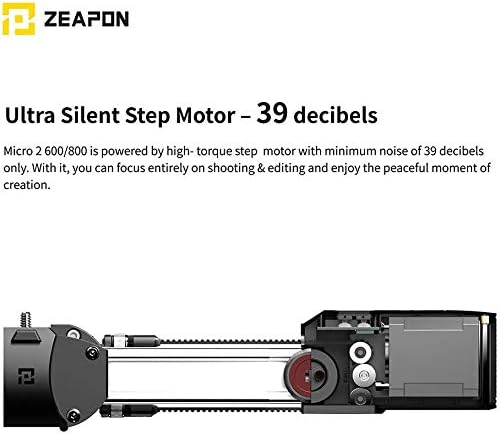
Image: An internal view of the Zeapon Micro 2 E800's ultra-silent step motor, highlighting its precision engineering for quiet operation.
3. Package Contents
Verify that all items are present in your package:
- Micro 2 E800 Motorized Double Distance Slider
- User Manual
- Warranty Card
- Carrying Case
- 1/4"-3/8" Screw Adapter
- Beginners’ Guide
- Hexagon Wrench
- Data Cable
- Rail Band Mount
4. Setup
4.1 Mounting the Slider
The Micro 2 E800 can be mounted on a tripod for stable operation. For enhanced stability, especially with longer travel distances, utilize the included support arms.
- Attach the slider to your tripod using the appropriate screw mount (1/4" or 3/8").
- For increased stability, attach the three support arms to the designated points on the slider and extend them to form a four-point structure with your tripod. This configuration is recommended for runs up to 1 meter to prevent tilting or turning.
- Adjust the telescopic support legs to a parallel angle if using the slider on a flat surface without a tripod, or to achieve linear movements in various directions with landing wheels (sold separately).

Image: The Zeapon Micro 2 E800 mounted on a tripod with three additional support arms, illustrating the four-point support structure for enhanced stability.
4.2 Powering the Device
The Micro 2 E800 is powered by standard F550, F750, or F970 lithium batteries (sold separately).
- Insert a compatible battery into the designated battery slot on the slider.
- The slider supports PD Type-C charging and firmware upgrades via the data cable.
- Battery life reference (approximate):
- F550 (2200mAh): 4 hours (Video Mode)
- F750 (4400mAh): 7 hours (Video Mode)
- F970 (6600mAh): 14 hours (Video Mode)
Note: Timelapse battery life is subject to parameter settings and may vary.

Image: Diagram showing the compatible F-series batteries (F550, F750, F970) and the various ports on the Zeapon Micro 2 E800, including PD Type-C and 2.5mm camera cable release.
5. Operating Instructions
5.1 Basic Movement
The slider can be manually positioned using the direction buttons located on the unit itself. This allows for quick adjustments and simple linear movements.
5.2 App Control (ZEAPON LAB App)
For advanced control and precise motion, use the ZEAPON LAB mobile application (available for Android and iOS).
- Download and install the ZEAPON LAB App from your device's app store.
- Connect your mobile device to the Micro 2 E800 slider via Bluetooth.
- Within the app, you can intelligently set waypoints and define complex motion tracks for smooth cinematic footage.
- Adjust speeds and other customizable parameters for your desired motion.

Image: A visual representation of the Zeapon LAB App interface, demonstrating how to set customizable paths and waypoints for precise slider motion control.
5.3 Timelapse Features
The ZEAPON LAB App offers comprehensive features for time-lapse photography:
- One-Tap Timelapse Preview: Easily preview your time-lapse video directly through the camera screen after setting the motion path.
- Timelapse Calculator: The app intelligently calculates various time-lapse parameters, including duration, number of photos, and video length, based on your preset motion path and speed.
- Preset Parameters: Utilize pre-configured settings for easy time-lapse creation.
- Two-Way Camera & Slider Control: When connected with a wireless synchronizer (sold separately), the slider can perform precise motion following the camera's waypoint settings, or the slider can lead the camera to set waypoints and take time-lapse photos accordingly. This feature supports App-based video/photo shutter control.

Image: The Zeapon LAB App displaying the one-tap timelapse preview and calculator functions, showing estimated waiting time and picture amount for a star trail timelapse.

Image: A diagram illustrating the two-way control functionality between the camera and the Zeapon Micro 2 E800 slider, enabled by a wireless synchronizer and the app.
6. Maintenance
To ensure the longevity and optimal performance of your Zeapon Micro 2 E800 slider, follow these maintenance guidelines:
- Keep the slider clean and free from dust, dirt, and moisture. Use a soft, dry cloth for cleaning.
- Avoid exposing the slider to extreme temperatures or direct sunlight for prolonged periods.
- Regularly check all screws and connections to ensure they are secure.
- Store the slider in its carrying case when not in use to protect it from damage.
- Do not attempt to disassemble the motor or internal components, as this will void the warranty.
7. Troubleshooting
If you encounter issues with your Zeapon Micro 2 E800 slider, refer to the following common problems and solutions:
- Slider not moving or unresponsive:
- Ensure the battery is fully charged and correctly inserted.
- Check the power connection and ensure the slider is turned on.
- Verify that the app is properly connected to the slider via Bluetooth.
- Vibration or shaking during movement:
- Ensure the slider is mounted on a stable surface or tripod. Use the three support arms to create a four-point structure for maximum stability.
- Check that the camera and any accessories are securely mounted and balanced on the slider.
- Inspect the rail for any obstructions or debris that might interfere with smooth movement.
- If vibration occurs specifically when the motor passes over the outer support, this may indicate a mechanical issue. Contact customer support for assistance.
- App connectivity issues:
- Ensure Bluetooth is enabled on your mobile device.
- Restart both the slider and your mobile device.
- Make sure the ZEAPON LAB App is updated to the latest version.
8. Specifications
| Feature | Detail |
|---|---|
| Brand | ZEAPON |
| Model | Micro 2 E800 |
| Color | Black |
| Compatible Devices | Camera |
| Item Weight | 4 Kilograms |
| Maximum Weight Recommendation | 8 Kilograms (18 lbs) |
| Motor Noise Level | 39 decibels |
| Power Source | F550/F750/F970 standard lithium battery (sold separately) |
| Connectivity | Bluetooth (for App control), PD Type-C (charging/firmware) |
| UPC | 712350115500 |
| ASIN | B08DR59LNJ |
9. Warranty Information
Warranty details for the Zeapon Micro 2 E800 Motorized Double Distance Camera Slider are typically provided with the product packaging or on the manufacturer's official website. Please refer to the included Warranty Card for specific terms and conditions. If a Warranty Card was not included, please contact Zeapon customer support for information regarding your product's warranty coverage.
10. Customer Support
For further assistance, technical support, or inquiries regarding your Zeapon Micro 2 E800 slider, please visit the official ZEAPON website or contact their customer service department. Contact information can usually be found on the product packaging, the included documentation, or the manufacturer's website.


