1. Introduction
Thank you for choosing the Optonica 20W LED Projector. This high-efficiency floodlight is designed for both indoor and outdoor use, featuring an IP65 waterproof rating. With a luminous output equivalent to a 100W traditional light source, it provides 1600 lumens of warm white light (2700K) while consuming only 20 watts of power. Its versatile design makes it ideal for illuminating garages, driveways, architectural features, or general area lighting.
This manual provides essential information for the safe installation, operation, and maintenance of your LED projector. Please read it thoroughly before use and retain it for future reference.
2. Safety Information
- Always disconnect power before installation, maintenance, or cleaning.
- Installation should be performed by a qualified electrician in accordance with local electrical codes.
- Ensure the mounting surface is strong enough to support the weight of the projector.
- Do not look directly into the LED light source when it is illuminated, as this may cause eye damage.
- Do not modify the product in any way. Unauthorized modifications may void the warranty and pose safety risks.
- Keep packaging materials out of reach of children.
- The product is IP65 rated for water and dust resistance, suitable for outdoor use. However, do not submerge it in water.
3. What's in the Box
Carefully unpack the contents and ensure all items are present and undamaged:
- Optonica 20W LED Projector
- Integrated Electrical Cable (approx. 25 cm, 120° angled)
- Mounting Bracket (pre-attached)

Figure 3.1: Front view of the Optonica 20W LED Projector, showing the LED array and white casing.
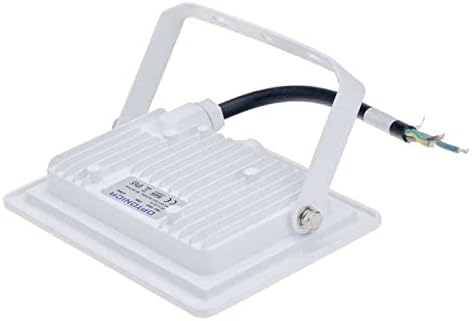
Figure 3.2: Back view of the Optonica 20W LED Projector, illustrating the heat sink, adjustable mounting bracket, and integrated electrical cable.
4. Setup and Installation
This LED projector is designed for surface mounting. Ensure the installation location is stable and can support the fixture's weight.
4.1 Tools Required
- Drill
- Screwdriver
- Wire strippers
- Measuring tape
- Pencil
- Appropriate mounting screws and wall anchors (not included)
4.2 Installation Steps
- Power Disconnection: Before starting, ensure the main power supply to the installation area is turned off at the circuit breaker.
- Marking: Position the projector's mounting bracket on the desired surface. Use a pencil to mark the locations for drilling mounting holes.
- Drilling: Drill pilot holes at the marked locations. Use appropriate drill bits for your mounting surface (e.g., masonry, wood, drywall). Insert wall anchors if necessary.
- Mounting: Secure the projector's mounting bracket to the surface using suitable screws. Ensure it is firmly attached.
- Wiring: Connect the projector's integrated electrical cable to your mains power supply. Follow local electrical codes for wiring. Typically, the brown wire is Live (L), the blue wire is Neutral (N), and the green/yellow wire is Earth (E). Ensure all connections are secure and insulated.
- Adjust Angle: Loosen the screws on the sides of the mounting bracket to adjust the projector's angle to your desired illumination direction. Tighten the screws firmly once the angle is set.
- Power Connection: Restore power to the circuit. The projector should illuminate instantly.
Note: For outdoor installations, ensure all electrical connections are made within a waterproof junction box to maintain the IP65 rating of the overall system.
5. Operation
The Optonica 20W LED Projector operates by direct connection to the mains power supply. It does not feature an integrated switch. Control of the light is typically managed via an external wall switch, timer, or motion sensor connected to the circuit.
- Turning On/Off: Use the external switch connected to the power circuit to turn the projector on or off.
- Instant Ignition: The LED projector provides instant full brightness upon activation.
6. Maintenance
The Optonica LED Projector requires minimal maintenance. Regular cleaning will help maintain its performance and appearance.
6.1 Cleaning
- Power Disconnection: Always turn off and disconnect power to the projector before cleaning.
- Surface Cleaning: Use a soft, damp cloth to wipe the exterior of the projector. Do not use abrasive cleaners, solvents, or harsh chemicals, as these can damage the finish or the lens.
- Lens Cleaning: Gently wipe the front lens with a clean, lint-free cloth to remove dust or debris that might obstruct light output.
- Drying: Ensure the projector is completely dry before restoring power.
6.2 Recycling
LED products should not be disposed of with general household waste. Please dispose of this product responsibly at an authorized recycling facility for electronic waste. This helps conserve natural resources and ensures that it is recycled in a manner that protects human health and the environment.
For information on recycling your old light bulbs and electronic devices, please consult your local waste management authority or visit relevant recycling websites.
7. Troubleshooting
If you experience issues with your Optonica LED Projector, please refer to the following common problems and solutions:
| Problem | Possible Cause | Solution |
|---|---|---|
| Projector does not turn on. | No power supply. Loose wiring connection. Faulty external switch/circuit breaker. | Check if the power supply is active. Verify all wiring connections are secure (ensure power is off first). Test the external switch or reset the circuit breaker. |
| Light output is dim or flickers. | Unstable power supply. Dust/debris on lens. | Ensure stable power supply. Clean the lens surface as per maintenance instructions. |
| Projector turns on/off unexpectedly. | Interference from other devices. Faulty external sensor (if applicable). | Check for nearby devices causing electrical interference. Inspect or replace the external sensor. |
If the problem persists after trying these solutions, please contact Optonica customer support or a qualified electrician.
8. Specifications
| Feature | Specification |
|---|---|
| Brand | Optonica |
| Model Reference | 3800156659056 |
| Power Consumption | 20 Watts |
| Equivalent Incandescent Power | 100 Watts |
| Luminous Flux | 1600 lumens |
| Color Temperature | 2700 Kelvin (Warm White) |
| Material | Aluminum |
| Color | White |
| IP Rating | IP65 (Waterproof) |
| Usage | Indoor / Outdoor |
| Power Source | Electrical Cable |
| Installation Type | Surface Mount |
| Included Components | Integrated Electrical Cable (approx. 25 cm, 120° angled) |
Note: Specifications are subject to change without notice for product improvement.
9. Warranty and Support
Optonica products are manufactured to high-quality standards. This product comes with a standard manufacturer's warranty against defects in materials and workmanship. Please refer to your purchase documentation for specific warranty terms and duration.
For technical support, warranty claims, or further inquiries, please contact your retailer or Optonica customer service through their official website or contact channels. When contacting support, please have your product model number (3800156659056) and purchase date available.
For more information on Optonica products, visit: www.optonica.com


