
XIAOMI TWSEJ04LS
Xiaomi Redmi Airdots Earphones User Manual
Model: TWSEJ04LS
Introduction
This manual provides comprehensive instructions for the safe and effective use of your Xiaomi Redmi Airdots Earphones. Please read this manual thoroughly before using the product and retain it for future reference.
The Xiaomi Redmi Airdots are true wireless earbuds designed for a seamless audio experience, featuring Bluetooth 5.0 connectivity, a lightweight design, and intelligent noise reduction for clear sound and calls.
Product Overview
Familiarize yourself with the components of your Redmi Airdots.

Image: Xiaomi Redmi Airdots Earbuds resting inside their open charging case. The earbuds are black, and the case is also black with a smooth, matte finish. This image shows the compact design of the earbuds and their charging solution.
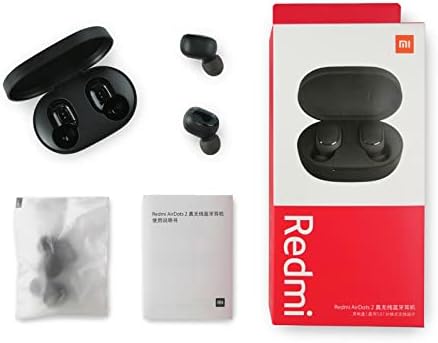
Image: The Xiaomi Redmi Airdots Earbuds are shown outside their charging case. The two black earbuds are positioned next to the open black charging case, illustrating their small size and the design of the charging contacts.
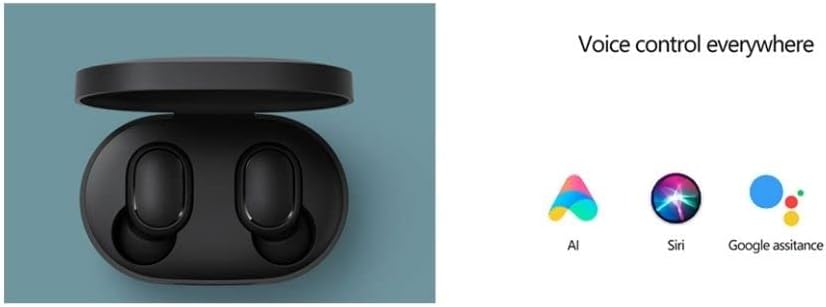
Image: This image displays the complete retail package of the Xiaomi Redmi Airdots. It includes the product box, the charging case with earbuds, a small user manual, and a sealed bag containing additional ear tip sizes. This provides a clear view of what is included in the product purchase.
What's in the Box:
- Xiaomi Redmi Airdots Earbuds (Left and Right)
- Charging Case
- Ear Tips (Small, Medium, Large - one set pre-installed)
- User Manual
Setup
1. Charging the Earbuds and Case:
Before first use, ensure both the earbuds and the charging case are fully charged.
- Place the earbuds into the charging case.
- Connect the charging case to a power source using a compatible USB cable (not included).
- The indicator light on the case will show charging status. Once fully charged, the light will turn off or change color depending on the model.
- Earbuds provide approximately 4 hours of listening time on a single charge. The charging case provides an additional 12 hours of battery life.
2. Pairing with Your Device:
The Redmi Airdots use Bluetooth 5.0 for a fast and stable connection.
- Take both earbuds out of the charging case. They will automatically power on and attempt to pair with each other.
- On your device (smartphone, tablet, etc.), go to the Bluetooth settings.
- Enable Bluetooth and search for available devices.
- Select "Redmi Airdots" (or similar name) from the list of devices.
- Once connected, you will hear a confirmation tone, and the earbuds will be ready for use.
- For subsequent uses, the earbuds will automatically connect to the last paired device when taken out of the case.
Operating Instructions
The Redmi Airdots feature a multi-function button on each earbud for easy control.
Basic Controls:
- Play/Pause: Single press the multi-function button on either earbud.
- Answer/End Call: Single press the multi-function button on either earbud during an incoming call.
- Reject Call: Press and hold the multi-function button for approximately 1 second during an incoming call.
- Next Song: Double press the multi-function button on the right earbud.
- Previous Song: Double press the multi-function button on the left earbud.
- Activate Voice Assistant: Double press the multi-function button on either earbud when not on a call. This activates your phone's voice assistant (e.g., Siri, Google Assistant, AI).

Image: This graphic illustrates the voice control capabilities of the Redmi Airdots, showing icons for AI, Siri, and Google Assistant. It emphasizes the convenience of activating your device's voice assistant directly from the earbuds.
Single Earbud Mode:
You can use either the left or right earbud independently. Simply take one earbud out of the case, and it will automatically connect to your device if previously paired.
Maintenance
Proper care ensures the longevity and performance of your Redmi Airdots.
- Cleaning: Use a soft, dry, lint-free cloth to clean the earbuds and charging case. Do not use abrasive cleaners, alcohol, or chemical solvents.
- Water Resistance: The earbuds are IPX4 waterproof, meaning they are resistant to splashing water and sweat. Do not submerge them in water or expose them to heavy rain. Dry them thoroughly if they get wet.
- Storage: When not in use, store the earbuds in their charging case to protect them and keep them charged. Store in a cool, dry place away from direct sunlight and extreme temperatures.
- Ear Tips: Regularly check and clean the ear tips to prevent wax buildup, which can affect sound quality. Replace ear tips if they become damaged or worn.
Troubleshooting
If you encounter issues, try these common solutions:
| Problem | Solution |
|---|---|
| Earbuds not pairing with each other. | Place both earbuds back into the charging case. Close the lid, wait a few seconds, then open and take them out again. This often forces them to re-sync. |
| Earbuds not connecting to device. | Ensure Bluetooth is enabled on your device. Forget "Redmi Airdots" in your device's Bluetooth settings and try pairing again. Ensure earbuds are charged. |
| Only one earbud working. | Place both earbuds back in the case, then take them out simultaneously. Check battery levels of both earbuds. |
| Low volume or poor sound quality. | Adjust volume on your device. Ensure ear tips are clean and properly seated in your ear. Try different sized ear tips for a better seal. |
| Earbuds not charging. | Ensure charging contacts on earbuds and inside case are clean and dry. Check USB cable and power adapter. Ensure case has power. |
Specifications
Key technical details of your Xiaomi Redmi Airdots Earphones.
- Model Name: Airdots True Wireless Black
- Model Number: TWSEJ04LS
- Connectivity Technology: Bluetooth
- Bluetooth Version: 5.0
- Bluetooth Range: Up to 10 Meters (33 feet)
- Audio Driver Size: 7.2 mm Dynamic Driver
- Frequency Range: 20 Hz - 20,000 Hz
- Impedance: 16 Ohm
- Earbud Battery Life: Approximately 4 hours (single charge)
- Charging Case Battery Life: Approximately 12 hours (additional charges)
- Control Method: Touch, Voice Control
- Noise Control: Active Noise Cancellation (DSP intelligent environment noise reduction)
- Water Resistance Level: IPX4 (Sweatproof, Splash resistant)
- Item Weight: 4.1g per earbud, 58g total (earbuds + case)
- Product Dimensions: 2.44 x 1.57 x 1.1 inches (Charging Case)
Warranty and Support
For warranty information and customer support, please refer to the warranty card included with your product packaging or visit the official Xiaomi website. You may also find additional support resources and FAQs online.
Official Xiaomi Website: www.mi.com
Please retain your proof of purchase for any warranty claims.
Related documentsTWSEJ04LS


Ask a question about this manual
Ask about setup, troubleshooting, compatibility, parts, safety, or missing instructions. Manuals+ will review the question and use this page’s manual context to help answer it.