1. Introduction
This manual provides essential information for setting up, operating, and maintaining your Amazfit Band 5 activity fitness tracker. Please read it thoroughly to ensure proper use and to maximize the device's features.
1.1. About Your Amazfit Band 5
The Amazfit Band 5 is a versatile activity fitness tracker designed to support your health and wellness journey. It features a 1.1-inch full-touch color AMOLED display and offers comprehensive health management capabilities, including blood-oxygen-level measurement, 24/7 heart rate monitoring, sleep quality and stress level tracking, breathing exercises, and menstrual cycle tracking. With built-in Amazon Alexa, you can access voice commands directly from your wrist. The device also supports 11 sports modes and is water-resistant up to 5 ATM.

Image 1.1: Amazfit Band 5 Activity Fitness Tracker.
1.2. What's in the Box
- Amazfit Band 5 Fitness Tracker
- Charging Cable
- User Manual
2. Getting Started
2.1. Charging the Device
Before first use, fully charge your Amazfit Band 5. Connect the charging cable to the charging contacts on the back of the device and plug the USB end into a power adapter (not included) or a computer's USB port. The device will display a charging indicator.
2.2. Pairing with Your Smartphone
- Download the Zepp App (formerly Amazfit App) from the App Store (iOS) or Google Play Store (Android).
- Open the Zepp App and create an account or log in.
- Ensure your Amazfit Band 5 is charged and near your phone.
- In the Zepp App, navigate to 'Profile' > 'My Devices' > 'Add device' > 'Band'.
- Follow the on-screen instructions to scan the QR code on your band or search for it via Bluetooth.
- Confirm the pairing request on both your phone and the band.
3. Operating Your Amazfit Band 5
3.1. Basic Navigation
The Amazfit Band 5 features a full-touch AMOLED display. Swipe up/down or left/right to navigate through menus and functions. Tap to select an option or confirm an action. The single touch button below the screen typically acts as a 'back' button or to return to the watch face.

Image 3.1: Interacting with the Amazfit Band 5.
3.2. Heart Rate Monitoring
The band continuously monitors your heart rate. To view your current heart rate or initiate a manual measurement:
- Swipe up or down on the watch face until you find the 'Heart Rate' option.
- Tap on 'Heart Rate' to start a measurement. Ensure the band is worn snugly on your wrist.
- The result will be displayed on the screen. Detailed historical data is available in the Zepp App.

Image 3.2: Heart Rate Monitoring on the Band 5.
3.3. Blood Oxygen Saturation (SpO2) Measurement
To measure your blood oxygen level:
- Swipe up or down on the watch face until you find the 'SpO2' option.
- Tap on 'SpO2' to begin the measurement. Keep your arm still and the band snugly fitted.
- The result will appear on the screen. For best results, ensure the band is worn tightly and your arm is flat on a tabletop.

Image 3.3: Blood Oxygen Measurement on the Band 5.
3.4. Sleep Tracking
The Amazfit Band 5 automatically tracks your sleep patterns, including deep sleep, light sleep, REM sleep, and awake times. It also monitors 20-minute daily naps. To view your sleep data, swipe to the 'Sleep' option on the band or check the detailed analysis in the Zepp App.
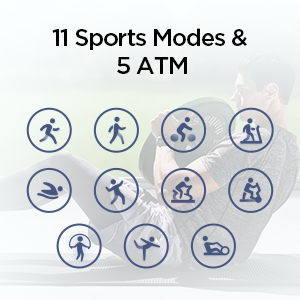
Image 3.4: Sleep Quality Monitoring.
3.5. Stress Monitoring & Breathing Exercises
The band can measure your stress levels. To access this feature and guided breathing exercises:
- Swipe up or down on the watch face until you find the 'Stress' option.
- Tap to initiate a stress measurement.
- You can also find 'Breathing' exercises in the menu to help you relax.

Image 3.5: Stress Monitoring and Breathing Exercise.
3.6. Sports Modes
The Amazfit Band 5 supports 11 built-in sports modes to track your workouts. These include outdoor running, treadmill, cycling, swimming, and more. To start a workout:
- Swipe up or down on the watch face until you find the 'Workout' option.
- Tap on 'Workout' and select your desired activity.
- The band will record data such as distance, speed, heart rate changes, and calories burned.

Image 3.6: Tracking workouts with Amazfit Band 5.
3.7. Amazon Alexa Built-in
Your Amazfit Band 5 comes with Amazon Alexa built-in. To use Alexa:
- Ensure your band is connected to the Zepp App on your smartphone and Alexa is enabled in the app settings.
- Swipe right on the watch face to access the Alexa interface.
- Speak your commands or questions directly into the band. You can ask questions, get translations, set alarms and timers, create shopping lists, check the weather, and control smart home devices.
4. Care and Maintenance
4.1. Cleaning Your Device
Regularly clean your Amazfit Band 5 to ensure optimal performance and hygiene. Wipe the screen and band with a soft, damp cloth. Avoid using harsh chemicals or abrasive materials.
4.2. Water Resistance (5 ATM)
The Amazfit Band 5 has a water-resistance rating of 5 ATM, meaning it can withstand pressures equivalent to a depth of 50 meters. This makes it suitable for showering, swimming, and other shallow-water activities. However, it is not recommended for diving or high-pressure water activities. Avoid prolonged exposure to hot water or steam.
4.3. Battery Life Optimization
The Amazfit Band 5 offers up to 15 days of battery life under typical usage. To optimize battery performance:
- Reduce screen brightness.
- Disable continuous heart rate monitoring if not needed 24/7.
- Limit notifications from apps.
- Use power-saving mode when available.
5. Troubleshooting
If you encounter issues with your Amazfit Band 5, try the following common solutions:
- Device not turning on: Ensure the device is fully charged.
- Not pairing with phone: Check Bluetooth settings on your phone, ensure the Zepp App is updated, and try restarting both devices.
- Inaccurate heart rate/SpO2 readings: Ensure the band is worn snugly on your wrist, not too loose or too tight, and keep your arm still during measurement.
- Notifications not appearing: Check app notification settings on your phone and within the Zepp App. Ensure the band is connected via Bluetooth.
- Battery draining quickly: Refer to the 'Battery Life Optimization' section for tips.
For further assistance, consult the official Amazfit support resources or contact customer service.
6. Technical Specifications
| Model Number | A2005-Black |
| Product Dimensions | 0.49 x 0.73 x 1.86 inches |
| Item Weight | 0.42 ounces |
| Screen Size | 1.1 Inches AMOLED |
| Operating System | Amazfit OS |
| Battery Capacity | 125 mAh Lithium Polymer |
| Battery Life | Up to 15 days (typical usage) |
| Water Resistance | 5 ATM |
| Connectivity | Bluetooth 5.2 |
| Compatible Phone Models | Android 5.0 or iOS 10.0 and above |
7. Warranty and Support
For warranty information, product registration, and detailed support resources, please visit the official Amazfit website or refer to the warranty card included with your product. You can also find FAQs and contact customer support through the Zepp App.
Manufacturer: Amazfit


