1. Introduction
The WZRELB 3000Watt Pure Sine Wave Inverter converts 48V DC battery power to 120V AC household electricity. This inverter is designed for applications requiring clean, stable power, such as RVs, solar systems, and camping setups. It provides 3000W continuous power and a 6000W peak surge capacity, ensuring compatibility with a wide range of electronic devices and appliances. Key features include intelligent temperature control cooling, dual AC outlets, a hardwire terminal block, and comprehensive safety protections.

Image 1.1: Overview of the WZRELB 3000W Pure Sine Wave Inverter.
2. Safety Information
Read all instructions and warnings carefully before installation and operation. Failure to follow these instructions may result in electric shock, fire, serious injury, or death.
- Installation: Ensure the inverter is installed in a well-ventilated area, away from flammable materials, and protected from direct sunlight and moisture.
- Battery Connection: Always connect the inverter to a 48V DC battery system. Connect the negative (-) cable first, then the positive (+) cable. Ensure all connections are tight and secure to prevent sparking and overheating.
- Grounding: The inverter must be properly grounded. Connect the grounding lug on the inverter to an appropriate earth ground.
- Load Capacity: Do not overload the inverter. Ensure the total wattage of connected appliances does not exceed the inverter's continuous power rating (3000W) or peak surge capacity (6000W).
- Polarity: Never reverse the polarity of the battery connections. This will damage the inverter and void the warranty.
- Maintenance: Regularly inspect cables and connections for wear or damage. Replace fuses only with the specified type and rating.
- Emergency: In case of smoke, unusual odors, or abnormal operation, immediately disconnect the inverter from the battery and AC loads.
3. Product Overview
The WZRELB 3000W Pure Sine Wave Inverter is built with high-quality components to ensure stable and efficient power conversion. It features a robust design suitable for various demanding environments.
Key Features:
- 3000W Continuous / 6000W Peak Pure Sine Wave Output
- 48V DC Input to 120V AC Output, 60Hz Frequency
- Dual US Standard AC Outlets
- Hardwire Terminal Block for High-Power Appliances
- Intelligent Temperature Control Cooling Fan
- Digital LED Display for Input/Output Voltage
- Earth Connection for PCB Board and Output
- High-Quality True Copper Inductance for Clean AC Output
- All Big Imported MOSFETs for Strong Driving Capacity
- 2.00mm Thick PCB for Stronger Current Floating and Increased Load Capacity
- High-Frequency Transformer for Stable and Full AC Output
- CE EMC Approved
What's in the Box:
- WZRELB 3000W Pure Sine Wave Inverter
- 2 Sets of Battery Cables
- Spare Fuses for Replacement
- User Manual

Image 3.1: The inverter, battery cables, and spare fuses included in the package.
4. Setup
Proper installation is crucial for the safe and efficient operation of your inverter. Follow these steps carefully.
4.1 Mounting the Inverter
- Choose a dry, cool, and well-ventilated location.
- Mount the inverter securely using appropriate fasteners. Ensure there is sufficient space around the unit for airflow, especially around the cooling fans.
4.2 DC Input Connection (Battery)
The inverter requires a 48V DC battery system. Use the provided battery cables for connection.
- Ensure the inverter is turned OFF before making any connections.
- Connect the negative (-) battery cable (black) to the negative terminal of your 48V battery bank.
- Connect the other end of the negative (-) cable to the black terminal on the inverter.
- Connect the positive (+) battery cable (red) to the positive terminal of your 48V battery bank.
- Connect the other end of the positive (+) cable to the red terminal on the inverter.
- Tighten all connections securely using the provided hardware (flat washer, lock washer, nut).
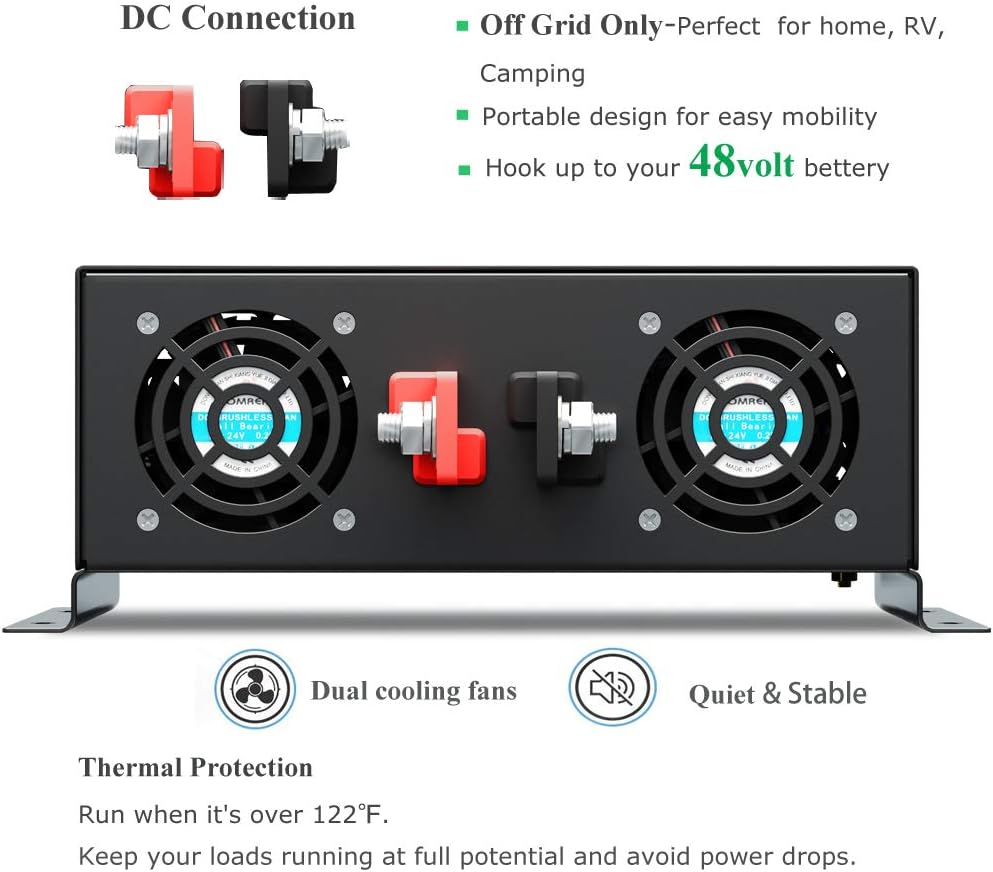
Image 4.1: Rear view of the inverter showing the DC input terminals and cooling fans.

Image 4.2: Detailed diagram illustrating the correct installation of battery cables with washers and nuts.
4.3 Grounding the Inverter
Connect the grounding screw on the inverter chassis to a reliable earth ground using a suitable gauge wire. This is essential for safety.
4.4 AC Output Connection
The inverter provides two standard US AC outlets and a hardwire terminal block.
- Standard Outlets: For connecting typical household appliances directly.
- Hardwire Terminal Block: For connecting high-power appliances or integrating into a distribution panel. Ensure proper wiring (Live, Ground, Neutral) according to local electrical codes.

Image 4.3: Front view of the inverter showing the digital display, AC outlets, and hardwire terminal block.
4.5 Setup Video Guide
Video 4.1: This video demonstrates the basic connection and setup of the inverter, including battery connections and initial power-up.
5. Operating Instructions
Once properly installed, operating the WZRELB inverter is straightforward.
5.1 Powering On/Off
- Ensure all DC and AC connections are secure.
- Press the ON/OFF switch on the front panel to power on the inverter. The digital display will illuminate, showing the input DC voltage and output AC voltage.
- To power off, press the ON/OFF switch again.
5.2 Connecting AC Loads
- Plug your AC appliances into the standard outlets or connect them to the hardwire terminal block.
- Always check the wattage requirements of your appliances to ensure they do not exceed the inverter's capacity.
5.3 Load Considerations
Different types of loads have varying power demands:
- Resistive Loads: Appliances like heaters, toasters, and incandescent lights draw power consistently. Choose an inverter with continuous power higher than the appliance's rated power.
- Inductive Loads: Appliances with motors or compressors (e.g., refrigerators, air conditioners, power tools) have a high startup (surge) current. For these, choose an inverter whose continuous power is 3-7 times higher than your appliance's rated power to handle the initial surge.

Image 5.1: Chart illustrating reliable and unreliable power for various resistive and inductive loads based on inverter capacity.
5.4 Operation Demonstration
Video 5.2: This video demonstrates the WZRELB 3000W Pure Sine Wave Inverter powering various loads in an RV setting, showcasing its practical application.
6. Maintenance
Regular maintenance ensures the longevity and optimal performance of your inverter.
- Cleaning: Keep the inverter clean and free from dust and debris. Use a dry cloth to wipe the exterior. Do not use liquid cleaners.
- Ventilation: Ensure the cooling fans and ventilation openings are not blocked. The intelligent cooling fans activate automatically when the internal temperature rises, helping to dissipate heat.
- Connections: Periodically check all DC and AC connections for tightness. Loose connections can cause overheating and power loss.
- Fuse Replacement: If the inverter stops working due to an overload or short circuit, check the fuses. Replace blown fuses only with spare fuses of the correct type and rating provided with the unit.

Image 6.1: Diagram highlighting the input terminals, cooling fans, and output connections of the inverter.
7. Troubleshooting
The WZRELB inverter is equipped with multiple protection features to ensure safe operation. If the inverter is not functioning as expected, refer to the following common issues and their solutions.
Protection Features:
- Overload Protection: Shuts down if connected loads exceed capacity. Reduce load and restart.
- Short Circuit Protection: Protects against short circuits in the AC output. Disconnect load and check wiring.
- Reverse Polarity Protection: Prevents damage from incorrect battery connections. Ensure correct positive/negative connections.
- Overheating Protection: Activates if internal temperature is too high. Allow to cool, ensure ventilation.
- Low Voltage Protection: Shuts down if battery voltage drops too low. Recharge battery.
- High Voltage Protection: Protects against excessively high input voltage. Check battery charging system.
- Anti-Surge Protection: Manages sudden power surges.
- Soft Starter: Ensures smooth startup for inductive loads.

Image 7.1: Visual representation of the inverter's comprehensive protection technology.
Common Issues:
- Inverter not turning on: Check battery connections, ensure battery voltage is within operating range, and verify the ON/OFF switch is engaged.
- No AC output: Check if the inverter is on, if any protection features are active (e.g., overload), and if AC loads are properly connected.
- Sparking during battery connection: This can occur due to the inverter's internal capacitors charging. Ensure connections are made quickly and securely. If excessive, recheck polarity and cable integrity.
8. Specifications
Detailed technical specifications for the WZRELB 3000W Pure Sine Wave Inverter.
| Feature | Specification |
|---|---|
| Model Name | RBP300048 |
| Continuous Power | 3000 Watts |
| Peak Power | 6000 Watts |
| DC Input Voltage | 48 Volts (DC) |
| AC Output Voltage | 120 Volts (AC) |
| Frequency | 60 Hz |
| Product Dimensions | 14.2 x 9.7 x 3.7 inches |
| Item Weight | 14.47 pounds |
| Recommended Uses | Vehicle, RV, Solar System, Camping |
| Power Source | Battery Powered |
| Certifications | CE EMC Approved |

Image 8.1: Visual display of 3000W 48VDC specifications and compatible battery types (AGM, GEL, FLD, LI, SLD).
9. Warranty and Support
For warranty information, technical support, or service inquiries, please refer to the contact details provided in your product packaging or visit the official WZRELB website. Keep your purchase receipt for warranty claims.


