
Introduction
This manual provides detailed instructions for the setup, operation, maintenance, and troubleshooting of your ZdalaMit AH59-02546B Replacement Remote Control. This remote is designed to be compatible with various Samsung Soundbar models, offering a seamless replacement experience without the need for complex programming.
Compatible Samsung Soundbar Models:
- HW-F550
- HW-F551
- HW-FM55C
- HW-F550/ZA
- HW-F551/ZA
- HW-FM55C/ZA
- HW-F550/ZC
- HW-F551/ZC
- HW-FM55C/ZC
Package Contents
Upon opening the package, please ensure all items are present and in good condition.
- 1x AH59-02546B Replacement Remote Control
Note: Batteries and additional manuals are not included in the package.
Setup
The AH59-02546B replacement remote control is designed for immediate use with compatible Samsung Soundbar models without requiring any programming or pairing procedures.
Installing Batteries
- Locate the battery compartment on the back of the remote control.
- Slide open the battery compartment cover.
- Insert two (2) 1.5V AAA alkaline batteries, ensuring the positive (+) and negative (-) terminals align correctly with the indicators inside the compartment.
- Close the battery compartment cover securely until it clicks into place.
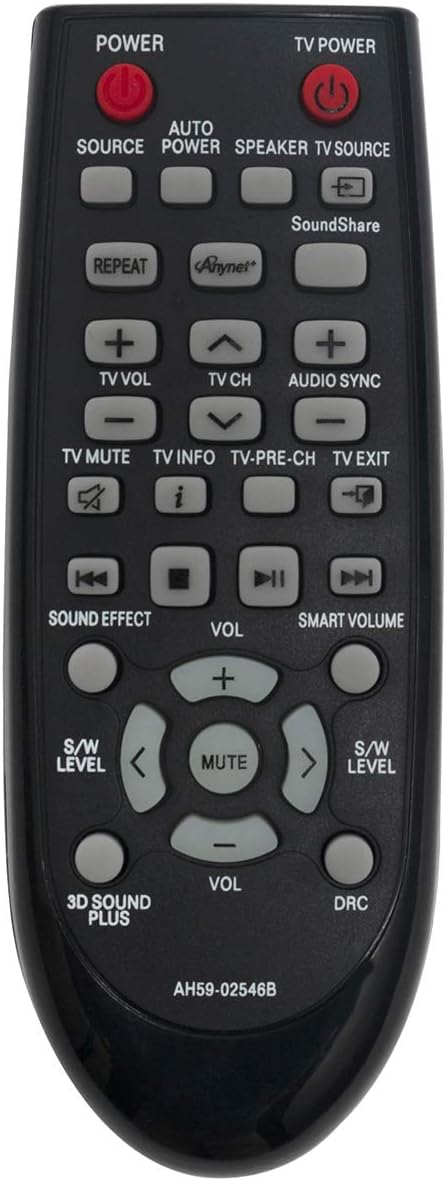
Image: Front view of the AH59-02546B replacement remote control, showing all buttons and the model number at the bottom. This image illustrates the overall design and button layout of the remote.

Image: Angled view of the AH59-02546B replacement remote control, highlighting its ergonomic shape and button placement from a side perspective. This view provides a better sense of the remote's depth and contours.
Operating the Remote Control
Once batteries are installed, the remote is ready to operate your compatible Samsung Soundbar. Point the remote directly at the soundbar's infrared receiver.
Key Functions
| Button | Function |
|---|---|
| POWER | Turns the soundbar power on or off. |
| TV POWER | Turns the connected TV power on or off. |
| SOURCE | Cycles through available input sources (e.g., D.IN, AUX, HDMI). |
| AUTO POWER | Enables or disables the Auto Power Link feature. |
| SPEAKER | Adjusts speaker settings or modes. |
| TV SOURCE | Switches the TV input source. |
| SoundShare | Connects to compatible Samsung TVs via SoundShare. |
| REPEAT | Repeats playback (functionality may vary by soundbar model). |
| Anynet+ | Activates Samsung's Anynet+ (HDMI-CEC) function. |
| VOL (+/-) | Adjusts the soundbar's master volume. |
| TV VOL (+/-) | Adjusts the connected TV's volume. |
| CH (Up/Down) | Changes channels on the connected TV. |
| AUDIO SYNC | Adjusts audio delay to synchronize with video. |
| TV MUTE | Mutes or unmutes the connected TV's audio. |
| TV INFO | Displays information about the current TV program or input. |
| TV PRE-CH | Returns to the previously viewed TV channel. |
| TV EXIT | Exits the current menu or function on the TV. |
| SOUND EFFECT | Cycles through various sound effects or modes (e.g., Standard, Music, Cinema). |
| SMART VOLUME | Enables or disables Smart Volume to maintain consistent volume levels. |
| S/W LEVEL (Left/Right) | Adjusts the subwoofer volume level. |
| MUTE | Mutes or unmutes the soundbar's audio. |
| 3D SOUND PLUS | Activates or deactivates 3D Sound Plus feature. |
| DRC | Enables or disables Dynamic Range Control. |
| Playback Controls (Rewind, Play/Pause, Fast Forward, Stop) | Controls media playback functions. |
Maintenance
Proper care and maintenance will extend the life of your remote control.
- Cleaning: Use a soft, dry cloth to clean the surface of the remote. Do not use liquid cleaners or abrasive materials.
- Battery Replacement: Replace batteries when the remote's response becomes sluggish or stops working. Always replace both batteries at the same time with new ones.
- Storage: If the remote will not be used for an extended period, remove the batteries to prevent leakage and potential damage.
- Avoid Exposure: Keep the remote away from direct sunlight, heat sources, and excessive moisture.
Troubleshooting
If you encounter issues with your remote control, please refer to the following common problems and solutions:
| Problem | Possible Cause / Solution |
|---|---|
| Remote is not responding. |
|
| Certain buttons do not work. |
|
| Remote works intermittently. |
|
Specifications
| Feature | Detail |
|---|---|
| Model Number | AH59-02546B |
| Brand | ZdalaMit |
| Power Supply | 2 x 1.5V AAA Alkaline Batteries (not included) |
| Dimensions (L x W x H) | 4.8 x 1.2 x 0.5 inches |
| Item Weight | 1.41 ounces |
| Special Feature | Pre-Programmed (No programming or pairing needed) |
| Compatible Devices | Samsung Soundbar models: HW-F550, HW-F551, HW-FM55C, HW-F550/ZA, HW-F551/ZA, HW-FM55C/ZA, HW-F550/ZC, HW-F551/ZC, HW-FM55C/ZC |
Warranty and Support
This product is a replacement remote control. For specific warranty information, please refer to the seller's policy at the time of purchase. Typically, replacement parts may come with a limited warranty against manufacturing defects.
If you have any questions or require further assistance, please contact the seller or manufacturer directly. Contact information can usually be found on your purchase receipt or the product listing page.
For general inquiries or troubleshooting tips, you may also refer to the product's listing on Amazon: Amazon Product Page