
Introduction
This manual provides instructions for the ZdalaMit RM-ADU007A replacement remote control, designed for use with various Sony DVD Home Theater Systems. This remote offers a direct replacement solution, requiring no complex programming or pairing.
Compatible Sony DVD Home Theater Systems include:
- DAV-HDX285
- DAV-HDZ485
- DAV-HDX287WC
- DAV-HDX587WC
- DAV-HDX589W
- DAV-HDX585
- DAV-HDX686W
Setup
The RM-ADU007A remote control is designed for immediate use without any programming or pairing procedures. Simply install the batteries, and it will be ready to operate your compatible Sony DVD Home Theater System.
Battery Installation
- Locate the battery compartment on the back of the remote control.
- Slide open the battery compartment cover.
- Insert two (2) 1.5V AA alkaline batteries, ensuring the correct polarity (+ and -) as indicated inside the compartment.
- Close the battery compartment cover securely.
Note: Batteries are not included with the remote control and must be purchased separately.
Operating Instructions
This remote control provides full functionality for your compatible Sony DVD Home Theater System. Below is a general overview of key button functions.
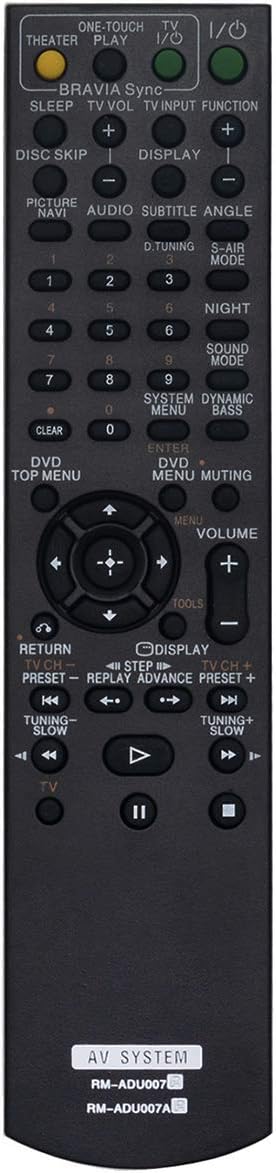
Figure 1: Front view of the RM-ADU007A remote control, showing all buttons and their labels.
Key Functions Overview
| Button | Function |
|---|---|
| I/O (Power) | Turns the system power on or off. |
| Theater Play | Initiates Theater Play mode. |
| TV I/O | Turns the connected TV power on or off. |
| BRAVIA Sync | Activates BRAVIA Sync functions for connected Sony devices. |
| TV VOL +/- | Adjusts the volume of the connected TV. |
| TV INPUT | Switches the input source on the connected TV. |
| FUNCTION | Selects the function/mode of the home theater system. |
| DISC SKIP +/- | Skips between discs in a multi-disc changer. |
| DISPLAY | Shows on-screen display information. |
| Numeric Keypad (0-9) | Used for direct track selection, channel input, or menu navigation. |
| DVD TOP MENU | Accesses the top menu of a DVD. |
| DVD MENU | Accesses the main menu of a DVD. |
| MUTING | Mutes or unmutes the audio output. |
| Navigation (Up/Down/Left/Right/Enter) | Navigates through menus and confirms selections. |
| VOLUME +/- | Adjusts the master volume of the home theater system. |
| RETURN | Returns to the previous menu or screen. |
| Play/Pause/Stop/Fast Forward/Rewind/Skip | Standard media playback controls. |
For detailed operation of specific features, please refer to the original user manual of your Sony DVD Home Theater System.
Maintenance
To ensure the longevity and optimal performance of your RM-ADU007A remote control, follow these maintenance guidelines:
- Cleaning: Use a soft, dry cloth to wipe the surface of the remote. For stubborn dirt, slightly dampen the cloth with water or a mild, non-abrasive cleaner. Avoid using harsh chemicals, solvents, or abrasive cleaning pads, as these can damage the remote's finish or internal components.
- Battery Replacement: Replace batteries when the remote's response becomes sluggish or stops working. Always replace both batteries at the same time with new ones of the same type (1.5V AA alkaline). Do not mix old and new batteries, or different types of batteries.
- Storage: If the remote will not be used for an extended period, remove the batteries to prevent leakage, which can cause damage to the remote. Store the remote in a cool, dry place away from direct sunlight and extreme temperatures.
- Avoid Drops and Impacts: Protect the remote from physical shocks. Dropping the remote can damage internal circuitry or external casing.
- Liquid Exposure: Keep the remote away from liquids. Spills can cause short circuits and permanent damage.
Troubleshooting
If you encounter issues with your RM-ADU007A remote control, please refer to the following common troubleshooting steps:
| Problem | Possible Cause | Solution |
|---|---|---|
| Remote is not responding. | Dead or incorrectly installed batteries. | Replace batteries with new 1.5V AA alkaline batteries, ensuring correct polarity. |
| Remote works intermittently. | Low battery power; obstruction between remote and system; remote sensor on system is blocked. | Replace batteries. Ensure a clear line of sight to the system's IR sensor. Remove any obstructions. |
| Specific buttons do not work. | Button stuck or damaged; system not in correct mode. | Check if the button is physically stuck. Ensure the home theater system is in the appropriate mode (e.g., DVD mode for DVD controls). |
| Remote does not control the TV. | TV not compatible or not properly connected to the home theater system. | Ensure your TV is compatible with the Sony Home Theater System's control features (e.g., BRAVIA Sync). Verify connections. |
If these steps do not resolve the issue, please contact customer support for further assistance.
Specifications
| Feature | Detail |
|---|---|
| Model Number | RM-ADU007A |
| Brand | ZdalaMit |
| Compatible Devices | Sony DVD Home Theater Systems (DAV-HDX285, DAV-HDZ485, DAV-HDX287WC, DAV-HDX587WC, DAV-HDX589W, DAV-HDX585, DAV-HDX686W) |
| Power Supply | 2 x 1.5V AA Alkaline Batteries (not included) |
| Product Dimensions | 6.2 x 1.8 x 0.6 inches (approximately) |
| Item Weight | 1.41 ounces (approximately) |
| Color | Black |
| Special Feature | Ergonomic design |
Warranty and Support
For any queries or support regarding your ZdalaMit RM-ADU007A remote control, please contact the seller or manufacturer directly. Information regarding specific warranty terms may be provided at the point of purchase or through the seller's contact channels.
You can often find contact information on the packaging or through the online retailer where the product was purchased. Please have your purchase details and model number (RM-ADU007A) ready when contacting support.
As per product information, "Please feel free to contact us if you have any query, thanks!"