1. Important Safety Instructions
When using electrical appliances, basic safety precautions should always be followed to reduce the risk of burns, electric shock, fire, injury to persons, or exposure to excessive microwave energy.
- Read all instructions before using the appliance.
- Do not attempt to operate this oven with the door open as this can result in harmful exposure to microwave energy.
- Do not place any object between the oven front face and the door, or allow soil or cleaner residue to accumulate on sealing surfaces.
- Do not operate the oven if it is damaged. It is particularly important that the oven door closes properly and that there is no damage to the: (1) door (bent), (2) hinges and latches (broken or loosened), (3) door seals and sealing surfaces.
- The oven should not be adjusted or repaired by anyone except properly qualified service personnel.
- Ensure the appliance is properly grounded.
- Do not heat liquids or other foods in sealed containers as they are liable to explode.
- This appliance is intended for commercial use.
2. Product Overview
The Panasonic NE-12521 is a heavy-duty, compact 1200W commercial microwave oven designed for efficient and consistent cooking in professional environments. It features top and bottom energy feed for even heating, programmable controls, and a durable stainless steel construction.
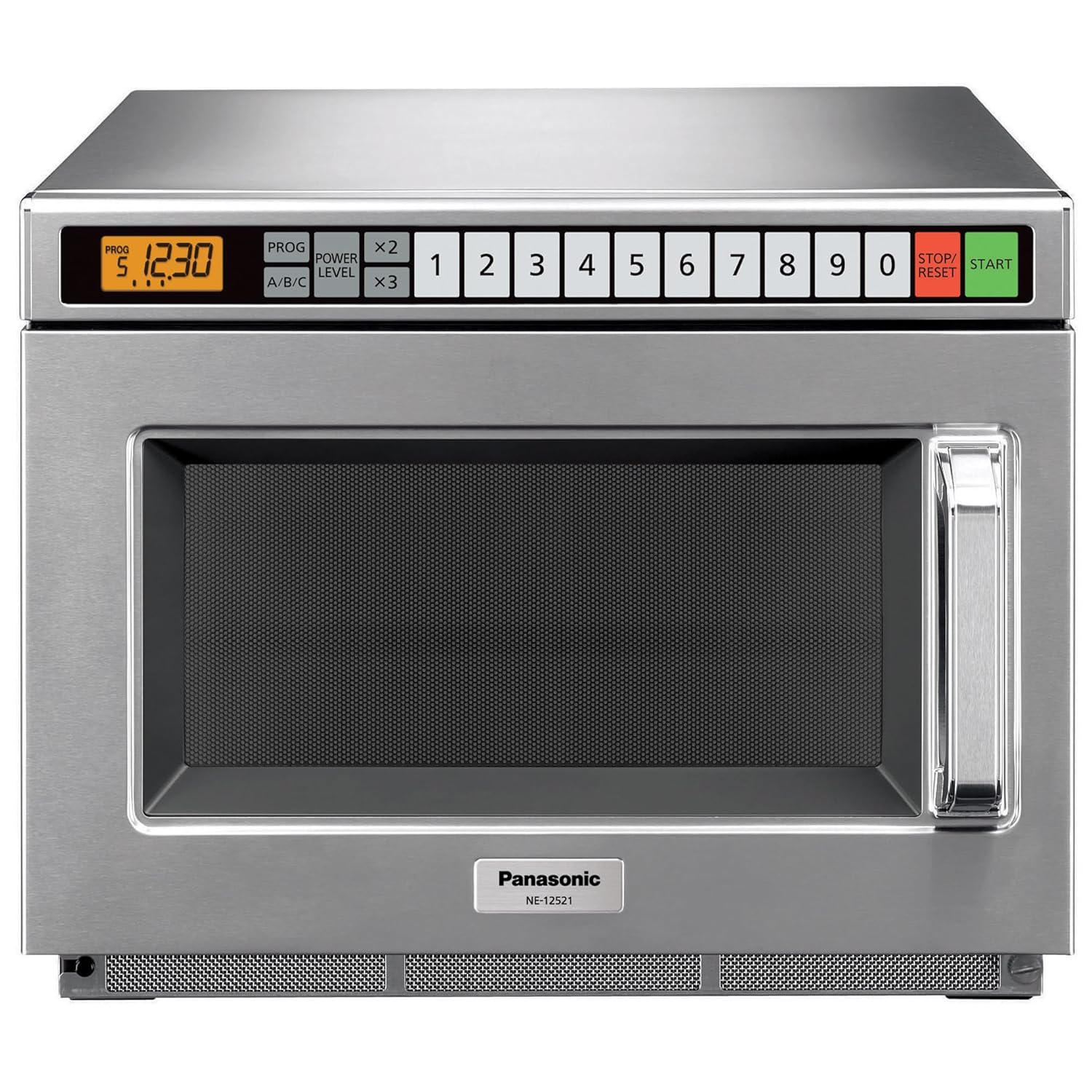
Figure 2.1: Front view of the Panasonic NE-12521 Commercial Microwave Oven, showcasing its stainless steel exterior and control panel.
Key Features:
- 1200W Power Output: Delivers fast and efficient heating.
- Compact Design: Fits on countertops and is stackable for space efficiency.
- Even, Consistent Cooking: Top and bottom energy feed ensures uniform heating.
- Programmable Controls: Features 30 memory programs and 15 power levels for precise cooking.
- Durable Construction: Stainless steel interior and exterior for longevity and easy cleaning.
- Heavy-Duty Grab-and-Go Door: Designed for high-volume use without moving parts.

Figure 2.2: Overview of the NE-12521's key features, including its powerful and compact design, even cooking, ease of use, simple cleaning, and high-volume durability.
3. Setup and Installation
Proper installation is crucial for the safe and efficient operation of your microwave oven.
3.1 Unpacking
- Remove all packaging materials from inside and outside the oven.
- Inspect the oven for any damage, such as a misaligned or bent door, damaged door seals, or dents in the cavity. Do not operate the oven if it is damaged. Contact customer support.
- Ensure the microwave rack is included.
3.2 Placement
- Place the oven on a flat, stable surface capable of supporting its weight (approximately 59 lbs).
- Ensure adequate ventilation around the oven. Maintain at least 4 inches (10 cm) of clearance on the top, back, and sides for proper airflow.
- This model is designed for countertop installation.
- Multiple units can be safely stacked. Refer to the detailed specifications for stacking guidelines.

Figure 3.1: Illustration of the microwave oven's exterior and interior dimensions, showing a half-size 6" tall pan fitting inside. Exterior: 16 5/8"W x 20"D x 13 1/4"H. Interior: 13"W x 12 7/32"D x 6 7/8"H.
3.3 Electrical Requirements
The oven requires a 120V, 60Hz, single-phase power source. It is recommended to use a dedicated circuit for the appliance. Refer to the product label for specific amperage requirements and NEMA plug type (NEMA 5-20).
4. Operating Instructions
This section details the basic and advanced functions of your Panasonic NE-12521 microwave oven.

Figure 4.1: Close-up of the control panel, highlighting programmable controls and the digital display. The oven features 30 customizable menus and 15 power levels for precise cooking, along with five-stage cooking for gradual power adjustments.
4.1 Basic Operation (Manual Cooking)
- Place food in a microwave-safe container inside the oven. Close the door securely.
- Enter the desired cooking time using the numeric keypad (0-9).
- Press the START button to begin cooking.
- To stop cooking at any time, open the door or press the STOP/RESET button.
4.2 Programmable Cooking
The NE-12521 offers 30 memory programs for frequently used recipes, allowing for consistent results with a single touch.
- Programming a Menu: Refer to the detailed programming guide in the full manual for step-by-step instructions on setting time, power levels, and multi-stage cooking for each of the 30 memory slots.
- Recalling a Program: Press the desired program number (1-30) on the keypad. The programmed time and power level will appear on the display.
- Press the START button to begin cooking with the selected program.
4.3 Power Levels
The oven features 15 power levels, allowing for precise control over cooking intensity. The default power level is typically 100% (Level 15). To adjust:
- Enter cooking time.
- Press the POWER LEVEL button.
- Enter the desired power level number (e.g., 7 for 50% power).
- Press START.
4.4 Portion Settings (x2, x3)
For convenience, the oven includes buttons to automatically adjust cooking times for double or triple portions of a programmed menu item.
- Select a programmed menu item.
- Press the x2 button for double portions or x3 button for triple portions. The cooking time will automatically adjust.
- Press START.

Figure 4.2: The control panel showing the 'x2' and 'x3' buttons, which allow for flexible portioning by automatically adjusting cooking times for double or triple servings.

Figure 4.3: A chef placing a food container into the open door of the Panasonic NE-12521 commercial microwave oven, demonstrating typical usage.
5. Maintenance and Cleaning
Regular cleaning and maintenance will ensure the longevity and optimal performance of your microwave oven.
5.1 General Cleaning
- Always unplug the oven before cleaning.
- Clean the interior and exterior surfaces with a damp cloth and mild detergent. Avoid abrasive cleaners or scouring pads.
- Pay special attention to the door seals and sealing surfaces to ensure they are free of food residue.
- The stainless steel interior and removable ceiling plate are designed for easy cleaning.
- Wipe the control panel with a soft, damp cloth. Do not allow water to seep into the control panel.
5.2 Removable Ceiling Plate
The removable ceiling plate facilitates thorough cleaning of the oven cavity. To remove, gently unclip or slide it out according to the design. Clean separately and ensure it is properly reinstalled before operating the oven.
6. Troubleshooting
If you experience issues with your microwave oven, consult the following table before contacting service personnel.
| Problem | Possible Cause | Solution |
|---|---|---|
| Oven does not start |
|
|
| Food not heating |
|
|
| Display shows error code | Internal malfunction. | Unplug the oven for 5 minutes, then plug back in. If the error persists, contact customer support. |
7. Specifications
Detailed technical specifications for the Panasonic NE-12521 Commercial Microwave Oven.
| Feature | Detail |
|---|---|
| Model Number | NE-12521 |
| Power Output | 1200 Watts |
| Power Source | 120V, 60Hz, Single Phase |
| Receptacle Required | NEMA 5-20 |
| Frequency | 2,450MHz |
| Capacity | 0.6 Cubic Feet |
| Exterior Dimensions (W x D x H) | 16 5/8" x 20" x 13 1/4" |
| Cavity Dimensions (W x D x H) | 13" x 12 7/32" x 6 7/8" |
| Net Weight | 59 lbs. |
| Material | Stainless Steel |
| Special Features | Programmable, Small Footprint, Top and bottom energy feed, 30 memory programs, 15 Power Levels, Stackable |
| Included Components | Microwave Rack |

Figure 7.1: Comprehensive technical specifications, certifications (UL, NSF), and dimensional diagrams for the NE-12521 microwave oven.
8. Warranty and Support
Panasonic provides warranty coverage for the NE-12521 Commercial Microwave Oven.
- Warranty: 1 year parts and labor.
- Magnetron Warranty: 3 years.
For technical assistance, service, or warranty claims, please contact Panasonic Commercial Food Service directly. Contact information can typically be found on the manufacturer's website or in the product packaging.
Manufacturer: Panasonic
Website: www.panasonic.com/cmo


