
Intex 26664GS
Intex QS400 Crystal Clear Saltwater Pool Chlorine System
User Instruction Manual
Introduction
Thank you for purchasing the Intex QS400 Crystal Clear Saltwater Pool Chlorine System. This system is designed to provide a more natural and pleasant swimming experience by converting ordinary salt into chlorine, eliminating the need for traditional packaged chlorine. Please read this manual thoroughly before installation and operation to ensure proper use and maintenance of your system.
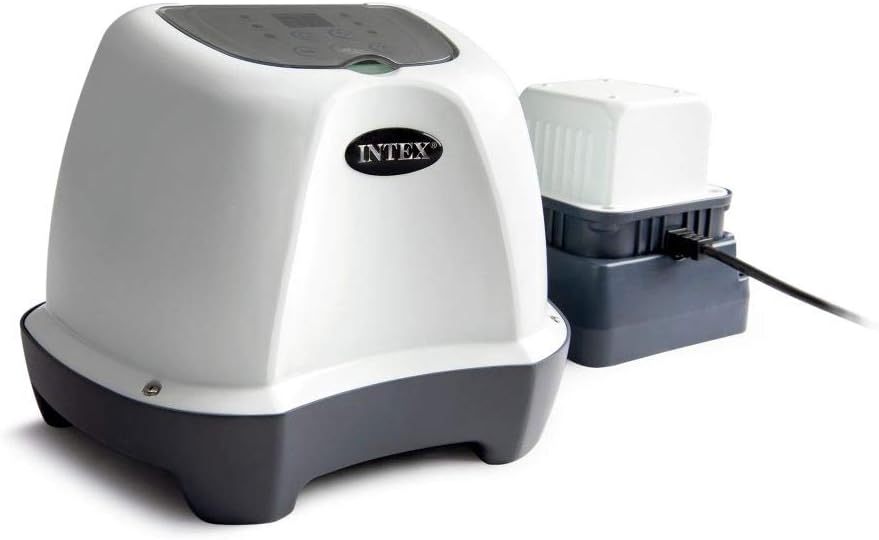
Image: The Intex QS400 Crystal Clear Saltwater Pool Chlorine System. The main unit is white and grey with the 'INTEX' logo, featuring a control panel on top. To its right, a smaller grey and white power supply unit is connected by a black cable. This system is designed for efficient pool water sanitization.
Safety Information
Always follow basic safety precautions when installing and using this electrical product. Failure to follow these instructions can result in serious injury or death.
- Read all instructions before using this product.
- Connect only to a grounded outlet protected by a Ground-Fault Circuit Interrupter (GFCI).
- Do not operate the system if the power cord or plug is damaged.
- Keep children away from the system during operation.
- Ensure the pool pump is running when the saltwater system is operating.
- Maintain proper salt levels as specified in this manual.
Setup
Package Contents:
- Intex QS400 Saltwater System Unit
- Power Supply
- Connection Hoses and Clamps
- Test Strips (for salt and chlorine levels)
- Instruction Manual
Installation Steps:
- Placement: Position the saltwater system on a firm, level surface, at least 10 feet (3 meters) from the pool. Ensure it is protected from direct sunlight and rain.
- Connect to Filter Pump: Connect the saltwater system in line with your pool's filter pump. The water should flow from the pool, through the filter pump, then through the saltwater system, and back to the pool. Use the provided hoses and clamps to secure all connections.
- Add Salt to Pool: Use only pure, non-iodized salt (sodium chloride) with a purity of 99.8% or higher. Refer to the specifications section for recommended salt levels based on your pool volume. Distribute the salt evenly around the pool and allow it to dissolve completely before operating the system.
- Power Connection: Plug the power supply into a grounded GFCI outlet. Ensure all connections are dry before plugging in.
Operating Instructions
The Intex QS400 system features a full control panel with a display and push buttons for easy operation.
Initial Start-up:
- Ensure the filter pump is running. The saltwater system requires water flow to operate.
- Press the Power button to turn on the system.
- The display will show the current salt level (if equipped with a sensor) or prompt for initial setup.
- Select the desired operating mode (6, 10, or 14 hours) using the mode selection buttons. These modes determine the duration of chlorine generation.
- The system will begin generating chlorine. Monitor the display for any error codes.
Daily Operation:
The system is designed for automatic daily operation once the cycle time is set. It will automatically turn on and off based on the programmed cycle.
- Regularly test your pool water for chlorine and pH levels using appropriate test strips.
- Adjust the operating time as needed to maintain optimal chlorine levels (1-3 ppm).
- Ensure the filter pump runs concurrently with the saltwater system.
Maintenance
Cell Cleaning:
The electrolytic cell may accumulate calcium deposits over time, reducing its efficiency. The system will indicate when cleaning is required.
- Turn off and unplug the system.
- Disconnect the hoses from the cell.
- Carefully remove the cell.
- Soak the cell in a solution of 1 part muriatic acid to 4 parts water until deposits dissolve. Always add acid to water, never water to acid.
- Rinse thoroughly with clean water and reinstall.
Water Chemistry:
- Salt Level: Maintain salt levels between 2500-3500 ppm (parts per million). Ideal is 3000 ppm. Low salt will reduce chlorine production, high salt can damage the cell.
- pH Level: Keep pH between 7.4 and 7.6. Adjust with pH increaser or decreaser as needed.
- Stabilizer (Cyanuric Acid): Use a stabilizer to protect chlorine from UV degradation, especially in outdoor pools. Maintain 30-50 ppm.
Troubleshooting
| Problem | Possible Cause | Solution |
|---|---|---|
| No chlorine production | Low salt level; Dirty cell; Pump not running; Low water flow | Add salt; Clean cell; Turn on pump; Check filter and hoses for blockages |
| Error code displayed | Refer to specific error code in manual (e.g., "Code 90" for low salt) | Consult the full manual for detailed error code explanations and solutions. Common issues are low salt or flow. |
| Cloudy pool water | Insufficient chlorine; Poor filtration; High pH | Increase operating time; Backwash/clean filter; Adjust pH |
Specifications
- Model: Intex QS400 (Model Number: 26664GS)
- Brand: Intex Recreation Corp.
- Voltage: 12 Volts (AC)
- Max Pool Volume: Up to 17,413 liters (4,600 gallons)
- Material: PVC Plastic 1.3 mm
- Dimensions: 32.4 x 25.1 x 43.8 cm (12.76 x 9.88 x 17.24 inches)
- Weight: 3.2 kg (7.05 lbs)
- Self-cleaning Modes: 6, 10, 14 hours cycles
- Features: Full control panel with display and push buttons, Electro-catalytic oxidation process.
Warranty and Support
For warranty information and customer support, please refer to the warranty card included with your product or visit the official Intex website. Keep your purchase receipt as proof of purchase for warranty claims.
Manufacturer: Intex Recreation Corp.
Contact: Please visit www.intexcorp.com/support/ for the latest support information and contact details.
Related documents26664GS

Ask a question about this manual
Ask about setup, troubleshooting, compatibility, parts, safety, or missing instructions. Manuals+ will review the question and use this page’s manual context to help answer it.