
1. Introduction
Thank you for choosing the LogiLink ET0013 Mechanical Outdoor Timer with Twilight Sensor. This device is designed to automatically control the power supply to connected appliances, such as garden lighting, based on ambient light conditions and your selected time settings. Its robust IP44 protection makes it suitable for outdoor use. This manual provides essential information for safe installation, operation, and maintenance of your timer.
2. Safety Instructions
- Read all instructions carefully before use.
- This device is designed for outdoor use with IP44 protection. Ensure the socket cover is securely closed when not in use or when an appliance is plugged in to maintain water resistance.
- Do not immerse the timer in water or expose it to direct water jets.
- Ensure the power supply matches the device's specifications (230 V AC, 50 Hz).
- Do not exceed the maximum load capacity of 16A / 3680W.
- Do not open or attempt to repair the device. Refer all servicing to qualified personnel.
- Keep out of reach of children.
- Always unplug the timer from the power outlet before cleaning or when not in use for extended periods.
3. Product Overview
The LogiLink ET0013 timer features a simple dial for mode selection and an integrated twilight sensor. The robust housing provides IP44 protection against splashing water and solid objects larger than 1mm.

Figure 1: Front view of the LogiLink ET0013 timer, highlighting its IP44 water protection.

Figure 2: Detailed front view showing the mode selection dial, ON/OFF indicators, and the integrated twilight sensor.
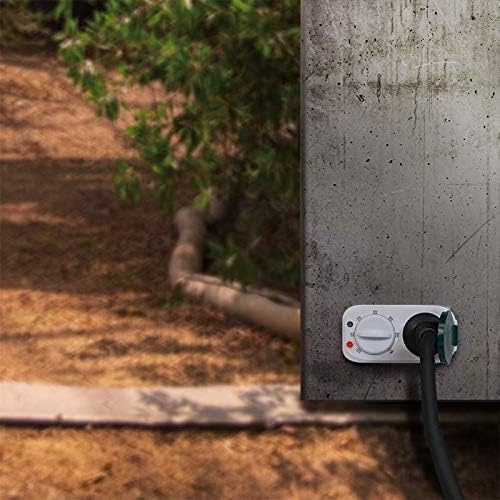
Figure 3: Close-up of the timer's socket with its protective cover open, showing the increased contact protection.
4. Setup
- Placement: Choose a suitable outdoor location for the timer. Ensure it is protected from direct heavy rain and that the twilight sensor is not obstructed by objects or artificial light sources, which could interfere with its function.
- Mounting (Optional): The timer can be mounted to a wall using appropriate screws and anchors (not included) through the designated mounting holes on the back.
- Plug In: Insert the timer into a grounded outdoor power outlet.
- Connect Appliance: Plug the appliance you wish to control (e.g., garden lights) into the timer's socket. Ensure the appliance's power cord is suitable for outdoor use.
- Secure Cover: Close the protective cover of the timer's socket securely to maintain IP44 protection, even when an appliance is plugged in.

Figure 4: Example of the LogiLink ET0013 timer installed on an outdoor wall, controlling an appliance.
5. Operating Instructions
The LogiLink ET0013 offers 7 distinct operating modes, selected by rotating the dial on the front of the device. The red indicator light signifies power is ON, and the green indicator light signifies the twilight sensor is active.

Figure 5: Visual representation of the timer's twilight sensor function, turning off during the day and on at night.
Mode Selection:
- OFF: The connected appliance remains off. The power supply to the socket is interrupted.
- ON: The connected appliance remains continuously on. The power supply to the socket is constant.
- Twilight Sensor (Dusk-to-Dawn): The appliance turns on automatically when it gets dark and turns off when it gets light. This mode provides continuous operation throughout the night.
- Twilight Sensor + 2Hr: The appliance turns on when it gets dark and remains on for 2 hours, then turns off.
- Twilight Sensor + 4Hr: The appliance turns on when it gets dark and remains on for 4 hours, then turns off.
- Twilight Sensor + 6Hr: The appliance turns on when it gets dark and remains on for 6 hours, then turns off.
- Twilight Sensor + 8Hr: The appliance turns on when it gets dark and remains on for 8 hours, then turns off.
To select a mode, simply rotate the dial until the desired setting aligns with the indicator mark. The timer will then operate according to the chosen mode.
6. Maintenance
- Cleaning: Disconnect the timer from the power outlet before cleaning. Wipe the exterior with a soft, damp cloth. Do not use abrasive cleaners or solvents. Ensure no moisture enters the device.
- Storage: If storing the timer for an extended period, unplug it from the power outlet and store it in a dry, cool place away from direct sunlight.
- Inspection: Periodically inspect the timer and its power cord for any signs of damage. If damage is found, discontinue use and replace the unit.
7. Troubleshooting
| Problem | Possible Cause | Solution |
|---|---|---|
| Appliance does not turn on. |
|
|
| Appliance stays on continuously (in twilight mode). |
|
|
| Appliance turns off too early/late (in timed twilight mode). |
|
|
8. Specifications
| Model Number | ET0013 |
| Brand | Logilink |
| Voltage | 230 V AC, 50 Hz |
| Max. Power Load | 16A / 3680 W |
| Standby Consumption | 1 W |
| Protection Rating | IP44 (Splash-proof) |
| Number of Modes | 7 (ON, OFF, Twilight, Twilight+2h, Twilight+4h, Twilight+6h, Twilight+8h) |
| Material | Plastic |
| Color | White |
| Product Dimensions (L x W x H) | 11.2 x 5.7 x 8.75 cm |
| Item Weight | 170 Grams |
| Country of Origin | China |
| Included Components | 1 mechanical timer, 1 instruction manual |

Figure 6: Dimensions of the LogiLink ET0013 timer.
9. Warranty and Support
For warranty information and technical support, please refer to the documentation provided with your purchase or contact your retailer. Keep your proof of purchase for warranty claims.
