
Potensic DSDR01C
Contents
Potensic Dreamer Pro 4K Drone User Manual
Brand: Potensic | Model: DSDR01C
1. Introduction and Overview
Welcome to the user manual for your Potensic Dreamer Pro 4K Drone. This manual provides essential information for setting up, operating, maintaining, and troubleshooting your drone to ensure a safe and enjoyable flight experience. The Potensic Dreamer Pro is a high-performance quadcopter equipped with a 3-axis mechanical gimbal and a 4K camera, offering stable aerial photography and video recording with a transmission range of up to 2 kilometers.
For detailed instructions and safety guidelines, please refer to the complete user manual PDF available for download from the official Potensic website or the product page.
2. What's in the Box
The Potensic Dreamer Pro package includes the following components:
- Potensic Dreamer Pro Drone
- Remote Control
- Smart Battery
- Propellers (spare set included)
- Aluminum Carrying Case
- 32GB Micro SD Card
- USB Cables (3 types for remote control connection)
- Power Adapter and Cable

Image: All components included in the Potensic Dreamer Pro package.
3. Product Features
3-Axis Gimbal with 4K Camera
The drone features a 3-axis mechanical gimbal and a 1/3-inch SONY CMOS sensor, enabling it to record 16MP photos and 4K/30fps video. The gimbal ensures stable aerial capturing, providing smooth and clear footage even during dynamic movements. The camera also supports high-resolution livestream directly from the drone.

Image: Detailed view of the 3-Axis Tilt Gimbal and 4K camera.
2KM Transmission Range
Utilizing Qualcomm technology, the drone offers a control range of up to 2 kilometers by connecting your phone to the remote control via a USB cable. It broadcasts on 5.8GHz for enhanced Wi-Fi image reliability, providing real-time live video transmission for an immersive flying experience.

Image: Illustration of the 2KM transmission range and USB connection types.
Powerful Performance with Brushless Motor
The exclusive PowerAC dynamic system allows the Dreamer Pro to instantly burst out triple power within 0.1 seconds, achieving speeds of up to 10m/s. Equipped with a powerful brushless motor, the drone operates effectively in temperatures from 0° to 40° Celsius and can withstand gentle breeze conditions.

Image: PowerAC Dynamic System highlighting the drone's speed capability.
Intelligent Flight Modes
The Dreamer Pro offers multiple intelligent flight functions for an intuitive flying experience, including:
- Follow Me: The drone automatically follows the remote controller.
- DIY Circle Flight: Customize the drone's circling direction, speed (1-5m/s), and radius (10-50m).
- Waypoint Flight: Plan a flight path by setting multiple waypoints on the map.
- Precise Altitude Flight: Maintain a stable altitude for steady shots.
- Auto Return: Automatically returns to the take-off point in case of low battery, signal loss, or manual activation.

Image: Visual representation of intelligent flight modes.
Extended Flight Time
The smart battery provides up to 28 minutes of flight time, allowing for extended aerial photography and exploration.
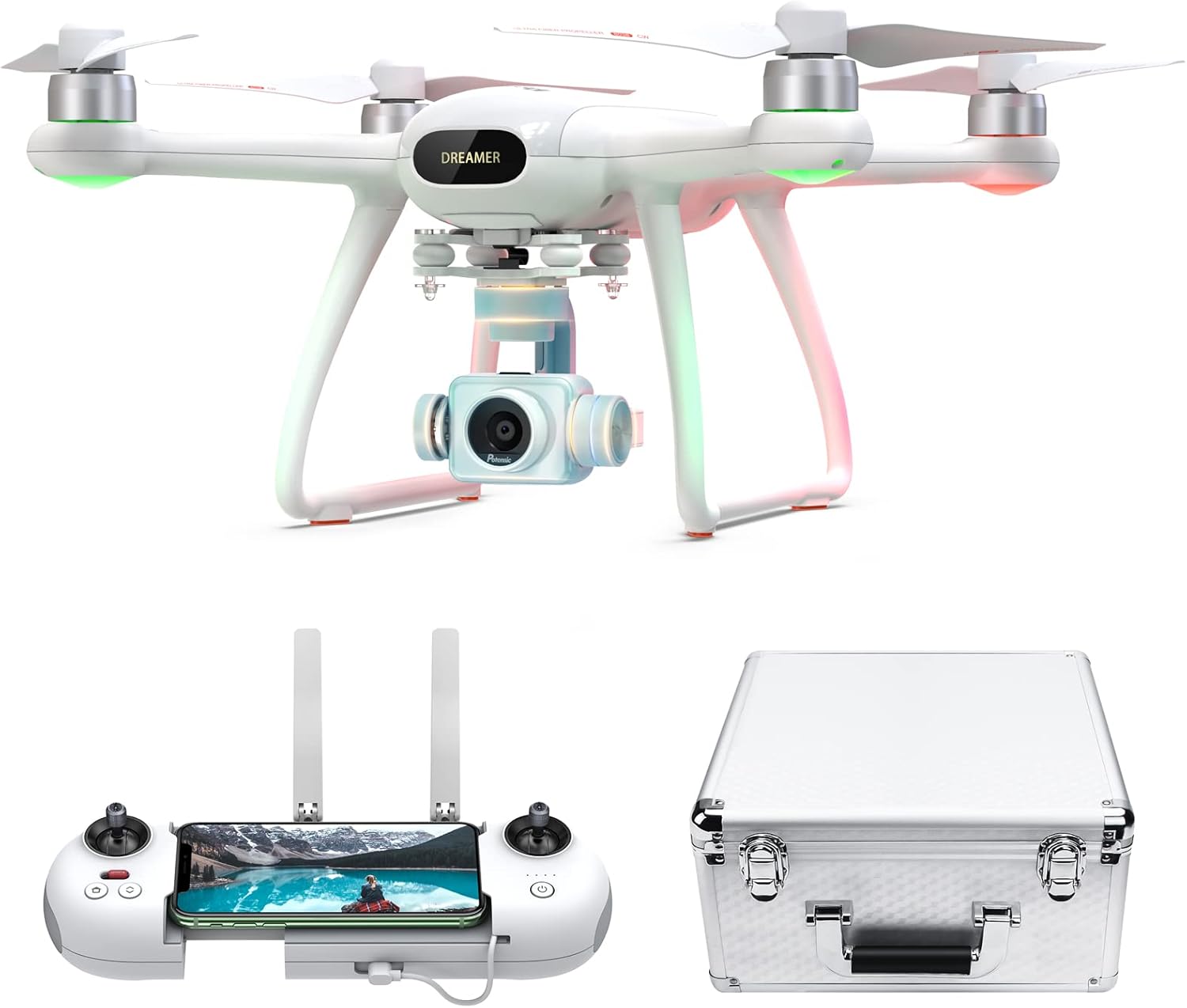
Image: Potensic Dreamer Pro drone and accessories in a scenic outdoor setting.
4. Setup
- Charge the Battery: Fully charge the drone's smart battery and the remote control before first use. Connect the power adapter to the battery and a power outlet.
- Install Propellers: Attach the propellers according to the markings (e.g., A and B) on the propellers and motor arms. Ensure they are securely fastened.
- Install SD Card: Insert the provided 32GB Micro SD card into the drone's camera slot.
- Download the App: Download the official Potensic app (e.g., PotensicPro) from your device's app store.
- Connect Remote Control: Place your smartphone in the remote control holder and connect it to the remote control using one of the provided USB cables (Micro, Type C, or Lightning).
- Power On: Power on the remote control, then power on the drone. Wait for the drone and remote to establish a connection.
- Calibration: Perform a compass calibration and gyroscope calibration as instructed by the app or drone's indicator lights. This is crucial for stable flight.
5. Operating Instructions
Pre-Flight Checklist:
- Ensure batteries are fully charged.
- Check that propellers are correctly installed and undamaged.
- Verify the SD card is inserted.
- Confirm GPS signal is strong (indicated by the app).
- Choose an open area free from obstacles, people, and electromagnetic interference.
Basic Flight Controls:
Familiarize yourself with the remote control sticks and buttons. The left stick typically controls altitude and yaw (rotation), while the right stick controls forward/backward and left/right movement.
- Take-off: Use the one-key take-off button or manually push both sticks to the bottom-outer corners to start motors, then push the left stick up.
- Landing: Use the one-key landing button or slowly pull the left stick down.
- Emergency Stop: In an emergency, press and hold the emergency stop button (refer to manual for exact button).
Intelligent Flight Modes:
Access and activate intelligent flight modes through the Potensic app. Ensure sufficient GPS signal before using these features.
- Follow Me: Select "Follow Me" in the app. The drone will track your movement based on the remote control's GPS.
- DIY Circle Flight: Set the center point, radius, and speed in the app. The drone will orbit the selected point.
- Waypoint Flight: Tap points on the map in the app to create a flight path. The drone will fly along this path.
Camera Operation:
Control the camera directly from the remote control or through the Potensic app interface.
- Photo/Video Capture: Use dedicated buttons on the remote or tap icons in the app to take photos or start/stop video recording.
- Gimbal Control: Use the gimbal dial on the remote control to adjust the camera's tilt angle.
6. Maintenance
- Cleaning: Regularly clean the drone body, propellers, and camera lens with a soft, dry cloth. Avoid using harsh chemicals.
- Propeller Inspection: Inspect propellers for cracks, bends, or damage before each flight. Replace damaged propellers immediately.
- Battery Care:
- Do not overcharge or over-discharge batteries.
- Store batteries in a cool, dry place away from direct sunlight.
- If storing for extended periods, charge batteries to about 50-60%.
- Storage: Store the drone and its accessories in the provided aluminum carrying case to protect them from dust and physical damage.
7. Troubleshooting
| Problem | Possible Cause | Solution |
|---|---|---|
| Drone does not power on | Battery not charged or improperly inserted. | Ensure battery is fully charged and correctly inserted. |
| No image transmission to phone | Loose USB connection, app not running, or Wi-Fi interference. | Check USB cable connection, restart app, move to an area with less interference. |
| Unstable flight/Drifting | Improper calibration, strong winds, or damaged propellers. | Perform gyroscope and compass calibration. Check weather conditions. Inspect and replace propellers if damaged. |
| Drone does not respond to remote | Remote not paired, low remote battery, or out of range. | Re-pair remote and drone. Charge remote battery. Fly within specified range. |
For more comprehensive troubleshooting steps, please consult the full user manual or contact Potensic customer support.
8. Specifications
| Feature | Detail |
|---|---|
| Brand | Potensic |
| Model Name | DSDR01C |
| Camera | 4K UHD 2160p (Video), 16MP (Photo) |
| Gimbal | 3-Axis Mechanical Gimbal |
| Max Transmission Range | 2 Kilometers |
| Flight Time | Up to 28 minutes |
| Motor Type | Brushless Motor |
| Control Type | Remote Control / APP Control |
| Connectivity | USB, Wi-Fi (5.8GHz for FPV) |
| Dimensions (L x W x H) | 13.7"L x 12.59"W x 7.67"H |
| Item Weight | 7.48 pounds |
| Battery Type | Lithium Ion |
9. Warranty and Support
Potensic products come with a standard manufacturer's warranty. For specific warranty terms, registration, and support inquiries, please visit the official Potensic website or contact their customer service directly.
You can find more information and support resources at the Potensic Store on Amazon.
Documents and downloads
Ask a question about this manual
Ask about setup, troubleshooting, compatibility, parts, safety, or missing instructions. Manuals+ will review the question and use this page’s manual context to help answer it.