
1. Introduction and Overview
This manual provides instructions for the TUCCH Wallet Case designed exclusively for the iPhone 12 Pro Max 6.7-inch. This case offers comprehensive protection and enhanced functionality for your device.
Key features include a wallet function with card slots, a kickstand for hands-free viewing, RFID blocking technology for data security, and a magnetic closure for secure keeping. The case is constructed with a durable PU leather exterior and a protective TPU interior shell.

Image 1.1: TUCCH Wallet Case for iPhone 12 Pro Max (Black)
Important Compatibility Note: This case is ONLY COMPATIBLE WITH iPhone 12 Pro Max 6.7-inch. It will not fit other iPhone models. The iPhone 12 Pro Max does not feature an auto wake/sleep function, so this case does not support that feature.

Image 1.2: Device Compatibility Guide
2. Setup and Installation
2.1 Installing Your iPhone
- Gently align your iPhone 12 Pro Max with the flexible TPU inner shell of the case.
- Press the phone firmly into the case, ensuring all corners and edges are securely seated within the shock-absorbent TPU material.
- Verify that all buttons and ports are accessible and aligned with the case's precise cutouts.

Image 2.1: Inserting the iPhone into the TPU Shell
2.2 Using the Card Slots and Money Pocket
The wallet case features four dedicated card slots and one larger money pocket. Insert your credit cards, ID, or other essential cards into the designated slots. Use the larger pocket for banknotes.

Image 2.2: Card Slots and Money Pocket
3. Operating Instructions
3.1 Kickstand Function
To use the kickstand function, simply fold the back cover of the case to create a triangular stand. This allows for multi-angle viewing, ideal for watching videos or making video calls hands-free.
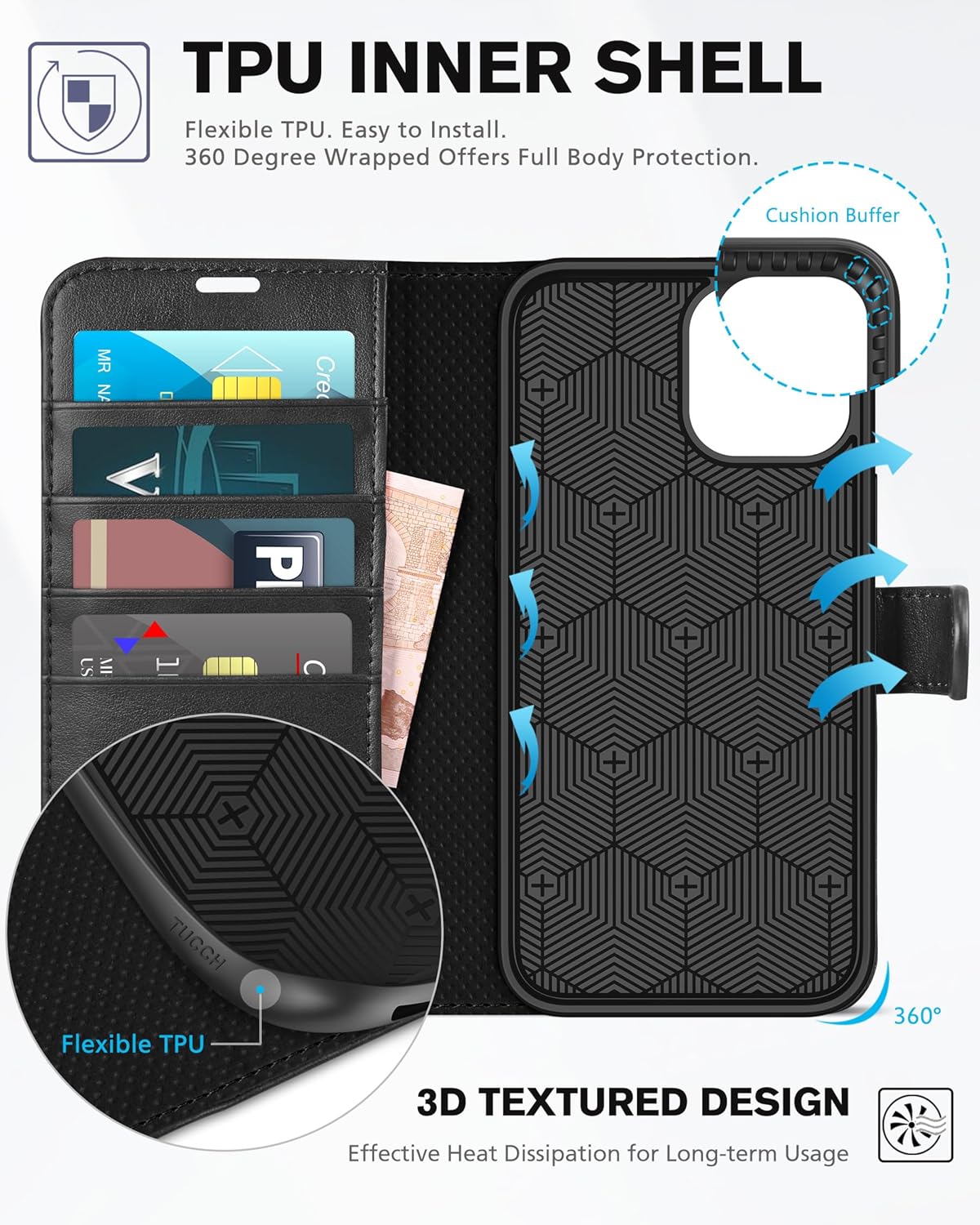
Image 3.1: Kickstand Function in Use
3.2 Magnetic Closure
The case features a magnetic clasp to keep the front cover securely closed, protecting your screen and contents. When the case is open, the magnetic strap can be secured to the back of the case to prevent interference during use.
3.3 RFID Blocking Technology
The integrated RFID blocking material within the case effectively shields signals from your credit cards and IDs, helping to protect your personal information from unauthorized scanning.

Image 3.2: RFID Blocking Feature
4. Maintenance
4.1 Cleaning the Case
- For general cleaning, wipe the exterior PU leather with a soft, damp cloth.
- Avoid using harsh chemicals, abrasive cleaners, or solvents, as these can damage the material.
- Allow the case to air dry completely before reinserting your phone.
4.2 General Care
- Avoid prolonged exposure to direct sunlight or extreme temperatures, which can cause material degradation.
- Do not overfill the card slots, as this can stretch the material and affect the magnetic closure.
5. Troubleshooting
5.1 Case Does Not Fit My Phone
Ensure your device is an iPhone 12 Pro Max 6.7-inch. This case is specifically designed for this model and will not fit other iPhone versions (e.g., iPhone 12, iPhone 12 Pro, iPhone 12 Mini).
5.2 Magnetic Closure Not Holding Securely
Check if the card slots or money pocket are overfilled. Excessive contents can prevent the magnetic clasp from closing properly. Remove some items if necessary.
5.3 Phone Not Waking/Sleeping Automatically
The iPhone 12 Pro Max does not feature an auto wake/sleep function. Therefore, this case does not support automatic screen activation or deactivation upon opening or closing.
6. Specifications
| Feature | Detail |
|---|---|
| Compatible Phone Models | iPhone 12 Pro Max |
| Material | Faux Leather, Thermoplastic Polyurethane (TPU) |
| Special Features | Card Slot, Kickstand, Magnetic Closure, RFID Blocking, Shock-Absorbent |
| Product Dimensions | 6.54 x 3.31 x 0.74 inches |
| Item Weight | 3.83 ounces |
| Color | Black |
| Form Factor | Flip |
| Manufacturer | TUCCH |
7. Warranty
All TUCCH phone cases are covered by a lifetime warranty. If you encounter any non-artificial quality problems with your product, please contact our support team for a replacement or refund.
8. Support
For further assistance, questions, or warranty claims, please contact TUCCH customer support. Refer to the contact information provided with your purchase or visit the official TUCCH website for support details.
Note: No official product videos were found in the provided data.