Introduction
The Pioneer TS-A1300C 5-1/4" component speaker system is designed to deliver enhanced audio performance in your vehicle. This system includes woofers and separate tweeters, allowing for flexible installation to optimize sound staging. The woofers feature a Carbon and Mica reinforced polypropylene (IMPP) cone for rigidity, responsive low-frequency output, and durability.
- Power Handling: 300 W Max Power (50 W Nominal)
- Tweeter: 20 mm polyimide (PI) hard dome tweeter for clear highs
- Woofer: 5-1/4" carbon and mica reinforced Injection Molded Polypropylene (IMPP) cone construction
- Installation: Universal woofer basket design for expanded installation options
What's in the Box
Carefully unpack all components and ensure all items are present before beginning installation.

Image: All components of the Pioneer TS-A1300C component speaker system, including woofers, tweeters, wiring, and mounting hardware.
- (2) 5-1/4" Woofers
- (2) 20mm Tweeters (with attached 10" speaker leads terminated with quick-connects)
- (2) Lengths of Speaker Wire (each has quick slides to connect to the woofer, a 40" tweeter output leg with integrated crossover, and an 11" input leg)
- (2) Tweeter Angled Surface Mount Housings
- (2) Tweeter Flush Mount Rings
- (2) Tweeter Factory Mount Brackets
- (8) 3/4" Screws
- (6) 1/2" Screws
- (2) Speed Clips
- (2) Adhesive Backed Foam Discs
- 1 Year Warranty Sheet
- Installation Template and Specs on Box
Installation Guide
This section provides general guidance for installing your Pioneer TS-A1300C component speakers. Refer to the detailed installation template and specifications provided on the product packaging for precise measurements and vehicle-specific instructions.
1. Preparation
- Disconnect the vehicle's negative battery terminal to prevent electrical shorts.
- Remove existing speakers and trim panels as necessary to access mounting locations.
- Identify suitable mounting locations for the woofers and tweeters. The universal woofer basket design allows for flexible installation.
2. Woofer Installation
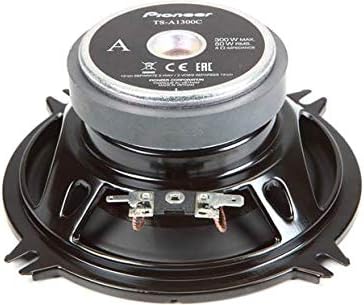
Image: Rear view of a Pioneer TS-A1300C woofer, showing the magnet and terminals.
- Mount the 5-1/4" woofers securely in the designated speaker openings using the provided screws. Ensure a tight fit to prevent vibrations.
- Connect the woofer wires to the vehicle's speaker wiring, observing correct polarity (positive to positive, negative to negative).
3. Tweeter Installation
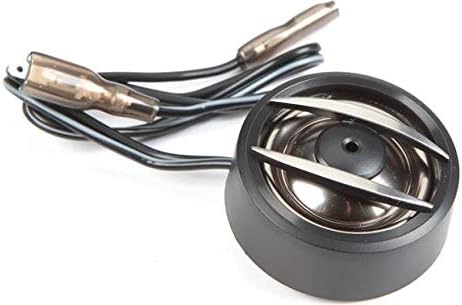
Image: Close-up view of a Pioneer TS-A1300C tweeter with its integrated crossover wiring.
- Choose between flush mount, angled surface mount, or factory mount brackets for the 20mm tweeters based on your vehicle's interior and desired sound dispersion.
- Install the tweeters in a location that provides optimal sound imaging, typically higher up in the vehicle's cabin.
- Connect the tweeter wires, which include an integrated crossover, to the appropriate speaker output from your amplifier or head unit.
4. Wiring and Connections
- Ensure all connections are secure and insulated to prevent short circuits.
- Route speaker wires away from moving parts and potential pinch points.
- Once all speakers are connected, re-install any removed trim panels.
Operating Instructions
The Pioneer TS-A1300C component speakers are passive devices and do not require direct power. Their operation is dependent on the amplifier or head unit they are connected to.
- Power On: Once correctly installed and connected to an amplifier/head unit, the speakers will produce sound when the audio system is powered on.
- Volume Control: Adjust volume and audio settings (bass, treble, balance, fader) via your vehicle's head unit or external amplifier.
- Amplifier Settings: If using an external amplifier, ensure its gain settings are properly adjusted to match the output of your head unit and prevent distortion.
Maintenance
Proper maintenance ensures the longevity and optimal performance of your speakers.
- Cleaning: Gently wipe the speaker grilles and cones with a soft, dry cloth. Avoid using harsh chemicals or abrasive cleaners.
- Inspection: Periodically check speaker connections for tightness and ensure no wires are frayed or exposed.
- Environment: Protect speakers from excessive moisture, direct sunlight, and extreme temperatures.
Troubleshooting
If you experience issues with your speakers, refer to the following common troubleshooting steps:
No Sound from Speakers
- Check Connections: Ensure all speaker wires are securely connected to both the speakers and the amplifier/head unit, with correct polarity.
- Amplifier/Head Unit: Verify that your amplifier or head unit is powered on and functioning correctly. Check its fuses.
- Source: Confirm the audio source (radio, CD, Bluetooth) is active and playing.
- Volume: Ensure the volume is turned up and not muted.
Distorted Sound
- Volume Level: Reduce the volume. Distortion often occurs when the amplifier is overdriven.
- Amplifier Gain: Adjust the gain settings on your amplifier. If the gain is set too high, it can cause distortion.
- Speaker Damage: Inspect speaker cones for any visible damage or tears.
Intermittent Sound
- Loose Connections: Re-check all wiring connections for looseness or corrosion.
- Wiring Damage: Inspect speaker wires for cuts or pinches that could cause intermittent contact.
Specifications
| Model Name | A Series |
| Speaker Type | Component |
| Material | Polypropylene |
| Speaker Size | 5.25 Inches |
| Woofer Diameter | 5.25 Inches |
| Tweeter Diameter | 20 Millimeters |
| Maximum Output Power | 300 Watts |
| Nominal Power | 50 Watts |
| Impedance | 4 Ohms |
| Connectivity Technology | Wired |
| Audio Output Mode | Stereo |
| Product Dimensions | 2"D x 5.25"W x 5.25"H |
| Item Weight | 2.9 Pounds |
| Manufacturer | Pioneer |
| Model Number | TS-A1300C |
| UPC | 884938468862 |
Warranty Information
This Pioneer product is covered by a 1-year warranty. Please refer to the included '1 Year Warranty sheet' in your product packaging for detailed terms, conditions, and claim procedures. Retain your proof of purchase for warranty service.
Safety Information
WARNING: This product contains chemicals known to the State of California to cause cancer and birth defects or other reproductive harm.
Always follow local regulations for disposal of electronic components. Ensure proper ventilation during installation and operation.