
Introduction
Thank you for choosing the BigBlue 120W Foldable Solar Charger. This manual provides essential information for the safe and efficient operation of your solar charger. Please read it thoroughly before use and retain it for future reference. This device is designed to convert sunlight into electrical energy to charge various portable electronic devices and power stations.

Image: The BigBlue 120W Foldable Solar Charger in its unfolded state, displaying its solar panels and integrated control box.
Product Features
- 120W Solar Charger with MPPT Technology: The integrated junction box features Maximum Power Point Tracking (MPPT) technology, enabling faster and smarter charging. MPPT controllers are more efficient than traditional PWM controllers, allowing the solar panel to operate at its optimal voltage for maximum power output, potentially increasing efficiency by up to 30%.
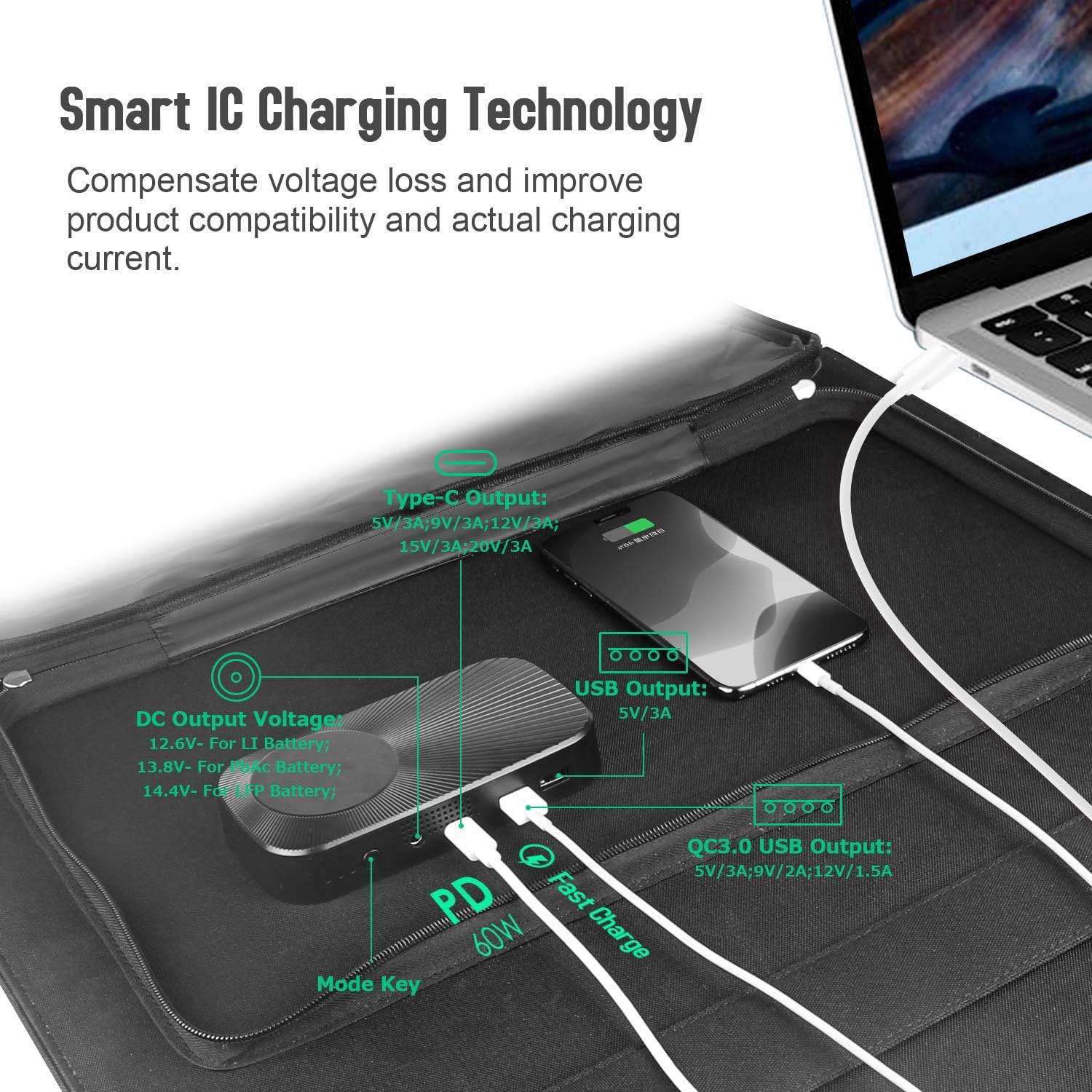
Image: A graph illustrating the charging speed comparison between MPPT and PWM technologies, demonstrating MPPT's superior performance.
- Wide Compatibility: Equipped with multiple output ports including 1x standard USB, 1x QC3.0 fast-charging USB (18W max), 1x DC port, and 1x 60W Type-C Power Delivery (PD) port. This makes it ideal for charging power stations, smartphones, tablets, and other USB-powered devices in emergencies or remote locations.
- Smart Charging and High Conversion Efficiency: Features smart chip technology to ensure a safe energy flow through the USB ports, compensating for voltage loss. It also provides overcharge, overheat, and short-circuit protection. The high-efficiency solar cells offer a conversion rate of up to 22%.
- Adjustable Battery Types: Allows setting different charging modes for various battery types: 12.6V for Li-battery, 13.8V for PbAc-battery, and 14.4V for LFP-battery, ensuring optimal and safe charging.
- Portable and Foldable Design: The 120W solar charger is foldable and includes a TPE rubber handle for easy transport. Integrated kickstands allow for a 45° angle setup to maximize energy efficiency. Constructed from durable fabric, robust zippers, and PET material, it is water-resistant and features four eyelets for secure placement.
Setup Instructions
- Unfold the Solar Panel: Carefully unfold the BigBlue 120W solar charger completely.
- Position for Sunlight: Place the solar panel in direct sunlight. Utilize the integrated kickstands to angle the panel at approximately 45 degrees towards the sun for optimal energy capture. Ensure no shadows are cast on the panels.
- Connect Your Device: Locate the control box on the solar panel. Connect your device (power station, smartphone, tablet, etc.) to the appropriate output port (DC, USB, or Type-C PD) using the correct cable.

Image: The solar panel deployed with its kickstands, angled at 45 degrees for maximum sun exposure, highlighting its waterproof design.
Operating Instructions
Connecting Devices
The BigBlue 120W solar charger offers multiple output options:
- DC Output: Use the DC port with the provided adapters to connect to compatible power stations or devices requiring 18V input.
- USB Output: Connect standard USB devices to the 5V/3A USB port.
- QC3.0 USB Output: For fast charging compatible devices, use the QC3.0 port (5V/3A, 9V/2A, 12V/1.5A).
- Type-C PD Output: Connect USB-C Power Delivery compatible devices to the 60W Type-C port (5V/3A, 9V/3A, 12V/3A, 15V/3A, 20V/3A).

Image: A detailed view of the control box, illustrating the various output ports (DC, USB, QC3.0 USB, Type-C PD) and their typical connections to electronic devices.
Setting Battery Type
The charger allows you to select the appropriate battery type for optimal charging. Press the Mode Key on the control box to cycle through the battery type settings. The LED indicators will flash to show the current selection.

Image: A visual guide to setting the battery type using the Mode Key and interpreting the LED indicators for Li-polymer, Lead-Acid, and LiFePO4 batteries.
| NO. | LED1 | LED2 | LED3 | Battery Status |
|---|---|---|---|---|
| 1 | O | X | X | (LI)Li-polymer (12.6V) |
| 2 | X | O | X | (PbAc)Lead-Acid (13.8V) |
| 3 | X | X | O | (LFP)LiFePO4 (14.4V) |
| 4 | FLASH | FLASH | FLASH | Abnormal (Input/Output) |
Note: O = LED indicator is ON, X = LED indicator is OFF, FLASH = LED indicator is flashing.
Compatibility
The BigBlue 120W Solar Charger is designed for broad compatibility with most portable power stations and various electronic devices. It includes a range of DC adapters and alligator clips to ensure connectivity with different input ports.

Image: The solar panel displayed alongside a comprehensive set of DC adapters and alligator clips, demonstrating its compatibility with a wide range of portable power stations and car batteries.
Maintenance
- Cleaning: Regularly wipe the solar panels with a soft, damp cloth to remove dust, dirt, or debris. Avoid using abrasive materials or harsh chemicals that could scratch the surface.
- Storage: When not in use, fold the solar panel and store it in a dry, cool place away from direct sunlight and extreme temperatures.
- Inspection: Periodically check cables and connectors for any signs of wear, damage, or corrosion. Replace any damaged components immediately.
- Water Resistance: The panel is water-resistant (IPX5), meaning it can withstand splashes of water. However, avoid submerging it in water or exposing it to heavy rain for extended periods. Ensure all ports are dry before connecting devices.
Troubleshooting
- No Charging Output:
- Ensure the solar panel is in direct sunlight and not shaded.
- Check all cable connections to ensure they are secure and correctly inserted.
- Verify that the connected device is compatible with the charger's output specifications.
- If charging a battery, ensure the correct battery type is selected using the Mode Key.
- Check the LED indicators for any abnormal status (all flashing).
- Slow Charging:
- Adjust the panel's angle to face the sun directly (ideally 45 degrees).
- Clean the solar panel surface if it's dirty.
- Cloudy weather or low light conditions will significantly reduce charging speed.
- Ensure the connected device is not drawing more power than the panel can supply under current conditions.
- Device Not Recognized:
- Try a different cable or port.
- Ensure the device is powered on or in a state that allows charging.
Specifications
| Feature | Specification |
|---|---|
| Brand | BigBlue |
| Model | B442-EU |
| Power Output | 120W |
| Efficiency | Up to 22% conversion |
| DC Output | 18V (adjustable for battery types) |
| USB Output | 5V/3A |
| QC3.0 USB Output | 5V/3A, 9V/2A, 12V/1.5A (18W Max) |
| Type-C PD Output | 5V/3A, 9V/3A, 12V/3A, 15V/3A, 20V/3A (60W Max) |
| Special Features | Short-circuit protection, Fast charging, Water-resistant (IPX5) |
| Item Weight | 5.64 Kilograms |
| Folded Dimensions | Approximately 530mm x 515mm (20.86in x 20.27in) |
| Unfolded Dimensions | Approximately 1748mm x 530mm (68.81in x 20.86in) |

Image: Visual representation of the BigBlue 120W Portable Solar Panel, detailing its folded and unfolded dimensions and weight.
Safety Information
- Do not attempt to modify or disassemble the solar charger.
- Keep the product away from fire, water, and corrosive substances.
- Avoid dropping or subjecting the product to severe impacts.
- Do not expose the control box to direct sunlight for prolonged periods, as this may cause overheating.
- Ensure proper ventilation around the control box during operation.
- Supervise children when the product is in use.
Warranty and Support
BigBlue products are designed for reliability and performance. For warranty information, technical support, or any questions regarding your BigBlue 120W Foldable Solar Charger, please refer to the contact information provided with your purchase or visit the official BigBlue website. Please have your model number (B442-EU) and purchase details ready when contacting support.


