
1. Introduction
Thank you for choosing the TBI Pro Solar Outdoor Security Lights. This manual provides essential information for the proper installation, operation, and maintenance of your new solar-powered lighting system. Designed for outdoor use, these lights feature 216 high-brightness LEDs, a sensitive motion sensor, and adjustable heads to provide reliable illumination and enhanced security for your property.
2. Safety Information
- Ensure the product is installed in a location where it receives direct sunlight for optimal charging.
- Do not attempt to disassemble or modify the product. This may void the warranty and pose safety risks.
- Keep the solar panel clean to ensure efficient charging.
- Avoid installing near heat sources or flammable materials.
- This product is designed for outdoor use and is IP65 waterproof, but avoid submerging it in water.
- Handle with care during installation to prevent damage to the solar panel or light heads.
3. Package Contents
Please check the package to ensure all components are present:
- 2 x TBI Pro Solar Outdoor Security Lights (Model 216leds-2pack)
- Mounting hardware (screws, wall plugs)
- User Manual
4. Product Overview
The TBI Pro Solar Outdoor Security Light features a compact design with a solar panel, a central light head with an integrated motion sensor, and two adjustable side light heads. Each unit is equipped with 216 LEDs for powerful illumination.
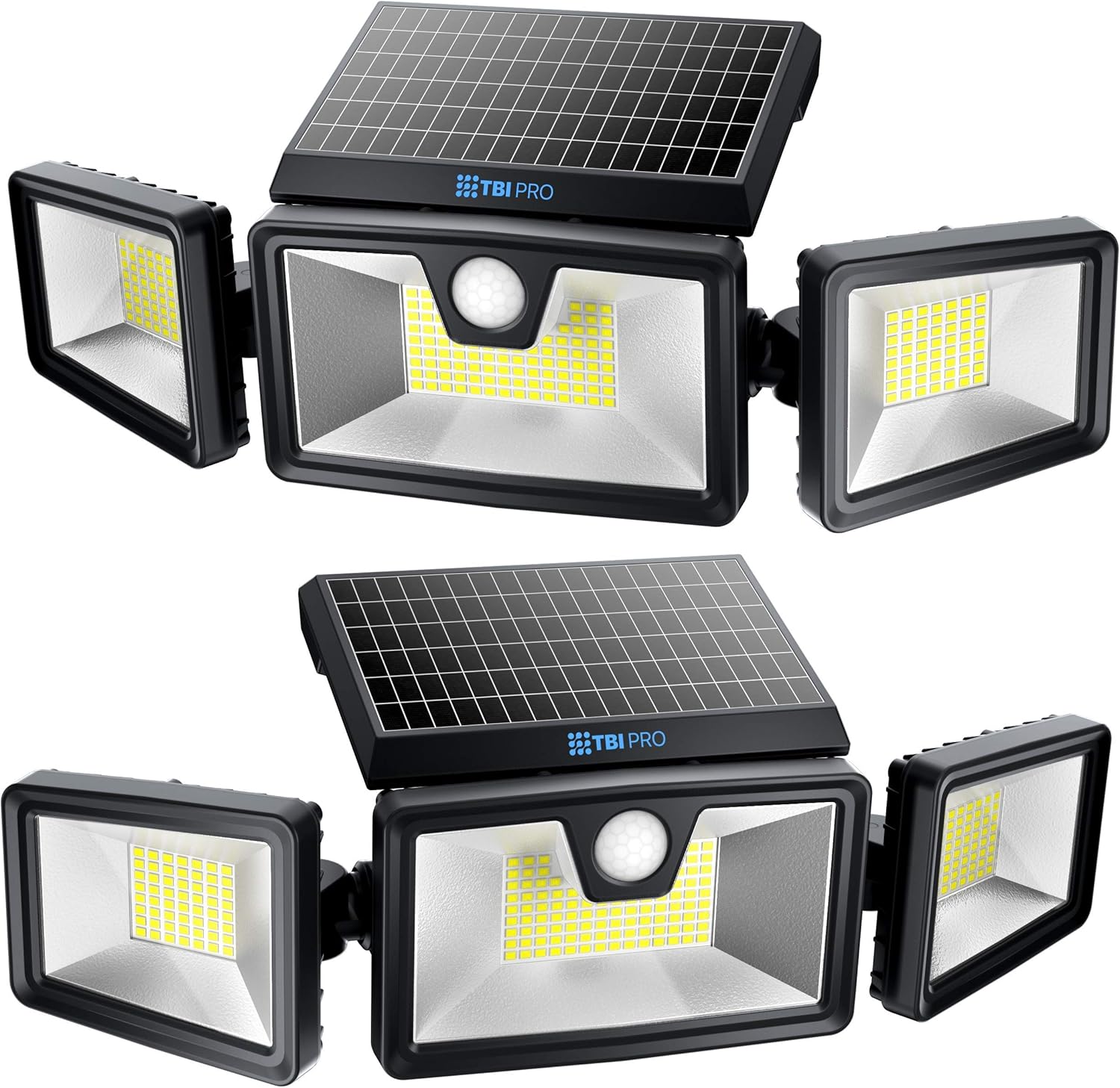
Figure 4.1: Two TBI Pro Solar Outdoor Security Lights, showing the solar panel and three adjustable light heads.

Figure 4.2: The adjustable design allows for flexible positioning of the solar panel (90° vertical) and light heads (180° horizontal, 355° horizontal and vertical rotation for side heads).
5. Setup and Installation
Follow these steps for optimal performance:
- Choose a Location: Select an outdoor location that receives at least 6-8 hours of direct sunlight daily. This is crucial for the solar panel to fully charge the internal battery. Avoid shaded areas.
- Mounting: Use the provided screws and wall plugs to securely mount the light fixture to a wall or other stable surface. Ensure the solar panel faces upwards towards the sun.
- Adjust Light Heads: Once mounted, adjust the three light heads to cover your desired illumination area. The side heads offer 355° rotation, and the central panel can be adjusted vertically by 90°.
- Initial Charge: Allow the light to charge for a full day (6-8 hours) in direct sunlight before its first use at night.

Figure 5.1: Example of TBI Pro Solar Lights installed on a building, providing wide light coverage.
6. Operating Instructions
The TBI Pro Solar Outdoor Security Lights feature a motion sensor and multiple operating modes. The light automatically turns on at dusk and off at dawn.
Motion Sensor Functionality
The integrated PIR motion sensor detects movement up to 40 feet away within a 130° detection angle. The light will activate or brighten when motion is detected.
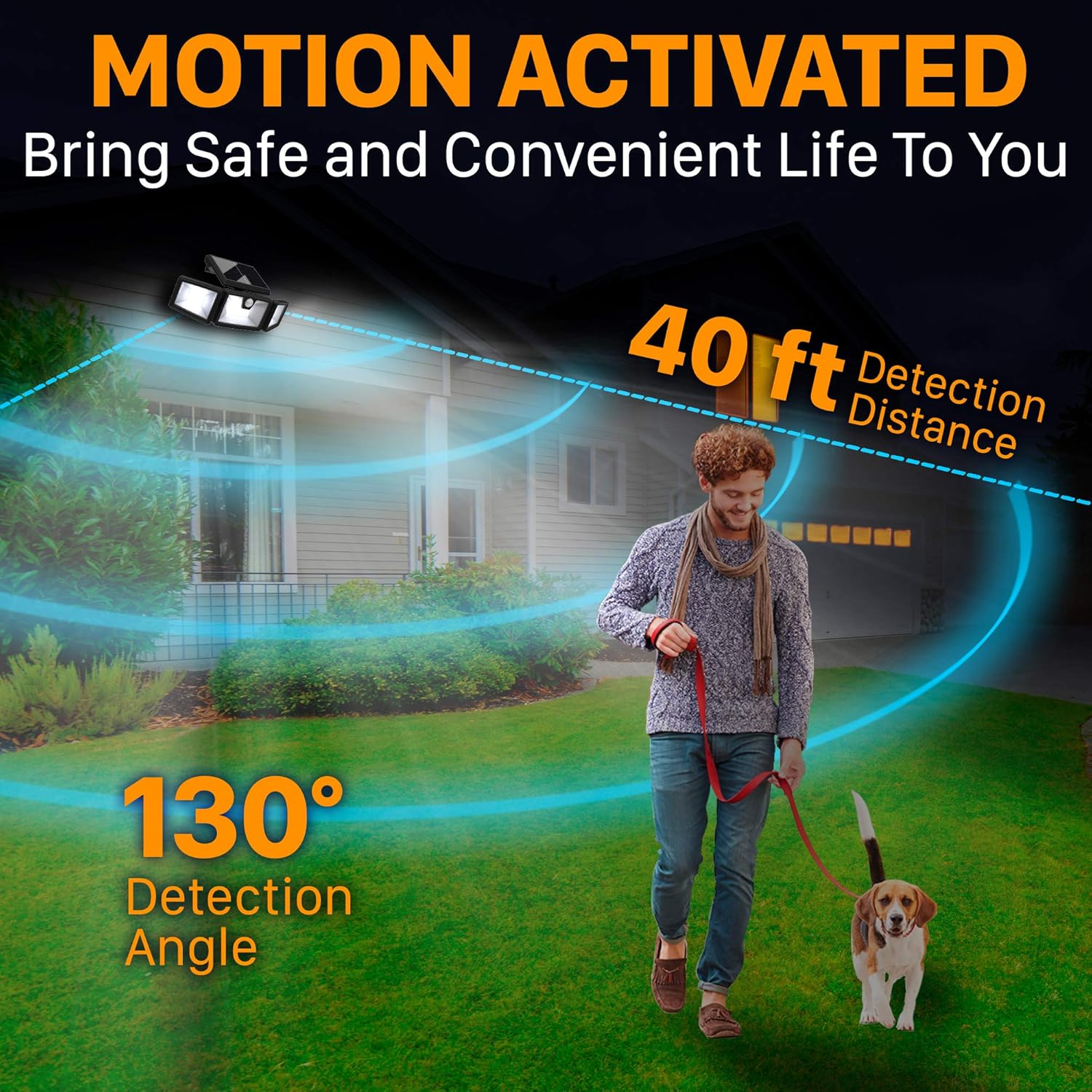
Figure 6.1: Illustration of the motion sensor's detection range (40 ft) and angle (130°).
Operating Modes
The lights offer three distinct operating modes, typically selectable via a button on the unit or a remote control (if included). Please refer to the specific product packaging or included remote for mode selection instructions.
- Dim All Night Mode: The light remains in a dim state throughout the night. It turns off automatically when sunlight is detected in the morning. This mode can last up to 12 hours after a full charge.
- Double Safety Mode (Dim-to-Bright): The light stays dim all night. When motion is detected, the brightness increases to 2200 lumens for 30 seconds, then returns to dim mode if no further motion is detected.
- Bright Light Mode (Motion Activated): The light remains off throughout the night. When motion is detected, the light turns on to its brightest setting (2200 lumens) for 30 seconds, then turns off if no further motion is detected.

Figure 6.2: Dim All Night Mode: Light stays dim all night, turns off at day.

Figure 6.3: Double Safety Mode: Dim all night, brightens to 2200 lm for 30 seconds upon motion detection.

Figure 6.4: Bright Light Mode: Off at night, brightens to 2200 lm for 30 seconds upon motion detection.
7. Maintenance
To ensure the longevity and optimal performance of your solar lights:
- Clean Solar Panel: Regularly wipe the solar panel with a soft, damp cloth to remove dust, dirt, leaves, or snow. A clean panel ensures maximum sunlight absorption and charging efficiency.
- Inspect for Damage: Periodically check the light fixture for any physical damage, loose connections, or wear and tear.
- Battery: The internal Lithium Ion battery is designed for long-term use and is not user-replaceable.
8. Troubleshooting
| Problem | Possible Cause | Solution |
|---|---|---|
| Light does not turn on at night. | Insufficient sunlight for charging. Battery not fully charged. | Ensure the solar panel is in direct sunlight for 6-8 hours daily. Relocate if necessary. Allow for a full day's charge. |
| Light is dim or only stays on for a short period. | Solar panel is dirty. Insufficient charge due to cloudy weather or shade. | Clean the solar panel. Ensure optimal sun exposure. |
| Motion sensor not detecting movement. | Obstruction in detection path. Sensor is dirty. Incorrect mode selected. | Clear any obstructions. Clean the sensor lens. Verify the selected operating mode. |
| Light flickers. | Low battery charge. | Allow the light to charge for a full day in direct sunlight. |
9. Specifications
| Feature | Detail |
|---|---|
| Brand | TBI Pro |
| Model Number | 216leds-2pack |
| LED Quantity | 216 LEDs |
| Brightness | Up to 2200 Lumens |
| Color Temperature | 6500K (Cool White) |
| Motion Sensor Detection Angle | 130° |
| Motion Sensor Detection Distance | Up to 40 ft |
| Battery Capacity | 2200mAh Lithium Ion (included) |
| Water Resistance Rating | IP65 |
| Material | Aluminum, Plastic |
| Product Dimensions | 3.8"L x 3.8"W x 2.7"H |
| Item Weight | 3.04 pounds |
| Power Source | Solar-powered, Battery-powered |
| Control Method | Remote (if included), Push Button |
10. Warranty and Support
Warranty: The product specifications indicate 'Warranty Description: None.' Please refer to your purchase documentation or retailer for any applicable return or exchange policies.
Customer Support: For any questions, issues, or assistance with your TBI Pro Solar Outdoor Security Lights, please contact the retailer or manufacturer's customer service. Refer to your purchase receipt or the product packaging for contact information.
