
Garmin Garmin Dash Cam Tandem
Contents
Garmin Dash Cam Tandem User Manual
Model: Garmin Dash Cam Tandem
Introduction
The Garmin Dash Cam Tandem is a compact dual-lens dash camera designed to provide comprehensive video coverage both in front of and inside your vehicle. It features two 180-degree lenses that record simultaneously, ensuring full visibility day and night. The front-facing lens captures footage in super HD 1440p, while the interior-facing lens records in 720p with NightGlo technology for clear night vision. This manual provides essential information for setting up, operating, and maintaining your device.
Setup
Follow these steps to properly set up your Garmin Dash Cam Tandem:
- Mounting the Dash Cam: Securely attach the dash camera to your vehicle's dashboard or windshield using the provided mount. Ensure the camera has a clear view of the road ahead and the vehicle's interior. The compact design allows for discreet placement, often behind the rearview mirror to keep it out of the way.
- Connecting Power: Connect the included power cord to the dash camera and then to your vehicle's 12V power outlet (cigarette lighter). The charger includes an extra USB port for charging other devices.
- Optional Parking Mode Cable (010-12530-03): For continuous power and motion detection monitoring when your vehicle is parked and turned off, install the Garmin 010-12530-03 Parking Mode Cable. This cable connects your dash cam directly to constant power.

Figure 1: The Garmin Dash Cam Tandem installed, displaying its front and interior views on a connected smartphone.

Figure 2: The Garmin 010-12530-03 Parking Mode Cable, used for continuous power supply to the dash cam when the vehicle is off.
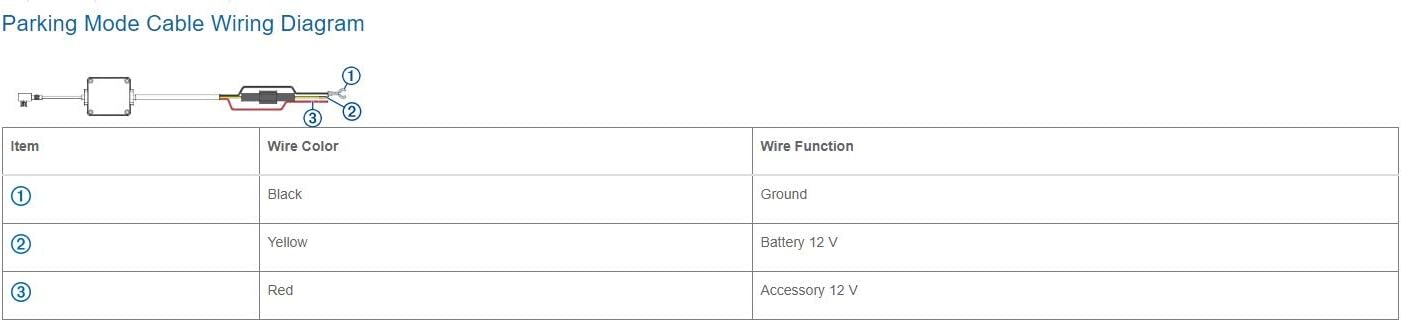
Figure 3: Detailed wiring diagram for the Parking Mode Cable, indicating connections for ground (black), battery 12V (yellow), and accessory 12V (red).
Operating Instructions
The Garmin Dash Cam Tandem is designed for ease of use. Here are its primary operating features:
- Dual-Lens Recording: The camera records simultaneously from two 180-degree lenses. The front lens captures 1440p video of the road, while the interior lens records 720p video of the cabin, even in low light conditions thanks to NightGlo technology.
- Voice Control: Control the dash cam hands-free using voice commands. This feature enhances safety by allowing you to manage recordings without taking your hands off the wheel.
- Built-in GPS: Automatically records location and time data for all captured events, providing crucial context for incidents.
- Incident Detection: The camera automatically detects incidents and saves video footage before and after the event, ensuring important moments are preserved.
- Garmin Drive App: Connect your dash cam to your smartphone via Wi-Fi using the Garmin Drive app. This allows for easy viewing, editing, and sharing of recorded videos. The app also supports Dash Cam Auto Sync, enabling control and synchronized playback from up to four Garmin dash cameras.

Figure 4: The dash cam's ability to record both the interior and exterior of the vehicle simultaneously.
Maintenance
To ensure optimal performance and longevity of your Garmin Dash Cam Tandem, consider the following maintenance tips:
- Lens Cleaning: Regularly clean the camera lenses with a soft, lint-free cloth to ensure clear video recording. Avoid abrasive materials that could scratch the lenses.
- Firmware Updates: Check for and install any available firmware updates via the Garmin Drive app to ensure your device has the latest features and bug fixes.
- Memory Card Management: Periodically format the microSD card (not included) to prevent data corruption and ensure sufficient storage space for new recordings. Refer to the Garmin Drive app for instructions on formatting.
Troubleshooting
If you encounter issues with your Garmin Dash Cam Tandem, try these common troubleshooting steps:
- No Power: Ensure the power cable is securely connected to both the dash cam and the vehicle's power outlet. Check the vehicle's fuse for the power outlet if necessary.
- Recording Issues: If the camera is not recording, check if the microSD card is inserted correctly and has sufficient free space. Try formatting the card through the Garmin Drive app.
- App Connectivity Problems: Ensure Bluetooth and Wi-Fi are enabled on your smartphone and the Garmin Drive app is up to date. Try restarting both the dash cam and your smartphone.
- Poor Video Quality: Clean the camera lenses. Ensure the camera is securely mounted and not vibrating excessively.
Specifications
| Feature | Detail |
|---|---|
| Brand | Garmin |
| Model Name | Garmin Dash Cam Tandem |
| Color | Black |
| Connectivity Technology | Bluetooth, Wi-Fi |
| Video Capture Resolution | 1440p (Front), 720p (Interior) |
| Field Of View | 180 Degrees (each lens) |
| Mounting Type | Dashboard Mount |
| Included Components | Cable |
| Vehicle Service Type | Car |
Warranty and Support
For detailed warranty information and additional support, please refer to the official Garmin website or the full user manual available in PDF format. You can access the PDF user manual here.
Documents and downloads
Ask a question about this manual
Ask about setup, troubleshooting, compatibility, parts, safety, or missing instructions. Manuals+ will review the question and use this page’s manual context to help answer it.