
DAYBETTER DR507250R-RGB-V2
DAYBETTER 32.8ft LED Strip Lights User Manual
Model: DR507250R-RGB-V2
Introduction
Thank you for choosing DAYBETTER LED Strip Lights. This kit provides a vibrant and customizable lighting solution for various indoor applications, including bedrooms, ceilings, TVs, desks, cabinets, and walls. Featuring 5050 RGB LED chips, these lights offer a wide range of colors and modes controlled by an infrared remote. This manual will guide you through the setup, operation, maintenance, and troubleshooting of your LED strip lights to ensure optimal performance and enjoyment.
What's in the Box
Your DAYBETTER LED Strip Lights kit includes the following components:
- Two (2) rolls of 16.4 feet LED strip lights (total 32.8 feet)
- One (1) controller box
- One (1) 44-key IR remote control
- One (1) power adapter

Setup Instructions
- Prepare the Surface: Ensure the surface where you plan to install the LED strips is clean, dry, and smooth. Dust, dirt, or uneven textures can affect the adhesive's effectiveness.
- Connect the Components:
- Connect the LED strip lights to the controller box. Ensure the arrows on the connectors align correctly.
- Connect the power adapter to the controller box.
- Plug the power adapter into a standard electrical outlet.
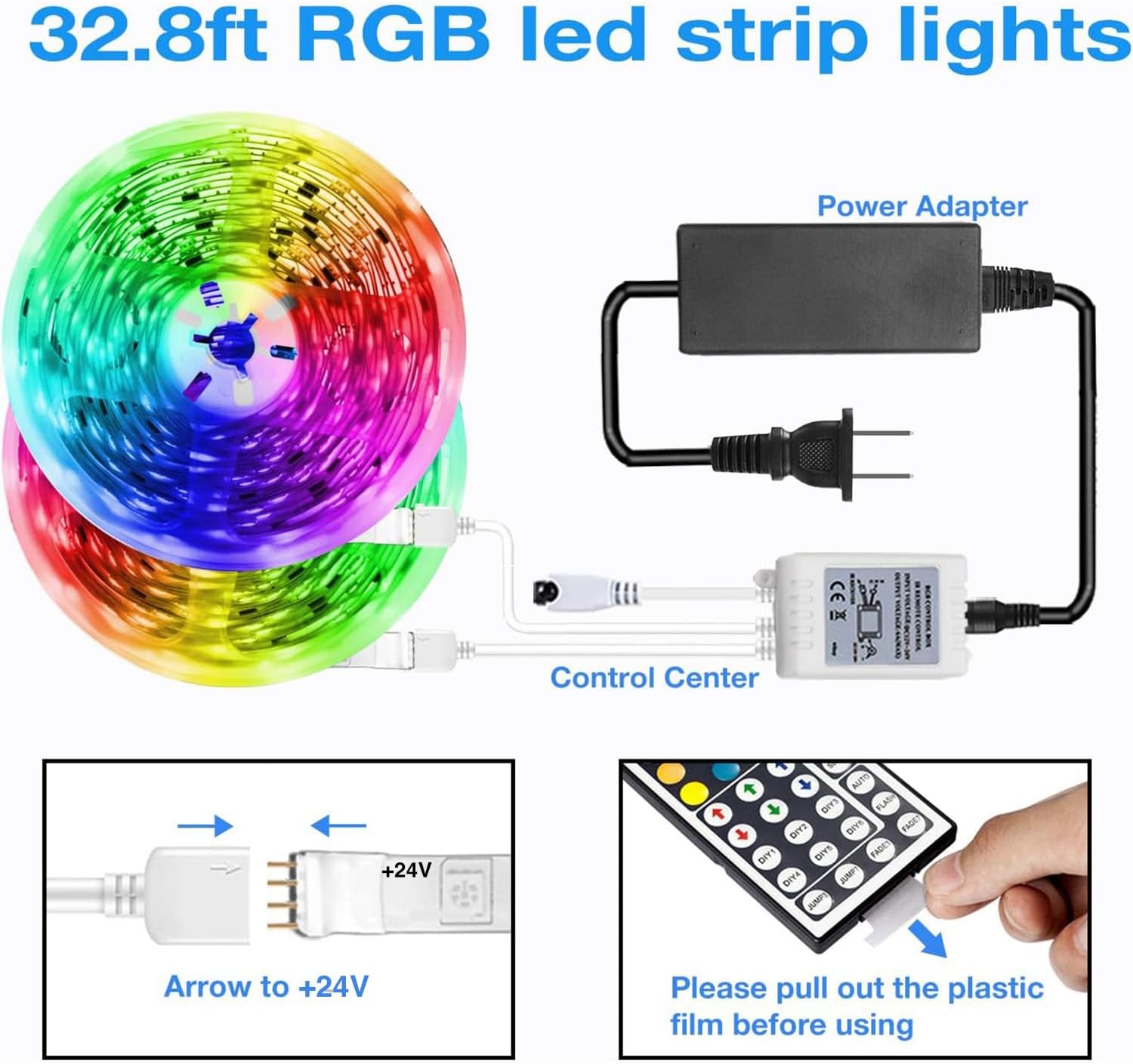
Image: Diagram illustrating the connection of LED strips to the control center, which then connects to the power adapter. Note the arrow alignment for proper connection. - Prepare the Remote: Before first use, locate the plastic film in the battery compartment of the 44-key IR remote control. Pull this film out to activate the battery.

Image: A hand pulling out the clear plastic film from the bottom of the remote control, indicating battery activation. - Install the LED Strips: Carefully peel off the adhesive backing from the LED strips. Press the strips firmly onto the prepared surface, ensuring good contact along the entire length. Avoid sharp bends or creases that could damage the LEDs or circuitry.
- Test the Lights: Once installed, use the remote control to turn on the lights and test various colors and modes to ensure proper functionality.
Operating Instructions
Your DAYBETTER LED Strip Lights are controlled by the included 44-key IR remote. Point the remote directly at the controller box for optimal response. The remote has a range of approximately 26 feet.

Remote Functions:
- On/Off: Press the red power button to turn the lights on or off.
- Brightness Dimming: Use the sun icon buttons (up/down arrows) to adjust the brightness level.
- Color Options: Select from 20 preset colors using the colored buttons.
- DIY Colors: The remote features 6 DIY buttons (DIY1-DIY6) allowing you to customize and save your preferred color mixes. To set a DIY color: Press a DIY button, then use the R, G, B up/down arrows to adjust the red, green, and blue components until you achieve your desired color. Press the same DIY button again to save it.
- Color Speed: Use the 'QUICK' and 'SLOW' buttons to adjust the speed of dynamic modes.
- Automatic Color Change: Press 'AUTO' to cycle through various color changing modes automatically.
- Flash Single Color: The 'FLASH' button activates a flashing effect for the currently selected color.
- Jump 3/7 Colors: 'JUMP3' and 'JUMP7' buttons cycle through 3 or 7 colors with a jumping effect.
- Fade 3/7 Colors: 'FADE3' and 'FADE7' buttons cycle through 3 or 7 colors with a smooth fading effect.
Maintenance
Proper maintenance ensures the longevity and performance of your DAYBETTER LED Strip Lights.
- Cleaning: Gently wipe the LED strips with a dry, soft cloth to remove dust. Do not use liquid cleaners or abrasive materials, as they can damage the LEDs or the protective coating.
- Adhesive Care: If the adhesive begins to lose its stickiness over time, especially in areas exposed to heat or frequent movement, you may reinforce it with additional double-sided tape or light-duty command hooks.
- Handling: Avoid bending the LED strips sharply or repeatedly, as this can damage the internal circuitry and LED chips. Handle them with care during installation and repositioning.
- Storage: If you need to store the lights, ensure they are rolled loosely and kept in a cool, dry place away from direct sunlight and extreme temperatures.
Troubleshooting
If you encounter issues with your DAYBETTER LED Strip Lights, refer to the following common problems and solutions:
| Problem | Possible Cause | Solution |
|---|---|---|
| Lights do not turn on. | No power, loose connection, remote battery dead. | Check if the power adapter is securely plugged into the outlet and the controller box. Ensure LED strip connectors are properly aligned (arrow to arrow). Verify the remote's battery is active (remove plastic film) or replace if necessary. |
| Remote control is unresponsive or inconsistent. | Remote not pointed at receiver, low battery, obstruction. | Ensure the remote is pointed directly at the IR receiver on the controller box. Remove any obstructions between the remote and the receiver. Replace the remote battery if it's old or weak. |
| Lights flicker or display incorrect colors. | Loose connection, faulty power adapter/controller, damaged strip. | Check all connections for looseness. Try unplugging and replugging the power adapter. If the issue persists, the power adapter or controller box may be faulty. Inspect the LED strip for visible damage or kinks. |
| Adhesive is not holding the strips. | Unclean surface, high temperature, heavy object. | Ensure the surface was thoroughly cleaned and dry before installation. For better adhesion, press firmly along the entire strip during installation. Consider using additional adhesive tape or mounting clips for reinforcement, especially in areas with higher temperatures or where the strip supports its own weight. |
Product Specifications
| Brand | DAYBETTER |
| Model Number | DR507250R-RGB-V2 |
| Color | Multicolor |
| Indoor/Outdoor Usage | Indoor |
| Special Feature | Remote Controlled, Color Changing |
| Light Source Type | LED |
| Power Source | Corded Electric |
| Wattage | 60 watts |
| Number of Light Sources | 150 |
| Controller Type | Remote Control |
| Material | Vinyl (Strip), Plastic (Shade) |
| Item Weight | 7.4 ounces |
| Water Resistance Level | Not Water Resistant |
Warranty and Support
For any questions, concerns, or support needs regarding your DAYBETTER LED Strip Lights, please contact DAYBETTER customer service. Refer to your purchase documentation or the official DAYBETTER website for specific warranty information and contact details.
Related documentsDR507250R-RGB-V2

Ask a question about this manual
Ask about setup, troubleshooting, compatibility, parts, safety, or missing instructions. Manuals+ will review the question and use this page’s manual context to help answer it.