
FEZIBO SDF-KA01B
FEZIBO 48 x 24 Inches Standing Desk User Manual
Model: SDF-KA01B
1. Introduction
Thank you for choosing the FEZIBO 48 x 24 Inches Standing Desk. This electric height-adjustable desk is designed to enhance your home office experience by allowing seamless transitions between sitting and standing positions. This manual provides essential information for assembly, operation, maintenance, and troubleshooting to ensure safe and efficient use of your new desk.
The desk features a robust industrial-grade steel frame, a convenient storage drawer, and a quiet electric lift system with memory presets. Please read this manual thoroughly before assembly and use.
2. Important Safety Information
Please observe the following safety guidelines to prevent injury or damage to the product:
- Always follow the assembly instructions carefully to avoid injury.
- Do not exceed the maximum weight limit of 176 pounds (80 kg) on the desktop.
- Be cautious of casters when in use to avoid tripping hazards. Ensure casters are locked when the desk is in a stationary position.
- Always follow the manufacturer's instructions for proper use and maintenance.
- Keep children and pets away from the desk during operation to prevent accidents.
- Ensure all cables are properly managed to avoid entanglement or damage during height adjustments.
3. Setup and Assembly
Your FEZIBO standing desk comes with all necessary components and tools for assembly. For detailed step-by-step instructions, please refer to the included Assembly Instructions with Diagram or the User Manual PDF available online.
Included Components:
- Desktop
- Leg Columns (2)
- Feet (2)
- Control Box
- Handset Controller
- Power Cable
- Upgraded Leather Drawer
- Desk Hooks (Set of 2)
- Casters (Set of 4)
- Basic Assembly Tools (L-shaped wrench, screws)
Assembly Tips:
- Unpack all components and verify against the parts list in the assembly manual.
- Assemble the desk on a soft, clean surface to prevent scratches.
- Ensure all screws are tightened securely, but do not overtighten.
- The embedded screw hole locations simplify the assembly process.

Figure 3.1: Fully assembled FEZIBO Standing Desk, showcasing its design and functionality with typical office setup.

Figure 3.2: Desk dimensions and included accessories (desk hooks and leather drawer).
4. Operating Instructions
4.1. Height Adjustment
The desk's height can be adjusted electrically using the control panel located on the front edge of the desktop. The adjustable height range is from 27.7 inches (sitting) to 46.6 inches (standing).

Figure 4.1: Desk Controller with Up/Down Buttons and Memory Presets.
- Up/Down Buttons: Press and hold the Up (▲) or Down (▼) button to move the desk to your desired height. Release the button to stop.
- Memory Presets: The desk features 4 programmable memory positions. To save a height:
- Adjust the desk to your desired height.
- Press the M button (if available, or a similar 'Set' button).
- Press one of the numbered preset buttons (e.g., 1, 2, 3, 4) within a few seconds to save the current height to that preset.
The desk operates quietly at approximately 45 dB during height adjustments.
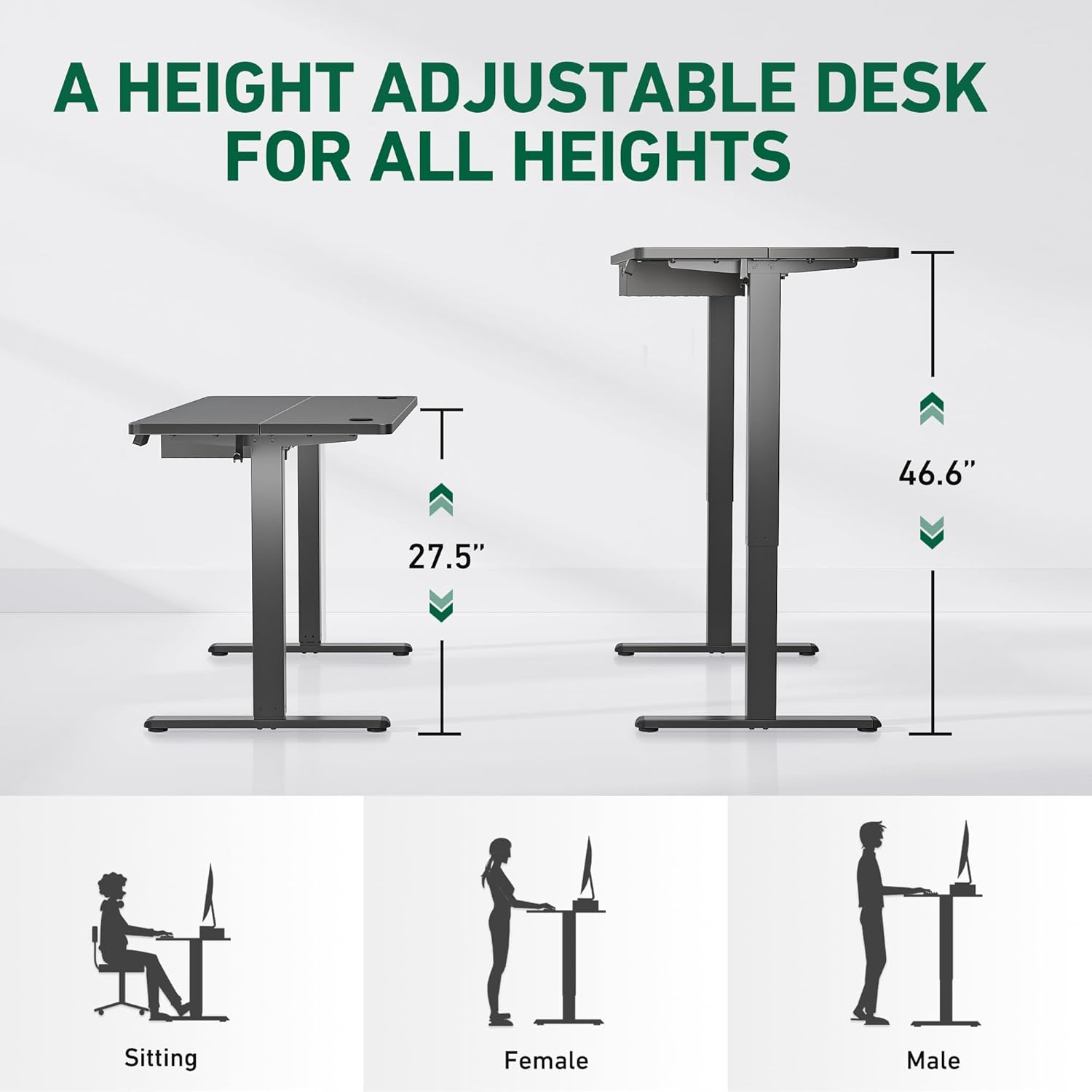
Figure 4.2: Height adjustment range and ergonomic positions.
4.2. Storage Drawer
The integrated leather drawer provides 15.7 inches wide by 3.15 inches high storage space for your daily work essentials. The upgraded leather material is waterproof and offers improved texture.
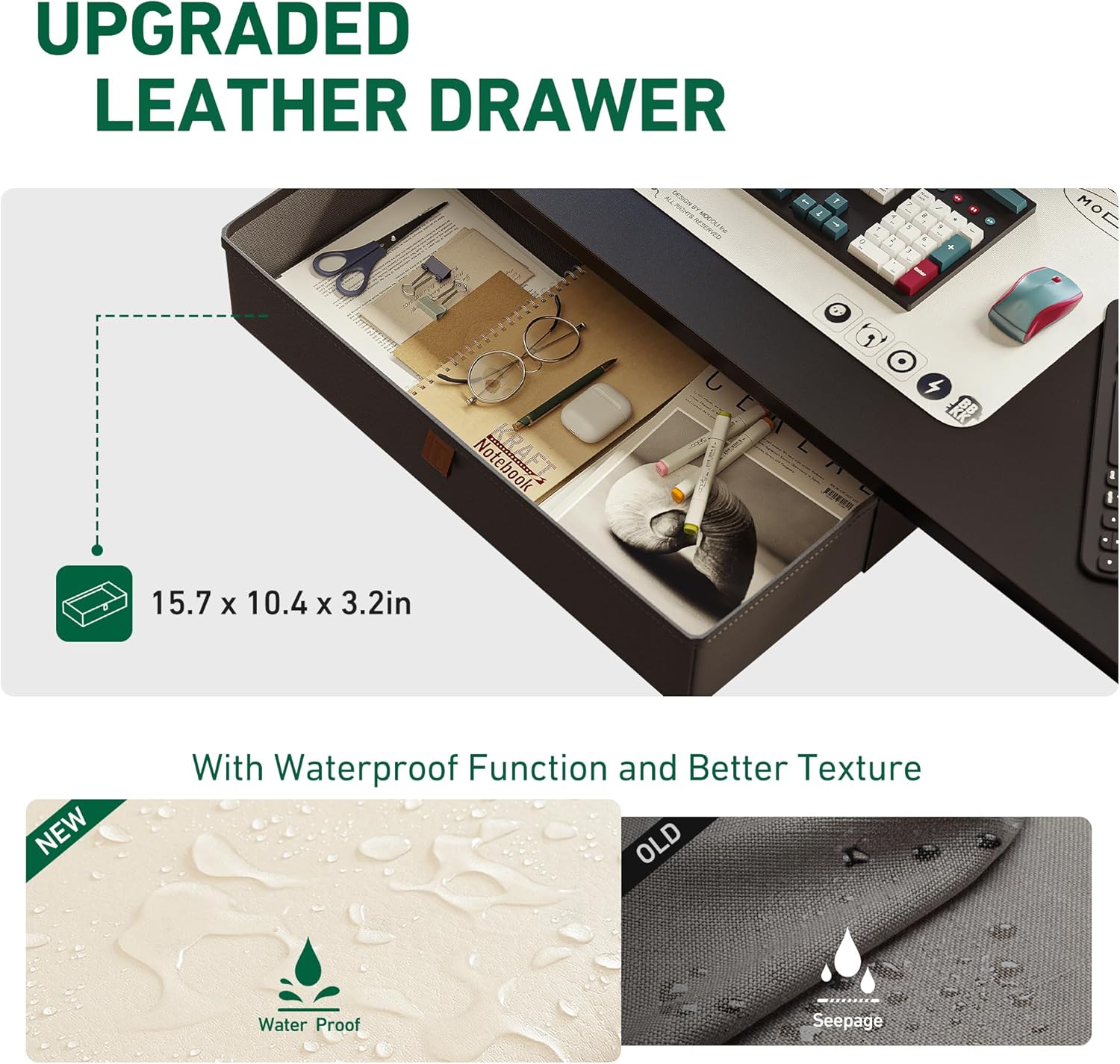
Figure 4.3: Upgraded leather drawer with waterproof feature.

Figure 4.4: Benefits of the integrated drawer for organization.
4.3. Accessories
The desk comes with two desk hooks and four casters for added convenience and mobility. The desktop also includes cable grommets to help manage and sort your wires, contributing to a clean and comfortable workspace.

Figure 4.5: Desk with casters for easy mobility.
5. Maintenance
To ensure the longevity and optimal performance of your FEZIBO standing desk, follow these maintenance guidelines:
- Cleaning: Wipe the desktop and frame with a soft, damp cloth. Avoid harsh chemicals or abrasive cleaners that could damage the finish. For the leather drawer, use a mild soap solution if necessary, and wipe dry immediately.
- Cable Management: Regularly check and organize cables to prevent tangling or interference with the desk's movement.
- Fasteners: Periodically check all screws and bolts to ensure they remain tight. Retighten if necessary.
- Weight Distribution: Distribute weight evenly on the desktop to prevent strain on the lifting mechanism.
6. Troubleshooting
If you encounter any issues with your FEZIBO standing desk, please refer to the following common troubleshooting tips:
- Desk Not Moving:
- Check if the power cable is securely plugged into both the desk and the wall outlet.
- Ensure there are no obstructions preventing the desk from moving up or down.
- If the desk has an error code on the display, consult the full user manual for specific error code meanings and solutions.
- Uneven Movement:
- Ensure the desk is not overloaded and weight is evenly distributed.
- Perform a reset procedure (refer to the full user manual for specific steps, typically involves holding down certain buttons).
- Noise During Operation:
- A slight hum is normal (approx. 45 dB). If the noise is excessive or unusual, check for loose components or obstructions.
For issues not covered here, or if troubleshooting steps do not resolve the problem, please contact FEZIBO customer support.
7. Specifications
| Feature | Specification |
|---|---|
| Brand | FEZIBO |
| Model Number | SDF-KA01B |
| Product Dimensions (D x W x H) | 24"D x 48"W x 27.68"H |
| Adjustable Height Range | 27.7 Inches (Min) to 46.6 Inches (Max) |
| Color | Black |
| Maximum Weight Recommendation | 176 Pounds (80 kg) |
| Base Material | Alloy Steel |
| Top Material Type | Wood |
| Number of Drawers | 1 (Upgraded Leather Drawer) |
| Special Features | 4 Preset Buttons Control, 2 Desk Hooks, Casters, Cable Grommets |
| Operation Noise Level | 45 dB |
| Required Assembly | Yes |
| Recommended People for Assembly | 1 |
8. Warranty and Support
8.1. Warranty Information
The FEZIBO 48 x 24 Inches Standing Desk comes with a Limited Warranty. Please refer to the warranty card included with your product or contact customer support for detailed terms and conditions regarding coverage and duration.
8.2. Customer Support
For any questions, technical assistance, or warranty claims, please do not hesitate to contact FEZIBO customer support. Our team is available to assist you.
- Customer Service U.S. Phone: +1 702-620-5156
- Hours: 24/5 (Monday - Friday)
- Online Support: Visit the official FEZIBO website or your purchase platform for FAQs and contact forms.
You can also find additional resources, including installation videos and user manuals, on the FEZIBO brand store page: FEZIBO Amazon Store.
Related documentsSDF-KA01B


Ask a question about this manual
Ask about setup, troubleshooting, compatibility, parts, safety, or missing instructions. Manuals+ will review the question and use this page’s manual context to help answer it.