
1. Introduction
This manual provides detailed instructions for the installation and use of the Scosche CR0714DDCS Double DIN Radio Installation Kit. This kit is designed to facilitate the integration of an aftermarket stereo into select Chrysler, Dodge, and Jeep vehicles, while retaining essential factory features such as steering wheel controls.
The kit includes a dash kit, a wiring interface with steering wheel control (SWC) retention, and a wire harness. It is manufactured from high-quality ABS plastic to ensure a factory-matched texture and fit.
2. Compatibility
The Scosche CR0714DDCS kit is vehicle-specific. Please verify your vehicle's make, model, and year against the compatibility guide below to ensure proper fitment. This kit is compatible with Infinity and Boston Acoustics factory amplified premium sound systems but is not compatible with Alpine factory amplified premium sound systems.
Double DIN stereos with a maximum screen size/faceplate opening of 3 13/16" x 6 13/16" (96.8mm x 173mm) are supported. Some oversized car radios may require minor trimming of the kit for proper fit.

Image: Fit Guide for Scosche CR0714DDCS, detailing compatible Chrysler, Dodge, Jeep, Mitsubishi, and Volkswagen models and years. Includes notes on Alpine audio system incompatibility and dash cavity modification requirements for certain models.
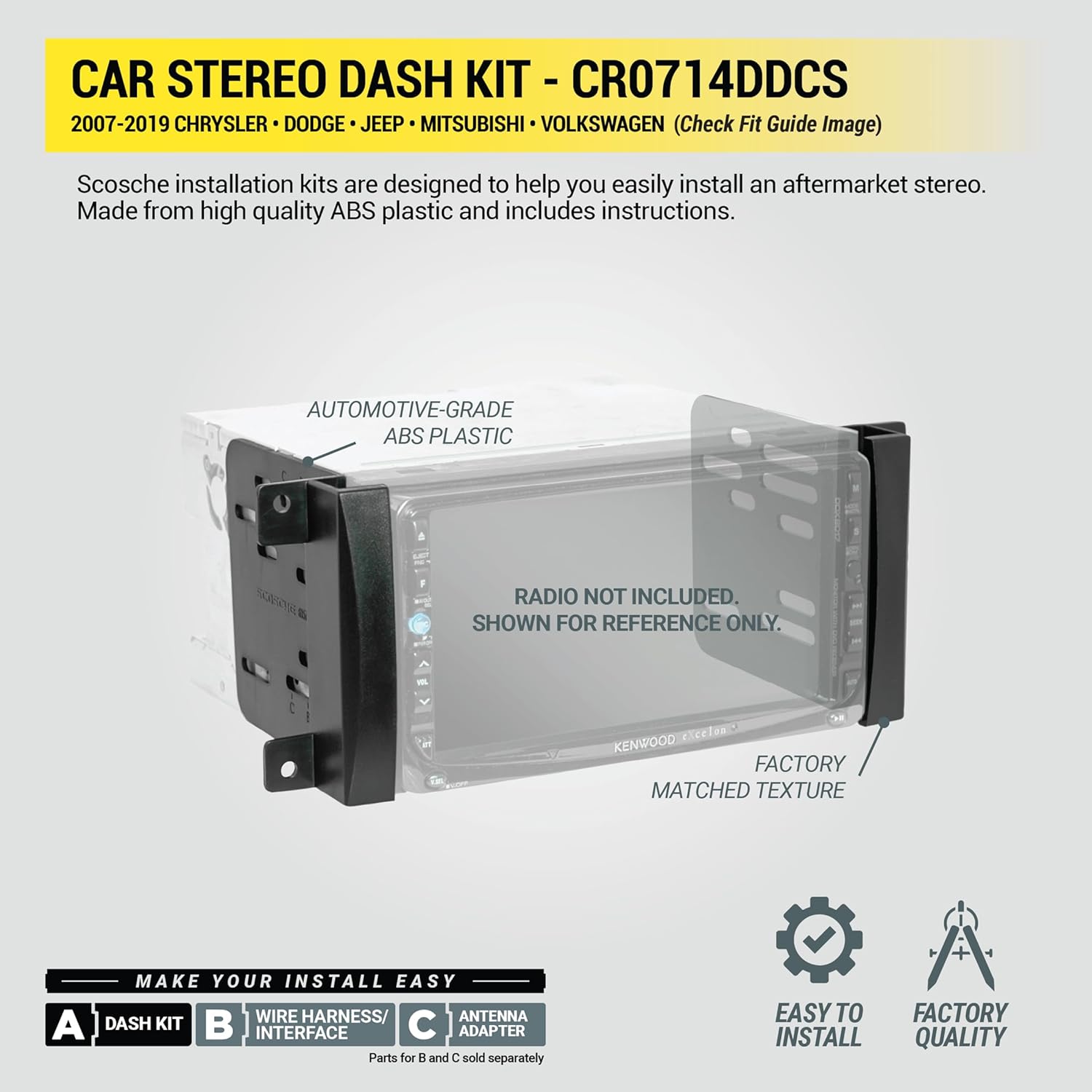
Image: Scosche CR0714DDCS Car Stereo Dash Kit, showing the automotive-grade ABS plastic dash kit designed for double DIN radios. The image highlights that the radio is not included and is for reference only, and that the kit features a factory-matched texture.
3. Package Contents
The Scosche CR0714DDCS kit typically includes the following components:
- Dash Kit
- Interface with Steering Wheel Control (SWC)
- Wire Harness
- Instruction Manual

Image: All components included in the Scosche CR0714DDCS kit, featuring the dash kit, wiring harness, interface module, and an antenna adapter. These parts are designed for a complete car stereo installation.
4. Setup and Installation
Follow these general steps for installing your aftermarket stereo with the Scosche CR0714DDCS kit. Professional installation is recommended if you are unfamiliar with car audio wiring.
- Prepare the Vehicle: Disconnect the vehicle's battery before beginning any electrical work.
- Remove Factory Stereo: Carefully remove the factory radio from the dashboard. This typically involves removing trim panels and screws.
- Disconnect Factory Harnesses: Unplug all harnesses and antenna cables from the back of the factory stereo.
- Connect Aftermarket Stereo: Connect the Scosche wire harness to your aftermarket stereo's wiring. Ensure all connections are secure and insulated. Standard wire color codes are utilized for ease of installation.
- Integrate Interface: Connect the Scosche interface module to the vehicle's factory radio harness and the aftermarket stereo's wiring. This interface allows for the retention of steering wheel controls and provides a +12V switched ACC power source.
- Install Dash Kit: Mount the aftermarket stereo into the Scosche dash kit. The dash kit is designed to fit precisely into your vehicle's dashboard opening.
- Test Connections: Before fully reassembling the dashboard, reconnect the vehicle's battery and test the aftermarket stereo's functionality, including audio, power, and steering wheel controls.
- Final Assembly: Once all functions are verified, carefully reassemble the dashboard trim panels.
Video: Scosche Dash Kit Installation for Aftermarket Stereo. This video provides a visual guide on how to install a Scosche dash kit for an aftermarket stereo, demonstrating the process of removing the factory unit and fitting the new components.
Video: Radio Replacement Interface Installation. This video demonstrates the installation of a radio replacement interface, showing how to connect the wiring harness and interface module to integrate an aftermarket radio with the vehicle's existing systems.
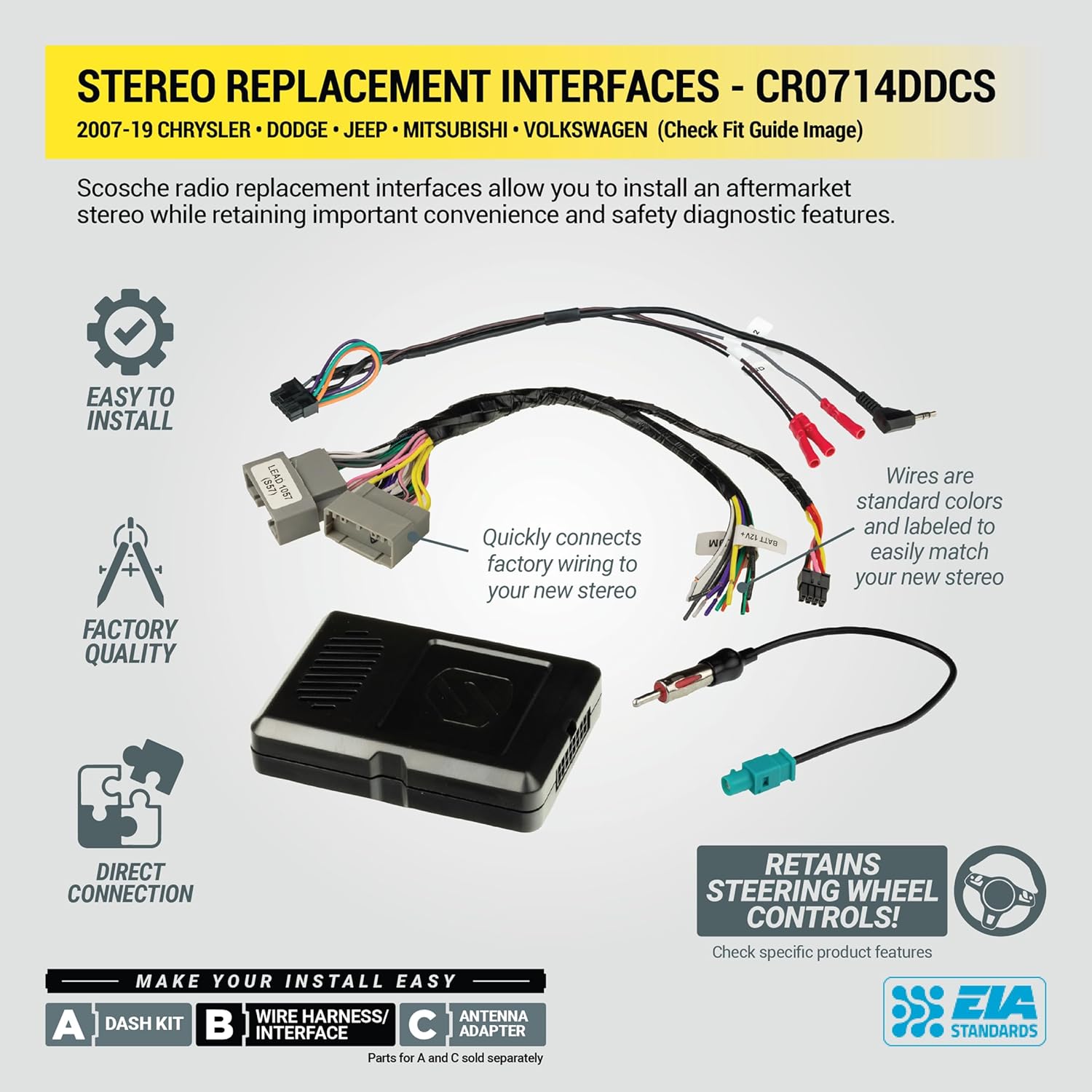
Image: Scosche CR0714DDCS Stereo Replacement Interfaces. This image illustrates the interface module and wiring harnesses, highlighting features like easy installation, factory quality, direct connection, and retention of steering wheel controls.
5. Wiring Diagram
The color codes used on this car stereo interface harness conform to the E.I.A. (Electronics Industry Association) standard. These colors may differ from the wiring found on your stereo. Always refer to your stereo owner's manual for specific wiring details before making any connections.
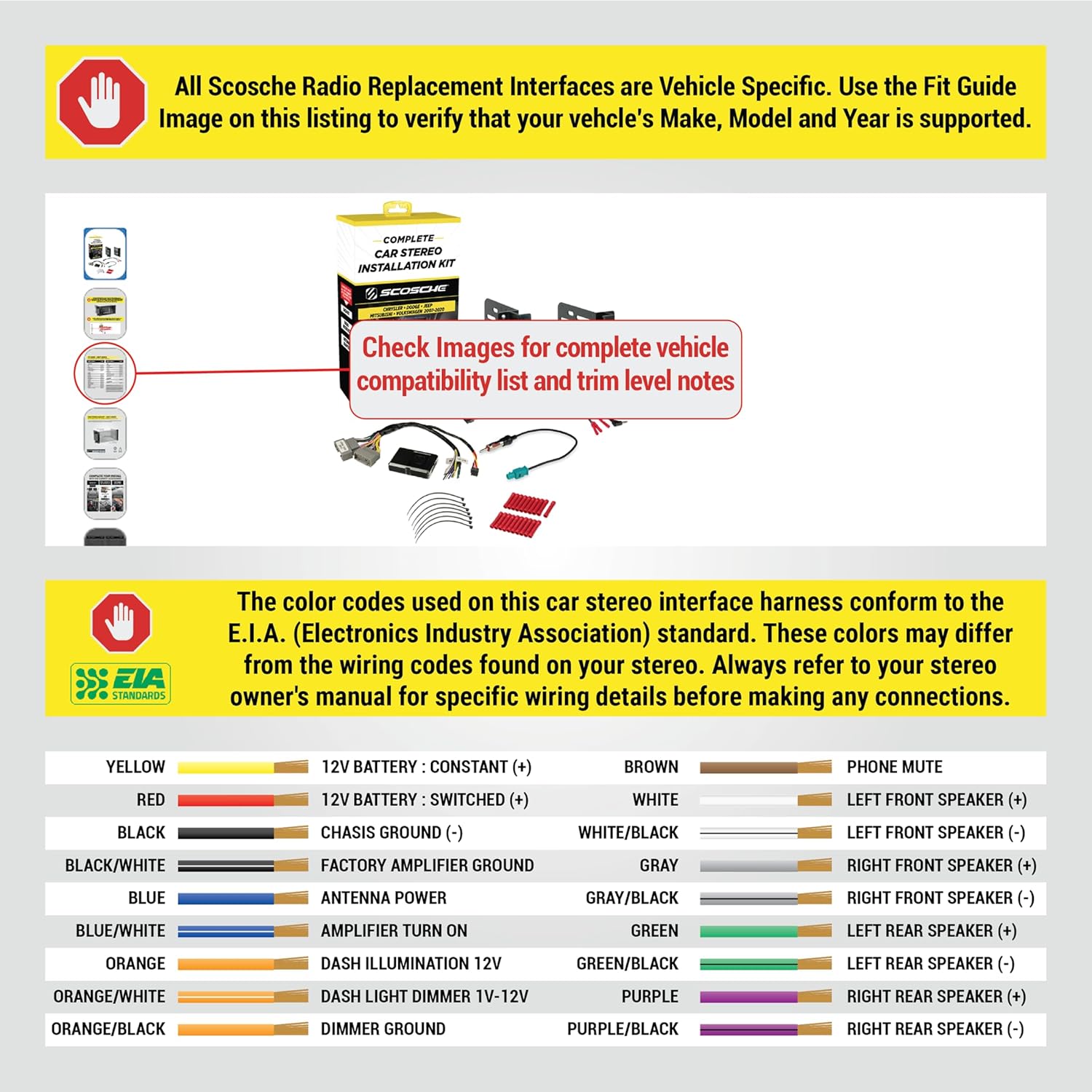
Image: Scosche CR0714DDCS Wiring Diagram. This diagram shows the EIA standard color codes for the wiring harness, indicating connections for constant power, switched power, ground, antenna power, amplifier turn-on, dash illumination, dash light dimmer, phone mute, and speaker outputs.
| Wire Color | Function | Wire Color | Function |
|---|---|---|---|
| YELLOW | 12V BATTERY : CONSTANT (+) | BROWN | PHONE MUTE |
| RED | 12V BATTERY : SWITCHED (+) | WHITE | LEFT FRONT SPEAKER (+) |
| BLACK | CHASIS GROUND (-) | WHITE/BLACK | LEFT FRONT SPEAKER (-) |
| BLACK/WHITE | FACTORY AMPLIFIER GROUND | GRAY | RIGHT FRONT SPEAKER (+) |
| BLUE | ANTENNA POWER | GRAY/BLACK | RIGHT FRONT SPEAKER (-) |
| BLUE/WHITE | AMPLIFIER TURN ON | GREEN | LEFT REAR SPEAKER (+) |
| ORANGE | DASH ILLUMINATION 12V | GREEN/BLACK | LEFT REAR SPEAKER (-) |
| ORANGE/WHITE | DASH LIGHT DIMMER 1V-12V | PURPLE | RIGHT REAR SPEAKER (+) |
| ORANGE/BLACK | DIMMER GROUND | PURPLE/BLACK | RIGHT REAR SPEAKER (-) |
6. Operating the Aftermarket Stereo
Once installed, operate your aftermarket stereo according to its specific manufacturer's instructions. The Scosche CR0714DDCS kit ensures that your vehicle's factory steering wheel controls remain functional, allowing you to safely manage audio functions while driving.
Refer to your aftermarket stereo's manual for details on:
- Powering on/off
- Volume control
- Source selection (Radio, Bluetooth, USB, etc.)
- Navigation and menu options
- Bluetooth pairing

Image: An aftermarket stereo seamlessly integrated into a Jeep dashboard, demonstrating a successful installation with a modern interface.

Image: Another example of an aftermarket stereo installed in a vehicle, showing a user-friendly interface with various application icons, similar to a smartphone display.
7. Maintenance
The Scosche CR0714DDCS kit requires minimal maintenance. Ensure all connections remain secure over time. Periodically check for any loose wiring or components, especially after significant vehicle vibrations or impacts.
- Keep the dash kit clean using a soft, dry cloth. Avoid harsh chemicals that may damage the finish.
- Ensure no liquids or debris enter the stereo or dash kit openings.
8. Troubleshooting
If you encounter issues after installation, consider the following troubleshooting steps:
- No Power to Stereo:
- Check vehicle's fuse box for blown fuses.
- Verify all power connections (constant 12V, switched 12V, ground) are secure.
- Ensure the interface module is properly connected and receiving power.
- No Sound:
- Confirm speaker wires are correctly connected to the aftermarket stereo and the vehicle harness.
- If using a factory amplified system, ensure the amplifier turn-on wire is connected. Note: No fade control with factory amplified systems.
- Check stereo settings for mute or volume levels.
- Steering Wheel Controls Not Working:
- Ensure the SWC interface is correctly wired and programmed (if applicable, refer to the interface's specific instructions).
- Verify compatibility of the interface with your specific vehicle and aftermarket stereo.
- Poor Radio Reception:
- Check antenna connection to the aftermarket stereo.
- Ensure the antenna adapter (if included/used) is properly installed.
For persistent issues, consult a professional car audio installer or contact Scosche technical support.
9. Specifications
- Model: CR0714DDCS
- Compatible Vehicles: Select 2007-2019 Chrysler, Dodge, Jeep, Mitsubishi, Volkswagen models (refer to fit guide for details)
- Stereo Type: Double DIN
- Maximum Stereo Faceplate Opening: 3 13/16" x 6 13/16" (96.8mm x 173mm)
- Material: Automotive-grade ABS Plastic
- Features: Retains steering wheel controls, provides +12V switched ACC power, utilizes standard wire color codes.
- Amplifier Compatibility: Compatible with Infinity and Boston Acoustics factory amplified premium sound systems. Not compatible with Alpine factory amplified premium sound systems.
- Item Dimensions (L x W x H): 2.73 x 8.5 x 16.25 inches
- Item Weight: 3.84 ounces
- Connector Type: Automotive Standard
10. Warranty and Support
The Scosche CR0714DDCS Double DIN Radio Installation Kit is backed by Scosche's Limited Lifetime Warranty.
For technical assistance or warranty claims, please contact Scosche customer support. Refer to the official Scosche website or the contact information provided with your product for the most up-to-date support details.
Scosche Technical Support: Lifetime Tech Support is available for this product.