1. Introduction
This manual provides detailed instructions for installing the SCOSCHE FD0514DDCS Double DIN Premium Installation Solution and Interface. This kit is designed to facilitate the seamless integration of an aftermarket car stereo into your vehicle's dashboard, while retaining important factory features.
Please read all instructions carefully before beginning the installation process. Ensure all components are present and that your vehicle is compatible with this kit.
2. Package Contents
Verify that all items listed below are included in your package:
- Radio Bezel and Mounting Brackets
- Single DIN Pocket
- Radio Replacement Interface with Steering Wheel Control (SWC) Harness
- Antenna Adapter
- Instruction Manual
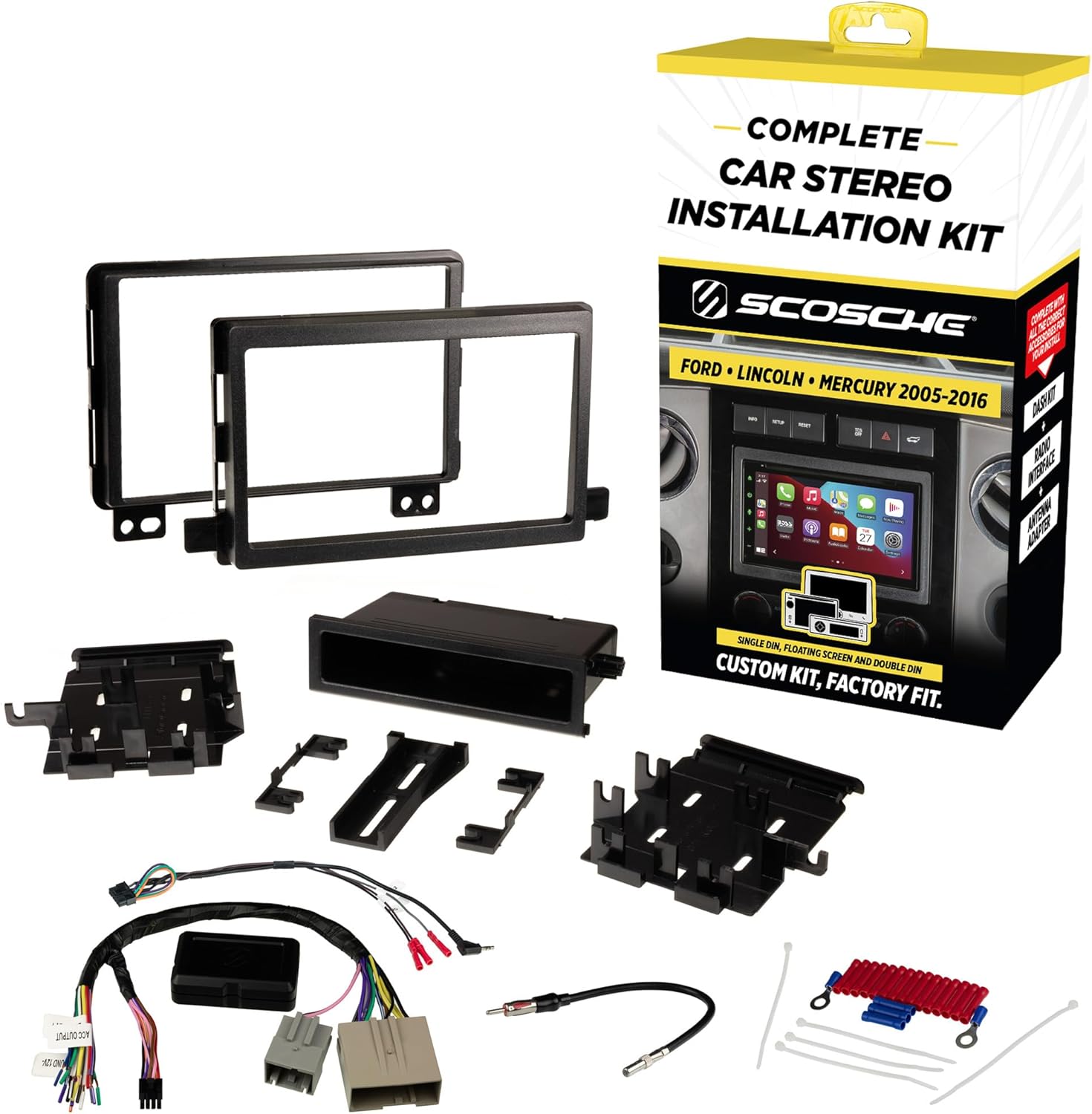
Image: The complete SCOSCHE FD0514DDCS kit, including the dash bezel, mounting brackets, wiring harness, interface module, and antenna adapter.
3. Vehicle Compatibility
This kit is designed for select 2005-2014 Ford, Lincoln, and Mercury vehicles. Refer to the fit guide image below to confirm your vehicle's compatibility.
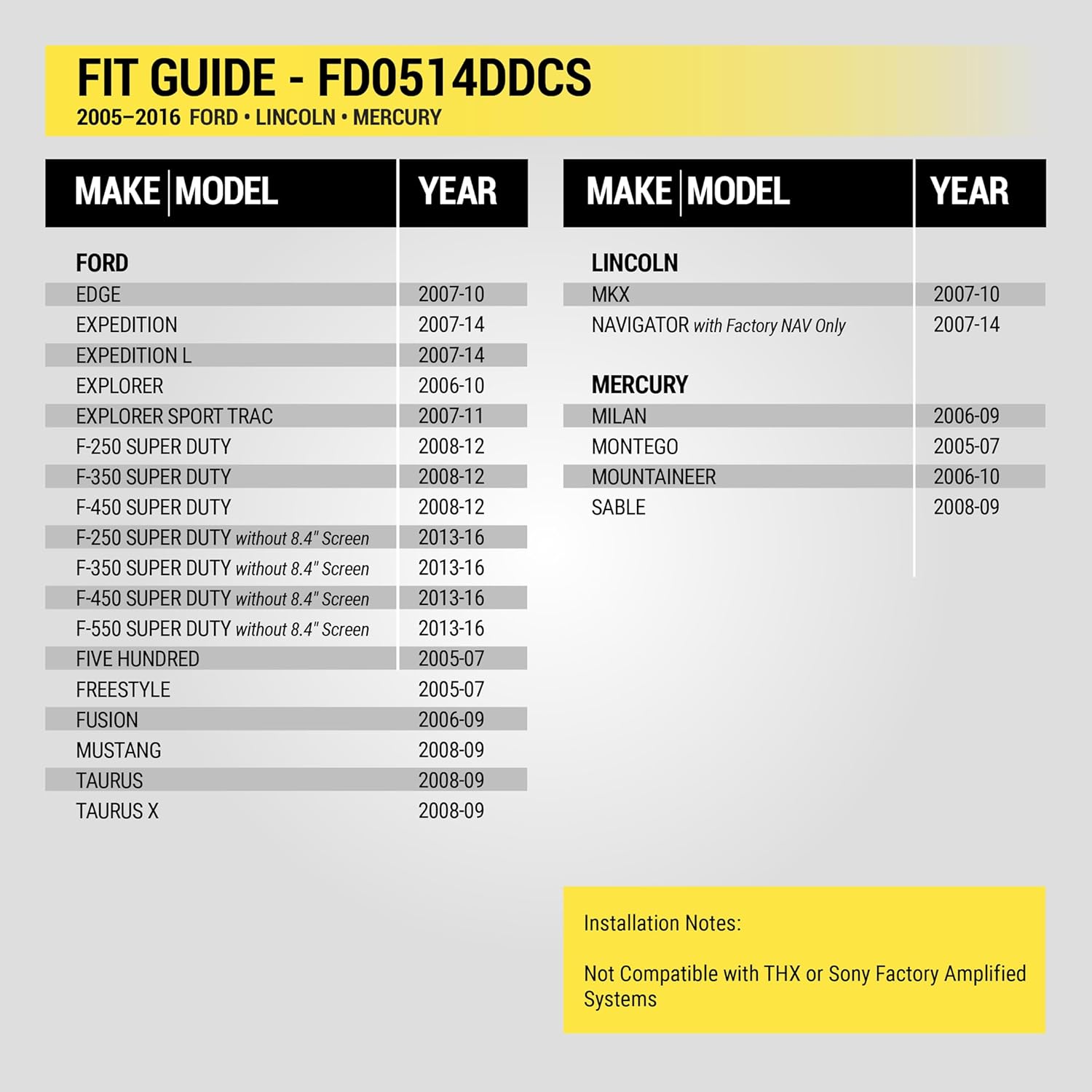
Image: A detailed fit guide table listing compatible Ford, Lincoln, and Mercury models and years for the FD0514DDCS kit.
Important Compatibility Notes:
- Not Compatible with THX or Sony Factory Amplified Systems.
- Scosche Double DIN Kits fit True Double DIN stereos with a maximum faceplate opening of 96.8mm x 173mm (3-13/16" x 6-13/16"). Some radios labeled as Double DIN may be oversized and require minor trimming of the kit for proper fit.
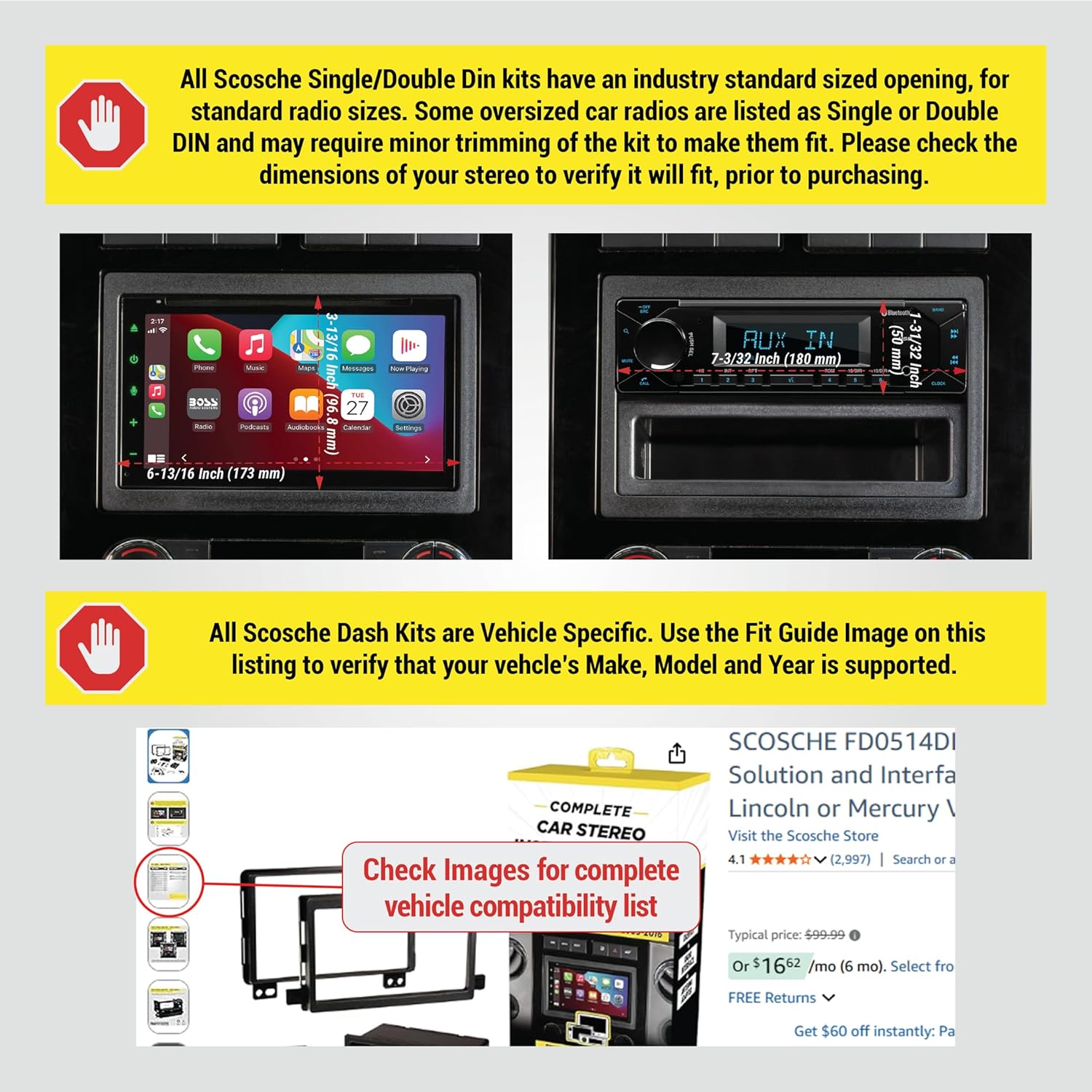
Image: Illustrates the maximum dimensions for compatible Double DIN stereos and a note about potential trimming for oversized units.
4. Product Components Overview
4.1 Dash Kit (Radio Bezel and Mounting Brackets)
The dash kit is constructed from automotive-grade ABS plastic with a factory-matched texture. It securely holds your aftermarket stereo in place and provides a clean, integrated look. It accommodates Double DIN radios, Single DIN radios with the included storage pocket, and Floating Screen Radios that have a Single DIN mounting frame.

Image: Shows the individual components of the dash kit, including the main bezel, side mounting brackets, and a single DIN storage pocket.
4.2 Radio Replacement Interface with SWC Harness
This interface allows you to install an aftermarket stereo while retaining important convenience and safety diagnostic features, including steering wheel controls. The wires are color-coded for easy matching with your new stereo's harness.

Image: Displays the radio replacement interface module, the SWC harness, and the antenna adapter, highlighting their factory quality and direct connection.
4.3 EIA Wire Color Code Chart
The color codes used on this car stereo connector harness conform to the E.I.A. (Electronics Industry Association) standard. These colors may differ from the wiring codes found on your stereo. Always refer to your stereo owner's manual for specific wiring details before making any connections.
| Wire Color | Function |
|---|---|
| Yellow | 12V Battery : Constant (+) |
| Red | 12V Battery : Switched (+) |
| Black | Chassis Ground (-) |
| Black/White | Factory Amplifier Ground |
| Blue | Antenna Power (When Tuner is On) |
| Blue/White | Amplifier Turn On |
| Orange | Dash Illumination 12V |
| Orange/White | Dash Light Dimmer 1V-12V |
| Orange/Black | Dimmer Ground (Negative Trigger Circuit) |
| Brown | Phone Mute |
| White | Left Front Speaker (+) |
| White/Black | Left Front Speaker (-) |
| Gray | Right Front Speaker (+) |
| Gray/Black | Right Front Speaker (-) |
| Green | Left Rear Speaker (+) |
| Green/Black | Left Rear Speaker (-) |
| Purple | Right Rear Speaker (+) |
| Purple/Black | Right Rear Speaker (-) |
Image: A table detailing the Electronics Industry Association (EIA) standard wire color codes and their corresponding functions for car stereo wiring.
5. Installation Instructions
5.1 Preparation
- Disconnect Battery: Before starting any electrical work, disconnect the negative terminal of your vehicle's battery to prevent electrical shorts.
- Review Instructions: Carefully read the radio removal instructions provided with your specific vehicle's service manual or the kit's instructions.
- Prepare Dash Kit: Based on your new stereo's size and your vehicle's requirements, break off any unnecessary tabs from the dash kit components.
Video: A demonstration of preparing the dash kit by removing unnecessary tabs and installing the new stereo into the kit's brackets.
5.2 Dash Disassembly and Factory Radio Removal
- Remove Trim Panels: Using appropriate panel removal tools, carefully remove the trim panels surrounding your factory stereo.
- Unscrew Factory Radio: Locate and unscrew the mounting screws holding the factory radio in place.
- Unplug Harnesses: Gently pull out the factory radio and unplug all electrical harnesses and the antenna cable from its rear.
Video: Demonstrates the process of removing the factory stereo, including trim panel removal and disconnecting harnesses.
5.3 Wiring Connections
- Connect Harnesses: Using splice connectors (or soldering), connect the wires from your new stereo's harness to the provided Scosche vehicle harness, matching colors according to the EIA chart (Section 4.3).
- Interface Module: Connect the Scosche interface module as per its specific instructions. This module manages steering wheel controls and other vehicle-specific features.
- Antenna Adapter: Connect the antenna adapter to the vehicle's factory antenna cable and to your new stereo.
Video: Illustrates the wiring process, including connecting the aftermarket stereo harness to the vehicle harness and the interface module.
Video: Shows the connection of a Double DIN kit with radio wire for Ford/Mercury vehicles, including the wiring harness and antenna adapter.
Video: A guide on installing the radio wiring harness, demonstrating how to connect the new stereo's harness to the vehicle's wiring.
5.4 New Stereo Installation and Final Assembly
- Mount New Stereo: Install your new stereo into the prepared dash kit using the screws provided with your stereo.
- Connect to Vehicle: Plug the assembled stereo and dash kit into the vehicle's factory harnesses.
- Secure Stereo: Screw the new stereo and dash kit assembly into the dashboard's mounting points.
- Reinstall Trim: Carefully reattach all removed trim panels, ensuring they snap securely into place.

Image: A double DIN aftermarket radio seamlessly installed into a vehicle's dashboard using the Scosche dash kit.

Image: A floating screen aftermarket radio installed in a vehicle's dashboard, demonstrating the kit's versatility.
6. Operating and Testing
- Reconnect Battery: Reconnect the negative terminal of your vehicle's battery.
- Test Functions: Turn on your vehicle and test all functions of your new stereo, including audio, radio reception, steering wheel controls, and any other connected accessories.
Video: Shows the final steps of installation, including reconnecting the battery and testing the new radio's functions.
7. Troubleshooting
- No Power to Stereo: Check battery connections, ensure the red (switched) and yellow (constant) power wires are correctly connected and receiving power. Verify all fuses.
- No Sound: Confirm all speaker wires are correctly connected to the stereo and vehicle harness. Check amplifier turn-on wire if applicable.
- Steering Wheel Controls Not Working: Ensure the interface module is correctly connected and programmed (if required by your stereo/interface model). Refer to the interface's specific instructions.
- Radio Does Not Fit: Double-check the dimensions of your aftermarket radio against the kit's specifications (96.8mm x 173mm max faceplate opening). Minor trimming of the dash kit may be required for some oversized radios.
- Intermittent Issues: Recheck all wiring connections for secure and proper insulation. Ensure no wires are pinched or shorting.
8. Specifications
- Brand: Scosche
- Model Number: FD0514DDCS
- Material: Plastic
- Item Dimensions (L x W x H): 2.75 x 8.5 x 16.25 inches
- Item Weight: 15.7 ounces
- Connector Type: RCA, 3.5mm Jack, ISO (for interface)
- Compatibility: Select 2005-2014 Ford, Lincoln, Mercury vehicles (refer to Section 3 for details)
9. Warranty and Support
The SCOSCHE FD0514DDCS kit is backed by Scosche's Limited Lifetime Warranty. For technical assistance or warranty claims, please contact Scosche customer support. Lifetime technical support is available to assist with any installation or product-related questions.
For further information, visit the official Scosche website or contact their customer service department.


