
1. Introduction
The IVISII G2 Pocket RGB Camera Light is a versatile and portable lighting solution designed for photography, videography, and content creation. Featuring a durable aluminum alloy body and advanced LED technology, it offers a wide range of customizable lighting options to enhance your visual projects.

Figure 1: The IVISII G2 Pocket RGB Camera Light with its included mini tripod.
2. Package Contents
Ensure all items are present in the package:
- 1 x G2 RGB LED Panel Light
- 1 x Portable Carrying Bag
- 1 x 1/4" Screw (for mounting)
- 1 x USB Type-C Charging Cable
- 1 x Mini Tripod Stand
3. Product Features
- Professional RGB LED Video Light: Equipped with 150 LED beads (80 bi-color, 70 RGB) for vibrant and customizable illumination.
- Portable Design: Compact and lightweight (11.3 oz, 5.6x3.1x0.6 inches) for easy portability.
- Adjustable Color Temperature (CCT): Dimmable from 2600K (warm) to 10000K (cold).
- Full Color Gamut (RGB): Hue adjustable from 0-360 degrees with color saturation from 0-100%.
- Brightness Control: Dimmable from 0% to 100%.
- High Color Accuracy: CRI > 97, TLCI > 99 for accurate color rendering.
- Built-in Rechargeable Battery: 7.7V 4300mAh Li-Polymer battery provides approximately 190 minutes of operation at 100% brightness or 345 minutes at 50% brightness.
- USB Type-C Charging: Fully charges in approximately 3 hours. The light can be used while charging.
- 9 Special Light Effects: Includes SOS, Lightning 1, Lightning 2, TV Screen, Police, Ambulance, Fire Engine, RGB Slow, and RGB Fast.
- Durable Construction: Features a full metal body for enhanced durability.
- Multi-function Mounting Bracket: Allows 360° rotation and 90° tilt, with multiple 1/4" screw holes and cold shoe mounts for versatile attachment to cameras, gimbals, or tripods.
- Intuitive Controls: Equipped with a built-in LCD display and dial system for easy adjustment of settings.

Figure 2: The versatile mounting bracket allows for various angles and attachments.

Figure 3: Detailed view of the LCD display and control dials for CCT and RGB adjustments.

Figure 4: Visual representation of the 9 built-in light effects.

Figure 5: Key specifications including battery capacity and charging port.
4. Setup
4.1 Charging the Device
Before first use, fully charge the G2 light using the provided USB Type-C cable. Connect the cable to the USB-C port on the side of the light and plug the other end into a compatible USB power source (e.g., wall adapter, power bank, computer USB port). The LCD display will indicate charging status.
4.2 Mounting the Light
The G2 light comes with a multi-function mounting bracket. Attach the light to the mini tripod stand by screwing the 1/4" screw into one of the threaded holes on the bracket. The bracket allows for 360° rotation and 90° tilt to achieve desired lighting angles. It can also be mounted directly onto a camera's cold shoe or other compatible accessories.
5. Operating Instructions
5.1 Power On/Off
Locate the power switch on the side of the light. Slide it to the "ON" position to power on the device. Slide to "OFF" to power off.
5.2 Brightness Adjustment
Use the top dial on the side of the light to adjust brightness. Rotate the dial upwards to increase brightness and downwards to decrease brightness (0-100%).
5.3 Color Temperature (CCT) Mode
In CCT mode, use the bottom dial to adjust the color temperature from 2600K (warm) to 10000K (cold). Press the dial to cycle through different modes if applicable.
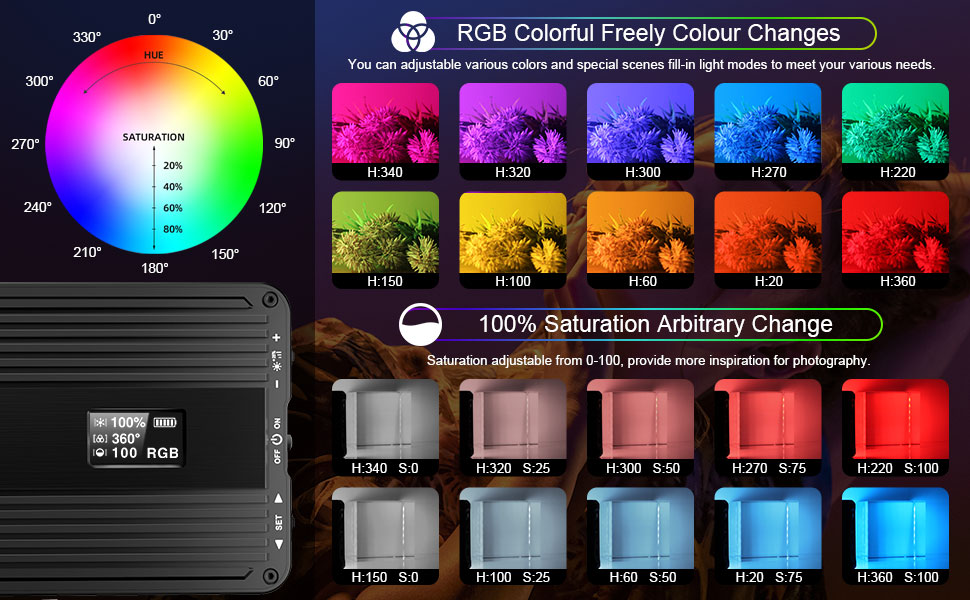
Figure 6: Visual guide for RGB color selection and saturation levels.
5.5 Special Effects (FLS) Mode
The G2 offers 9 built-in special effects. Cycle through these effects using the designated button or dial. Effects include SOS, Lightning 1, Lightning 2, TV Screen, Police, Ambulance, Fire Engine, RGB Slow, and RGB Fast.
6. Maintenance
- Cleaning: Use a soft, dry cloth to clean the light. Do not use abrasive cleaners or solvents.
- Storage: Store the light in a cool, dry place away from direct sunlight and extreme temperatures.
- Battery Care: To prolong battery life, avoid fully discharging the battery frequently. Recharge regularly.
7. Troubleshooting
- Light not turning on: Ensure the battery is charged. Connect to a USB-C power source.
- Brightness/Color not changing: Check if the correct mode is selected. Ensure dials are functioning correctly.
- Short battery life: Ensure the battery is fully charged. Reduce brightness settings for longer usage.
8. Specifications
| Attribute | Value |
|---|---|
| Brand | IVISII |
| Model Number | G2 |
| Product Dimensions | 5.59 x 2.83 x 0.59 inches |
| Item Weight | 11.3 ounces |
| Battery Capacity | 7.7V 4300mAh (32Wh) |
| Color Temperature Range | 2600K-10000K |
| CRI | >97 |
| TLCI | >99 |
| Charging Port | USB Type-C |
9. Warranty and Support
For warranty information or technical support, please refer to the contact details provided on the product packaging or visit the official IVISII website. Specific warranty terms may vary.


