
1. Introduction
The GUITTO GGP-01 is an innovative double pickup system engineered to enhance the acoustic sound of classic and acoustic guitars. It is compatible with guitars ranging from 36 to 42 inches. This system integrates both a piezoelectric pickup and dual microphones to capture a comprehensive range of sound nuances, ensuring a rich and authentic acoustic tone.

Figure 1: The GUITTO GGP-01 Double Pickup system, showing the main soundhole unit and the separate output jack.
2. Product Features
- Double Pickup System: Features dual microphones for detailed sound capture and a piezoelectric pickup for wider audio frequency range. This combination ensures a subtle, mellow tone, effectively capturing the "acoustic guitar" sound and deeper tapping sounds.
- EQ Adjustment Function: Equipped with controls to optimize sound effects for various guitars. Includes a phase reversal knob, allowing for both plus phase and anti-phase sound effects.
- Easy Installation: Designed with an exquisite buckle mechanism that securely attaches the pickup to the soundhole. The main unit does not require drilling into the soundhole itself.
- Minimum Noise: Incorporates shielding and strong anti-interference capacity to significantly reduce background noise.
- Long Battery Life: Capable of operating for over 40 hours continuously on a single CR2 battery.

Figure 2: Detailed view of the GGP-01 control panel.
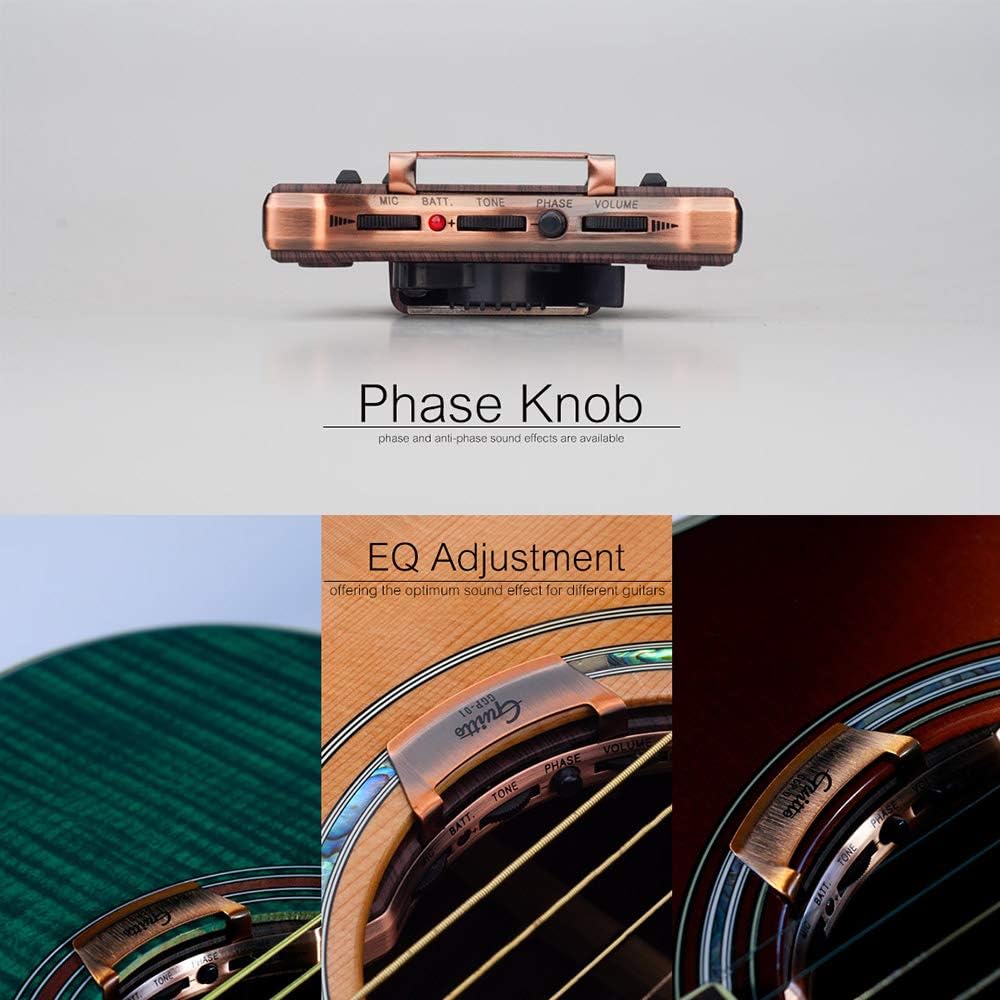
Figure 3: Rear view of the GGP-01, illustrating the secure buckle design for soundhole attachment.
Video 1: An overview of the GUITTO GGP-01 Guitar Soundhole Double Pickup, demonstrating its features and sound capabilities.
3. Installation Guide
The GGP-01 pickup is designed for straightforward installation. While the main soundhole unit clips on without drilling, full functionality utilizing the piezoelectric pickup and integrated output jack typically requires minor modifications to the guitar. It is recommended to consult a professional luthier if you are unsure about these steps.
3.1. Package Contents
Before beginning installation, ensure all components are present:
- GUITTO GGP-01 Soundhole Pickup Unit
- Piezoelectric Pickup (thin wire)
- Tail Nail's Connecting Wire (output jack assembly)
- Wire Clip
- CR2 Batteries (included)
- Owner's Manual
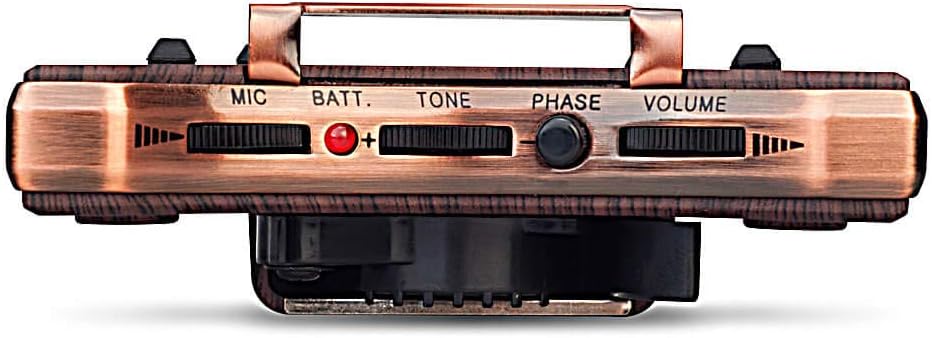
Figure 4: All components included in the GGP-01 package.
3.2. Piezoelectric Pickup Installation
- Carefully remove the saddle from the guitar bridge.
- Using a 2.5mm drill bit, drill a small hole in the bridge slot where the piezo pickup wire will be inserted. This allows the wire to pass through cleanly.
- Insert the end of the piezoelectric pickup wire into this drilled hole, ensuring it sits flush within the saddle slot.
- Place the saddle back into its slot, ensuring it rests directly on top of the piezoelectric pickup wire.

Figure 5: Detailed view of the piezoelectric pickup being installed under the saddle.
3.3. Tail Nail (Output Jack) Installation
- Locate the existing end pin at the bottom of your guitar. This will typically need to be removed.
- Using a 12mm drill bit, carefully enlarge the end pin hole to accommodate the GGP-01's output jack assembly. Exercise caution to avoid splintering the wood.
- Insert the tail nail's connecting wire (output jack) into the enlarged hole from the outside of the guitar body. Secure it firmly.

Figure 6: Internal wiring diagram showing the connection points for the main pickup unit, piezoelectric pickup, and tail nail output jack.
3.4. Wiring and Main Pickup Unit Installation
- Inside the guitar, connect the piezoelectric pickup wire to the designated input jack on the main GGP-01 soundhole pickup unit.
- Connect the tail nail's connecting wire (output jack) to the main GGP-01 soundhole pickup unit's output jack.
- Use the provided wire clip to neatly bundle and secure any excess wiring inside the guitar body, preventing rattling or interference.
- Carefully position the main GGP-01 soundhole pickup unit and secure it to the edge of the guitar's soundhole using its built-in buckle mechanism. Ensure it is firmly attached and does not obstruct the strings.

Figure 7: Securing internal wiring with the wire clip for a clean installation.

Figure 8: Final step of buckling the main pickup unit onto the guitar's soundhole.
4. Operating Instructions
Once installed, the GGP-01 offers intuitive controls for sound shaping.
4.1. Controls Overview
- MIC: Adjusts the volume of the internal microphones.
- BATT: Battery indicator light. A red light indicates low battery.
- TONE: Adjusts the treble and bass frequencies for overall sound shaping.
- PHASE: Phase reversal knob. Press to switch between normal and reversed phase, which can help reduce feedback in certain environments.
- VOLUME: Master volume control for the entire pickup system.
Figure 9: Detailed view of the control panel on the GGP-01 pickup.
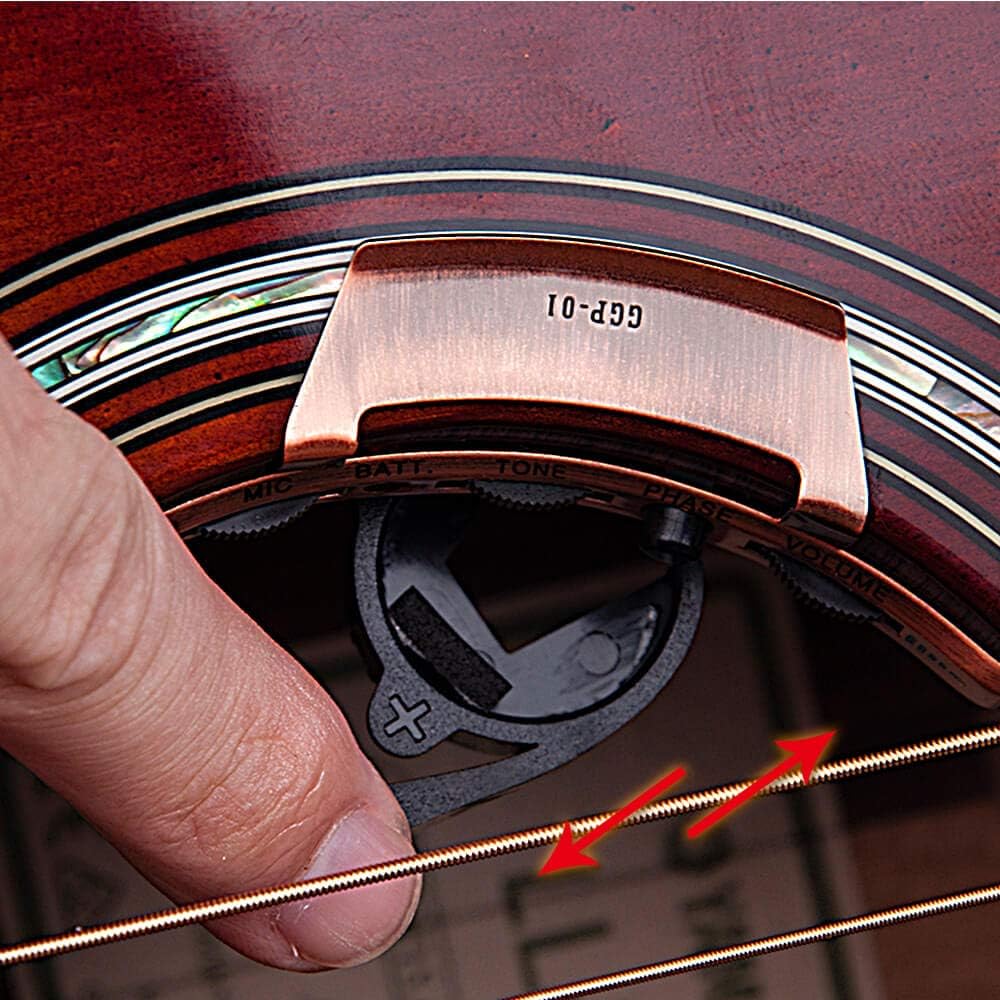
Figure 10: Adjusting the phase control for optimal sound and feedback reduction.
4.2. Battery Replacement
When the BATT indicator light turns red, it's time to replace the battery. The GGP-01 uses a CR2 battery.
- Carefully unclip the pickup from the soundhole.
- Locate the battery compartment on the underside of the pickup unit.
- Remove the old CR2 battery and insert a new one, ensuring correct polarity.
- Re-attach the pickup to the soundhole.

Figure 11: Inserting the CR2 battery into the designated slot on the pickup.
5. Specifications
| Feature | Detail |
|---|---|
| Item Weight | 5.3 ounces |
| Product Dimensions | 5.31 x 1.77 x 4.53 inches |
| Country of Origin | China |
| ASIN | B08D63ZDDK |
| Item Model Number | JOYO-GUITTO-GGP01 |
| Batteries | 1 CR2 battery required (included) |
| Compatible Devices | Classic Acoustic Guitar (36-42 inches) |
| Material Type | Aluminum |
| Battery Type | Lithium Manganese Dioxide |
6. Troubleshooting
If you encounter issues with your GGP-01 pickup, refer to the following common problems and solutions:
- No Sound Output:
- Check if the pickup is properly connected to the guitar amplifier.
- Ensure the battery is correctly installed and not depleted. Replace if necessary.
- Verify all internal connections (piezo pickup, tail nail, main unit) are secure.
- Confirm the VOLUME knob on the pickup is turned up.
- Weak or Distorted Sound:
- Check battery level; a low battery can cause weak output.
- Adjust the TONE and MIC knobs to find the optimal balance.
- Ensure the piezoelectric pickup is correctly seated under the saddle.
- Test with a different cable or amplifier to rule out external equipment issues.
- Excessive Noise or Feedback:
- Adjust the VOLUME and MIC knobs to lower levels.
- Press the PHASE reversal knob to see if it reduces feedback.
- Ensure internal wiring is neatly bundled and not touching the guitar body where it could vibrate.
- Move away from the amplifier or adjust its position.
- Battery Indicator (BATT) is Red:
- This indicates a low battery. Replace the CR2 battery as described in Section 4.2.
7. Maintenance
Proper maintenance will ensure the longevity and optimal performance of your GUITTO GGP-01 pickup.
- Cleaning: Use a soft, dry cloth to wipe down the pickup unit. Avoid using harsh chemicals or abrasive materials.
- Storage: When not in use for extended periods, remove the battery to prevent leakage and damage. Store the pickup in a cool, dry place.
- Handling: Handle the pickup and its components with care. Avoid dropping or subjecting it to excessive force.