Introduction
This manual provides detailed instructions for the assembly, operation, and maintenance of your SONGMICS VASAGLE L-Shaped Computer Desk. Please read these instructions carefully before assembly and use to ensure safe and correct operation. Keep this manual for future reference.
Safety Instructions
- Ensure all parts are present and undamaged before beginning assembly. Do not use if any parts are missing or damaged.
- Assemble the desk on a soft, clean surface to prevent scratches.
- Tighten all screws and bolts securely, but do not overtighten. Periodically check and retighten fasteners as needed.
- Do not stand or sit on the desk.
- Distribute weight evenly across the desk surface. Avoid placing heavy items on one side only.
- Keep small parts away from children during assembly to prevent choking hazards.
- Use the desk only for its intended purpose as a computer or workstation.
Package Contents
Before assembly, verify that all components listed below are present. Refer to the included assembly diagram for specific part identification.
- Desk panels (L-shaped main surface, keyboard tray)
- Steel frame components (X-shaped tubes, support bars)
- Adjustable feet
- Assembly hardware (screws, bolts, Allen wrench)
- Instruction manual
Setup and Assembly Instructions
Assembly is designed to be straightforward. Follow the numbered steps in the provided assembly diagram. It is recommended to have two people for assembly.
- Step 1: Unpack and Identify Parts
Carefully unpack all components and lay them out on a clean, soft surface. Compare each part to the parts list in the separate assembly diagram to ensure everything is present. - Step 2: Assemble the Steel Frame
Begin by connecting the X-shaped steel tubes and horizontal support bars according to the diagram. Hand-tighten screws initially. - Step 3: Attach Desk Panels
Place the L-shaped desk panels onto the assembled steel frame. Align the pre-drilled holes and secure the panels using the provided screws. Ensure the corner cut-out for cables is correctly oriented.
Image: The fully assembled L-shaped computer desk, showcasing its vintage brown desktop and sturdy black steel frame with X-shaped supports.
- Step 4: Install Keyboard Tray
Attach the sliding keyboard tray mechanism to the underside of the desk, then secure the keyboard tray itself. Ensure it slides smoothly.
Image: A detailed view of the integrated sliding keyboard tray, designed to hold a keyboard and mouse, enhancing ergonomic use.
- Step 5: Attach Adjustable Feet
Screw the adjustable feet into the bottom of the desk legs. These feet allow for leveling the desk on uneven floors.
Image: A close-up demonstrating the adjustable feet at the base of the desk legs, which can be rotated to stabilize the desk on uneven surfaces.
- Step 6: Final Tightening
Once all parts are assembled, go back and fully tighten all screws and bolts using the provided Allen wrench. Do not overtighten.

Image: The L-shaped desk integrated into a modern home office setting, featuring a computer, laptop, and various office accessories, demonstrating its functional use.
Operating Instructions
The SONGMICS VASAGLE L-Shaped Computer Desk is designed for versatile use in home offices, studies, or gaming setups.
- Placement: Position the desk in a corner to maximize space utilization. Ensure adequate clearance for the keyboard tray to slide in and out.
- Cable Management: Utilize the cut-out in the back corner of the desk for routing cables from monitors, computers, and other peripherals, helping to keep your workspace tidy.
- Keyboard Tray: The sliding keyboard tray provides an ergonomic position for your keyboard and mouse, freeing up main desk surface space.
- Weight Distribution: For optimal stability, distribute the weight of your equipment and items evenly across the desk surface. The desk is designed to support standard computer setups.
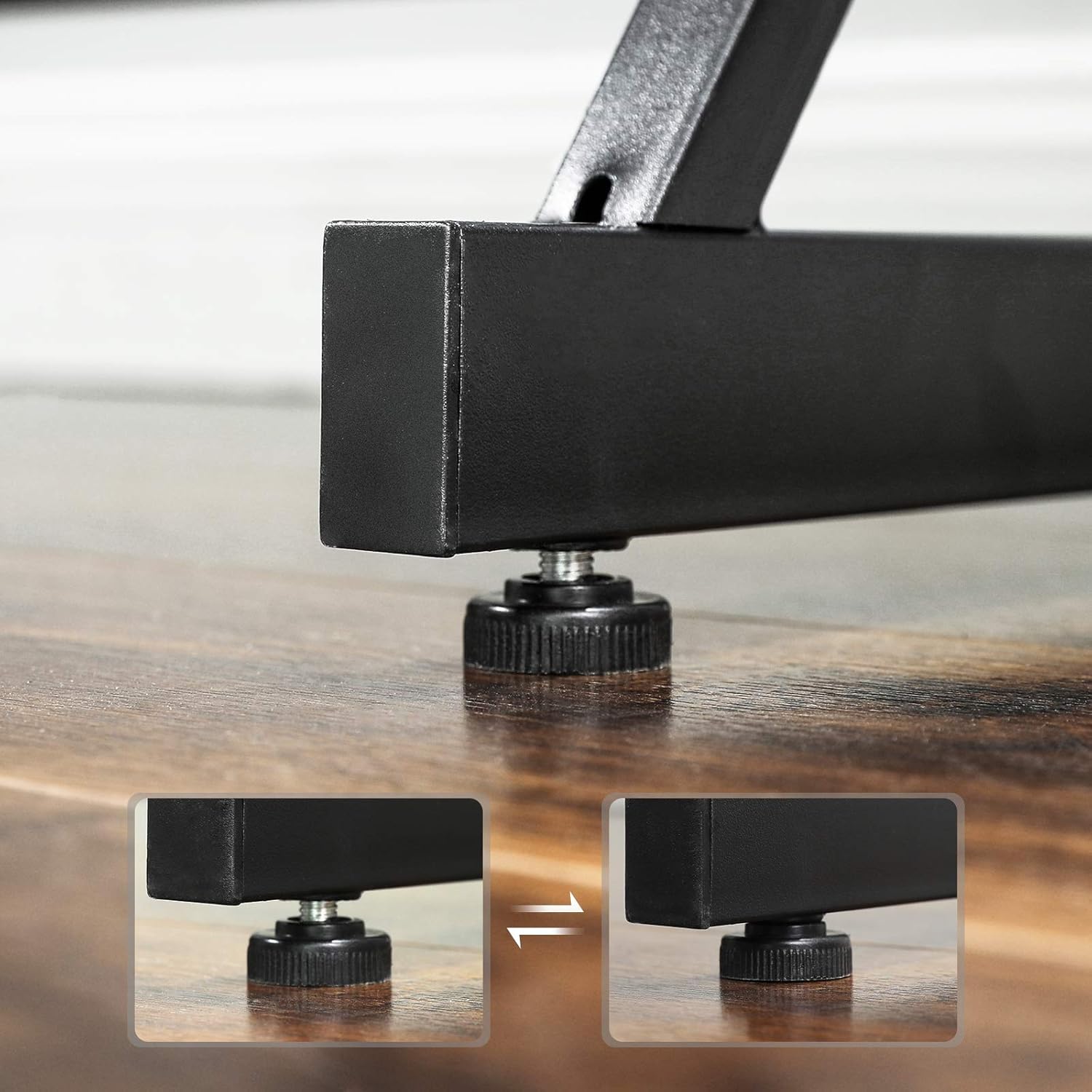
Image: The L-shaped desk with a computer tower neatly placed in the corner space beneath the desktop, illustrating efficient use of the desk's design.
Maintenance
Regular maintenance will help prolong the life and appearance of your desk.
- Cleaning: Wipe the desk surfaces with a soft, damp cloth. Avoid abrasive cleaners or harsh chemicals that could damage the melamine veneer.
- Spills: Clean up spills immediately to prevent water damage or staining to the engineered wood panels.
- Fasteners: Periodically check all screws and bolts to ensure they remain tight. Retighten as necessary to maintain stability.
- Avoid Heat and Moisture: Do not place hot items directly on the desk surface without protection. Avoid excessive moisture.
Troubleshooting
| Problem | Possible Cause | Solution |
|---|---|---|
| Desk is wobbly or unstable. | Loose fasteners; uneven floor. | Check and tighten all screws and bolts. Adjust the leveling feet on the bottom of the desk legs. |
| Keyboard tray does not slide smoothly. | Improper installation; debris in tracks. | Ensure the tray is installed correctly according to the assembly diagram. Clean the sliding tracks of any dust or debris. |
| Parts missing or damaged upon arrival. | Manufacturing or shipping error. | Contact SONGMICS customer support with your purchase details for replacement parts. |
Specifications
- Brand: SONGMICS
- Model: L-Shaped Computer Desk
- Overall Dimensions (L x W x H): 150 cm x 138 cm x 75 cm (59.1 in x 54.3 in x 29.5 in)
- Material: Engineered Wood (Particleboard with Melamine Veneer), Steel Alloy Frame
- Color: Vintage Brown and Black
- Special Features: L-shaped design, Sliding Keyboard Tray, Adjustable Leveling Feet, Cable Management Corner Cut-out, X-shaped Steel Frame
- Weight Capacity: Refer to specific product packaging or contact customer support for detailed load limits.

Image: A technical diagram illustrating the precise dimensions of the L-shaped desk, including length, width, and height measurements for both main sections and the keyboard tray.
Warranty and Support
SONGMICS products are designed for quality and durability. For warranty information, replacement parts, or technical assistance, please contact SONGMICS customer support through your purchase platform or the official SONGMICS website.
Please have your purchase receipt and product model information ready when contacting support.
Note: Specific warranty terms may vary by region and retailer.


