Introduction
Thank you for purchasing the Hitachi S-blade RMH-F470B Electric Shaver. This shaver is designed to provide a smooth and comfortable shaving experience with its stainless steel 4-blade system and flexible 3D head. Please read this manual thoroughly before use to ensure proper operation, maintenance, and safety.
Safety Information
WARNING:
- This shaver is a reciprocating type. Improper use may cause cuts. Handle with care.
- This is a rechargeable device. Exercise caution when handling the shaver during charging.
- If using the travel lock function, ensure the lock is released before attempting to use the shaver.
- The shaver body is washable, but do not immerse it in water.
- Always perform proper maintenance as described in this manual to ensure longevity and safe operation.
Package Contents
Please check that all the following items are included in your package:
- Hitachi S-blade RMH-F470B Shaver Unit
- Power Adapter
- Shaver Oil
- Cleaning Brush
- Shaver Case
- Warranty Card
- Instruction Manual (this document)

Image: Hitachi RMH-F470B shaver shown with its included travel case, highlighting its portability for business trips and travel.
Setup
1. Initial Charging
Before first use, fully charge the shaver. Connect the power adapter to the shaver and plug it into an electrical outlet. The charging indicator lamp will illuminate. A full charge takes approximately 5 hours and provides about 15 days of use (based on 3 minutes per day).
2. Travel Lock
The shaver features a travel lock function to prevent accidental activation. To activate or deactivate the travel lock, press and hold the power button for approximately 3 seconds until the lock indicator appears or disappears.

Image: A close-up view of the shaver's power button, which also serves as the travel lock control, and the 'WASHABLE' text indicating its water-resistant design.
Operating Instructions
1. Shaving Technique
For optimal results, hold the shaver at a right angle to your skin and shave against the direction of hair growth. The 3D head and independent floating blades are designed to follow facial contours for a close and comfortable shave.

Image: The Hitachi RMH-F470B shaver demonstrating its 3D head movement, which can move 8 degrees left/right, 12 degrees front/back, and 2.5mm up/down to adapt to facial contours.
2. Foam Shaving
This shaver supports foam shaving. You can use shaving foam or facial cleanser to create a rich lather for a smoother shave. After foam shaving, rinse the shaver thoroughly to remove any foam residue.

Image: The Hitachi RMH-F470B shaver being used with shaving foam on a face, illustrating its compatibility with wet shaving methods.
Maintenance
1. Cleaning
The outer blade, inner blade, and main body are washable. After each use, remove the outer foil and rinse the blades and shaver head under running water. Use the included cleaning brush to remove any stubborn hair clippings. Ensure the power adapter is disconnected from the shaver before cleaning.
2. Lubrication
Apply a drop of the included shaver oil to the blades periodically (e.g., once a week) to maintain optimal performance and blade sharpness.
3. Blade Replacement
For continued excellent shaving performance, it is recommended to replace the outer and inner blades periodically. The replacement outer blade is K-NS1 and the inner blade is K-NU1. Refer to the separate instruction manual for blade replacement details.

Image: A detailed view of the shaver's stainless steel 4-blade system and the independent float mechanism, where each of the four blades moves independently to enhance skin contact.
Troubleshooting
| Problem | Possible Cause | Solution |
|---|---|---|
| Shaver does not turn on. | Battery is depleted. Travel lock is activated. | Charge the shaver. Deactivate the travel lock by pressing and holding the power button. |
| Poor shaving performance. | Blades are dull or dirty. | Clean the blades thoroughly. Apply shaver oil. Consider replacing the outer and inner blades. |
| Unusual noise during operation. | Hair clippings stuck in blades. Blades are worn. | Clean the blades. If noise persists, replace the blades. |
Specifications
- Model Number: RMH-F470B
- Dimensions: Width 6.4 cm × Height 16.6 cm × Depth 5.2 cm
- Weight: Approximately 196 g
- Blade Type: Reciprocating, Stainless Steel 4-blade system
- Head Type: 3D Head
- Power Source: Rechargeable (Ni-MH battery)
- Charging Time: Approximately 5 hours
- Operating Time: Approximately 15 days (based on 3 minutes/day)
- Features: Travel Lock, Washable (IPX7 standard for main unit)
- Accessories: Power Adapter, Shaver Oil, Cleaning Brush, Shaver Case, Warranty Card, Instruction Manual
- Replacement Outer Blade: K-NS1
- Replacement Inner Blade: K-NU1
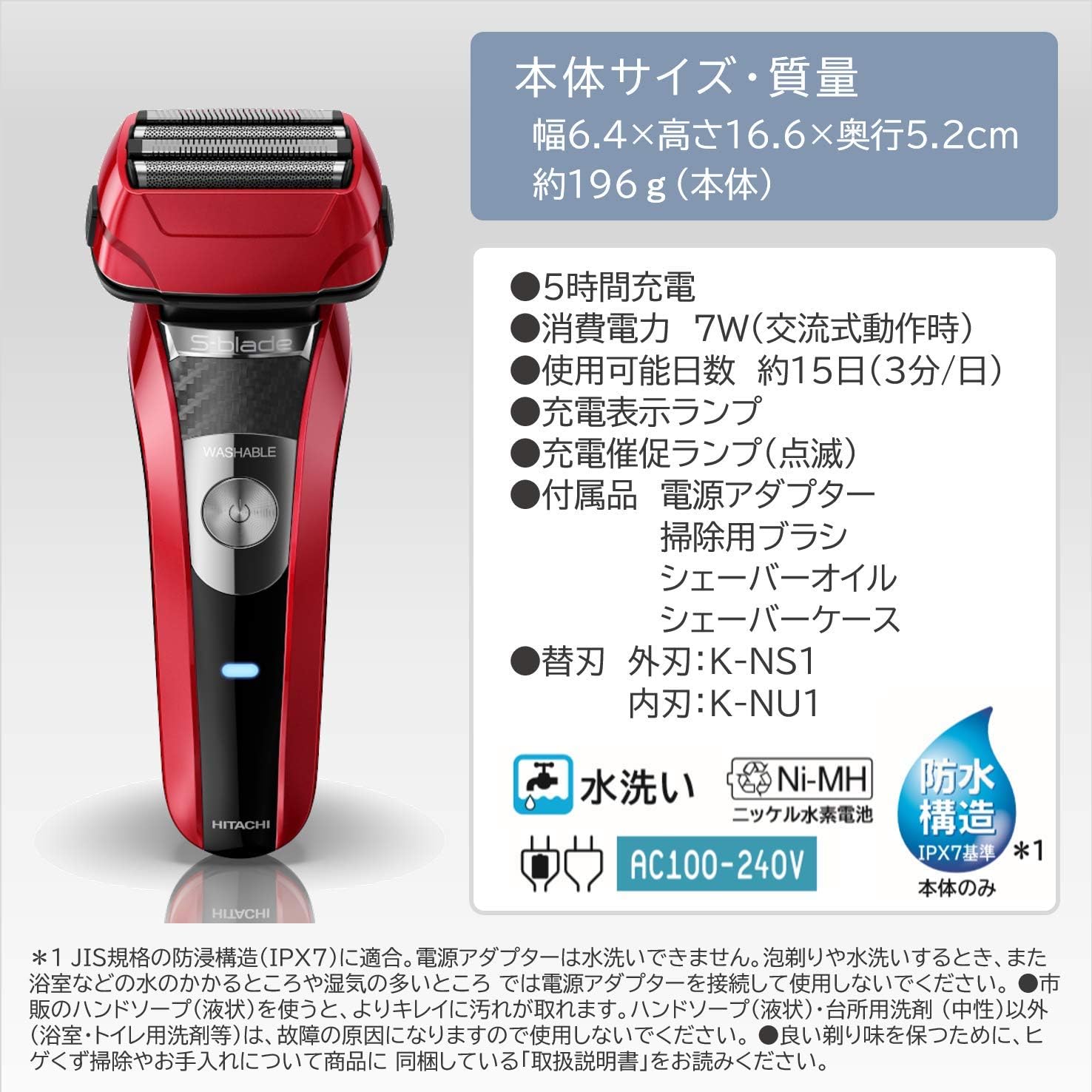
Image: A diagram illustrating the main specifications and features of the Hitachi RMH-F470B shaver, including dimensions, weight, charging time, and included accessories.
Warranty and Support
This product comes with a manufacturer's warranty. Please refer to the included warranty card for details regarding warranty period and terms. For product support, inquiries, or service, please contact Hitachi customer service. Contact information can typically be found on the warranty card or the official Hitachi website.
For more information, visit the official Hitachi store: Hitachi Official Store


