
Introduction
This manual provides essential instructions for setting up, operating, and maintaining your Haylou Solar 2AMQ6 LS05 Smartwatch. Please read this guide thoroughly to ensure optimal performance and longevity of your device. The Haylou Solar 2AMQ6 LS05 is a modern smartwatch designed for fitness tracking and smart notifications, compatible with both Android and iOS devices. It features a metal body, 12 sports modes, science-based sleep management, 24-hour heart rate monitoring, and up to 30 days of standby time.

Figure 1: Haylou Solar 2AMQ6 LS05 Smartwatch highlighting its metal body, 12 sports modes, sleep management, 24-hour heart rate monitoring, and 30-day standby time.
Package Contents
Upon opening the package, ensure all the following items are present:
- Haylou Solar 2AMQ6 LS05 Smartwatch (with black rubber band)
- Charging Cable
- User Manual (this document)

Figure 2: The Haylou Solar 2AMQ6 LS05 Smartwatch, featuring a round display and a black rubber strap.
Setup
1. Charging the Smartwatch
Before initial use, fully charge your smartwatch. Connect the charging cable to the charging port on the back of the watch and plug the USB end into a compatible power adapter (not included) or a computer's USB port. The watch display will indicate charging status. A full charge provides up to 30 days of standby time or 15 days with continuous heart rate monitoring.

Figure 3: The smartwatch connected to its charging cable, displaying the charging percentage.
2. App Installation and Pairing
- Download the official Haylou Fit app from your smartphone's app store (available for Android and iOS).
- Enable Bluetooth on your smartphone.
- Open the Haylou Fit app and follow the on-screen instructions to create an account or log in.
- Select "Add Device" or similar option within the app and choose your Haylou Solar 2AMQ6 LS05 from the list of nearby devices.
- Confirm the pairing request on both your smartwatch and smartphone.
Operating Instructions
Basic Navigation
The Haylou Solar 2AMQ6 LS05 features a touch-sensitive LCD screen for navigation.
- Swipe Up/Down: Scroll through menus and notifications.
- Swipe Left/Right: Access quick functions or different data screens.
- Tap: Select an item or confirm an action.
- Press Side Button: Return to the home screen or power on/off the device.

Figure 4: The smartwatch display showing clear content even in varying light conditions, thanks to its TFT high-definition screen.
Sports Modes
The smartwatch supports 12 different sports modes to track your activities accurately. To access, swipe to the sports mode menu and select your desired activity.
- Outdoor Running
- Walking
- Cycling
- Mountaineering
- Sports Cycling
- Yoga
- Indoor Running
- Free Training
- Gymnastics
- Basketball
- Football
- Boating

Figure 5: Visual representation of the 12 distinct sports modes available on the smartwatch.
Health Monitoring
The Haylou Solar 2AMQ6 LS05 provides continuous health monitoring features:
- Heart Rate Monitoring: Tracks your heart rate 24 hours a day.
- Sleep Management: Analyzes your sleep patterns to help improve sleep quality.
- Activity Tracking: Records steps, distance, and calories burned throughout the day.
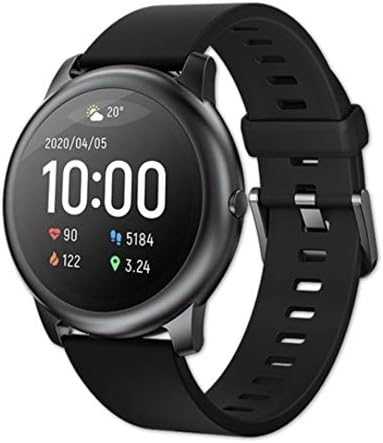
Figure 6: The smartwatch display showing current time, date, heart rate, step count, and distance covered.
Notifications and Other Features
Once paired with your smartphone, the smartwatch can display notifications for calls, messages, and app alerts. It also includes a built-in GPS for accurate location tracking during outdoor activities and a microphone for voice assistant interaction.

Figure 7: Examples of various watch faces and notification displays, including call alerts and activity goals.
Maintenance
Water Resistance
The Haylou Solar 2AMQ6 LS05 has an IP68 waterproof rating, meaning it is resistant to dust and can withstand immersion in water up to 1.5 meters for 30 minutes. It is suitable for daily use, such as hand washing or light rain. However, it is not recommended for swimming, diving, or high-pressure water activities.

Figure 8: The smartwatch demonstrating its IP68 waterproof rating by being splashed with water.
Cleaning and Care
- Wipe the watch and band regularly with a soft, dry cloth.
- If necessary, use a slightly damp cloth for cleaning, then dry thoroughly.
- Avoid using harsh chemicals, abrasive cleaners, or solvents.
- Ensure the charging contacts are clean and dry before charging.
Troubleshooting
| Problem | Possible Solution |
|---|---|
| Watch does not turn on | Ensure the watch is fully charged. Press and hold the side button for several seconds. |
| Cannot pair with smartphone |
|
| Inaccurate heart rate/activity data |
|
| Notifications not appearing |
|
Specifications
| Feature | Detail |
|---|---|
| Brand | Haylou |
| Model Name | Solar 2AMQ6 LS05 |
| Operating System Compatibility | iOS, Android |
| Connectivity Technology | Bluetooth |
| Special Features | Built-in GPS |
| Item Shape | Round |
| Screen Size | 30 mm |
| Display Type | LCD Screen |
| Resolution | 240 x 240 |
| Case Material | Stainless Steel |
| Band Material | Rubber |
| Band Color | Black |
| Water Resistance Level | Waterproof (IP68) |
| Sport Types Supported | Fitness, Multi-sport (12 modes) |
| Control Type | Touch Control |
| Human Interface Input | Microphone |
| Supported Applications | Fitness Tracker, Phone, Voice Assistant |
| Included Components | Smartwatch Band, Charging Cable |
Warranty and Support
For detailed warranty information, please refer to the warranty card included with your product or visit the official Haylou website. If you encounter any issues not covered in this manual, please contact Haylou customer support through their official channels.


