
1. Introduction
Thank you for choosing the SALTER Ronda PT-1970 Exercise Bike. This manual provides essential information for the safe assembly, operation, and maintenance of your new fitness equipment. Please read this manual thoroughly before use and keep it for future reference.
The SALTER Ronda PT-1970 is designed for home use, offering easy access, making it suitable for seniors or users with reduced mobility. It features a magnetic resistance system for smooth and quiet operation, an adjustable seat and handlebar, and an LCD monitor to track your workout progress.
2. Safety Information
- Consult your physician before starting any exercise program.
- Always place the exercise bike on a flat, stable surface.
- Keep children and pets away from the equipment during use.
- Ensure all bolts and nuts are securely tightened before each use.
- Wear appropriate exercise clothing and footwear.
- Stop exercising immediately if you feel faint, dizzy, or experience pain.
- The maximum user weight for this bike is 130 kg.
- Do not attempt to modify the equipment.
3. Package Contents
Carefully unpack the box and ensure all components are present. If any parts are missing or damaged, contact customer support.
- Complete SALTER Ronda PT-1970 Exercise Bike (main frame, handlebars, seat, pedals, bases)
- LCD Monitor
- Monitor Batteries (4 x AAA)
- Assembly Tools (wrenches, Allen keys)
- User Manual (this document)
4. Assembly Instructions
Follow these steps to assemble your SALTER Ronda PT-1970 Exercise Bike. It is recommended to have two people for assembly.
- Attach Stabilizer Bases: Secure the front and rear stabilizer bases to the main frame using the provided bolts and washers. Ensure the leveling feet are facing downwards.
- Install Pedals: Identify the left (L) and right (R) pedals. The left pedal screws counter-clockwise, and the right pedal screws clockwise. Tighten them firmly.
- Mount Seat Post and Seat: Insert the seat post into the main frame and secure it at the desired height using the adjustment knob. Attach the seat to the seat post.
- Attach Handlebar Post and Handlebars: Connect the handlebar post to the main frame. Route any necessary cables through the post. Attach the handlebars to the handlebar post.
- Install LCD Monitor: Connect the sensor cables from the handlebar post to the back of the LCD monitor. Insert the 4 AAA batteries into the monitor. Mount the monitor onto the handlebar post.

Image: Full view of the SALTER Ronda PT-1970 exercise bike with dimensions indicated (148cm H x 110cm L x 52cm W).

Image: Left side view of the assembled SALTER Ronda PT-1970 exercise bike, showing the main components.
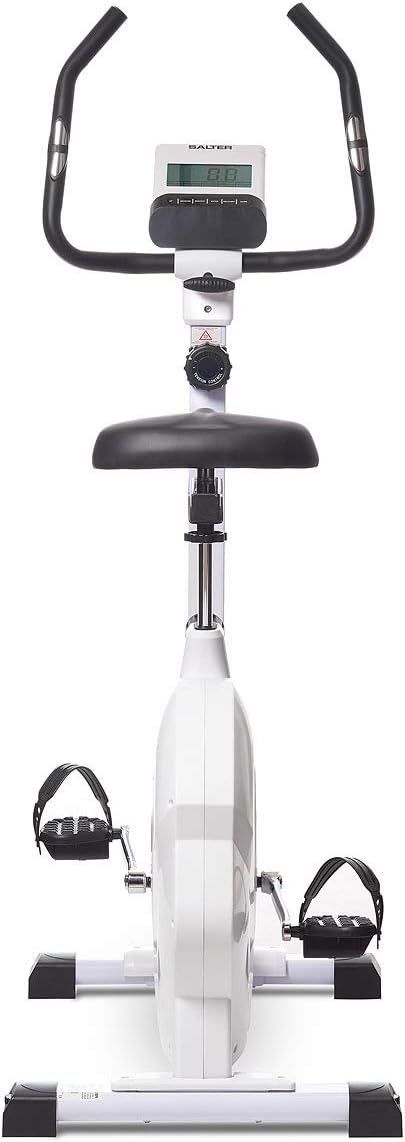
Image: Front view of the SALTER Ronda PT-1970 exercise bike, highlighting the handlebars and LCD monitor.
5. Adjustments
5.1 Seat Adjustment
The seat can be adjusted both vertically and horizontally to achieve an optimal and comfortable riding position.
- Vertical Adjustment: Loosen the vertical adjustment knob located on the seat post. Raise or lower the seat to the desired height. Ensure the seat post is inserted past the minimum insertion mark. Tighten the knob firmly.
- Horizontal Adjustment: Loosen the horizontal adjustment knob located under the seat. Slide the seat forward or backward to your preferred position. Tighten the knob firmly.

Image: Close-up of the seat post and horizontal adjustment mechanism, showing the knob for sliding the seat.

Image: Close-up of the seat height adjustment knob, used to secure the seat at the desired vertical position.
5.2 Handlebar Adjustment
The handlebar angle can be adjusted to provide a comfortable grip and varied workout positions.
- Loosen the handlebar adjustment knob located at the base of the handlebars. Adjust the angle of the handlebars to your preference. Tighten the knob firmly to secure the position.

Image: Close-up of the handlebar base, showing the adjustment knob and the tension control dial.
6. Operating Instructions
6.1 Resistance Control
The SALTER Ronda PT-1970 features 8 levels of magnetic resistance, allowing you to customize your workout intensity.
- Turn the tension control knob, located below the handlebars, clockwise to increase resistance (higher numbers).
- Turn the knob counter-clockwise to decrease resistance (lower numbers).
Image: The tension control knob with resistance levels 1-8 clearly visible.
6.2 LCD Monitor Functions
The easy-to-use LCD monitor provides real-time feedback on your workout:
- TIME: Displays the duration of your workout.
- SPEED: Shows your current cycling speed.
- DISTANCE: Tracks the total distance covered during your session.
- CALORIES: Estimates the calories burned during your workout.
- PULSE: Shows your heart rate when holding the pulse sensors.
6.3 Pulse Measurement
To measure your heart rate, firmly grip the contact sensors located on the handlebars. Your pulse will be displayed on the LCD monitor after a few seconds.
7. Maintenance
Regular maintenance ensures the longevity and optimal performance of your exercise bike.
- Cleaning: Wipe down the bike with a damp cloth after each use to remove sweat and dust. Do not use abrasive cleaners.
- Inspection: Periodically check all bolts, nuts, and moving parts for tightness and wear. Tighten any loose fasteners.
- Lubrication: The magnetic resistance system requires no lubrication.
- Storage: Store the bike in a dry, cool place away from direct sunlight and extreme temperatures. The integrated wheels allow for easy relocation.

Image: Close-up of a leveling foot, which can be adjusted to stabilize the bike on uneven surfaces.
8. Troubleshooting
If you encounter any issues, refer to the following common problems and solutions:
- Monitor Not Displaying:
- Check if the batteries are correctly installed and not depleted. Replace if necessary (4 x AAA).
- Ensure all cables connecting the monitor to the bike are securely plugged in.
- Inaccurate Pulse Reading:
- Ensure your hands are firmly gripping both pulse sensors.
- Make sure your hands are clean and free of lotions or excessive moisture.
- Unusual Noises During Operation:
- Check all visible bolts and nuts for tightness. Tighten any loose fasteners.
- Ensure the bike is on a level surface and the leveling feet are properly adjusted.
- Resistance Not Changing:
- Verify that the tension control knob is turning freely and engaging the resistance mechanism.
9. Specifications
| Model Name | SALTER Ronda PT-1970 |
| Brand | SALTER |
| Resistance Mechanism | Magnetic |
| Number of Resistance Levels | 8 |
| Flywheel Equivalent Weight | 7 kg |
| Product Dimensions (L x W x H) | 110 x 52 x 148 cm |
| Product Weight | 32 kg |
| Maximum User Weight | 130 kg |
| Power Source (Monitor) | 4 x AAA Batteries (included) |
| Material | Alloy Steel |
| Color | White |
10. Warranty and Support
For warranty information or technical support, please refer to the warranty card included with your product or contact SALTER customer service directly. Keep your proof of purchase for any warranty claims.
You can visit the SALTER brand store for more information: SALTER Brand Store


