
1. Introduction
This manual provides instructions for the BOMAZ RAV491 replacement remote control. This remote is designed to function as a direct replacement for the original remote controls of various Yamaha AV receiver models, including RX-V765, RX-V665, HTR-3067, HTR-5064, YHT-4910U, RX-V377, and YHT-595BL. It offers stable performance and is ready for use without complex programming for the primary receiver functions.
The remote features a slim design for comfortable handling and is constructed from durable ABS material.
2. Setup: Battery Installation
The remote control requires two AAA batteries (not included) for operation. Follow these steps to install the batteries:
- Locate the battery compartment cover on the back of the remote control.
- Press down on the tab and slide the cover downwards to open the compartment.
- Insert two AAA batteries, ensuring the positive (+) and negative (-) terminals align correctly with the markings inside the compartment.
- Slide the battery compartment cover back into place until it clicks securely.
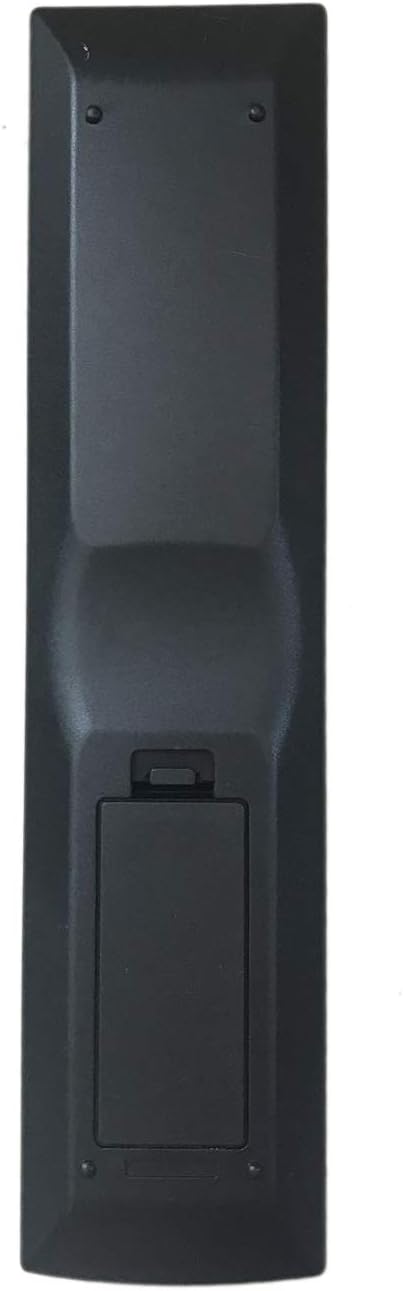
Image: Back view of the remote control with the battery compartment.

Image: Illustration of battery insertion into the remote control.
After battery installation, the remote control is ready for immediate use with your compatible Yamaha AV receiver. No additional programming is required for the receiver's primary functions.
3. Operating Instructions
This remote control is designed to replicate the functionality of your original Yamaha AV receiver remote. It operates directly with compatible Yamaha AV receivers without requiring any setup or code entry for the receiver's core functions.

Image: Front view of the remote control, displaying all buttons.
Key Functions:
- Power On/Off: Use the POWER button (usually at the top right) to turn the receiver on or off.
- Input Selection: Buttons labeled SOURCE, HDMI 1-4, AV 1-2, AUDIO 1-2, USB, V-AUX allow you to select different input sources connected to your receiver.
- Volume Control: Use the VOLUME + and VOLUME - buttons to adjust the audio level. The MUTE button silences the audio.
- Navigation and Menu: The directional arrow buttons (UP, DOWN, LEFT, RIGHT) and ENTER button are used to navigate menus on your receiver's display. SETUP accesses the main setup menu, RETURN goes back to the previous screen, and DISPLAY changes display modes.
- Tuner Functions: Buttons like FM, AM, PRESET, TUNING are for controlling the receiver's radio tuner.
- Scene Selection: SCENE buttons (BD/DVD, TV, CD, RADIO) allow for quick recall of pre-configured settings for different activities.
- Playback Controls: Standard playback buttons (PLAY, PAUSE, STOP, FAST FORWARD, REWIND, SKIP) are available for compatible media sources.
- Numeric Keypad: Use the number buttons (0-9) for direct input or channel selection.
- TV Control Buttons: The remote includes dedicated TV POWER, TV VOL +, TV VOL -, TV CH +, TV CH - buttons. While the remote is primarily for the AV receiver and requires no setup for that, the functionality of these TV buttons may vary depending on your TV model and might require specific programming not covered by the "no programming" feature for the receiver.

Image: Remote control in use, interacting with a television.
4. Maintenance
To ensure the longevity and optimal performance of your remote control, follow these maintenance guidelines:
- Cleaning: Wipe the remote control regularly with a soft, dry cloth. For stubborn dirt, slightly dampen the cloth with water or a mild cleaning solution, then wipe dry immediately. Avoid using abrasive cleaners, solvents, or alcohol, as these can damage the surface.
- Battery Replacement: Replace batteries when the remote's response becomes sluggish or stops working. Always replace both batteries at the same time with new AAA batteries. Do not mix old and new batteries, or different types of batteries. Remove batteries if the remote will not be used for an extended period to prevent leakage.
- Storage: Store the remote in a cool, dry place away from direct sunlight, extreme temperatures, and high humidity.
- Avoid Drops: Protect the remote from physical impact, as drops can damage internal components.
5. Troubleshooting
If you experience issues with your remote control, refer to the following common troubleshooting steps:
- Remote Not Responding:
- Check the batteries. Ensure they are inserted correctly with the correct polarity (+/-).
- Replace the batteries with fresh AAA batteries. Weak or dead batteries are the most common cause of remote control issues.
- Ensure there are no obstructions between the remote control and the AV receiver's infrared sensor.
- Verify that you are within the operable distance (more than 8 meters) and pointing the remote directly at the receiver.
- Specific Buttons Not Working:
- If only certain buttons are unresponsive, it might indicate a physical issue with those buttons. Ensure they are not stuck.
- For TV control buttons, note that their functionality may require specific setup for your television, which is separate from the receiver's "no programming" feature.
- Interference: Strong light sources (like direct sunlight or fluorescent lights) can sometimes interfere with infrared signals. Try operating the remote in a different lighting condition.
If these steps do not resolve the issue, please refer to the "Warranty and Support" section for further assistance.
6. Specifications
| Brand | BOMAZ |
| Model Number | RAV491 |
| Compatible Devices | Yamaha AV Receivers (RX-V765, RX-V665, HTR-3067, HTR-5064, YHT-4910U, RX-V377, YHT-595BL) |
| Material | ABS Material |
| Operable Distance | More than 8 meters |
| Batteries Required | 2 x AAA batteries (not included) |
| Item Weight | 3.52 ounces |
| Package Dimensions | 9.57 x 4.29 x 1.06 inches |
| Color | Black |
| Special Feature | Ergonomic design |
7. Warranty and Support
This BOMAZ remote control comes with a 30-day warranty from the date of purchase. This warranty covers manufacturing defects and ensures the remote functions as described.
If you encounter any issues or have questions regarding the operation or functionality of your remote control, please contact the seller or retailer from whom you purchased the product. Provide your purchase details and a description of the issue for prompt assistance.