
Introduction
This manual provides detailed instructions for the installation, operation, and maintenance of your HUANUO Gaming Dual Monitor Wall Mount, model HNWDS1. Designed for monitors between 17 and 32 inches, each arm supports up to 17.6 lbs and is compatible with VESA 75x75mm and 100x100mm mounting patterns. Please read this manual thoroughly before installation and retain it for future reference.
Safety Information
- Weight Capacity: Do not exceed the maximum weight capacity of 17.6 lbs (8 kg) per arm. Overloading can result in serious injury or property damage.
- Monitor Size: Ensure your monitors are within the recommended size range of 17-32 inches.
- Wall Type: This mount is designed for installation on wood studs, solid concrete, or brick walls. DO NOT install on drywall alone.
- Professional Installation: If you are unsure about the installation process or wall type, consult a qualified professional.
- Children: Keep children away from the installation area. Small parts may be a choking hazard.
- Tools: Use appropriate tools and wear safety gear during installation.
Specifications
| Feature | Detail |
|---|---|
| Model Number | HNWDS1 |
| Mounting Type | Wall Mount |
| Material | Alloy Steel |
| Color | Matt Black |
| Compatible Screen Sizes | 17 to 32 inches |
| Weight Capacity (per arm) | 4.4 - 17.6 lbs (2 - 8 kg) |
| VESA Compatibility | 75x75mm, 100x100mm |
| Movement Type | Articulating, Swivel, Tilt, Rotate |
| Tilt Angle | +/-35 degrees |
| Swivel Angle | +/-90 degrees |
| Rotation | 360 degrees |
| Minimum Distance from Wall | 3.94 inches |
| Maximum Extension | 22.24 inches |
Note: Always verify your monitor's weight and VESA pattern before installation.

Figure 1: Monitor Size and Weight Compatibility (17-32 inches, up to 17.6 lbs)
Setup and Installation
Follow these steps for a secure and efficient installation of your HUANUO Dual Monitor Wall Mount.
1. Check VESA Compatibility
Ensure your monitors have VESA mounting holes (75x75mm or 100x100mm). If your monitor lacks VESA holes, a VESA adapter (sold separately) may be required.

Figure 2: Monitor with VESA Holes (75x75mm and 100x100mm patterns)

Figure 3: Monitor Without VESA Holes (Requires HUANUO HNMUA4 VESA Mount Adapter)
2. Choose a Compatible Wall Type
The mount can be securely installed on wood studs, solid concrete, or brick walls. It is not recommended for installation on drywall alone.

Figure 4: Compatible Wall Types for Installation

Figure 5: Wall Type Compatibility and Drywall Warning
3. Assembly Steps
All necessary instructions and hardware are included in the package. Follow the step-by-step guide provided with your product for detailed assembly. The process is designed for quick and easy setup, typically taking less than 10 minutes from unboxing to wall mounting.

Figure 6: Monitor Arm Extension and Retraction Capabilities

Figure 7: Wide Screen Compatibility with Dual 32-inch Monitors
Operating Instructions
The HUANUO Dual Monitor Wall Mount offers extensive adjustability to optimize your viewing experience and workspace ergonomics.
1. Adjusting Viewing Angle and Position
- Swivel: The arms can swivel +/-90 degrees, allowing you to easily share your screen or adjust for different tasks.
- Tilt: Adjust the monitor tilt from +35 to -35 degrees to reduce glare and find your optimal viewing angle.
- Rotation: Rotate your monitors 360 degrees to switch between landscape and portrait modes effortlessly.
- Height Adjustment: Raise your monitors to ergonomic heights, whether you are sitting or standing, to alleviate neck and shoulder strain.

Figure 8: Full Motion Adjustment for Optimal Viewing

Figure 9: Flexible Adjustment Options (Rotation, Tilt, Swivel)

Figure 10: Ergonomic Workspace with Wall-Mounted Monitors
2. Cable Management
The integrated cable management system helps keep your power cords and display cables organized and out of sight, contributing to a clutter-free workspace.
3. Stability and Workspace
Mounting your monitors on the wall eliminates monitor vibration often caused by desk shaking, providing a more stable and focused workspace compared to traditional desk mounts.
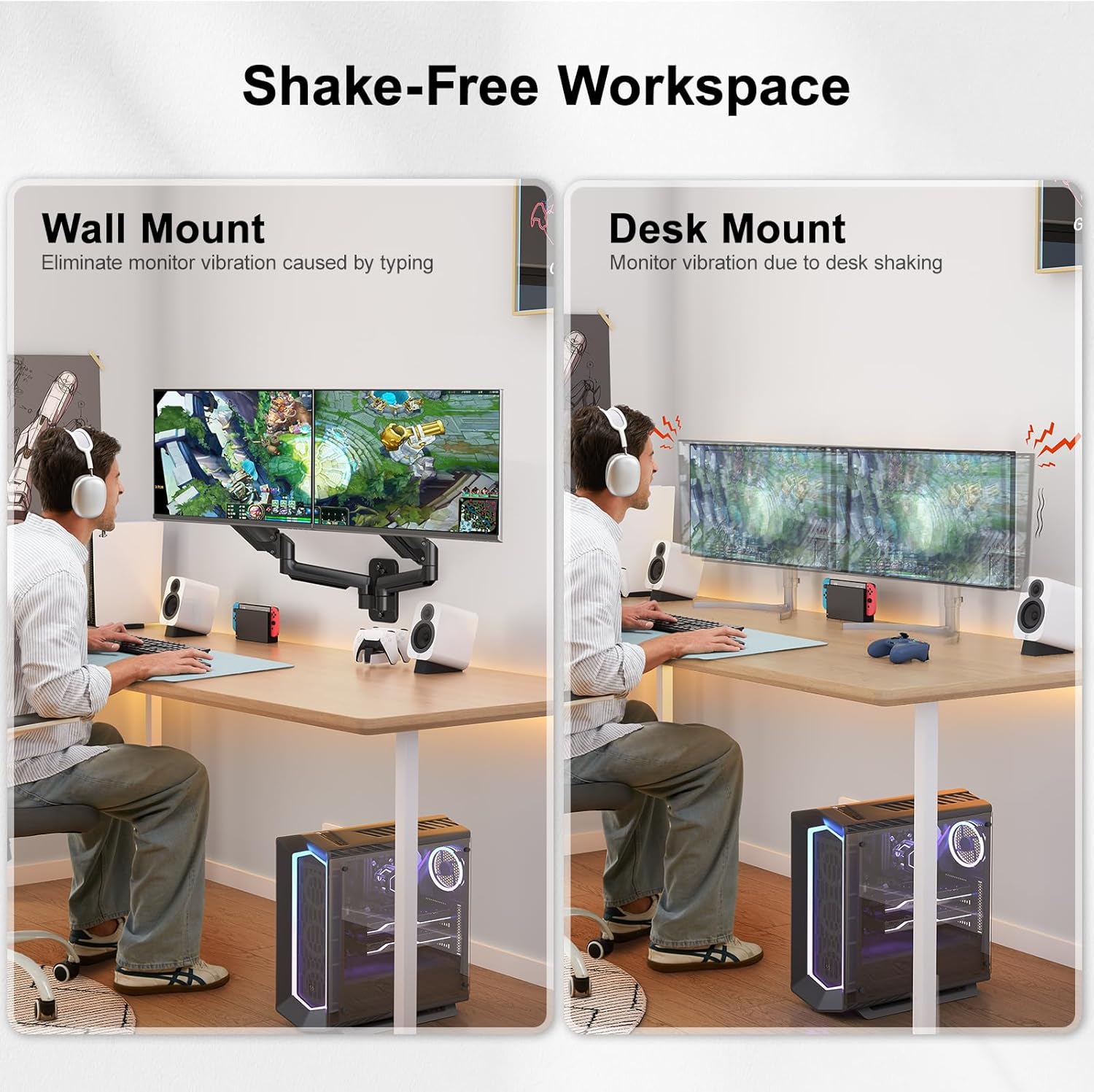
Figure 11: Wall Mount Provides a Shake-Free Workspace
4. Product Demonstration and Adjustment Guide
Watch this video for a visual demonstration of the HUANUO HNWDS1 Monitor Wall Mount and how to adjust it to your needs.
Video 1: HUANUO HNWDS1 Monitor Wall Mount Overview and Adjustment
Video 2: How to Adjust the Monitor Arm According to Your Needs
Maintenance
To ensure the longevity and optimal performance of your HUANUO Dual Monitor Wall Mount, follow these simple maintenance guidelines:
- Regular Cleaning: Wipe the mount with a soft, dry cloth to remove dust. Avoid abrasive cleaners or solvents.
- Check Connections: Periodically inspect all screws and bolts to ensure they are tight and secure. Retighten if necessary.
- Gas Spring Adjustment: If the monitor sags or does not hold its position, adjust the gas spring tension according to the instructions provided in the assembly guide.
Troubleshooting
If you encounter any issues with your monitor wall mount, refer to the following common solutions:
- Monitor Sags or Won't Stay Up: The gas spring tension may be too low for your monitor's weight. Increase the tension by turning the adjustment bolt clockwise (refer to your assembly guide for exact location and method).
- Monitor is Too Stiff to Move: The gas spring tension may be too high. Decrease the tension by turning the adjustment bolt counter-clockwise.
- Mount Feels Loose on the Wall: Recheck all wall mounting screws and ensure they are securely fastened into the appropriate wall structure (wood stud, concrete, or brick).
- Monitors Not Level: Adjust the tilt and rotation mechanisms on the VESA plate to fine-tune the monitor alignment.
Warranty
The HUANUO Gaming Dual Monitor Wall Mount (Model HNWDS1) comes with a lifetime warranty. Please retain your proof of purchase for warranty claims. For specific terms and conditions, refer to the warranty information provided with your product or contact customer support.
Support
For further assistance, technical support, or inquiries regarding your HUANUO product, please contact HUANUO customer service. You can typically find contact information on the HUANUO official website or through the retailer where you purchased the product.
We are committed to providing friendly customer service to address any of your needs.