
1. Introduction
Thank you for choosing the NICREW SlimLED Aquarium Light. This manual provides essential information for the safe and effective installation, operation, and maintenance of your new aquarium lighting system. This full-spectrum LED light is designed to promote healthy growth for freshwater aquarium plants and enhance the visual appeal of your aquatic environment.

Image 1.1: The NICREW SlimLED Aquarium Light with its integrated controller.
2. Safety Instructions
- Read all instructions carefully before use and retain for future reference.
- This product is designed for indoor use only. Do not use outdoors or in wet conditions other than over an aquarium.
- Do not submerge the light fixture or the power adapter in water.
- Always ensure your hands are dry before plugging in or unplugging the power adapter.
- Unplug the light from the power outlet before performing any maintenance, cleaning, or when handling the aquarium.
- Keep the light and its components out of reach of children and pets.
- Do not attempt to repair or modify the light. Refer all servicing to qualified personnel.
- Dispose of electrical waste responsibly according to local regulations.
3. Package Contents
Verify that all items are present in the package:
- NICREW SlimLED Aquarium Light Fixture
- Adjustable Mounting Brackets (pre-attached or separate)
- Power Adapter
- Instruction Manual
4. Product Features
- Full Spectrum Lighting: Combines 6500K bright white, 460nm blue, and 660nm red LEDs for optimal plant growth and vibrant aquatic colors.
- Adjustable Brightness: Offers 6 levels of brightness adjustment for both white/red and blue LED channels.
- Integrated Timer Function: Features 3 preset daylight timer modes (6H, 8H, 10H) and 3 moonlight timer modes (2H, 4H, 6H).
- Independent Channel Control: Blue and white/red LED channels can be controlled independently.
- Durable Construction: Aluminum alloy housing provides excellent heat dissipation and corrosion resistance, extending the lamp's lifespan.
- Adjustable Mounting Brackets: Extendable brackets allow for easy installation on various aquarium widths.
- Memory Function: Retains previous settings after power interruption.

Image 4.1: The aluminum alloy shell design ensures efficient heat dissipation and durability.
5. Installation
- Carefully unpack all components from the packaging.
- Attach the adjustable mounting brackets to the ends of the light fixture if they are not already pre-attached.
- Place the light fixture on the rim of your aquarium. Extend the brackets as needed to securely fit the width of your tank. Ensure the light is stable and level.
- Ensure the light fixture is securely positioned and that no part of the electrical components can fall into the water. The light itself is IP67 rated, but the power adapter is not.
- Connect the power adapter cable to the light fixture's input port.
- Plug the power adapter into a suitable electrical outlet.
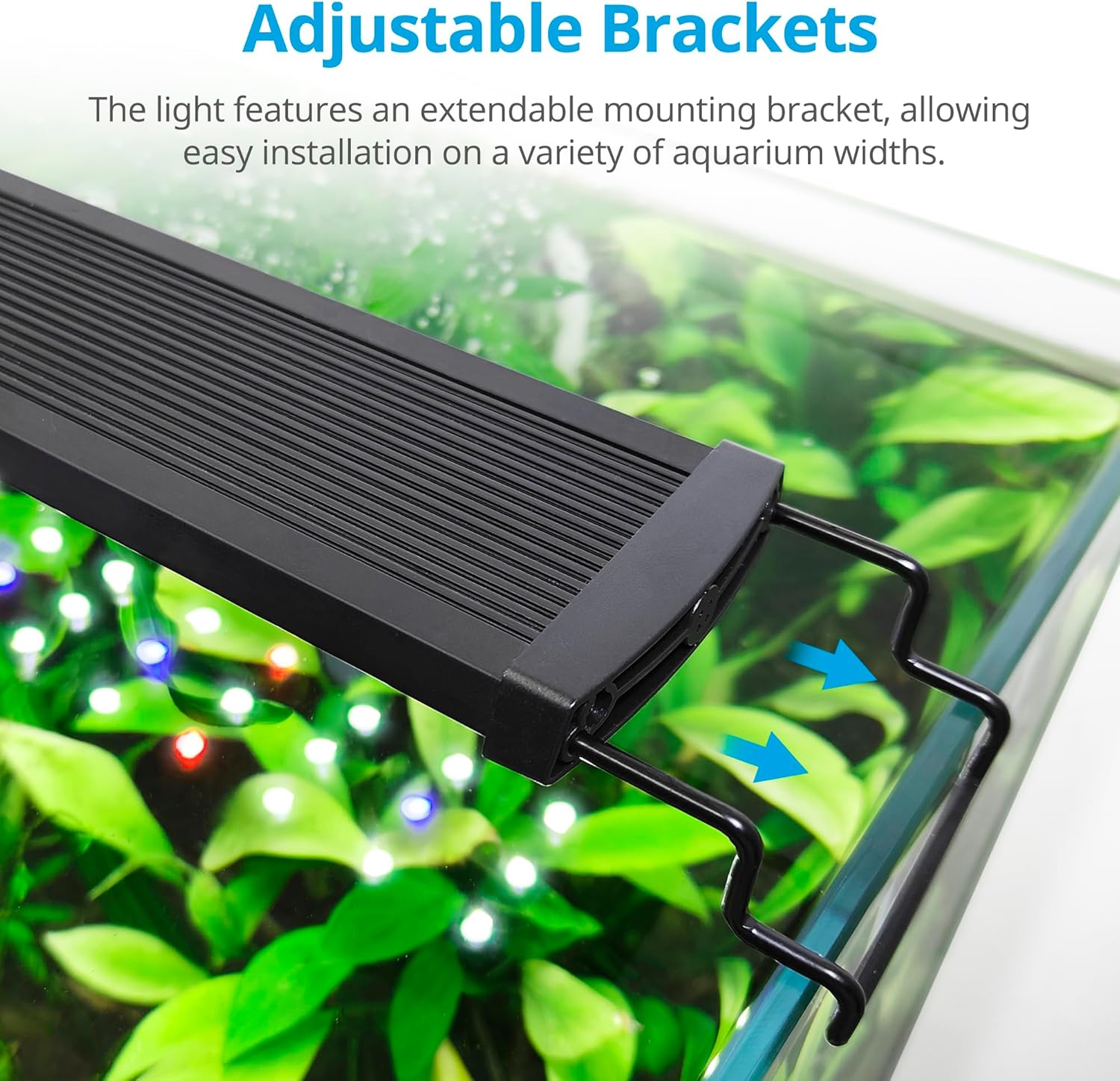
Image 5.1: The adjustable brackets allow for flexible installation on various aquarium sizes.
6. Operation
6.1 Controller Overview
The light is operated via an inline controller with three buttons:
- Power Button (⏻): Long press to turn the light ON or OFF. Short press to switch between different lighting modes (e.g., full spectrum, blue only).
- W/D Button (White/Daylight): Adjusts the brightness of the white and red LEDs. Also used to set the daylight timer.
- B/N Button (Blue/Night): Adjusts the brightness of the blue LEDs. Also used to set the moonlight timer.
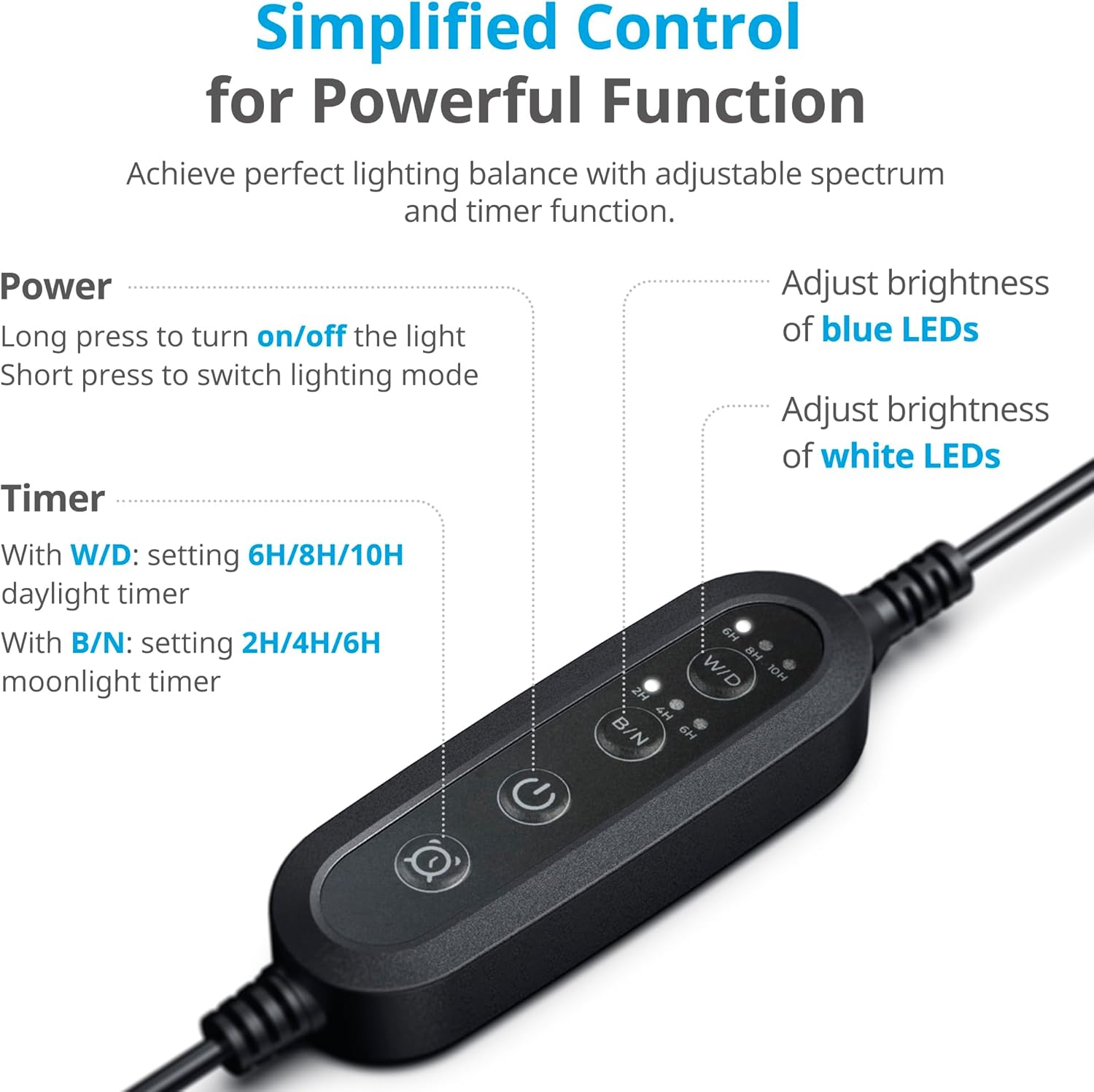
Image 6.1: Simplified control panel for power, timer, and brightness adjustments.
6.2 Setting Timer Modes
The light features a memory function, so your settings will be saved even after a power outage.
- Daylight Timer (W/D): Short press the W/D button to cycle through the preset daylight timer options: 6 hours, 8 hours, or 10 hours. The selected duration will be indicated by an LED light on the controller. The light will automatically turn on at the same time each day for the set duration.
- Moonlight Timer (B/N): Short press the B/N button to cycle through the preset moonlight timer options: 2 hours, 4 hours, or 6 hours. The selected duration will be indicated by an LED light on the controller. The blue light will automatically turn on at the same time each day for the set duration.

Image 6.2: The timer function simulates natural sunrise and sunset effects for a realistic environment.
6.3 Adjusting Brightness
- White/Red LEDs Brightness: When the light is in daylight mode, short press the W/D button to cycle through 6 brightness levels: 5%, 20%, 40%, 60%, 80%, 100%.
- Blue LEDs Brightness: When the light is in moonlight mode (blue only), short press the B/N button to cycle through 6 brightness levels: 0%, 5%, 20%, 40%, 60%, 80%, 100%.
7. Maintenance
- Always unplug the light from the power outlet before cleaning.
- Regularly wipe the light fixture with a soft, damp cloth to remove dust, water spots, and algae buildup.
- Do not use abrasive cleaners, solvents, or harsh chemicals, as these can damage the light's finish or components.
- Ensure the light is completely dry before plugging it back in.
- Keep the power adapter and cable dry and free from water splashes.
8. Troubleshooting
- Light not turning on:
- Check if the power adapter is securely plugged into both the light fixture and the wall outlet.
- Verify that the wall outlet is functional by plugging in another device.
- Ensure the power button on the controller has been pressed (long press) to turn the light on.
- Timer not working as expected:
- Re-set the desired timer duration (6.2 Setting Timer Modes).
- Ensure there have been no power interruptions that might reset the internal clock (though the memory function should retain settings).
- Light appears dim:
- Check the brightness settings for both white/red and blue channels (6.3 Adjusting Brightness).
- Clean the light fixture surface to remove any buildup that might obstruct light output.
- Flickering light:
- Ensure all connections are secure.
- Verify a stable power supply from the outlet.
If issues persist, please contact NICREW customer support.
9. Technical Specifications
| Specification | Value |
|---|---|
| Model Number | N18926 |
| Dimensions (L x W x H) | 117 x 6 x 1.15 cm |
| Weight | 1.1 Kilograms |
| Power Consumption | 32 Watts |
| Luminous Flux | 2000 lm |
| Color Temperature | 10000 Kelvin |
| LED Types | 6500K White, 460nm Blue, 660nm Red |
| IP Rating | IP67 |
| Input Voltage | 230 Volts |
| Material | Aluminum |
| Special Feature | Memory Function |

Image 9.1: Overview of SlimLED models, dimensions, and wattage for various aquarium sizes.

Image 9.2: Detailed spectral data and chlorophyll absorption curves for optimal plant growth.

Image 9.3: EU Energy Label for model N18926. For more details, visit EPREL Database.
10. Warranty and Support
This NICREW product is covered by a standard manufacturer's warranty. For specific warranty terms and conditions, please refer to the documentation provided with your purchase or visit the official NICREW website.
If you encounter any issues or have questions regarding your NICREW SlimLED Aquarium Light, please contact NICREW customer support for assistance. Provide your model number (N18926) and purchase details when contacting support.


