
1. Introduction
Thank you for choosing the ANERIMST Outdoor Torch Bluetooth Speaker. This device combines a high-quality wireless speaker with an LED flame effect light, designed to enhance your outdoor and indoor environments. This manual provides essential information for safe operation, setup, and maintenance of your speaker.

Image 1.1: The ANERIMST Outdoor Torch Bluetooth Speaker, showcasing its design and flame effect.
2. Safety Information
Please read and follow these safety guidelines to prevent damage to the device or injury to yourself:
- Do not expose the speaker to extreme temperatures, direct sunlight, or open flames.
- Avoid dropping or subjecting the speaker to strong impacts.
- Do not disassemble, repair, or modify the device yourself. Contact customer support for assistance.
- Keep the speaker away from water and liquids, despite its water-resistant rating, to prevent damage to internal components.
- Use only the provided USB cable for charging.
- Keep out of reach of children.
3. Package Contents
Verify that all items are present in your package:
- ANERIMST Outdoor Torch Bluetooth Speaker
- USB Charging Cable
- User Manual (this document)
4. Product Overview
The ANERIMST Outdoor Torch Bluetooth Speaker features a combination of audio and lighting functionalities. Key features include:
- Wireless Connectivity: Bluetooth for seamless audio streaming.
- Flame Effect Light: 96 LED torch lights with flickering flame effect.
- Multiple Light Modes: Constant light and flashing flame light modes.
- Water Resistance: IP65 rated for protection against rain, dust, and spills.
- Long Battery Life: Up to 18 hours of playtime, or 1 week for light-only use.
- HD Sound: Equipped with a high-performance driver and passive subwoofer for clear sound and impressive bass.
- Dual Pairing Function: Connect two speakers for stereo sound.
Control Buttons
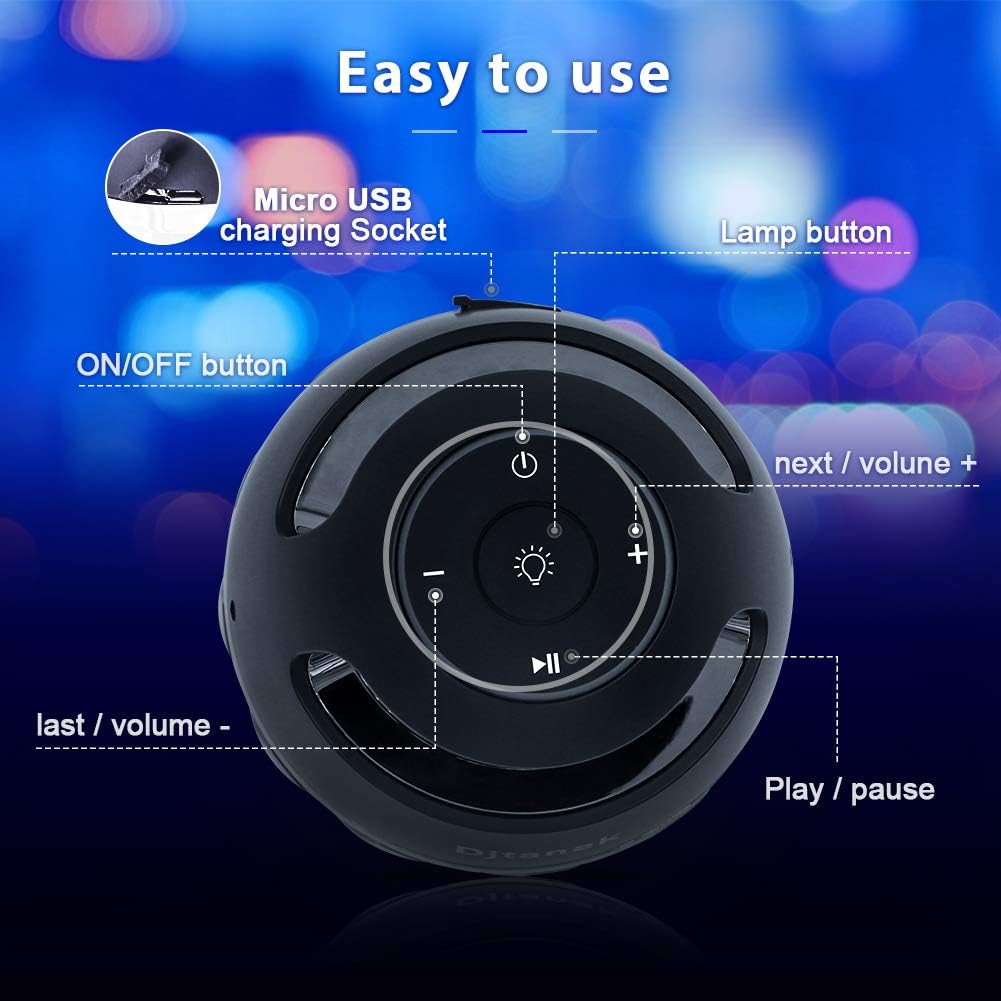
Image 4.1: Diagram illustrating the control buttons on the top of the speaker, including power, light mode, volume/track, and play/pause.
- ON/OFF Button: Powers the speaker on or off.
- Lamp Button: Cycles through light modes (constant light, flashing flame light, off).
- Play/Pause Button: Controls audio playback.
- Next / Volume + Button: Short press for next track, long press to increase volume.
- Last / Volume - Button: Short press for previous track, long press to decrease volume.
- Micro USB Charging Socket: For charging the internal battery.
5. Setup
5.1 Charging the Speaker
- Locate the Micro USB charging socket on the speaker.
- Connect the provided USB charging cable to the speaker and a compatible USB power adapter (not included).
- The charging indicator light will illuminate. A full charge typically takes 4-5 hours.
- Once fully charged, disconnect the charging cable.
5.2 Powering On/Off
- To power on, press and hold the ON/OFF Button until you hear an audible prompt or see the indicator light.
- To power off, press and hold the ON/OFF Button again until the speaker shuts down.
5.3 Bluetooth Pairing
- Ensure the speaker is powered on and in Bluetooth pairing mode (indicated by a flashing blue LED).
- On your mobile device (smartphone, tablet, etc.), enable Bluetooth and search for available devices.
- Select "ANERIMST Speaker" (or similar name) from the list of devices.
- Once connected, you will hear a confirmation tone, and the LED indicator will turn solid blue.
6. Operating Instructions
6.1 Light Modes
The speaker features two distinct light modes:
- Flickering Flame Mode: Mimics a realistic flame.
- Constant Light Mode: Provides a steady illumination.
To switch between light modes, press the Lamp Button. Press once for constant light, press twice for flashing flame light, and press a third time to turn the light off.

Image 6.1: The speaker demonstrating its two light modes: a flickering flame effect and a steady blue light.
6.2 Audio Playback
Once connected via Bluetooth, you can control your music directly from your paired device or using the speaker's control buttons:
- Play/Pause: Press the Play/Pause Button.
- Next Track: Short press the Next / Volume + Button.
- Previous Track: Short press the Last / Volume - Button.
- Volume Up: Long press the Next / Volume + Button.
- Volume Down: Long press the Last / Volume - Button.
6.3 Dual Pairing Function
For an enhanced stereo sound experience, you can pair two ANERIMST Outdoor Torch Bluetooth Speakers together:
- Ensure both speakers are powered off.
- Power on both speakers. They will automatically enter Bluetooth pairing mode.
- On one of the speakers (this will be the primary speaker), double-press the Play/Pause Button. The speakers will attempt to connect to each other.
- Once successfully paired, you will hear a confirmation tone, and the primary speaker's LED will flash, while the secondary speaker's LED will remain solid.
- Now, connect your mobile device to the primary speaker via Bluetooth as described in Section 5.3. Audio will play through both speakers in stereo.

Image 6.2: Two ANERIMST speakers shown together, illustrating the dual pairing capability for stereo audio.
6.4 Product Videos
Video 6.1: This video demonstrates the realistic flame effect and various lighting options of the ANERIMST speaker, highlighting its ambient capabilities.
Video 6.2: A general overview video showcasing the ANERIMST speaker in various settings and demonstrating its primary functions and design.
7. Maintenance
Proper care ensures the longevity and performance of your speaker:
- Cleaning: Wipe the speaker with a soft, damp cloth. Do not use abrasive cleaners or solvents.
- Storage: Store the speaker in a cool, dry place when not in use. Avoid extreme temperatures.
- Battery Care: For optimal battery life, charge the speaker regularly, even if not used frequently. Avoid fully discharging the battery for extended periods.

Image 7.1: The ANERIMST speaker positioned outdoors, illustrating its suitability for various environments and emphasizing its durable design.
8. Troubleshooting
If you encounter issues with your speaker, refer to the following common problems and solutions:
| Problem | Possible Solution |
|---|---|
| Speaker does not power on. | Ensure the battery is charged. Connect the speaker to a power source using the USB cable. |
| Cannot pair via Bluetooth. | Make sure the speaker is in pairing mode (flashing blue LED). Turn off and on your device's Bluetooth. Ensure the speaker is within range (up to 33 feet/10 meters). |
| No sound or low volume. | Check the volume levels on both the speaker and your paired device. Ensure the speaker is properly connected via Bluetooth. |
| Light effect not working. | Press the Lamp Button to cycle through the light modes. Ensure the speaker has sufficient battery charge. |
| Dual pairing fails. | Ensure both speakers are powered on and not connected to any other Bluetooth device. Follow the dual pairing instructions carefully. |
9. Specifications
| Feature | Specification |
|---|---|
| Brand | ANERIMST |
| Model Number | 92e69997-5324-4ec2-8e92-80da23fc0310 |
| Model Name | 8-Inches |
| Speaker Maximum Output Power | 5 Watts |
| Connectivity Technology | Wireless (Bluetooth, Wi-Fi) |
| Audio Output Mode | Stereo |
| Speaker Type | Outdoor |
| Is Waterproof | True (IP65) |
| Speaker Size | 40 Millimeters |
| Battery Average Life | 18 Hours (audio), 1 Week (light only) |
| Battery Charge Time | 4-5 Hours |
| Number of Batteries | 1 Lithium Ion (included) |
| Compatible Devices | Desktop, Laptop, MP3 Player, Smartphone, Tablet, Television |
10. Warranty and Customer Support
The ANERIMST Outdoor Torch Bluetooth Speaker comes with a Limited Warranty. Please refer to the warranty card included in your package for specific terms and conditions.
For technical support, warranty claims, or any questions regarding your product, please contact ANERIMST customer service through the retailer's platform or the official ANERIMST website.


