
1. Introduction
The Maclean Energy MCE315 is a high-quality wired bicycle computer designed to provide essential cycling data. Equipped with 16 functions, it is suitable for both casual rides and competitive cycling. The device communicates with magnetic sensors installed on the wheel spokes and fork to accurately track your ride data. Its clear, backlit display ensures easy readability of parameters in various lighting conditions.

Image 1: Front view of the Maclean Energy MCE315 Wired Bicycle Computer.
2. Package Contents
Please verify that all the following components are included in your package:
- Maclean Energy MCE315 Wired Bicycle Computer unit
- Sensor unit
- Mounting bracket with cable
- Wheel magnet
- Cable ties for installation
- CR2016 battery (for main unit)
- CR2032 battery (for transmitter)
- User Manual
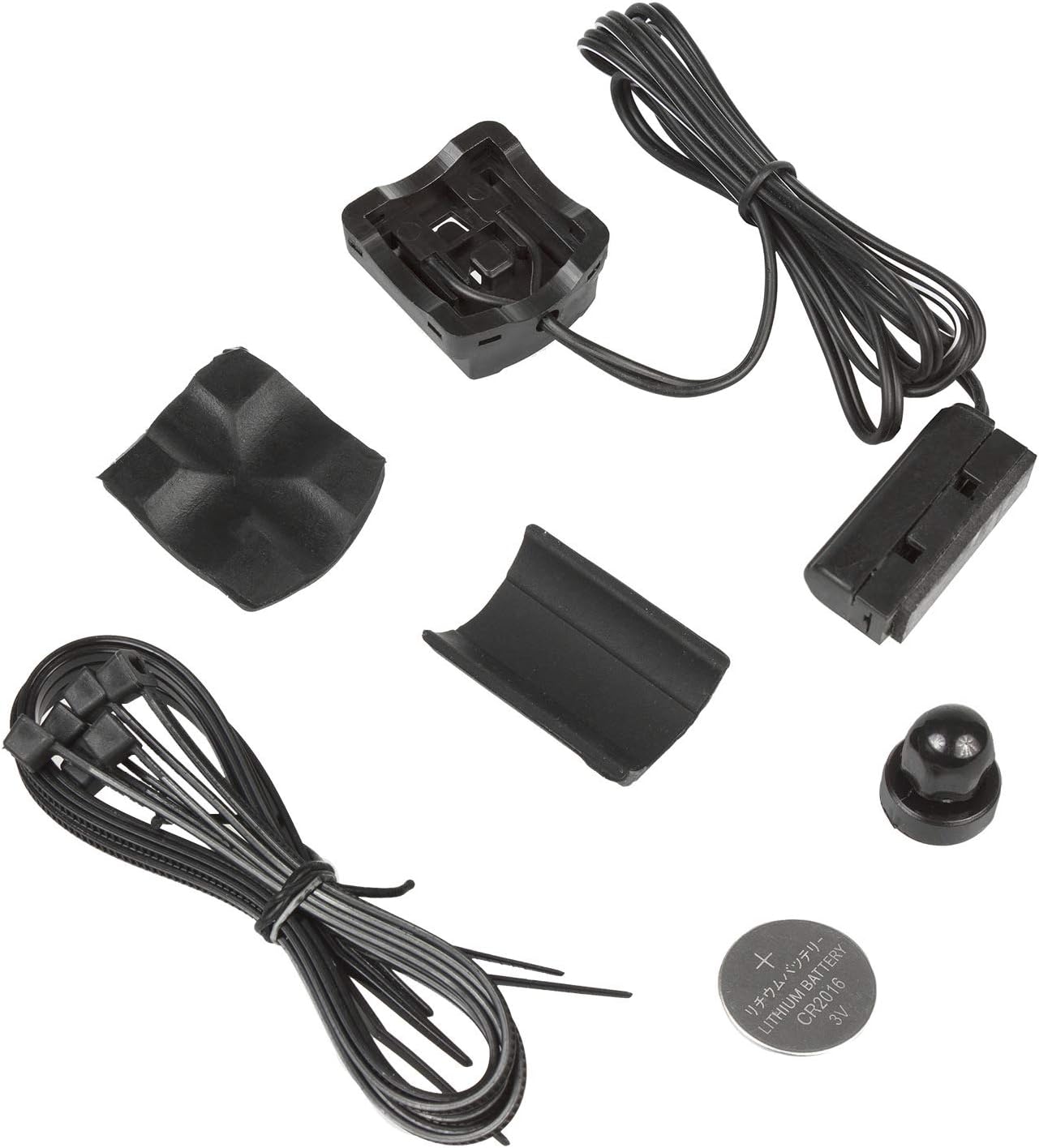
Image 2: All components included with the Maclean Energy MCE315 bicycle computer.
3. Installation and Setup
3.1 Battery Installation
- Open the battery compartment on the back of the main computer unit and the sensor unit.
- Insert the CR2016 battery into the main unit and the CR2032 battery into the sensor unit, ensuring correct polarity.
- Close the battery compartments securely.
3.2 Mounting the Computer and Sensor
- Attach the mounting bracket to your bicycle's handlebar or stem using the provided cable ties. Ensure it is securely fastened and the display is easily visible.
- Mount the sensor unit on the bicycle fork. The sensor is compatible with fork sizes from 12 mm to 50 mm.
- Attach the magnet to a spoke on the front wheel. Position the magnet so it passes the sensor unit with a gap of approximately 1-3 mm.
- Connect the sensor cable to the main computer unit. Route the cable neatly along the fork and frame, securing it with cable ties to prevent interference with moving parts.

Image 3: The bicycle computer mounted on a handlebar, showing the display.
3.3 Initial Settings
After installation, you need to configure the wheel circumference and preferred speed unit.
- Wheel Circumference Setting: Refer to your bicycle's tire size or measure the wheel circumference accurately. This value is crucial for precise speed and distance calculations. Enter this value into the computer's settings.
- Unit Selection: Choose between kilometers per hour (km/h) or miles per hour (MPH) for speed and distance display.
- Clock Setting: Set the current time (24-hour format).
Consult the detailed instructions in the manual for specific button presses to access and adjust these settings.
4. Operating Instructions
The MCE315 bicycle computer features two main buttons: "SET" and "MODE". These buttons are used to navigate through functions and adjust settings.
4.1 Button Functions
- MODE Button: Press to cycle through different display modes and functions. Hold to enter or exit certain setting menus.
- SET Button: Press to confirm selections or adjust values within setting menus.
4.2 Backlight Operation
The MCE315 offers two backlight modes:
- Mode LT1: The backlight will illuminate for 5 seconds after any button is pressed in any mode.
- Mode LT2: Press and hold the MODE button for 2 seconds to toggle the backlight ON or OFF.
5. Functions Overview
The Maclean Energy MCE315 offers 16 distinct functions to enhance your cycling experience:
- Current Speed (SPD): Displays your real-time cycling speed.
- 24H Clock (CLK): Shows the current time in 24-hour format.
- Scan Function: Automatically cycles through DST (Distance), TM (Ride Time), and AV SPD (Average Speed) every 2 seconds.
- Stopwatch (STW): Allows you to measure elapsed time for specific segments of your ride.
- Trip Distance (DST): Records the distance covered since the last reset.
- Total Distance (ODO): Accumulates the total distance traveled by the bicycle computer.
- Trip Time (TM): Records the duration of your current ride since the last reset.
- Average Speed (AV SPD): Calculates the average speed based on ride time and distance. Updates every 3 seconds.
- Maximum Speed (MX SPD): Displays the highest speed achieved during the current ride since the last reset.
- Calories (CAL): Estimates calories burned during the current ride.
- Total Calories (TOT CAL): Accumulates the total estimated calories burned since the last reset.
- Temperature (TEP): Displays the ambient temperature.
- Speed Tendency Indicator: Shows the difference between instantaneous speed and average speed.
- Maintenance Reminder: A service symbol appears when a preset distance is reached, reminding you to perform maintenance tasks like replacing parts or lubricating the chain.
- Backlight: Illuminates the display for improved visibility.
- Auto On/Off: The unit automatically turns on when motion is detected and off after a period of inactivity to conserve battery.
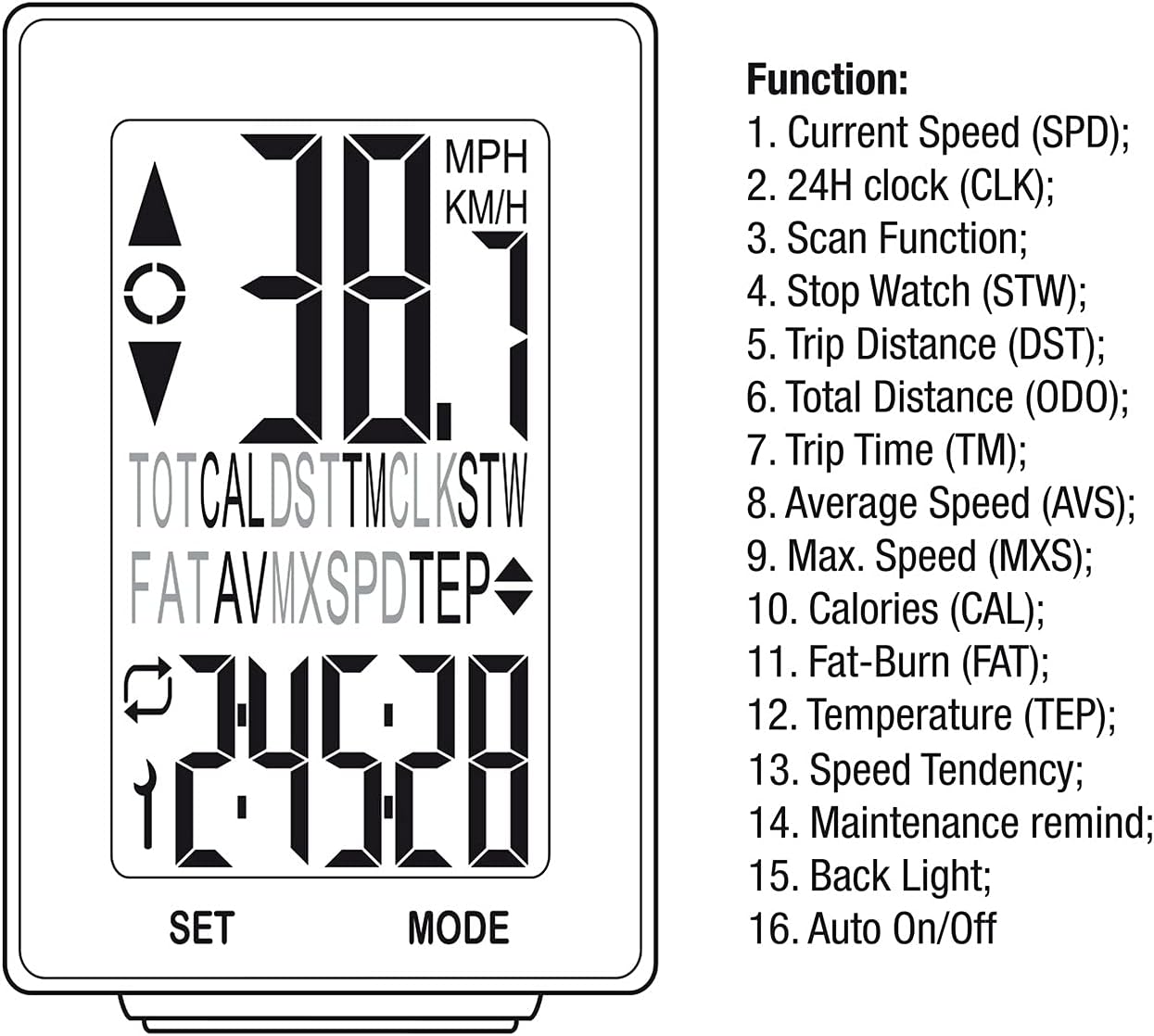
Image 4: Visual representation of the MCE315's display and its 16 functions.
6. Maintenance
To ensure the longevity and accurate performance of your Maclean Energy MCE315 bicycle computer, follow these maintenance guidelines:
- Cleaning: Wipe the unit with a soft, damp cloth. Do not use abrasive cleaners or solvents.
- Battery Replacement: Replace batteries (CR2016 for main unit, CR2032 for sensor) when the display becomes dim or functions are erratic. Ensure correct polarity during replacement.
- Sensor and Magnet Alignment: Periodically check the alignment and gap between the sensor and the wheel magnet. Adjust if necessary to maintain optimal signal reception.
- Cable Integrity: Inspect the sensor cable for any signs of wear, damage, or kinks. Ensure it is securely fastened and not interfering with moving parts of the bicycle.
- Service Reminder: The computer features a service reminder function. When the preset distance is reached, a service symbol will appear on the display. This is a prompt to perform general bicycle maintenance, such as chain lubrication or component checks.
7. Troubleshooting
If you encounter issues with your MCE315 bicycle computer, refer to the following common troubleshooting steps:
- No Display or Erratic Readings:
- Check battery levels in both the main unit and the sensor. Replace if necessary.
- Verify the connection of the wired sensor to the main unit.
- Ensure the magnet and sensor are correctly aligned and the gap is within 1-3 mm.
- Inspect the sensor cable for any damage or breaks.
- Incorrect Speed/Distance Readings:
- Re-check the wheel circumference setting. An incorrect value will lead to inaccurate measurements.
- Ensure the magnet passes the sensor consistently with each wheel rotation.
- Display Fails in Wet Conditions:
- While the device has some water resistance (IP65), extreme wet conditions or direct water exposure can affect performance. Allow the unit to dry completely.
- If issues persist after drying, check for moisture ingress in battery compartments or connections.
- Buttons Unresponsive:
- Check battery levels.
- Ensure no debris is lodged around the buttons.
If these steps do not resolve the issue, please contact customer support for further assistance.
8. Specifications
| Feature | Detail |
|---|---|
| Model | MCE315 |
| Connectivity | Wired |
| Functions | 16 (Current Speed, Clock, Scan, Stopwatch, Trip Distance, Total Distance, Trip Time, Average Speed, Max Speed, Calories, Total Calories, Temperature, Speed Tendency, Maintenance Reminder, Backlight, Auto On/Off) |
| Display Type | LCD with Backlight |
| Main Unit Power | 1x CR2016 3V battery |
| Transmitter Power | 1x CR2032 3V battery |
| Dimensions (L x W x H) | 63 x 40 x 17 mm |
| Weight | 28.7 g |
| Operating Temperature | 0°C to 50°C (32°F to 122°F) |
| Storage Temperature | -10°C to 60°C (14°F to 140°F) |
| Fork Size Compatibility | 12 mm to 50 mm |
| International Protection Rating | IP65 (Dust tight and protected against low-pressure water jets from any direction) |
9. Warranty and Support
For warranty information or technical support, please refer to the contact details provided on the product packaging or the official Maclean website. Keep your purchase receipt as proof of purchase for any warranty claims.