
Introduction
Thank you for choosing the HUANUO Dual Monitor Stand (Model HNCM18). This monitor mount is designed to enhance your workspace by providing a stable and adjustable solution for two LCD screens ranging from 17 to 32 inches. Each arm can support up to 26 lbs, offering flexibility for ergonomic viewing and efficient desk space utilization. This manual provides detailed instructions for assembly, operation, maintenance, and troubleshooting to ensure optimal performance and safety.

Figure 1: HUANUO Dual Monitor Stand (Model HNCM18)
Safety Information
Please read all instructions carefully before assembly and use. Failure to do so may result in personal injury or product damage. Keep this manual for future reference.
- Ensure your desk surface is strong enough to support the combined weight of the monitor stand and your monitors.
- Do not exceed the maximum weight capacity of 26 lbs per arm.
- Use only the provided hardware. If any parts are missing or damaged, contact customer support.
- Do not overtighten screws, as this may cause damage.
- Keep children and pets away during assembly.
- Periodically check all connections and tighten as necessary to ensure stability.
Package Contents
Verify that all components are present before beginning assembly. If any parts are missing or damaged, please contact HUANUO customer service.
- Main Pole with Desk Clamp Assembly
- Dual Monitor Arms (Pre-assembled)
- VESA Plates (2x)
- Grommet Base Plate and Screw
- Hardware Kit (various screws, washers, spacers)
- Hex Keys (Allen wrenches)
- Cable Management Clips
- Instruction Manual
Setup and Installation
The HUANUO Dual Monitor Stand offers two primary installation methods: C-Clamp and Grommet. Choose the method best suited for your desk.
1. Choose Installation Method
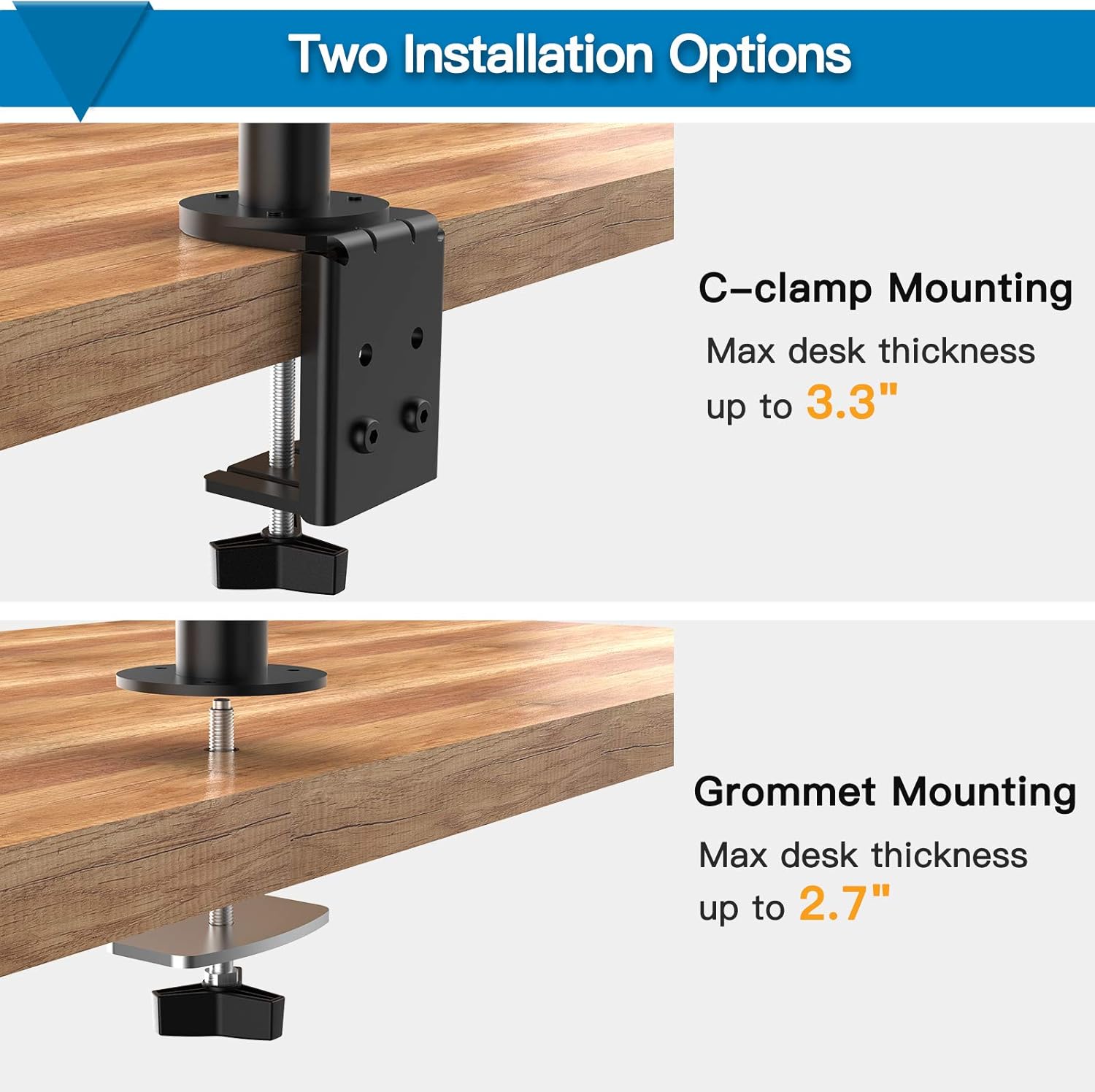
Figure 2: C-Clamp and Grommet Mounting Options
This image illustrates the two available installation methods for the monitor stand. The C-Clamp mounting option is suitable for desks with a maximum thickness of 3.3 inches, clamping directly to the edge of the desk. The Grommet mounting option requires a pre-existing hole in your desk (or drilling one) and supports desk thicknesses up to 2.7 inches.
C-Clamp Installation
- Attach the C-clamp bracket to the main pole using the provided screws.
- Position the C-clamp on the edge of your desk.
- Tighten the C-clamp screw until the stand is securely fastened to the desk. Ensure it is stable and does not wobble.
Video 1: How to Install HNCM18 Dual Monitor Stand (C-Clamp section from 0:05 to 0:15)
This video demonstrates the step-by-step process for installing the monitor stand using the C-Clamp method. It shows how to attach the clamp to the pole and secure it to the desk edge, highlighting the maximum desk thickness of 3.1 inches for this method.
Grommet Installation
- If your desk does not have a grommet hole, you may need to drill one (consult a professional if unsure).
- Insert the main pole through the grommet hole.
- Attach the grommet base plate and tighten the screw from underneath the desk to secure the stand.
Video 2: How to Install HNCM18 Dual Monitor Stand (Grommet section from 0:16 to 0:22)
This video segment illustrates the grommet installation process, showing how to secure the monitor stand through a desk hole. It specifies that this method supports a maximum desk thickness of 3.1 inches.
2. Attach Monitors
- Attach the VESA plates to the back of your monitors using the appropriate screws from the hardware kit. Ensure the VESA pattern (75x75mm or 100x100mm) matches your monitor.
- Slide the monitors onto the monitor arms. The VESA sliding design allows for easy adjustment.
- Secure the monitors by tightening the screws on the VESA plates.

Figure 3: Dual Monitors Mounted on Stand
This image provides a rear view of two monitors successfully mounted on the stand, demonstrating how the arms extend to hold the displays. It highlights the clean setup achieved with the stand.
Video 3: How to Install HNCM18 Dual Monitor Stand (Attaching VESA plate and monitor section from 0:30 to 0:36)
This video segment shows the process of attaching the VESA plate to the monitor and then sliding the monitor onto the arm, demonstrating the easy adjustability of the VESA sliding design.
3. Cable Management
Utilize the integrated cable management clips along the arms and main pole to route and organize your monitor cables. This helps maintain a clean and clutter-free workspace.

Figure 4: Cable Management System
This image details the cable management features of the stand, showing how cables can be neatly routed along the arms and down the central pole, contributing to a tidy desk environment.
Video 4: How to Install HNCM18 Dual Monitor Stand (Cable Management section from 0:37 to 0:39)
This video segment demonstrates the efficient cable management system, showing how to route monitor cables through the integrated clips for a clean setup.
Operating and Adjustments
The HUANUO Dual Monitor Stand offers various adjustment options to achieve your optimal viewing experience.
- Height Adjustment: Loosen the collar on the main pole to slide the monitor arms up or down. Retighten the collar to secure the desired height. Each monitor can also be individually adjusted vertically by up to 3 inches using the screw mechanism on the VESA plate.
- Swivel: The monitor arms can swivel horizontally to adjust viewing angles.
- Tilt: Adjust the tilt angle of your monitors (up to 45 degrees) to reduce glare and improve ergonomics.
- Rotation: Rotate your monitors from landscape to portrait orientation as needed.

Figure 5: Adjustable Height for Best Viewing Position
This diagram illustrates the maximum height of the monitor stand (16.9 inches) and confirms its compatibility with screens from 17 to 32 inches, with a weight capacity of 26 lbs per monitor. It also shows the compatible VESA patterns (75x75mm and 100x100mm).

Figure 6: VESA Sliding Distance and Easy Adjustment Tips
This image highlights the VESA sliding distance of 33 inches, allowing for flexible horizontal positioning of monitors. It also provides a close-up of the individual monitor height adjustment mechanism, which allows for up to 3 inches of vertical movement per monitor.
Maintenance
Regular maintenance ensures the longevity and safe operation of your monitor stand.
- Cleaning: Wipe the stand with a soft, damp cloth. Avoid harsh chemicals or abrasive cleaners.
- Tightening: Periodically check all screws and connections, especially those securing the stand to the desk and the monitors to the VESA plates. Tighten any loose fasteners to maintain stability.
- Lubrication: If joints become stiff, a small amount of silicone-based lubricant can be applied to pivot points, though this is generally not required for normal operation.
Troubleshooting
If you encounter issues with your monitor stand, refer to the following common problems and solutions:
| Problem | Possible Cause | Solution |
|---|---|---|
| Monitor sags or does not hold height. | Screws securing the monitor arm to the pole or the VESA plate to the monitor are loose. Monitor weight exceeds capacity. | Ensure all screws are securely tightened. Verify monitor weight is within the 26 lbs per arm limit. For individual monitor height adjustment, ensure the screw mechanism is fully tightened after setting the desired height. |
| Stand is wobbly or unstable. | Desk clamp or grommet mount is not tight enough. Desk surface is too thin or unstable. | Retighten the C-clamp or grommet screw. Ensure your desk meets the minimum thickness requirements and is sturdy. Consider adding a reinforcement plate if your desk is thin. |
| Monitor adjustments (swivel, tilt) are too stiff or too loose. | Tension screws for joints are incorrectly adjusted. | Use the provided hex keys to adjust the tension screws on the joints. Tighten for more resistance, loosen for less. Adjust gradually until desired movement is achieved. |
| Missing parts or damaged components. | Manufacturing defect or shipping damage. | Do not attempt to assemble. Contact HUANUO customer support immediately for replacement parts. |
Specifications
- Brand: HUANUO
- Model: HNCM18
- Screen Size Compatibility: 17 - 32 inches
- Weight Capacity: 26 lbs (11.8 kg) per arm
- VESA Compatibility: 75x75mm, 100x100mm
- Mounting Type: Desk Clamp (Max 3.3" thickness), Grommet (Max 2.7" thickness)
- Movement Type: Rotate, Swivel, Tilt
- Maximum Tilt Angle: 45 Degrees
- Product Dimensions: 17.4 x 6.5 x 3.7 inches (packaged)
- Item Weight: 9.94 pounds (packaged)
- Color: Black (Clear refers to packaging or a specific component, product is black)
- First Available Date: July 14, 2020
Warranty and Support
HUANUO stands behind the quality of its products. For warranty information, technical support, or any questions regarding your monitor stand, please visit the official HUANUO website or contact their customer service team directly. Please have your model number (HNCM18) and purchase information ready when contacting support.
You can find more information and support at the HUANUO Store on Amazon.


