
SWIFT S7-TL-CA05
SWIFT S7-TL-CA05 Trinocular Zoom Stereo Microscope User Manual
Model: S7-TL-CA05
1. Introduction
This manual provides detailed instructions for the setup, operation, and maintenance of your SWIFT S7-TL-CA05 Trinocular Zoom Stereo Microscope. Please read this manual thoroughly before using the microscope to ensure proper function and longevity of the instrument.
The SWIFT S7-TL-CA05 is a versatile trinocular zoom stereo microscope designed for industrial inspection, scientific research, and educational purposes. It features a wide magnification range, comfortable viewing, and flexible illumination options.
Key Features:
- Zoom Magnification: 7x-45x with 10x wide-field, high-eyepoint eyepieces.
- Trinocular Port: Allows for convenient attachment of a camera for image capture and digital display.
- Ergonomic Design: 45° inclined binocular head with interpupillary distance adjustment to reduce neck and eye strain.
- 360° Rotatable Head: Provides flexibility for various observation angles and shared viewing.
- Clear Optics: Large 6.4:1 zoom ratio delivers sharp and clear images.
- Dual LED Illumination: Built-in transmitted and incident LED lights with adjustable brightness for observing both opaque and transparent specimens.
- Wide Application: Suitable for precision instrument maintenance, chemistry, electronics, semiconductors, jewelry inspection, and various production line tasks.
2. Safety Information
Always observe the following safety precautions to prevent injury and damage to the instrument:
- Ensure the microscope is placed on a stable, level surface to prevent tipping.
- Connect the power cord to a grounded outlet of the correct voltage (90V-240V).
- Do not expose the microscope to direct sunlight, high temperatures, or high humidity.
- Avoid touching optical surfaces with bare hands. Use a lens cleaning cloth.
- Turn off the power and unplug the microscope before cleaning or performing any maintenance.
- Keep the microscope away from corrosive chemicals.
3. Package Contents
Verify that all components are present and undamaged upon unpacking:
- Microscope Head (Trinocular)
- Pillar Stand with Base
- WF10X/20MM Eyepieces (2)
- Power Cord
- Black/White Stage Plate
- Frosted Glass Stage Plate (for transmitted illumination)
- Dust Cover
4. Setup
4.1 Assembly
- Place the pillar stand base on a stable, flat surface.
- Insert the microscope head onto the pillar stand. Secure it using the fixing knob.
- Insert the two WF10X/20MM eyepieces into the eyepiece tubes on the binocular head.
- If using a camera, attach it to the trinocular port.
- Place either the black/white stage plate or the frosted glass stage plate onto the stage, depending on your observation needs.

Figure 4.1: Pillar stand with focus knob and power input. The pillar height is 240mm, offering a working distance of 100mm and a vertical adjustment range of 50mm.
4.2 Power Connection
Connect the provided power cord to the power input port on the microscope base and then to a suitable electrical outlet (90V-240V).
Figure 4.2: Power input port located on the microscope base.
5. Operating Instructions
5.1 Initial Adjustments
- Interpupillary Distance: While looking through the eyepieces, adjust the distance between the two eyepiece tubes until you see a single, clear circular field of view. The adjustable range is 54-76mm.
- Diopter Adjustment: If one eye is stronger than the other, use the diopter adjustment ring on one eyepiece (typically the left one) to compensate. Look through the non-adjustable eyepiece with your dominant eye and focus the image using the main focus knob. Then, look through the adjustable eyepiece with your other eye and rotate the diopter ring until the image is sharp, without touching the main focus knob. The diopter adjustment range is +/- 5DP.

Figure 5.1: Eyepieces showing diopter adjustment (+/- 5DP) and interpupillary distance adjustment (54-76mm).
5.2 Placing a Specimen
Place your specimen on the stage plate. Use the stage clips to hold it securely if necessary. For opaque specimens, use the black/white plate. For transparent specimens, use the frosted glass plate with transmitted illumination.

Figure 5.2: The wide stage (205x275x40mm) accommodates large specimens, shown here with a circuit board.
5.3 Illumination Control
The microscope is equipped with both incident (top) and transmitted (bottom) LED illumination. Use the switches and brightness control knobs on the base to select and adjust the desired lighting. The incident LED illumination operates at 5V/3W with a color temperature of 6000-7000K.
Figure 5.3: Incident LED illumination unit on the microscope base.
5.4 Focusing and Zooming
- Turn on the illumination.
- Rotate the zoom knob to the lowest magnification (7x).
- Adjust the focus knob (located on the pillar stand) to bring the specimen into sharp focus. The working distance is 100mm.
- Once focused at 7x, you can rotate the zoom knob to increase magnification up to 45x. Minor focus adjustments may be needed at higher magnifications. The zoom ratio is 1:6.4.
Figure 5.4: Focus adjustment knob and zoom mechanism on the microscope head.
5.5 Using the Trinocular Port
The trinocular port allows for the attachment of a digital camera (not included) to capture images or display the live view on a monitor. To use, simply attach your compatible camera to the port. The light path can be directed to the trinocular port for observation via camera.
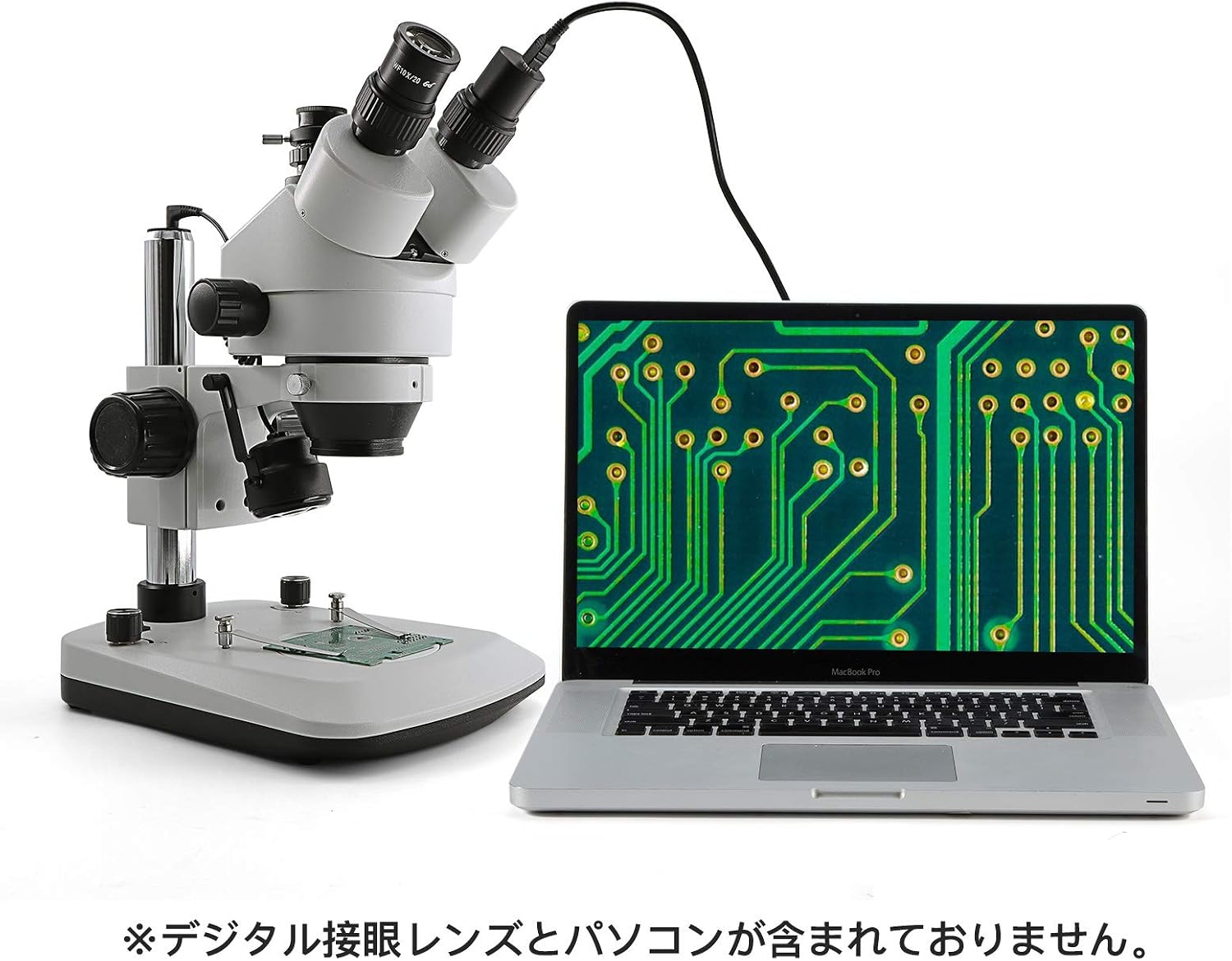
Figure 5.5: The microscope's trinocular port can be connected to a computer for digital imaging. (Digital eyepiece and PC are not included).

Figure 5.6: A user observing a specimen through the microscope, demonstrating typical usage.
6. Maintenance
6.1 Cleaning
- Optical Components: Use a soft, lint-free lens cleaning cloth and a specialized lens cleaning solution to clean eyepieces and objective lenses. Gently wipe in a circular motion. Avoid excessive pressure.
- Body: Wipe the microscope body with a soft, damp cloth. Do not use organic solvents or harsh chemicals.
- Dust: Use an air blower to remove dust from optical surfaces before wiping.
6.2 Storage
- When not in use, cover the microscope with the provided dust cover to protect it from dust and debris.
- Store the microscope in a cool, dry place, away from direct sunlight and vibrations.
- Remove eyepieces and store them in a dry container if the microscope will not be used for an extended period.
7. Troubleshooting
| Problem | Possible Cause | Solution |
|---|---|---|
| No illumination | Power cord not connected; Power switch off; LED failure | Check power connection; Turn on power switch; Contact support if LED is faulty |
| Image is blurry or out of focus | Incorrect focus adjustment; Diopter not adjusted; Eyepieces dirty | Adjust focus knob; Adjust diopter; Clean eyepieces |
| Only one eye sees an image | Interpupillary distance incorrect; Eyepiece not fully inserted | Adjust interpupillary distance; Re-insert eyepiece firmly |
| Dark spots in the field of view | Dust on eyepieces or objective lenses; Dust on specimen | Clean optical components; Clean specimen |
8. Specifications
| Feature | Detail |
|---|---|
| Model | S7-TL-CA05 |
| Head Type | Trinocular, 45° inclined, 360° rotatable |
| Eyepieces | WF10X/20MM High-Eyepoint |
| Zoom Magnification | 7x - 45x |
| Zoom Ratio | 1:6.4 |
| Interpupillary Distance | 54mm - 76mm |
| Diopter Adjustment | +/- 5DP |
| Working Distance | 100mm |
| Illumination | Incident (Top) and Transmitted (Bottom) LED, adjustable brightness |
| Incident LED Power | 5V / 3W |
| Incident LED Color Temperature | 6000-7000K |
| Stage Dimensions | 205 x 275 x 40 mm |
| Pillar Height | 240mm |
| Vertical Adjustment Range | 50mm |
| Power Input | 90V-240V |
| Product Dimensions | 51 x 36 x 31 cm |
| Product Weight | 6.2 kg |
9. Warranty and Support
For warranty information or technical support, please refer to the documentation included with your purchase or contact your retailer or the manufacturer directly. Keep your purchase receipt as proof of purchase.
Related documentsS7-TL-CA05


Ask a question about this manual
Ask about setup, troubleshooting, compatibility, parts, safety, or missing instructions. Manuals+ will review the question and use this page’s manual context to help answer it.