
Introduction
This manual provides comprehensive instructions for the assembly, operation, and maintenance of your Tribesigns 96.9" Double Computer Desk with Printer Shelf. Please read all instructions carefully before beginning assembly and retain this manual for future reference.

Image: The fully assembled Tribesigns 96.9 inch Double Computer Desk, showcasing its dual workstations and central printer shelf, set up in a home office environment.
Safety Information
WARNING:
- Ensure the desk is properly anchored to prevent tipping.
- Do not exceed the weight limit stated in the assembly instructions.
- Use appropriate tools and follow assembly instructions carefully to avoid injury.
- Keep small parts away from children during assembly to prevent choking hazards.
Package Contents
Before assembly, verify that all components are present and undamaged. If any parts are missing or damaged, please contact customer service.
- Desk Panels (Desktop surfaces, shelf panels)
- Metal Frame Components (Legs, support bars)
- Assembly Hardware (Screws, bolts, washers, nuts)
- Assembly Tools (Allen wrench, screwdriver)
- Instruction Manual

Image: Various desk components, including metal frames and wooden panels, neatly arranged before assembly, indicating a complete package.
Assembly Instructions
Assembly is recommended for two people. Please follow the steps below carefully. All necessary parts, tools, and instructions are included.
- Step 1: Unpack and Identify Components. Lay out all parts on a clean, soft surface to prevent scratches. Refer to the parts list to ensure all pieces are present.

Image: Illustration of the initial assembly phase, connecting the main metal frame components.
- Step 2: Assemble the Central Storage Unit. Begin by attaching the vertical supports to the base and top panels of the central printer shelf unit. Secure with the provided screws.

Image: Detailed view of assembling the central storage unit, including the placement of shelves.
- Step 3: Attach Desk Frames. Connect the metal frames for the left and right desk sections to the central storage unit. Ensure all connections are tight and stable.
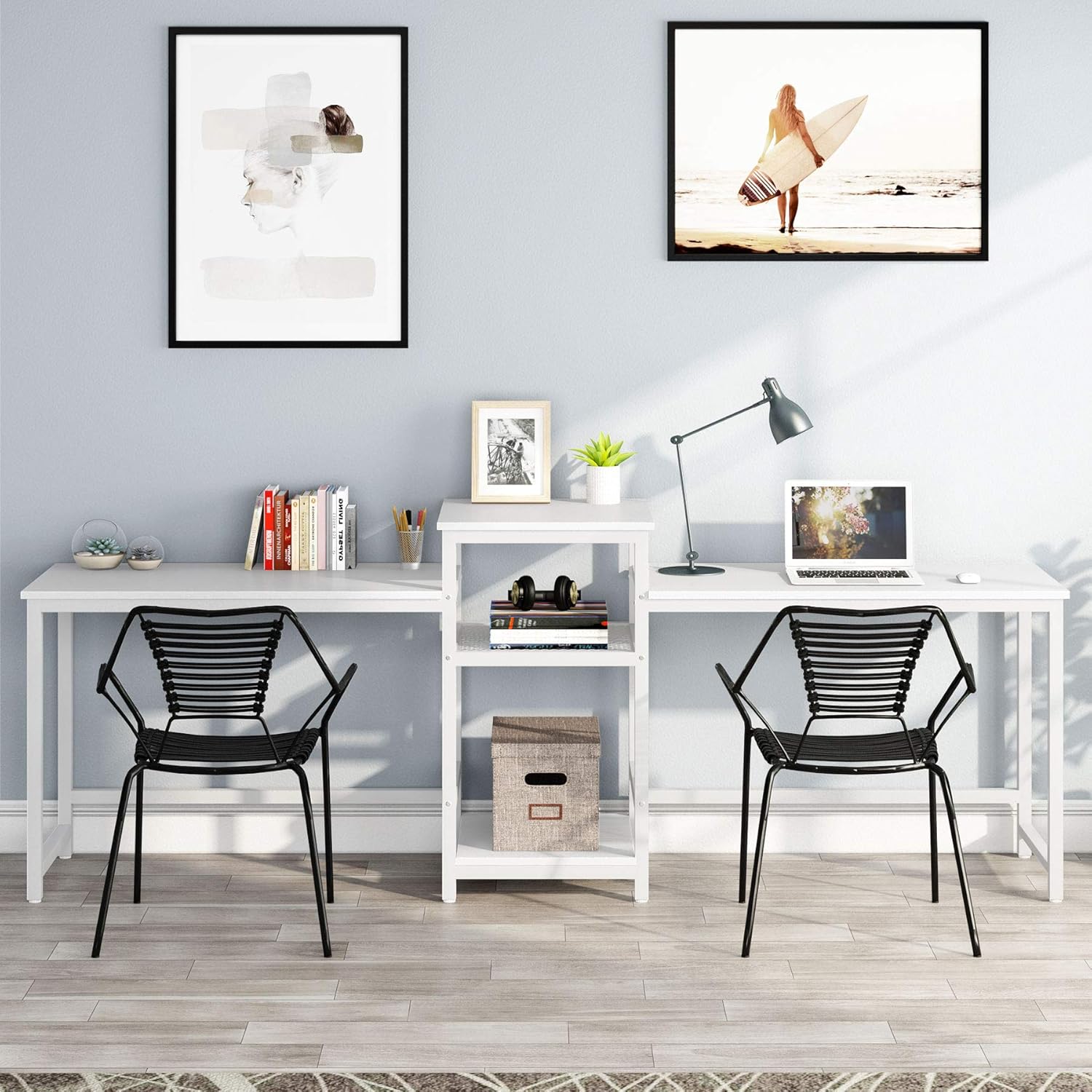
Image: Visual guide for attaching the side desk frames to the pre-assembled central storage unit.
- Step 4: Install Desktop Panels. Place the desktop panels onto the assembled frames. Secure them using the designated screws from underneath.
- Step 5: Final Adjustments. Ensure all screws are tightened. Adjust the foot pads on the desk legs to level the desk on uneven floors.
Usage and Features
The Tribesigns Double Computer Desk is designed for efficiency and shared workspaces, offering ample room for two individuals and integrated storage.
- Two-Person Design: Provides separate yet connected workspaces, ideal for collaborative environments or multiple users.
- Integrated Printer Shelf: The central unit features a dedicated shelf for a printer, optimizing desktop space.
- Storage Shelves: Three open storage shelves offer convenient access to documents, books, and office supplies.
- Durable Construction: Made with 0.59" thick MDF board and a powder-coated steel frame for stability and longevity.
- Adjustable Foot Pads: Ensures stability on various floor surfaces.

Image: A detailed view of the central three-tier storage unit, demonstrating its capacity for a printer, files, books, and other office essentials.
Maintenance
To ensure the longevity and appearance of your desk, follow these maintenance guidelines:
- Cleaning: Wipe surfaces with a soft, damp cloth. Avoid harsh chemicals or abrasive cleaners that may damage the finish.
- Spills: Clean spills immediately to prevent staining or damage to the wood.
- Inspection: Periodically check all screws and bolts to ensure they remain tight. Re-tighten if necessary.
- Weight Distribution: Distribute weight evenly across the desk surfaces and shelves to prevent stress on the structure.
Troubleshooting
| Problem | Possible Cause | Solution |
|---|---|---|
| Desk is wobbly | Loose screws; uneven floor; foot pads not adjusted | Tighten all assembly screws. Adjust the leveling foot pads on the bottom of the legs. |
| Parts do not align during assembly | Incorrect orientation of parts; manufacturing tolerance | Review the assembly diagrams to ensure parts are oriented correctly. If issues persist, contact customer service. |
| Missing hardware or damaged parts | Packaging error; shipping damage | Do not proceed with assembly. Contact Tribesigns customer service immediately for replacement parts. |
Specifications
| Feature | Detail |
|---|---|
| Brand | Tribesigns |
| Model Number | HOGA-W0077 |
| Product Dimensions (Overall) | 96.9" (L) x 19.7" (W) x 29.5" (H) |
| Desktop Length (Each Side) | 39.4" |
| Color | White |
| Material | Engineered Wood (MDF), Alloy Steel (Frame) |
| Finish Type | Powder Coated |
| Special Feature | Scratch Resistant |
| Number of Shelves | 3 (Open Storage) |
| Item Weight | 61.61 Pounds |
| Assembly Required | Yes |
| Recommended People for Assembly | 2 |

Image: Technical diagram illustrating the precise dimensions of the desk, including overall length, width, height, and individual shelf measurements.
Warranty and Support
Tribesigns provides an 18-month warranty for this product, covering manufacturing defects. For any questions, missing parts, or assistance with assembly, please contact Tribesigns customer service. Our friendly customer service team is ready to assist you.
For further support, please visit the official Tribesigns website or refer to the contact information provided with your purchase.


