
DEWENWILS BW0302E
DEWENWILS Wireless Light Switch and Receiver Kit User Manual
Model: BW0302E
Introduction
Thank you for choosing the DEWENWILS Wireless Light Switch and Receiver Kit. This product provides a convenient and flexible solution for controlling your lighting fixtures without the need for complex in-wall wiring. It is designed for ease of installation and reliable operation, offering both fixed and portable control options.

Image: The DEWENWILS wireless light switch and the compact receiver unit, showcasing their design and the wiring labels on the receiver.
Setup and Installation
This kit is designed for simple installation, eliminating the need for new in-wall wiring. Always ensure power is cut off before beginning any electrical installation.
Receiver Installation
The compact receiver unit is wired between the power source and the lighting fixture. Its small size allows it to fit into various spaces.
- Cut off Power: Before any wiring, ensure the main power supply to the circuit is turned off at the breaker.
- Connect Wiring:
- Connect the black wire (Input L) from the receiver to the Live wire from your power source.
- Connect the blue wire (Input N) from the receiver to the Neutral wire from your power source.
- Connect the red wire (Output L) from the receiver to the Load wire of your lighting fixture.
- Connect the white wire (Output N) from the receiver to the Neutral wire of your lighting fixture.
- Secure Receiver: The compact receiver can be placed in limited spaces such as rose/canopy, electrical junction boxes, or switch boxes.

Image: A detailed wiring diagram showing how to connect the receiver between the power source and a light fixture, along with illustrations of where the compact receiver can fit (rose/canopy, junction box, switch box).

Image: A visual comparison showing a ceiling fan before and after the installation of the wireless light switch and receiver, demonstrating the elimination of visible wiring.
Switch Installation
The wireless switch can be mounted anywhere or used as a portable remote.
- Remove Battery Insulation: Before first use, remove the battery insulation tab from the back of the switch. The switch uses a 12V (23A) alkaline battery, which is included.
- Mounting Options:
- Fixed Mode: Use the provided screws to mount the switch bracket to a wall or any desired surface. The switch then snaps into the bracket.
- Portable Mode: The switch can be detached from its mounting bracket and used as a handheld remote control.
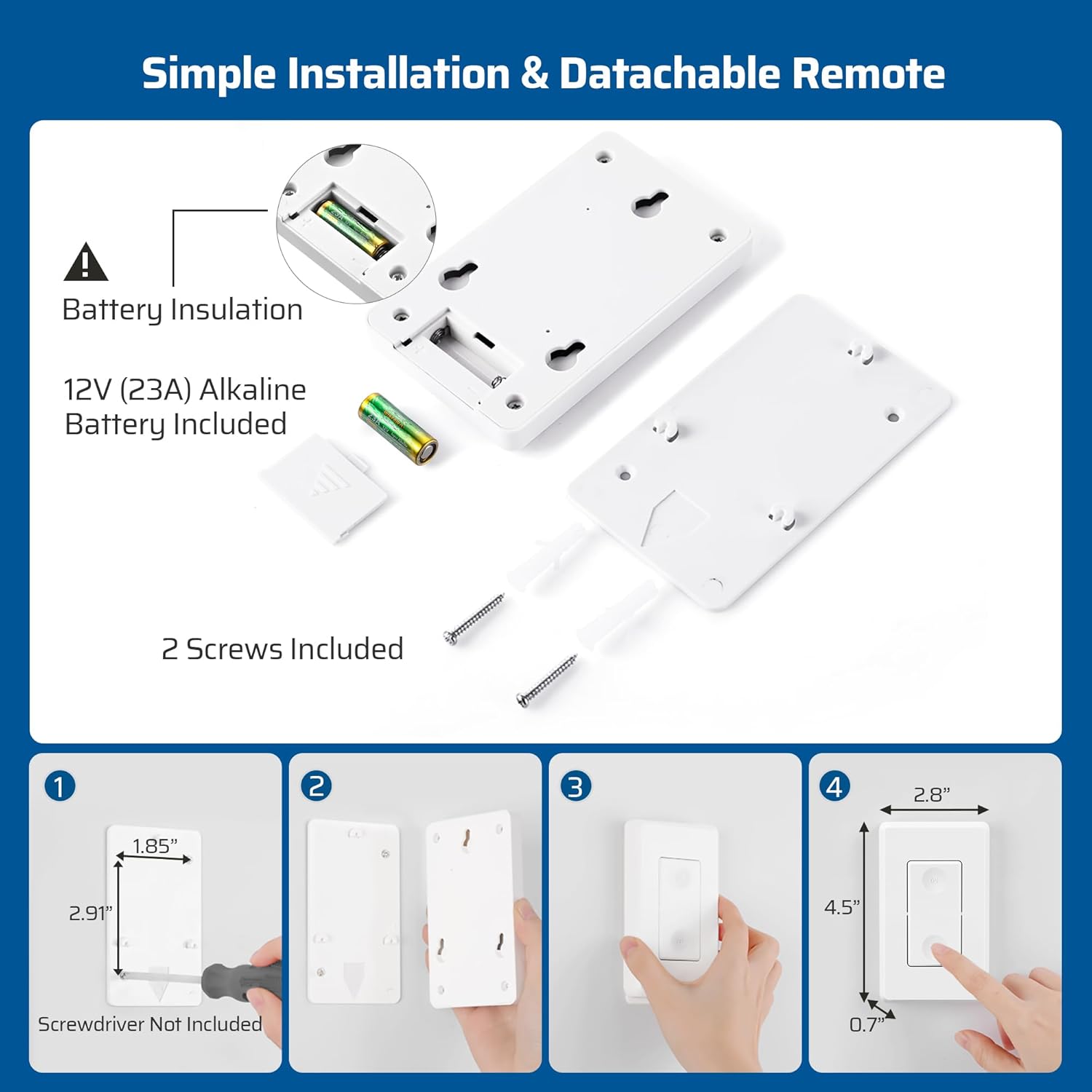
Image: An exploded view of the wireless switch showing the battery compartment, insulation tab, and mounting screws. Below, a four-step visual guide illustrates how to remove the battery insulation, attach the mounting bracket, and snap the switch into place.
Operating Instructions
The DEWENWILS Wireless Light Switch and Receiver Kit offers straightforward operation for controlling your lighting and other appliances.
Basic Operation
- Turning On/Off: Press the "ON" button on the wireless switch to turn on the connected light or appliance. Press the "OFF" button to turn it off.
- Remote Control: The switch functions as a remote control, allowing you to operate lights from up to 100 feet away in open areas. The RF signal works through walls and doors without interference.

Image: Two illustrations demonstrating the wireless switch's versatility: one showing it mounted on a wall (fixed mode) and another showing it being held as a portable remote (portable mode).

Image: A cutaway illustration of a multi-story house demonstrating the 100-foot RF range of the wireless switch, showing the signal passing through walls and floors to control lights in different rooms.
Programmable and Expandable System
The DEWENWILS system is designed to be programmable and expandable, allowing you to customize your lighting control setup.
- Pre-programmed: The transmitter wall switch and receiver are pre-programmed for immediate use out of the box.
- Adding Components: You can add more wall switches, receiver kits, extra handheld remotes, outlets, and light sockets (of the same model) to expand your system. Refer to the specific product instructions for pairing additional components.
- Versatile Applications: This kit can control various indoor lighting fixtures, ceiling lights, plug-in pendants, lamps, hard-to-reach lights, and other electric appliances within its power rating.

Image: A collage of images showing the wireless switch system being used with various home lighting types, including track lighting, wall sconces, ceiling lights, and closet lighting, illustrating its wide applicability.
Maintenance
The DEWENWILS Wireless Light Switch and Receiver Kit requires minimal maintenance to ensure long-term performance.
- Cleaning: Wipe the switch and receiver with a soft, dry cloth. Do not use abrasive cleaners or solvents.
- Battery Replacement: The wireless switch is powered by a 12V (23A) alkaline battery. If the switch becomes unresponsive or its range decreases significantly, it may be time to replace the battery. To replace, carefully open the battery compartment on the back of the switch and insert a new 12V (23A) battery, observing polarity.
- Environmental Conditions: Ensure the product is used within its specified operating temperature and humidity ranges. Avoid exposing the receiver to moisture or extreme temperatures.
Troubleshooting
If you encounter issues with your DEWENWILS Wireless Light Switch and Receiver Kit, refer to the following common problems and solutions:
| Problem | Possible Cause | Solution |
|---|---|---|
| Light/Appliance does not turn on/off. |
|
|
| Reduced RF range or intermittent operation. |
|
|
| Switch buttons feel unresponsive. |
|
|
Specifications
Technical specifications for the DEWENWILS Wireless Light Switch and Receiver Kit:
- Model: BW0302E
- Operation Mode: ON-OFF
- Current Rating: 10 Amps
- Operating Voltage: 125 Volts
- Contact Type: Normally Closed
- Connector Type: Wireless
- Terminal: Screw
- Item Dimensions (L x W x H): 4.72 x 1.97 x 2.95 inches
- Circuit Type: 2-way
- Mounting Type: Ceiling Mount, Wall Mount
- Max Load: 1000W Tungsten / 600W Fluorescent / 200W LED
- RF Range: Up to 100 feet (open area)
- Switch Battery: 12V (23A) Alkaline Battery (included)
Warranty Information
DEWENWILS products are designed for reliability and performance. For specific warranty details, please refer to the warranty card included with your product or visit the official DEWENWILS website. Typically, products come with a standard manufacturer's warranty covering defects in materials and workmanship under normal use.
Customer Support
For technical assistance, troubleshooting not covered in this manual, or general inquiries, please contact DEWENWILS customer support. Contact information can typically be found on the product packaging, the official DEWENWILS website, or through your purchase platform.
Online Resources: Visit the DEWENWILS Store on Amazon for product information and updates.
Ask a question about this manual
Ask about setup, troubleshooting, compatibility, parts, safety, or missing instructions. Manuals+ will review the question and use this page’s manual context to help answer it.