Product Overview
The BANVIE Car Alarm System with Remote Engine Start and Push to Start Stop Ignition Button Kit is designed to enhance vehicle security and convenience.
Key Features:
- Arm/Lock & Disarm/Unlock: Basic keyless entry functions for vehicle security.
- Panic Code/Car Finding: Locate your vehicle in crowded areas.
- Push Button Start/Stop: Convenient keyless engine ignition.
- Remote Engine Start/Stop: Start or stop your engine remotely for climate control.
- Remote Trunk Release: Open your vehicle's trunk remotely.
- Illegal Door Opening/ACC Triggered Alarm: Alerts for unauthorized access.
- Central Door Locking Automation: Automatic door locking for added security.
- Shock Alarm: Triggers an alarm if the vehicle experiences a shock.
- Emergency Override: Manual override function for critical situations.
- Automatic Engine Cut-off: Engine automatically cuts off after 15 minutes if remote started and foot brake is not pressed.
- Code Learning: Allows for pairing new remote controls.
Important Note:
- Professional installation by a qualified technician is highly recommended for this product.
- If your car uses chip keys (immobilizer), an immobilizer bypass module (e.g., Asin: B075TH5B91) may be required for the remote engine start function to operate correctly. This module is not included and sold separately.
- A method to bypass the chip without a dedicated bypass module is described on page 7 of the original user manual for installers.
- The remote controller does not have a silent button, therefore, the silent arm function is not available with this product.
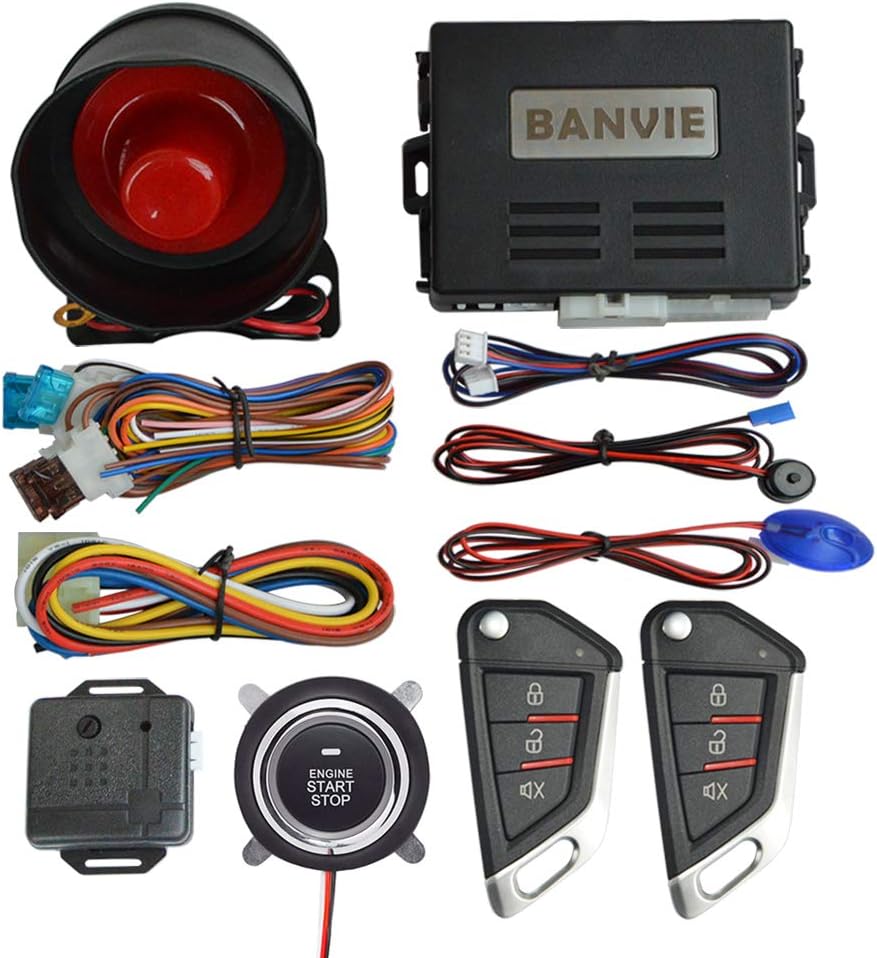
Image: Complete BANVIE Car Alarm System kit, showing the main control unit, siren, various wiring harnesses, the engine start/stop push button, and two remote key fobs.
Setup and Installation
Due to the complexity of automotive electrical systems, professional installation is strongly advised. This section provides general guidelines; refer to the detailed wiring diagrams and specific instructions provided with your product packaging for precise installation steps.
Pre-Installation Checks:
- Ensure all components listed in the package contents are present.
- Verify your vehicle's compatibility with the system.
- Disconnect the vehicle's battery before beginning any wiring.
Wiring and Component Placement:
- Main Unit: Install the main control unit in a secure, hidden location within the vehicle's cabin, away from moisture and extreme temperatures.
- Siren: Mount the siren securely in the engine bay, facing downwards to prevent water accumulation. Ensure it is away from heat sources.
- Push Button: Replace the existing ignition key cylinder with the provided push-to-start button. Ensure proper wiring to the main unit.
- Wiring Harnesses: Connect all wiring harnesses according to the provided wiring diagram. Pay close attention to power, ground, ignition, accessory, and starter wires.
- Shock Sensor: Mount the shock sensor securely to a rigid part of the vehicle's chassis, ensuring it is not easily accessible or prone to false triggers.
- Immobilizer Bypass (if applicable): If your vehicle has a factory immobilizer, install the bypass module as per its instructions to allow remote engine start.
Post-Installation:
- Reconnect the vehicle's battery.
- Perform initial system testing as outlined in the operating instructions.
- Test all functions, including arming, disarming, remote start, and push-button start.
Operating Instructions
This section details the primary functions of your BANVIE Car Alarm System using the provided remote controls and push-button start.
1. Arming and Locking the Vehicle
Press the Lock button on the remote control once. The system will arm, and the vehicle doors will lock. The turn signals may flash, and the siren will chirp once to confirm arming.

Image: Keyless Entry function, showing a hand using the remote control to lock/unlock a car.
2. Disarming and Unlocking the Vehicle
Press the Unlock button on the remote control once. The system will disarm, and the vehicle doors will unlock. The turn signals may flash twice, and the siren will chirp twice to confirm disarming.
3. Panic Code / Car Finding
To locate your vehicle in a parking lot or to trigger a panic alarm, press and hold the Panic/Car Finding button (often represented by a bell or horn icon) on the remote control for a few seconds. The vehicle's horn will sound, and lights will flash.
4. Push Button Start/Stop Engine
With the remote control within range (typically inside the vehicle), press the foot brake pedal and then press the ENGINE START STOP button once to start the engine. To stop the engine, press the foot brake pedal and then press the ENGINE START STOP button once again.
Note: If the engine does not start on the first press, ensure the foot brake is fully depressed and try again. For some vehicles, a longer press may be required.

Image: Keyless Go Push Start, showing a finger pressing the engine start/stop button.
5. Remote Engine Start/Stop
To remotely start the engine, press and hold the Remote Start button (often represented by a circular arrow or engine icon) on the remote control for approximately 3 seconds. The vehicle's lights will flash, and the engine will start. To remotely stop the engine, press and hold the same button again for 3 seconds.
Safety Feature: If the engine is remote started, it will automatically cut off after 15 minutes if the foot brake pedal is not pressed. This is a safety measure to prevent the engine from running indefinitely.

Image: Remote Engine Start feature, enabling pre-cooling in summer and pre-heating in winter.
6. Remote Trunk Release
To open the vehicle's trunk remotely, press and hold the Trunk Release button (often represented by a trunk icon) on the remote control for a few seconds. The trunk will unlatch.

Image: Remote Trunk Release function, showing a hand using the remote to open the car's trunk.
7. Alarm Triggered by Shock / Illegal Door Opening / ACC
The system is equipped with a shock sensor. If the vehicle experiences a significant impact while armed, the alarm will sound for approximately 8 seconds. If a door is opened illegally or the ACC (Accessory) is triggered while the system is armed, the alarm will sound for approximately 25 seconds.

Image: Shock Sensor Anti-Thief Alarm, depicting an alarm being triggered by an attempted break-in.
8. Central Door Locking Automation
This feature automatically locks the vehicle doors under certain conditions, typically when the ignition is turned on or the vehicle reaches a certain speed, enhancing security. Conversely, doors may unlock when the ignition is turned off.
9. Emergency Override
In case of remote control loss or malfunction, an emergency override procedure allows you to disarm the system and start the vehicle. Refer to the detailed instructions in your product's specific manual for the exact override sequence, which typically involves a combination of ignition turns and button presses.
10. Closing Window (Optional)
If a window closer module is installed and integrated with this system, the windows may automatically roll up when the system is armed. This function is dependent on the additional window closer module and its compatibility.
11. Code Learning
The system supports code learning to pair new or replacement remote controls. The procedure typically involves entering a programming mode using the ignition key and a system button, then pressing a button on the new remote. Consult your specific manual for the exact steps for code learning.
Maintenance
Proper maintenance ensures the longevity and reliable operation of your BANVIE Car Alarm System.
Remote Control Battery Replacement:
The remote controls are powered by CR2032 batteries. If the remote's range decreases or it becomes unresponsive, replace the battery. To replace:
- Carefully open the remote control casing, usually by prying it apart with a small flat-head screwdriver at the seam.
- Remove the old CR2032 battery.
- Insert a new CR2032 battery with the positive (+) side facing up.
- Snap the remote control casing back together securely.
General Care:
- Keep the main unit and remote controls away from excessive moisture, dust, and extreme temperatures.
- Avoid dropping the remote controls or subjecting them to strong impacts.
- Periodically check wiring connections for looseness or corrosion, especially after vehicle maintenance.
Troubleshooting
If you encounter issues with your BANVIE Car Alarm System, refer to the following common troubleshooting steps before seeking professional assistance.
| Problem | Possible Cause | Solution |
|---|---|---|
| System does not respond to remote control. | Dead remote battery; remote out of range; interference; remote not paired. | Replace remote battery; move closer to vehicle; check for strong radio interference; perform code learning procedure. |
| Engine does not start with push button or remote start. | Foot brake not pressed (for push button); immobilizer not bypassed; wiring issue; low vehicle battery. | Ensure foot brake is fully pressed; verify immobilizer bypass module installation; check all wiring connections; check vehicle battery charge. |
| Alarm triggers falsely. | Shock sensor sensitivity too high; loose mounting of sensor; environmental factors (e.g., strong winds, heavy vehicles passing). | Adjust shock sensor sensitivity (refer to installation manual); ensure sensor is mounted securely; avoid parking in areas prone to vibrations. |
| Doors do not lock/unlock. | Wiring issue to central locking; faulty actuator; system not armed/disarmed correctly. | Check wiring to door lock actuators; verify system status; consult professional if problem persists. |
If the problem persists after attempting these solutions, it is recommended to contact a professional automotive technician or BANVIE customer support for further assistance.
Specifications
Detailed technical specifications for the BANVIE Car Alarm System.
Main Unit System:
- Working Voltage: DC 12 V ± 3 V
- Static Current: ≤ 15mA
- PKE Emission Current: 40mA
- Working Frequency: 433 - 434 MHZ
- ACC / Start Current: 30A
Remote Control:
- Working Voltage: DC 3V
- Operation Current: 8uA
- Static Current: ≤ 15mA
- Battery: CR2032 (included)
Physical Dimensions and Weight:
- Product Dimensions: 11.81 x 11.81 x 11.81 inches
- Item Weight: 1.06 ounces
Warranty and Support
For warranty information, technical support, or any inquiries regarding your BANVIE Car Alarm System, please contact BANVIE customer service directly. Refer to the contact information provided with your product packaging or visit the official BANVIE website.
It is recommended to keep your purchase receipt as proof of purchase for warranty claims.
BANVIE is the manufacturer and seller of this product.


