
Introduction
Thank you for choosing the Joyroom JR-T03S Pro Wireless Earbuds. These earbuds are designed to provide a superior audio experience with advanced features such as Active Noise Cancellation (ANC), high-fidelity sound, and seamless Bluetooth 5.0 connectivity. This manual will guide you through the setup, operation, and maintenance of your new earbuds to ensure optimal performance and longevity.
Product Overview
The Joyroom JR-T03S Pro package includes the following components:
- Joyroom JR-T03S Pro Wireless Earbuds (Left and Right)
- Charging Case
- Charging Cable (Lightning)
- Customizable Silicon Ear-tips (Small, Medium, Large)
- User Manual (this document)

Image: All components included in the Joyroom JR-T03S Pro package, neatly arranged.
Specifications
Below are the detailed technical specifications for the JR-T03S Pro Wireless Earbuds:
| Brand | Joyroom |
| Model Number | JR-T03S Pro |
| Wireless Type | Bluetooth 5.0 |
| Vocalism Principle | Dynamic |
| Sensitivity | 103 ± 3dB |
| Impedance Range | Up to 32 Ω |
| Frequency Response | 20 - 20000 Hz |
| Microphone | Yes |
| Noise Control | Active Noise Cancellation (ANC) |
| Charging Method | Charging Case (Lightning Connector) |
| Charging Case Battery | 360 mAh |
| Earbud Battery | 45 mAh (each) |
| Operating Time | Approx. 5 hours |
| Call Duration | Approx. 3 hours |
| Charging Time | Approx. 1 hour (earbuds), 1.5 hours (case) |
| Control Type | Touch Control |
| Features | Support Apple Siri, Beam-forming Noise Reduction, CVC 8.0, Graphene Drivers, aptX Codec |

Image: A visual representation of the product's technical specifications and parameters.
Setup
Charging the Earbuds and Case
Before first use, ensure both the earbuds and the charging case are fully charged.
- Place the earbuds into the charging case. Ensure they are correctly seated in their respective slots (L for left, R for right).
- Connect the charging case to a power source using the provided Lightning cable.
- The indicator light on the charging case will show the charging status. A full charge for the earbuds takes approximately 1 hour, and the charging case takes about 1.5 hours.
- Once fully charged, disconnect the charging cable. The charging case has a 360 mAh battery, and each earbud has a 45 mAh battery, providing approximately 5 hours of operating time and 3 hours of call duration.

Image: Visual guide to the charging case and earbud battery capacities.
Bluetooth Pairing
Follow these steps to pair your Joyroom JR-T03S Pro earbuds with your device:
- Ensure the earbuds are charged and inside the charging case.
- Open the charging case lid. The earbuds will automatically enter pairing mode.
- On your device (smartphone, tablet, etc.), go to the Bluetooth settings.
- Search for "JR-T03S Pro" in the list of available devices and select it to connect.
- Once connected, you will hear a confirmation tone, and the earbuds will be ready for use.
- For subsequent uses, the earbuds will automatically connect to the last paired device when the case is opened, provided Bluetooth is enabled on your device.

Image: The Joyroom JR-T03S Pro earbuds in their charging case, illustrating their design for pairing.
Operating Instructions
Touch Controls
The JR-T03S Pro earbuds feature intuitive touch controls on each earbud. The specific functions are as follows:
- Single Tap: Play/Pause music, Answer/End call.
- Double Tap (Left Earbud): Previous track.
- Double Tap (Right Earbud): Next track.
- Triple Tap: Activate Voice Assistant (e.g., Apple Siri).
- Long Press (2 seconds): Toggle Active Noise Cancellation (ANC) / Transparency Mode.
- Long Press (5 seconds): Power On/Off (when not in case).
Active Noise Cancellation (ANC)
The JR-T03S Pro earbuds are equipped with advanced Active Noise Cancellation technology, allowing you to reduce ambient noise for an immersive listening experience. This feature is particularly effective in noisy environments such as public transport or busy offices.
- To activate or deactivate ANC, perform a long press (2 seconds) on either earbud. You will hear an audible prompt indicating the mode change.
- The earbuds also feature beam-forming noise reduction and CVC 8.0 technology for clear call quality, ensuring your voice is heard without background interference.

Image: An illustration demonstrating the active noise cancellation capability of the earbuds.

Image: Promotional image emphasizing the intelligent noise reduction core upgrade.
Sound Quality and Features
The JR-T03S Pro earbuds deliver a powerful and rich audio experience:
- Equipped with 13mm dynamic graphene drivers, they provide accurate and clear sound with enhanced bass.
- aptX codec ensures smooth audio transmission with minimal delay, contributing to a high-fidelity sound system.

Image: An internal view of the earbud highlighting the 13mm dynamic drivers responsible for HIFI sound quality.
Maintenance
Proper maintenance will extend the lifespan of your earbuds and ensure consistent performance.
- Cleaning: Regularly clean the earbuds, especially the ear tips and charging contacts, with a soft, dry, lint-free cloth. Do not use abrasive materials or harsh chemicals.
- Storage: When not in use, always store the earbuds in their charging case to protect them from dust, dirt, and physical damage.
- Ear Tips: The earbuds come with customizable silicon ear-tips in various sizes (Small, Medium, Large). Choose the size that provides the best seal and comfort for optimal sound and noise cancellation. Clean ear tips with water and mild soap if necessary, ensuring they are completely dry before reattaching.
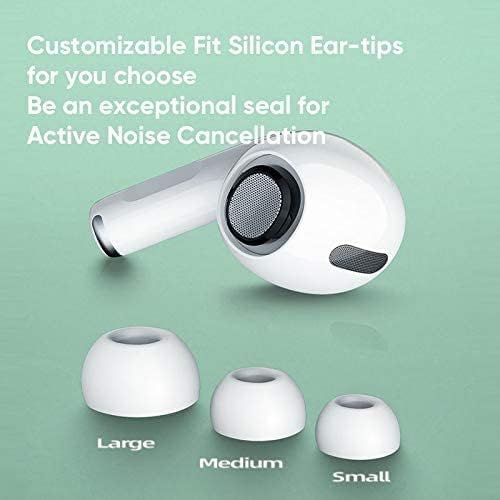
Image: Various sizes of silicon ear-tips provided for a customizable and secure fit.
Troubleshooting
If you encounter any issues with your Joyroom JR-T03S Pro earbuds, please refer to the following common solutions:
| Problem | Possible Solution |
|---|---|
| Earbuds not pairing/connecting. |
|
| No sound or low volume. |
|
| Charging issues. |
|
| Active Noise Cancellation not working effectively. |
|
If the issue persists after trying these solutions, please contact customer support.
Warranty and Support
Joyroom products are manufactured to high quality standards. For information regarding warranty coverage and customer support, please refer to the warranty card included in your product packaging or visit the official Joyroom website. Please retain your proof of purchase for any warranty claims.
For further assistance, you may also contact the retailer where you purchased the product.