1. Introduction
This manual provides instructions for the Powerextra D-Tap Charger, designed for V Mount, V Lock, and Gold Mount batteries. It ensures efficient and safe charging for compatible camera batteries and other devices that utilize a D-Tap port for charging.

Image 1.1: Powerextra D-Tap Charger with its integrated D-Tap cable.
2. Package Contents
Verify that all items are present in your package:
- 1 x Powerextra D-Tap Charger
- 1 x 100cm AC Charging Cable
- 1 x Microfiber Cleaning Cloth

Image 2.1: The D-Tap charger, AC power cable, and microfiber cloth included in the package.
3. Specifications
| Feature | Specification |
|---|---|
| AC Input | 100-240V / 0.8A |
| DC Output | 16.8V-2.0A |
| Output Voltage | 16.8 Volts |
| Item Weight | 8.1 ounces (approx. 230g) |
| Package Dimensions | 6.14 x 3.58 x 1.46 inches |
| Certifications | CE |
4. Setup
Follow these steps to set up your D-Tap Charger:
- Connect the AC Power Cable: Insert the included 100cm AC charging cable into the power input port on the charger unit.
- Plug into Power Outlet: Plug the other end of the AC charging cable into a standard wall power outlet (100-240V).
- Connect to Battery: Insert the D-Tap connector from the charger into the D-Tap port on your compatible V Mount, V Lock, or Gold Mount battery. Ensure a secure connection.

Image 4.1: The D-Tap connector for battery connection.


Image 4.2: Examples of compatible V-Mount, Gold Mount, and other D-Tap port batteries.
5. Operating Instructions
Once the charger is connected to a power source and a compatible battery, it will begin charging automatically.
- Charging Indicator: The charger features an LED indicator light to show the charging status.
- Red Light: Indicates that the battery is currently charging.
- Green Light: Indicates that the battery is fully charged.
The charger utilizes automatic constant current control to optimize charging speed and prevent overcharging.
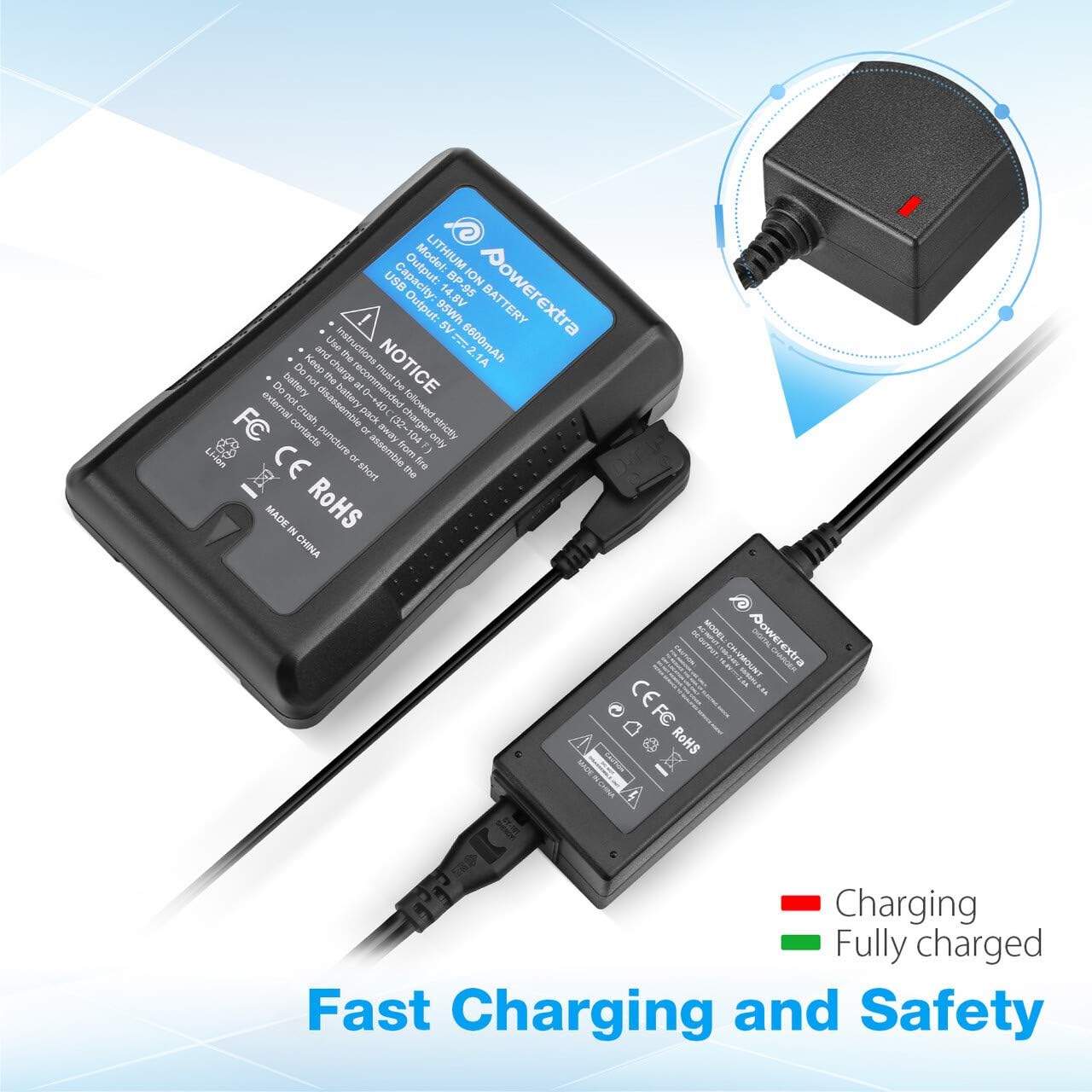
Image 5.1: Charger connected to a battery, with the red LED indicating active charging.
6. Safety Information
To ensure safe operation and prolong the life of your charger and batteries, please observe the following safety precautions:
- Overcharge Protection: The charger is designed to prevent batteries from overcharging.
- Short Circuit Protection: Built-in mechanisms protect against short circuits.
- Over Current Protection: Safeguards against excessive current flow.
- Over Heating Protection: Prevents the charger from overheating during operation.
- Over Discharge Protection: (Note: This protection is typically a feature of the battery itself, but the charger is designed to work safely with such batteries.)
- Use the charger only with compatible V Mount, V Lock, or Gold Mount batteries.
- Do not expose the charger to moisture, rain, or extreme temperatures.
- Do not disassemble or modify the charger. Refer all servicing to qualified personnel.
- Keep out of reach of children.

Image 6.1: Visual representation of the multi-protection features including short circuit, over discharge, over current, over charge, and over heating protection.
7. Maintenance
Proper maintenance ensures optimal performance and longevity of your charger:
- Cleaning: Use the provided microfiber cleaning cloth to gently wipe the charger and cables. Do not use liquid cleaners or solvents.
- Storage: Store the charger in a cool, dry place away from direct sunlight and extreme temperatures when not in use.
- Cable Care: Avoid bending or crimping the cables excessively. Always grasp the plug, not the cable, when disconnecting.
8. Troubleshooting
If you encounter issues with your Powerextra D-Tap Charger, refer to the following common problems and solutions:
- Charger Not Powering On:
- Ensure the AC power cable is securely connected to both the charger and the wall outlet.
- Verify that the wall outlet is functional by testing it with another device.
- Battery Not Charging:
- Check that the D-Tap connector is fully and correctly inserted into the battery's D-Tap port.
- Confirm that the battery is compatible with the charger and is not fully charged already (green LED).
- Inspect the D-Tap cable and connector for any visible damage.
- Indicator Light Not Functioning:
- If the charger is connected and the battery is not fully charged, but the light is off, contact customer support.
If the problem persists after attempting these solutions, please contact Powerextra customer support for further assistance.
9. Warranty and Support
Powerextra provides the following for this D-Tap Charger:
- Warranty: 12-month hassle-free warranty from the date of purchase.
- Support: Lifetime technical support.
For warranty claims, technical assistance, or any product-related inquiries, please contact Powerextra customer service through their official website or the retailer where the product was purchased.


