
Garmin Montana 700
Contents
Garmin Montana 700 User Manual
Rugged GPS Handheld Navigator
Introduction
The Garmin Montana 700 is a rugged, versatile GPS handheld designed for outdoor enthusiasts. It features routable mapping for both roads and trails, making it suitable for various activities such as hiking, biking, kayaking, and ATV use. The device boasts a glove-friendly 5-inch color touchscreen, which is significantly larger than previous models, enhancing visibility and ease of use.
This manual provides essential information for setting up, operating, maintaining, and troubleshooting your Montana 700 device. Please read it thoroughly to ensure optimal performance and longevity of your GPS handheld.
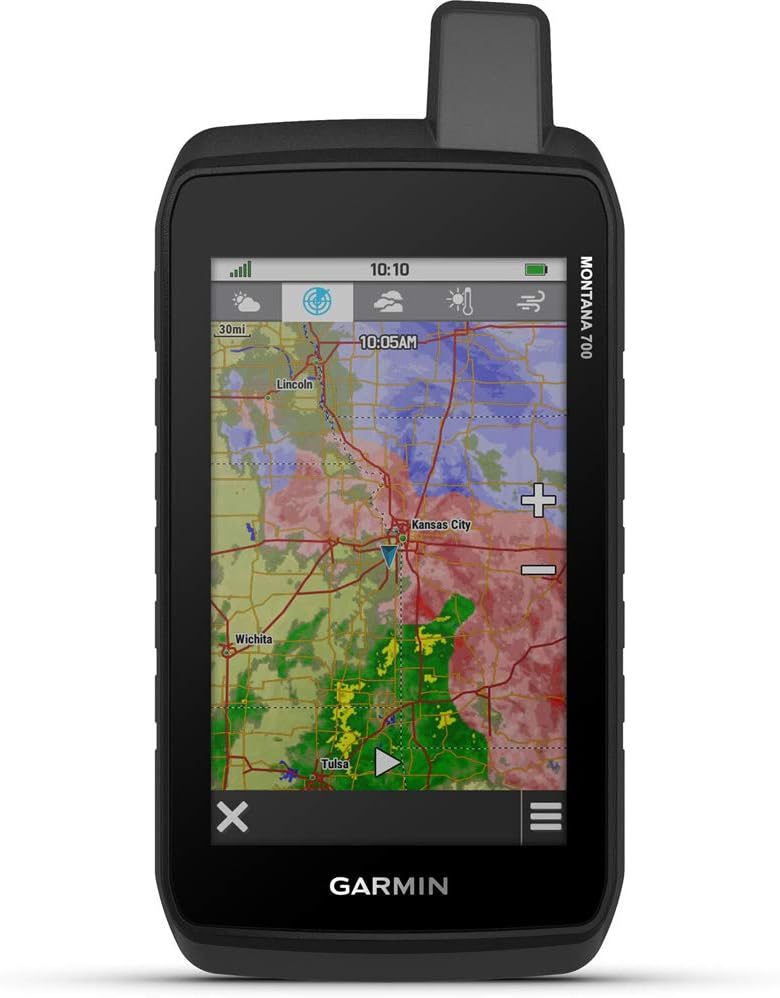
Figure 1: Front view of the Garmin Montana 700 displaying a topographic map with weather information.
Setup
1. Unboxing and Initial Inspection
Upon opening the package, ensure all components are present and undamaged. The standard package for the Montana 700 includes:
- Garmin Montana 700 device
- Lithium-ion battery pack
- USB cable
- Documentation (this manual and other guides)
2. Battery Installation and Charging
The Montana 700 is powered by a rechargeable lithium-ion battery pack. To install the battery:
- Locate the battery compartment cover on the back of the device.
- Open the cover by sliding the latch or unscrewing if applicable.
- Insert the lithium-ion battery pack, ensuring proper orientation.
- Close the battery compartment cover securely.
Before first use, fully charge the device using the provided USB cable. Connect the small end of the USB cable to the device's USB port and the large end to a compatible USB power adapter or computer USB port. A full charge typically provides up to 18 hours of battery life in standard GPS mode, and significantly longer in Expedition mode.

Figure 2: Rear view of the Garmin Montana 700, highlighting the battery compartment and mounting interface.
3. Initial Power On and Setup Wizard
Press and hold the power button located on the side of the device until the screen turns on. The device may guide you through an initial setup wizard, prompting you to select language, time zone, and other basic settings. Follow the on-screen instructions.
4. Software and Map Installation/Updates
Your Montana 700 comes with preloaded TopoActive maps. For additional maps or software updates, connect your device to a computer and use the Garmin Express application. This application allows you to manage maps, update software, and register your device. Ensure you have a stable internet connection for map downloads, as some map files can be large.
Operating Your Montana 700
1. Basic Navigation and Interface
The Montana 700 features a responsive 5-inch color touchscreen. Navigate through menus and maps by tapping, swiping, and pinching. The device supports multi-GNSS (GPS, GLONASS, and Galileo) reception for accurate positioning. It also includes advanced outdoor navigation sensors such as a 3-axis electronic compass and a barometric altimeter for precise heading and elevation data.

Figure 3: The Montana 700 showing the compass and key navigation metrics.

Figure 4: The Montana 700 displaying an elevation profile, useful for tracking ascent and descent during activities.
2. Wireless Connectivity
The Montana 700 is pro-connected with ANT+ technology, Wi-Fi connectivity, and BLUETOOTH wireless networking. These features enable:
- BirdsEye Satellite Imagery Downloads: Direct-to-device downloads of high-resolution satellite imagery (subscription may be required).
- Location Sharing: Share your location with others.
- Connect IQ App Support: Customize your device with apps, widgets, and data fields from the Connect IQ Store.
- Garmin Explore App: Sync your device with the Garmin Explore website and app to manage waypoints, routes, activities, and collections, and review trip data from the field.
3. Expedition Mode
For extended trips, activate Expedition mode to significantly extend battery life. This mode reduces GPS track points and screen activity to conserve power, allowing the device to operate for more than a week on a single charge.
4. Dog Tracking (Optional)
The Montana 700 can sync with compatible Garmin Astro or Alpha series handhelds (sold separately) to help track sporting dogs in the field. Refer to the respective dog tracking device's manual for pairing instructions.
5. Camera Functionality (Montana 750i only)
Please note that the Montana 700 model does not include an integrated 8MP camera. This feature is available on the Montana 750i model only.
Maintenance
1. Cleaning the Device
To clean your Montana 700, use a soft, lint-free cloth. For stubborn dirt, dampen the cloth with water. Avoid using abrasive cleaners, solvents, or chemical cleaning agents, as these can damage the device's screen and casing. The device is rated to IPX7 for water resistance, meaning it can withstand incidental exposure to water, but it should not be submerged for extended periods or subjected to high-pressure water jets.
2. Battery Care
To maximize battery life and performance:
- Avoid exposing the device to extreme temperatures.
- Store the device in a cool, dry place when not in use.
- If storing for an extended period, charge the battery to approximately 50% before storage.
- Use only Garmin-approved charging accessories.
3. Software Updates
Regularly check for and install software updates using the Garmin Express application. Updates often include performance improvements, bug fixes, and new features. It is recommended to back up your data before performing any major software updates.
Troubleshooting
Common Issues and Solutions
- Device not powering on: Ensure the battery is correctly installed and fully charged. Try connecting the device to a power source and attempting to power it on.
- Screen freezing or unresponsive: Perform a soft reset by holding down the power button for 10-15 seconds until the device powers off, then restart it. If the issue persists, ensure your software is up to date via Garmin Express.
- GPS signal acquisition issues: Ensure you are in an open area with a clear view of the sky. Allow several minutes for the device to acquire satellites. Verify that Multi-GNSS is enabled in settings.
- Map download failures: Ensure a stable and fast internet connection. Large map files can sometimes time out. Try restarting the download in Garmin Express. Ensure sufficient storage space on the device or an inserted microSD card.
- Connectivity problems (Wi-Fi, Bluetooth, ANT+): Ensure the respective wireless features are enabled on both the Montana 700 and the connected device. Check for interference from other electronic devices.
If you encounter persistent issues not covered here, please refer to the official Garmin support website or contact Garmin customer service for further assistance.
Specifications
| Feature | Detail |
|---|---|
| Product Dimensions | 8.54 x 5.9 x 3.26 inches |
| Item Weight | 14.6 ounces |
| Model Number | 010-02133-00 |
| Batteries | 1 Lithium Ion battery required (included) |
| Connectivity Technologies | Wi-Fi, ANT+, Bluetooth |
| Human Interface Input | Touchscreen |
| Color | Black |
| What's in the box | Montana 700; Lithium-ion battery pack; USB cable; Documentation |
| Manufacturer | Garmin |
| Screen Size | 5 Inches |
| Map Type | North America (preloaded) |
| Battery Life | 18 Hours (standard mode) |
| Ruggedness Rating | MIL-STD 810 (thermal, shock, water, vibration) |
| Water Rating | IPX7 |
Warranty and Support
Garmin products are designed for reliability and performance. For detailed warranty information, please refer to the warranty card included with your product or visit the official Garmin website.
For additional support, frequently asked questions, and the latest software downloads, please visit the Garmin Support Center. You can also download the full user manual in PDF format from here.
If you require technical assistance, please contact Garmin Customer Service. Have your device's model number (Montana 700) and serial number ready when contacting support.
Documents and downloads
Ask a question about this manual
Ask about setup, troubleshooting, compatibility, parts, safety, or missing instructions. Manuals+ will review the question and use this page’s manual context to help answer it.