
NetumScan NSI6-X
NetumScan NSI6-X Wireless CCD Barcode Scanner User Manual
Model: NSI6-X
1. Introduction
This manual provides detailed instructions for the setup, operation, and maintenance of your NetumScan NSI6-X Wireless CCD Barcode Scanner. The NSI6-X is a 1D barcode scanner designed for efficient data capture in various environments, including retail, hospitals, production lines, and warehouses. It offers both 2.4G wireless and USB wired connectivity for versatile use.
2. Package Contents
Please verify that all items are present in your package:
- 1 x Wireless Barcode Scanner
- 1 x Adjustable Hands-Free Stand
- 1 x 2.4G USB Receiver (Dongle)
- 1 x USB Cable
- 1 x User Manual
3. Product Overview
The NetumScan NSI6-X scanner is designed for ease of use and durability. It features a comfortable grip, a trigger button, and a CCD scanning window. The included adjustable stand allows for hands-free operation.

Figure 3.1: NetumScan NSI6-X Wireless CCD Barcode Scanner with its components, including the scanner unit, adjustable stand, USB cable for charging/wired connection, and the 2.4G USB wireless dongle.
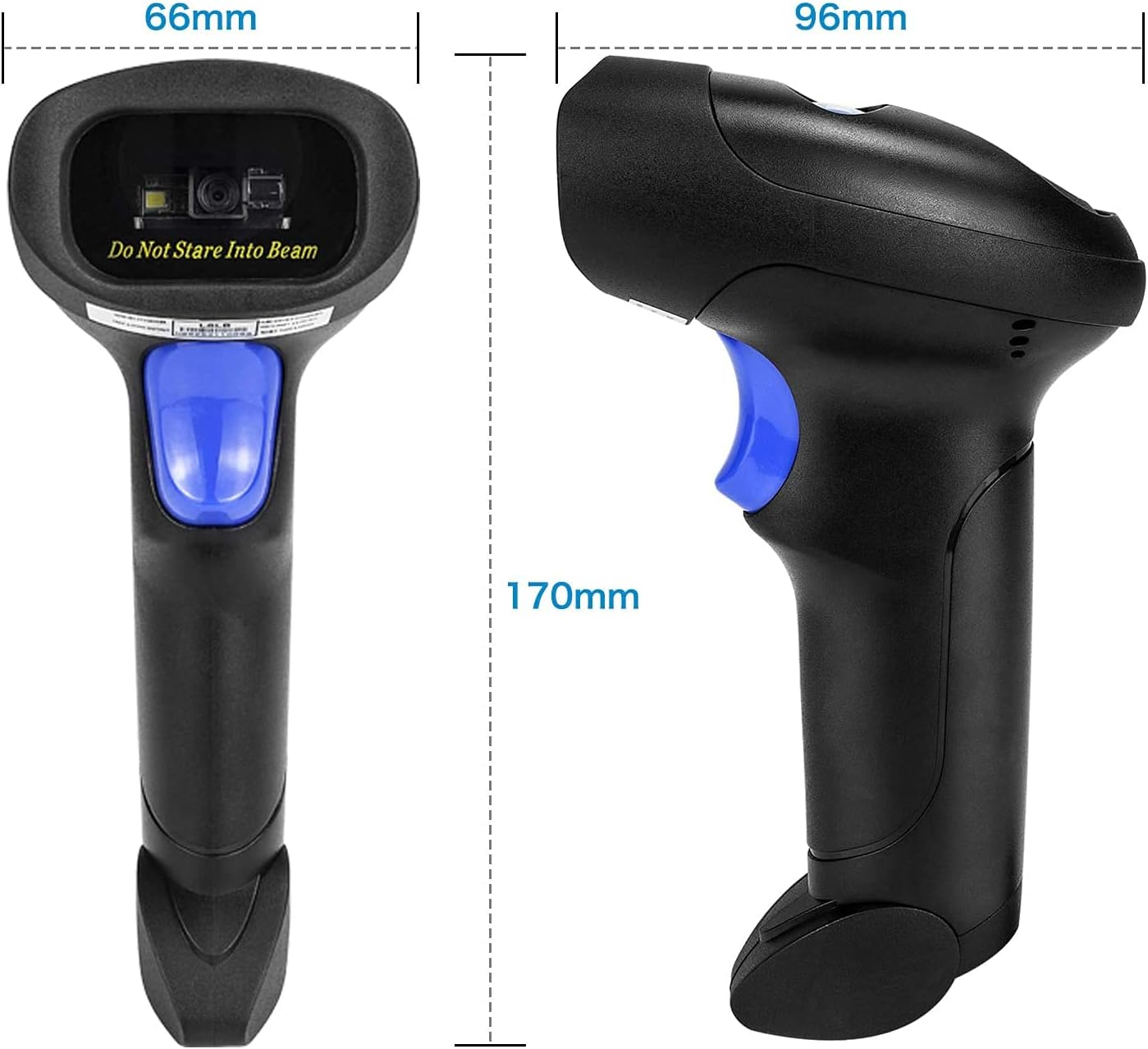
Figure 3.2: Physical dimensions of the NetumScan NSI6-X scanner, showing a width of 66mm, a depth of 96mm, and a height of 170mm.

Figure 3.3: Dimensions of the adjustable stand for the NetumScan NSI6-X, indicating a maximum height of 260mm, a base width of 132mm, and a base depth of 185mm.
4. Setup
4.1. System Compatibility
The NetumScan NSI6-X is compatible with Windows, Mac OS, and Linux operating systems.
4.2. Connection Methods
The scanner supports two connection modes: 2.4G wireless and USB wired.

Figure 4.1: Illustration of the two connectivity options for the NetumScan NSI6-X: a USB 2.0 wired connection and a 2.4G wireless connection via a USB dongle. The image also shows compatibility with PC and Laptops, but not iPads or Phones.
4.2.1. 2.4G Wireless Connection
- Insert the 2.4G USB receiver (dongle) into an available USB port on your computer.
- The computer will automatically install the necessary drivers (Plug and Play).
- Turn on the barcode scanner. It will automatically pair with the receiver.
- A successful connection is indicated by a specific sound or light on the scanner.
The wireless range is approximately 50 meters indoors and up to 100 meters outdoors without obstacles.
4.2.2. USB Wired Connection
- Connect the USB cable to the scanner and then to an available USB port on your computer.
- The scanner will function as a wired device, and the computer will automatically install drivers.
- The scanner will also charge its internal battery while connected via USB.
5. Operating Instructions
5.1. Basic Scanning
- Ensure the scanner is powered on and connected to your computer (either wirelessly or via USB).
- Open a text editor, spreadsheet, or any application where you want the scanned data to appear.
- Point the scanning window at the barcode you wish to read.
- Press and hold the trigger button. A red scanning line will appear.
- Align the red line across the entire barcode. A successful scan will be indicated by a beep and the data appearing on your computer screen.
The NSI6-X CCD scanner can read barcodes directly from paper, smartphone screens, or computer monitors. It is also effective at reading barcodes with poor print quality or scratches.
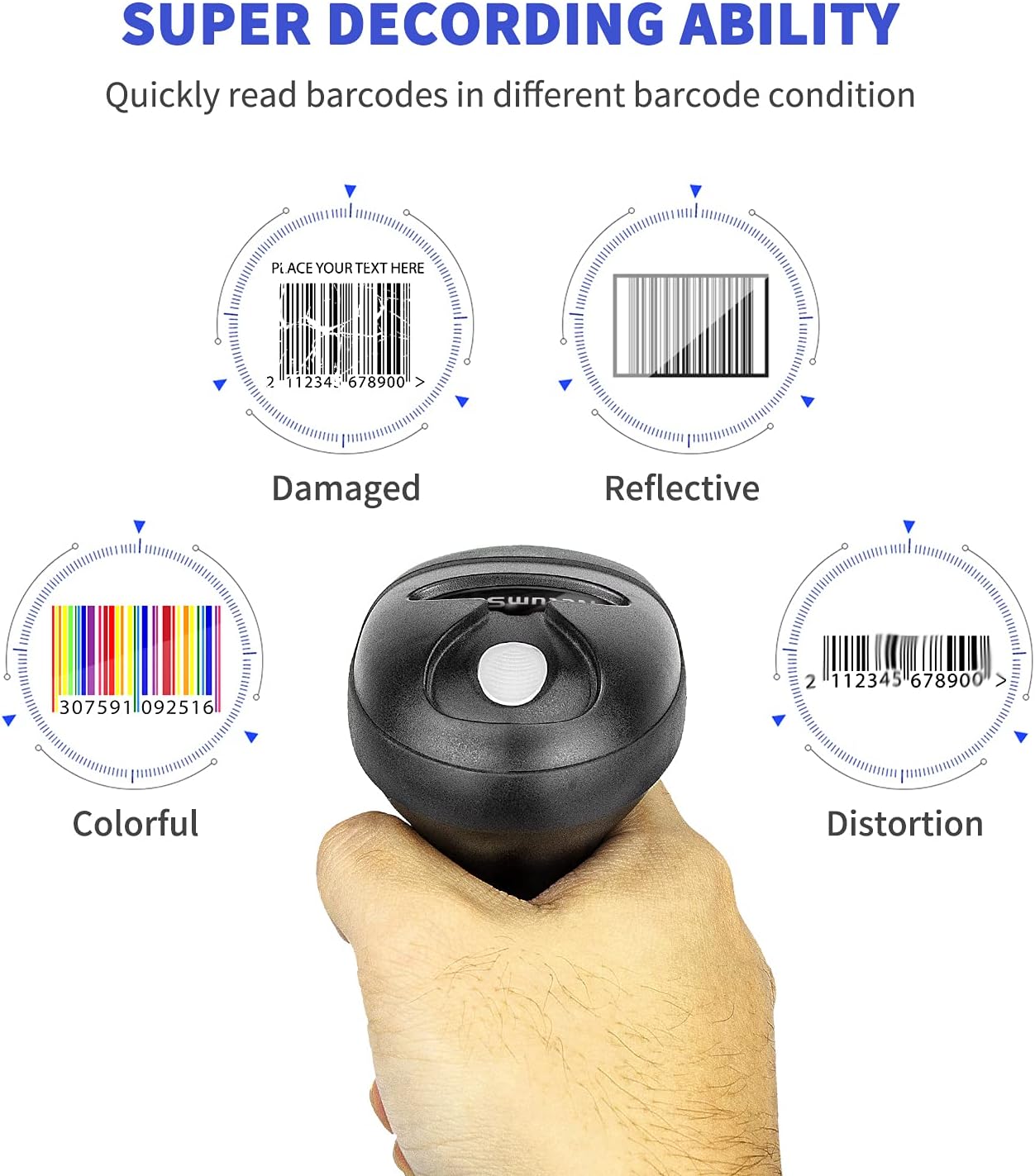
Figure 5.1: The NetumScan NSI6-X scanner's capability to read various barcode conditions, including damaged, reflective, colorful, and distorted barcodes, ensuring reliable data capture.
5.2. Hands-Free Operation
Place the scanner in its adjustable stand for continuous or presentation scanning. The stand allows for automatic scanning when a barcode is presented within the scanning area, eliminating the need to press the trigger for each scan.
6. Barcode Symbologies Supported
The NetumScan NSI6-X supports a wide range of 1D barcode types:
- EAN-8, EAN-13
- Codabar
- CODE11, CODE 39, CODE 93, CODE128
- China Post
- GS1-128, GS1 Limited, GS1 Omnidirectional
- UPC-A, UPC-E, UPC/EAN Add-on
- ISBN / ISSN, ISBT, ISBT 128
- Interleaved 2 of 5, Industrial 2 of 5, Matrix 2 of 5, Standard 2 of 5
- MSI / MSI PLESSEY
- ITF14
- GS1 DataBar
Note: This model can only read 1D barcodes. It cannot decode 2D barcodes (e.g., QR codes, Data Matrix).
7. Customization
The scanner offers customization options such as adding prefixes or suffixes to scanned data, or hiding certain digits. These functions are typically configured by scanning specific programming barcodes found in the full user manual or provided by customer support.

Figure 7.1: Examples illustrating barcode data customization options, including hiding digits (e.g., '123 456789'), adding a prefix (e.g., 'ABC123456789'), and adding a suffix (e.g., '123456789ABC').
If you require specific programming for prefixes, suffixes, or other advanced settings, please contact NetumScan customer support for the necessary programming barcodes and instructions.
8. Maintenance
8.1. Cleaning
To maintain optimal performance, keep the scanning window clean. Use a soft, lint-free cloth, slightly dampened with water or a mild cleaning solution. Avoid abrasive cleaners or solvents.
8.2. Battery Information
The scanner is equipped with a rechargeable Lithium-ion battery. It has a capacity of 1800 mAh, providing extended operation time. The battery charges automatically when the scanner is connected via the USB cable.

Figure 8.1: The NetumScan NSI6-X features an 1800 mAh long-life rechargeable battery. The device also incorporates anti-shock silicone (IP54 rated) and has passed a 5-foot (1.5 meters) drop test for durability.
8.3. Durability
The scanner features anti-shock silicone protection and has passed a drop test from 5 feet (1.5 meters), ensuring durability in various working environments.
9. Troubleshooting
If you encounter issues with your NetumScan NSI6-X scanner, please refer to the following common problems and solutions:
| Problem | Possible Cause | Solution |
|---|---|---|
| Scanner does not turn on. | Low battery. | Charge the scanner using the USB cable. |
| Scanner does not connect wirelessly. | USB receiver not plugged in or not recognized. Out of range. | Ensure the USB receiver is securely plugged into the computer. Move closer to the computer. Re-pair if necessary (refer to full manual for pairing barcode). |
| Scanner does not read certain barcodes. | Barcode type not enabled by default. Barcode is 2D. Barcode is damaged. | Confirm the barcode is 1D. Contact NetumScan support for programming barcodes to enable specific symbologies. Try scanning a different, known good barcode. |
| Scanned data appears incorrectly. | Incorrect keyboard layout setting on computer. | Ensure your computer's keyboard layout matches the scanner's default or programmed layout. |
| Scanner does not work with a device without a USB port. | This model requires a USB port for connection. | The NSI6-X operates via USB dongle or USB cable only. It does not support direct Bluetooth connection to devices without a USB port. |
For further assistance, please refer to the comprehensive user manual or contact NetumScan customer support.
10. Specifications
| Feature | Specification |
|---|---|
| Brand | NetumScan |
| Model Number | NSI6-X |
| Scanner Type | CCD (1D Barcodes Only) |
| Connectivity Technology | 2.4G Wireless (via USB Dongle), USB Wired |
| Compatible Operating Systems | Windows, Mac OS, Linux |
| Compatible Devices | Computer, Laptop |
| Battery Type | Lithium-ion (Rechargeable) |
| Battery Capacity | 1800 mAh |
| Wireless Range | Approx. 50m (indoor), 100m (outdoor, no obstacles) |
| Durability | Anti-shock silicone, 1.5m drop test passed |
| Power Source | Cable Electric |
| UPC | 649615769577 |
11. Warranty and Support
NetumScan products are designed for reliability and performance. For warranty information, please refer to the documentation included with your purchase or visit the official NetumScan website.
If you require technical support, have questions about product functionality, or need assistance with advanced programming, please contact NetumScan customer service. Contact details can typically be found on the product packaging or the official NetumScan website.
Related documentsNSI6-X


Ask a question about this manual
Ask about setup, troubleshooting, compatibility, parts, safety, or missing instructions. Manuals+ will review the question and use this page’s manual context to help answer it.