
Introduction
This instruction manual provides important information regarding the safe operation, setup, maintenance, and troubleshooting of your Makita 40V Max XGT Rapid Optimum Charger (Model DC40RA). Please read this manual thoroughly before using the charger to ensure proper and safe use. Keep this manual for future reference.
Important Safety Instructions
WARNING: Read all safety warnings and all instructions. Failure to follow the warnings and instructions may result in electric shock, fire, and/or serious injury.
- SAVE THESE INSTRUCTIONS – This manual contains important safety and operating instructions for battery charger DC40RA.
- Before using battery charger, read all instructions and cautionary markings on battery charger, battery, and product using battery.
- Do not charge other types of batteries. This charger is designed exclusively for Makita 40V Max XGT Lithium-Ion batteries.
- Do not expose charger to rain or wet conditions. Water entering the charger will increase the risk of electric shock.
- Do not abuse the cord or charger. Never use the cord for carrying, pulling, or unplugging the charger.
- Do not operate charger if it has received a sharp blow, been dropped, or otherwise damaged. Take it to a qualified service person.
- Do not disassemble charger. Take it to a qualified service person when service or repair is required. Incorrect reassembly may result in a risk of electric shock or fire.
- Unplug charger from outlet before attempting any maintenance or cleaning.
- To reduce risk of electric shock, unplug charger from outlet before attempting any cleaning. Removing the battery pack will not reduce this risk.
- This appliance is not intended for use by persons (including children) with reduced physical, sensory or mental capabilities, or lack of experience and knowledge, unless they have been given supervision or instruction concerning use of the appliance by a person responsible for their safety.
Product Overview
The Makita DC40RA is a rapid optimum charger designed for Makita 40V Max XGT Lithium-Ion batteries. It features intelligent charging technology to optimize battery life and charging speed, along with a built-in cooling fan to prevent overheating during the charging process.

Figure 1: Front view of the Makita DC40RA Rapid Optimum Charger, showing the battery slot and indicator panel.

Figure 2: Angled view of the Makita DC40RA charger, highlighting its compact design and side ventilation.
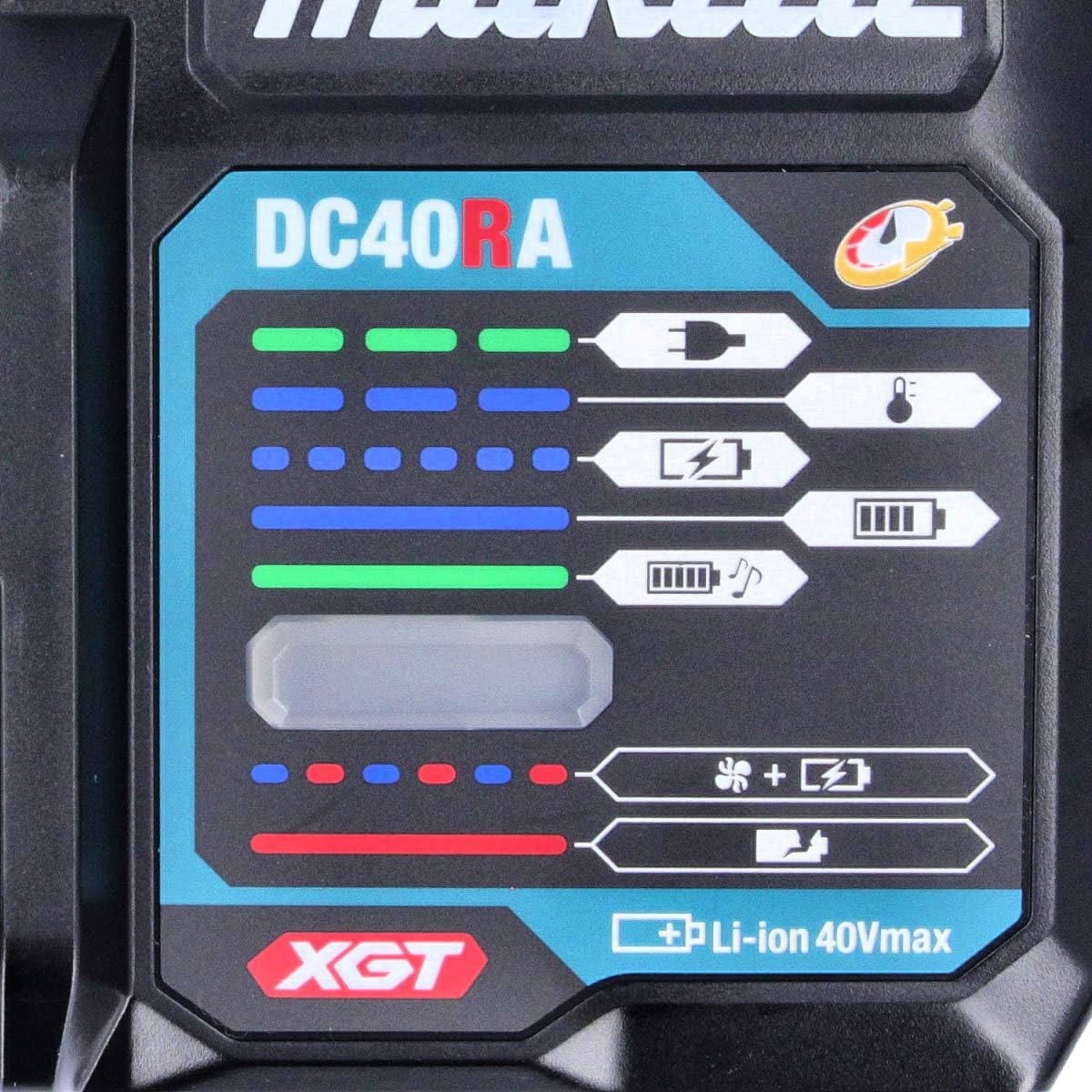
Figure 3: Close-up of the DC40RA indicator panel, displaying various charging status lights and symbols.

Figure 4: Detailed view of the battery insertion slot on the Makita DC40RA charger, showing the electrical contacts.
Setup
Follow these steps to set up your Makita DC40RA charger:
- Choose a Location: Place the charger on a stable, flat surface in a well-ventilated area, away from direct sunlight and moisture. Ensure there is sufficient space around the charger for proper airflow.
- Connect Power: Insert the charger's power plug into a standard electrical outlet. The charger is designed for 240 Volts.
- Initial Check: When the charger is plugged in, the charging indicator lights may briefly illuminate to confirm power connection.

Figure 5: Standard power plug for the Makita DC40RA charger, designed for 240V outlets.
Operating Instructions
The DC40RA charger is designed for rapid and optimum charging of Makita 40V Max XGT Lithium-Ion batteries. It features a built-in CPU that communicates with the battery to monitor its condition and optimize the charging process.
Charging Procedure:
- Insert Battery: Slide a Makita 40V Max XGT Lithium-Ion battery into the charger's battery slot until it clicks into place. Ensure it is fully seated.
- Monitor Charging Indicators: The charger's indicator lights will show the charging status. Refer to the "Charging Indicator Status" section below for details.
- Charging Completion: Once charging is complete, the indicator will change. Remove the battery by pressing the release button and sliding it out.
Charging Indicator Status:
The DC40RA charger features a clear indicator panel to communicate the battery's status during charging. Refer to Figure 3 for a visual representation of the indicator panel.
| Indicator Light | Status | Description |
|---|---|---|
| Solid Green | Charging | The battery is currently charging. The number of illuminated green segments indicates the charge level. |
| Solid Green (Full) | Charging Complete | The battery is fully charged and ready for use. |
| Flashing Red | Battery Error / Overheating | Indicates a problem with the battery or that the battery is too hot/cold to charge. Remove the battery and allow it to cool down or warm up. |
| Solid Red | Charger Error | Indicates an issue with the charger itself. Unplug the charger and plug it back in. If the error persists, contact Makita service. |
| Flashing Green/Red | Cooling Fan Operation | The internal cooling fan is active to maintain optimal charging temperature. This is normal during rapid charging. |
Cooling System:
The DC40RA charger incorporates a built-in cooling fan to cool the battery during the charging process. This helps to extend battery life and allows for faster charging. Ensure the fan vents are not obstructed.
Maintenance
Proper maintenance ensures the longevity and optimal performance of your charger.
- Cleaning: Disconnect the charger from the power outlet before cleaning. Use a dry cloth to wipe dust and dirt from the charger's exterior. Do not use water or chemical cleaners. Keep the ventilation openings clear of debris.
- Storage: When not in use, store the charger in a dry, cool place, away from direct sunlight and moisture. Do not store the charger with a battery inserted.
- Inspection: Periodically inspect the power cord for any signs of damage (cuts, fraying). If the cord is damaged, have it replaced by a qualified service technician.
Troubleshooting
If you encounter issues with your charger, refer to the table below for common problems and solutions.
| Problem | Possible Cause | Solution |
|---|---|---|
| Charger not working / No indicator lights | No power supply | Check if the power cord is securely plugged into the outlet and the charger. Test the outlet with another device. |
| Battery not charging (Flashing Red indicator) | Battery too hot/cold; Battery fault | Remove the battery and allow it to reach room temperature. Reinsert the battery. If the error persists, the battery may be faulty. |
| Charger error (Solid Red indicator) | Internal charger fault | Unplug the charger from the power outlet, wait a few minutes, then plug it back in. If the error persists, contact Makita service. |
| Charging takes too long | Battery condition; Ambient temperature | Ensure the battery is not excessively hot or cold. Charge in a room temperature environment. Ensure charger vents are clear. |
Specifications
| Feature | Detail |
|---|---|
| Model Number | DC40RA |
| Input Voltage | 240 Volts |
| Output Voltage | 40 Volts |
| Compatible Battery Type | Makita 40V Max XGT Lithium-Ion |
| Item Weight | 1.52 pounds (approx. 690 Grams) |
| Product Dimensions | 0.39 x 0.39 x 0.39 inches (Manufacturer's spec) / 12"D x 12"W x 12"H (Amazon's spec) |
| Color | Black, Blue |
| Power Source | Corded Electric |
| Certification | Energy Star |
Warranty and Support
Makita products are manufactured under strict quality control standards. For detailed warranty information, please refer to the warranty card included with your product or visit the official Makita website. In case of issues or for technical support, please contact Makita customer service.
For further assistance, visit the official Makita website: www.makitatools.com


