
Live Fine LVFPDBTC
Contents
Live Fine Automatic Pill Dispenser Instruction Manual
Model: LVFPDBTC
Product Overview
The Live Fine Automatic Pill Dispenser is designed to assist with medication management by providing timely reminders and secure dispensing of pills. It features a 28-day electronic organizer, customizable dosage templates, an easy-to-read LCD display, and both sound and light alerts to ensure medication adherence. The device is equipped with a key-locking mechanism for added security, preventing unauthorized access and accidental double-dosing.

Figure 1: Live Fine Automatic Pill Dispenser (Frosted Lid Model)
This dispenser is ideal for individuals requiring a structured medication schedule, including prescriptions, vitamins, and supplements. Its robust design and user-friendly interface make it a reliable tool for both patients and caregivers.
Setup
- Battery Installation: The dispenser operates on 4 AA batteries (included). Locate the battery compartment on the underside of the device. Insert the batteries, ensuring correct polarity.
- Loading Medications: Open the dispenser lid using the provided key. The clear removable carousel can be lifted out for easier loading. Place medications, vitamins, or pills into the 28 spacious compartments. Each compartment can hold multiple pills.
- Selecting Dosage Ring: Choose one of the 6 interchangeable dosage rings based on your medication schedule (e.g., 1x per day for 28 days, 2x per day for 14 days, etc.). Place the selected ring onto the carousel.
- Programming Dosage Times: Use the 3-button interface on the LCD display to set the current time and program up to 6 daily alarm times. The display shows the clock time (AM/PM) and allows manual programming.
- Securing the Dispenser: Close the lid and use the key to lock the cover. This prevents unauthorized access and ensures the integrity of the medication schedule.

Figure 2: Battery Compartment

Figure 3: Removable Tray for Easy Loading

Figure 4: Interchangeable Dosage Rings
Setup Video Guide
Video 1: Official LiveFine Automatic Pill Dispenser Overview and Setup. This video demonstrates the features and initial setup of the dispenser, including loading pills and setting alarms.
Operating Instructions
- Receiving Alerts: When it's time for a scheduled dose, the dispenser will activate loud audible beeps and flashing lights for up to 30 minutes. The LCD display will also indicate the time for the next dose.
- Dispensing Medication: To retrieve your medication, open the pill delivery door. Once opened, flip the unit upside down to pour the pills into your hand. The alerts will stop once the door is closed and the unit is turned right side up.
- Automatic Rotation: The internal carousel automatically rotates to present the correct compartment at the scheduled time.
- Viewing Dosage Information: An integrated mini magnifying glass is available on the lid to provide a closer look at the corresponding dosage information on the ring.

Figure 5: Custom Timer and Alerts

Figure 6: Medication Dispensing
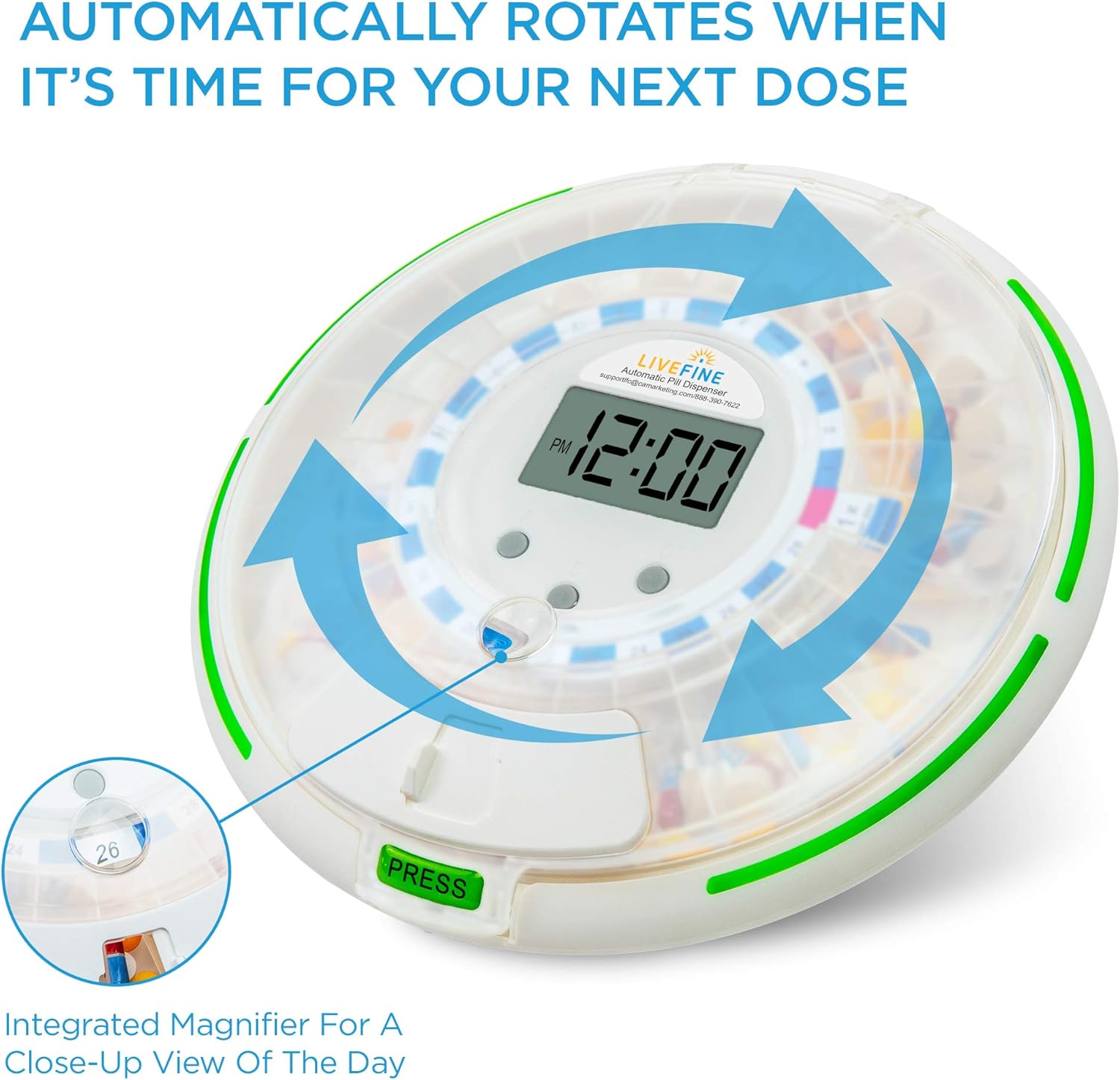
Figure 7: Automatic Carousel Rotation

Figure 8: Integrated Magnifier
Maintenance
- Cleaning: To clean the dispenser, wipe the exterior with a soft, damp cloth. The removable carousel can be washed with mild soap and water. Ensure all parts are completely dry before reassembling. Do not immerse the main unit in water.
- Battery Replacement: When the battery indicator on the LCD display shows low power, replace all 4 AA batteries simultaneously to ensure optimal performance. Refer to the "Battery Installation" step in the Setup section for guidance.
- Storage: Store the dispenser in a cool, dry place away from direct sunlight and extreme temperatures when not in use.
Troubleshooting
| Problem | Possible Cause | Solution |
|---|---|---|
| Dispenser not turning on/LCD blank | Batteries are dead or incorrectly installed. | Replace all 4 AA batteries with new ones, ensuring correct polarity. |
| Alarm not sounding or lights not flashing | Alarm settings are incorrect or volume is too low. | Check programmed alarm times and adjust volume settings via the LCD interface. Ensure batteries are not low. |
| Pills not dispensing or carousel not rotating | Obstruction in the compartment or mechanism. | Ensure no pills are jammed. Remove carousel and check for debris. Reinstall carousel correctly. |
| "Err" message on display | Internal error or malfunction. | Remove and reinsert batteries to reset the device. If the error persists, contact customer support. |
| Lid not locking securely | Locking mechanism is misaligned or damaged. | Ensure the lid is properly aligned before attempting to lock. Do not force the lock. If damaged, contact customer support. |
Specifications
| Feature | Detail |
|---|---|
| Model Number | LVFPDBTC |
| Dimensions | 9.25 x 9.25 x 3 inches |
| Weight | 1.92 Pounds |
| Power Source | 4x AA alkaline batteries (included) |
| Material | Plastic |
| Dispensing Capacity | 28 compartments, up to 18 pills per compartment |
| Alarm Settings | Up to 6 daily alarms (sound & light) |
| Lid Type | Frosted Lid (also available with Clear Lid) |
Safety Information
Important Safety Precautions:
- Keep out of reach of children.
- Do not operate with wet hands.
- Always supervise use, especially for individuals who may have cognitive impairments.
- Do not open the dispenser while in use to prevent choking hazards.
- Store batteries in a safe place out of reach of children.
- Always follow the manufacturer's instructions for use and disposal.
- Statements regarding dietary supplements have not been evaluated by the FDA and are not intended to diagnose, treat, cure, or prevent any disease or health condition.
Warranty and Support
For warranty information or technical support, please contact Live Fine customer service directly. Refer to the product packaging or the official Live Fine website for contact details.
An official User Guide PDF is also available for download: Download User Guide (PDF)
Documents and downloads
Ask a question about this manual
Ask about setup, troubleshooting, compatibility, parts, safety, or missing instructions. Manuals+ will review the question and use this page’s manual context to help answer it.