
Bose 805746-0010
Bose Sport Earbuds - Instruction Manual
Model: 805746-0010
Introduction
The Bose Sport Earbuds are engineered to enhance your exercise experience with acclaimed lifelike sound and a comfortable, secure fit. This manual provides essential information for setup, operation, maintenance, and troubleshooting to ensure optimal performance and longevity of your earbuds.
What's in the Box
- Bose Sport Earbuds (Left and Right)
- Charging Case
- USB Cable
- 3 Pairs of StayHear Max Tips (Sizes S, M, L)

Image: Bose Sport Earbuds in Triple Black, shown with their charging case.
Setup Guide
1. Initial Charge
Before first use, fully charge your Bose Sport Earbuds. Place both earbuds into the charging case. Connect the USB cable to the charging case and a power source. The status lights on the earbuds will pulse white while charging and turn solid white when fully charged. The charging case itself has indicator lights on the front to show its battery level.

Image: Bose Sport Earbuds resting in their charging case, indicating charging status.
2. Download the Bose Music App
For the best experience and full control over your earbuds, download the free Bose Music app from your device's app store. The app allows you to name your earbuds, set controls, check battery life, and more.
Video: Official Bose video demonstrating the Bose Music app and its features for the Sport Earbuds.
3. Pairing with Your Device
- Open the charging case. The earbuds will automatically enter pairing mode.
- On your device, enable Bluetooth and select "Bose Sport Earbuds" from the list of available devices.
- Once connected, you will hear an audible confirmation from the earbuds.
4. Choosing the Right Ear Tips
The Bose Sport Earbuds come with three sizes of StayHear Max tips (S, M, L) to ensure a secure and comfortable fit. Experiment with different sizes to find the best seal for your ear canal. A proper fit is crucial for optimal sound quality, especially for bass response, and for blocking ambient noise.
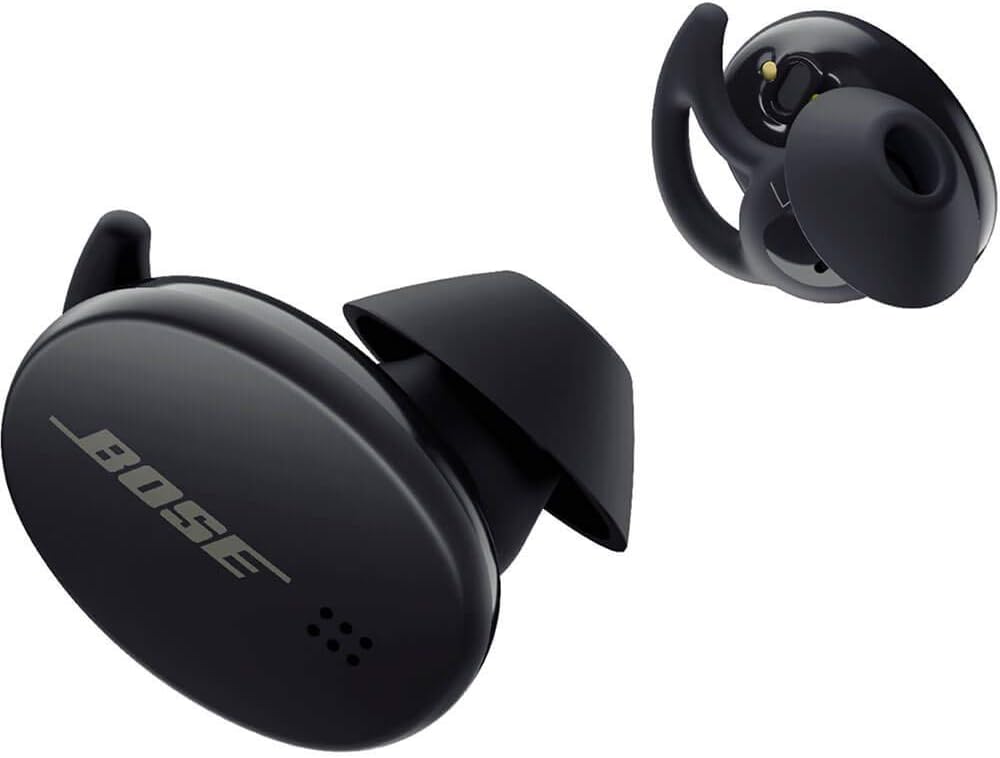
Image: Close-up of Bose Sport Earbuds showing the removable StayHear Max tips in various sizes.
Operating Instructions
Touch Controls
The Bose Sport Earbuds feature a capacitive touch interface for easy control without physical buttons.
- Right Earbud: Tap to play/pause music or answer calls. Press and hold to reject a call.
- Left Earbud: Double-tap to activate a Shortcut function (customizable via Bose Music app, e.g., checking battery level).
- Volume Control: Swipe up or down on the right earbud (opt-in feature via Bose Music App).
Video: Official Bose video demonstrating the touch controls and app integration for the Sport Earbuds.
Making and Receiving Calls
A beamforming microphone array separates your voice from surrounding noise, ensuring clear calls. You will hear calls clearly in both ears.
- Answer Call: Tap the right earbud.
- End Call: Tap the right earbud.
- Reject Call: Press and hold the right earbud.
Maintenance and Care
Cleaning Your Earbuds
Regular cleaning helps maintain sound quality and hygiene. Use a soft, dry cloth to wipe the earbuds and charging case. Do not use abrasive cleaners or submerge the earbuds in water.
The StayHear Max tips can be removed and rinsed with water. Ensure they are completely dry before reattaching them to the earbuds.
Water and Sweat Resistance
Bose Sport Earbuds are rated IPX4 for water resistance, meaning they are protected against sweat and light rain. The internal electronics are wrapped in special materials to protect them from moisture. While they are resistant, avoid prolonged exposure to water or submersion.
Troubleshooting
No Sound or Poor Sound Quality
- Ensure earbuds are fully charged.
- Check Bluetooth connection to your device. Try re-pairing if necessary.
- Verify ear tip fit. An improper seal can significantly affect sound quality.
- Clean any debris from the ear tips or earbud nozzles.
Earbuds Not Charging
- Ensure the charging case is charged.
- Verify earbuds are properly seated in the charging case.
- Check the USB cable and power source for proper connection.
Connectivity Issues
- Ensure your device is within the 30-foot (9-meter) Bluetooth range.
- Avoid obstacles between your device and earbuds that may interfere with the signal.
- Try resetting the Bluetooth connection on your device.
Specifications
| Feature | Detail |
|---|---|
| Model Name | Sport Earbuds |
| Model Number | 805746-0010 |
| Connectivity Technology | Bluetooth 5.1 |
| Wireless Communication Technology | Bluetooth |
| Battery Life (Earbuds) | Up to 5 hours per charge |
| Battery Life (with Charging Case) | Up to 10 additional hours (2 full charges) |
| Quick Charge | 15-minute charge for up to 2 hours of play |
| Water Resistance Rating | IPX4 (sweat and weather resistant) |
| Control Method | Touch |
| Dimensions (Earbud) | 0.83 x 1.05 x 0.74 inches |
| Weight (Earbud) | 9 Grams (0.317 ounces) |
| Material | Silicone, Hard plastic |
Warranty Information
For detailed warranty information, please visit the official Bose website or refer to the warranty card included in your product packaging.
Official Warranty Link: global.Bose.com/warranty
Support
For additional support, FAQs, and product registration, please visit the Bose support website:
Support Website: worldwide.Bose.com/Support/SportEarbuds
You can also refer to the official User Guide (PDF) for comprehensive details: User Guide (PDF)
Related documents805746-0010


Ask a question about this manual
Ask about setup, troubleshooting, compatibility, parts, safety, or missing instructions. Manuals+ will review the question and use this page’s manual context to help answer it.