
LENSGO LWM_328C
Contents
LENSGO LWM-328C Wireless Lavalier Microphone System User Manual
Brand: LENSGO | Model: LWM-328C
Introduction
The LENSGO LWM-328C is a professional 99-channel UHF wireless lavalier microphone system designed for crystal-clear, distortion-free audio recording. It features synchronous TF card recording to prevent audio loss, wide compatibility with various devices, and adjustable RF signal strength for optimal performance across different distances. This manual provides detailed instructions for setting up, operating, maintaining, and troubleshooting your microphone system.

Figure 1: LENSGO LWM-328C Wireless Lavalier Microphone System (Transmitter and Receiver)
What's in the Box?
Your LENSGO LWM-328C package includes the following components:
- 1 x Gift Box
- 1 x TX (Transmitter) unit
- 1 x RX (Receiver) unit
- 1 x Cold Shoe Seat
- 1 x Camera Cable
- 1 x Phone Cable
- 1 x Microphone
- 1 x Windproof Sponge
- 1 x Collar Clip
- 1 x User Manual

Figure 2: All components included in the LENSGO LWM-328C package.
Setup Guide
Follow these steps to set up your LWM-328C wireless microphone system:
1. Powering the Units
Each TX (Transmitter) and RX (Receiver) unit requires two AA batteries (not included). Open the battery compartment on the back of each unit and insert the batteries, ensuring correct polarity. The system provides up to 5 hours of operation on fresh batteries.
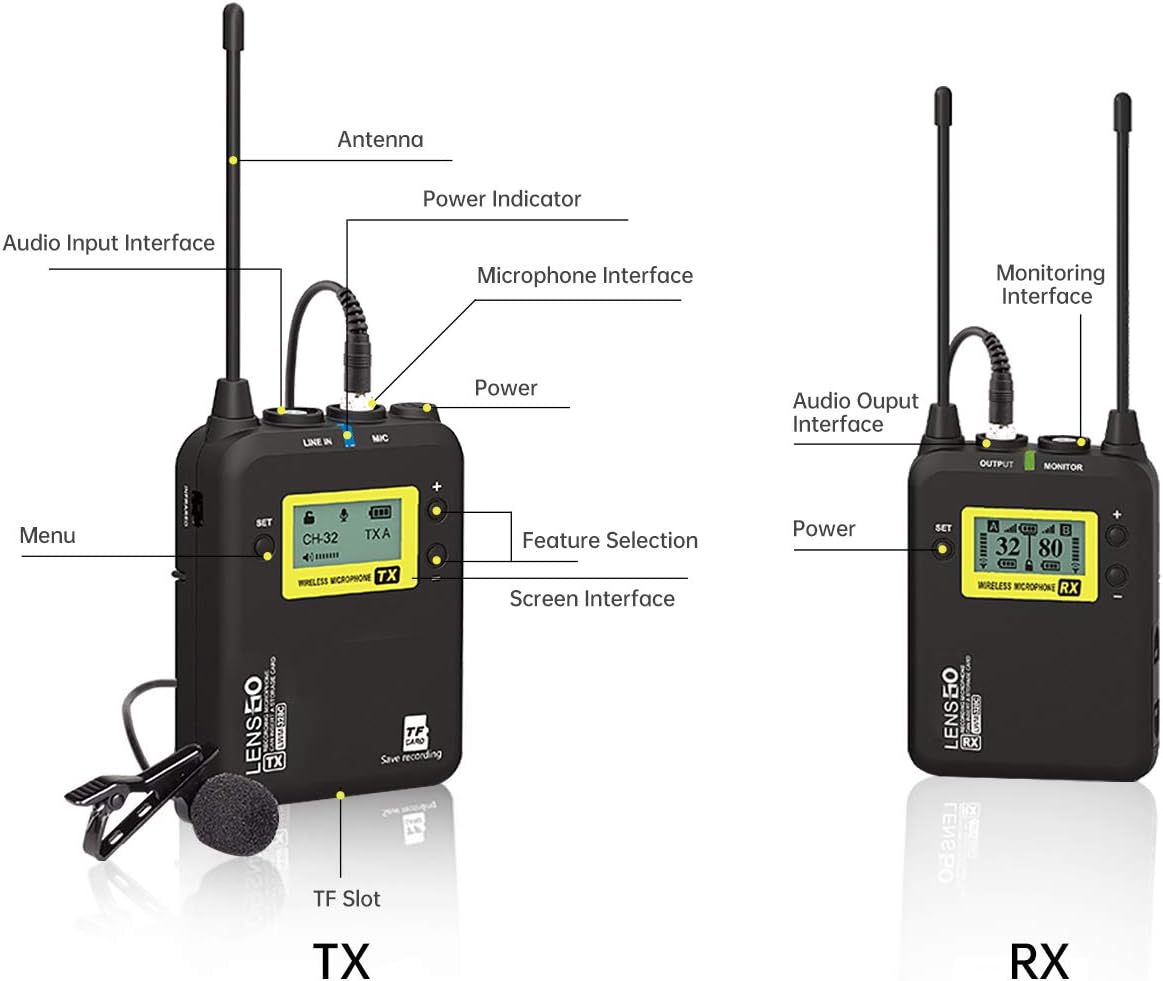
Figure 3: Battery compartment for two AA batteries on the LWM-328C units.
2. Connecting to Your Device
The LWM-328C system offers wide compatibility with various recording devices:
- For Cameras/Camcorders: Use the provided Camera Cable (3.5mm TRS) to connect the RX unit's OUTPUT port to your camera's microphone input.
- For Smartphones/Tablets: Use the provided Phone Cable (3.5mm TRRS) to connect the RX unit's OUTPUT port to your smartphone or tablet's headphone/microphone jack. For devices without a 3.5mm jack, an appropriate adapter (e.g., Lightning to 3.5mm for iPhone, USB-C to 3.5mm for Android) may be required (not included).

Figure 4: Connection diagrams for cameras and smartphones.
3. Attaching the Microphone
Connect the lavalier microphone to the MIC input port on the TX (Transmitter) unit. Use the collar clip to attach the microphone securely to the speaker's clothing, ensuring it is positioned to capture clear audio. The windproof sponge can be used to reduce plosives and wind noise.
4. TF Card Sync Recording (Optional)
For a backup recording and to prevent audio loss due to external interference, you can use the TF card sync recording feature. Insert a TF card (up to 32GB, not included) into the TF Slot on the TX (Transmitter) unit. Navigate to the 'Record Menu' on the TX unit's screen and select 'Enable' to activate synchronous recording.

Figure 5: TF card slot for internal recording on the transmitter unit.
Operating Instructions
Learn how to operate your LWM-328C system effectively:
1. Power On/Off
Press and hold the power button on both the TX and RX units to turn them on or off. The screens will illuminate upon successful power-up.
2. Channel Selection and Auto-Sync
The system offers 99 UHF selectable channels. To ensure optimal signal and avoid interference, use the auto-scanning and IR sync function:
- Turn on the RX unit.
- Enter the menu on the RX unit.
- Choose 'IR SYNC'.
- Keep the RX and TX units close to each other for successful synchronization. The system will automatically scan for the best available channel.

Figure 6: Steps for automatic channel scanning and infrared synchronization.
3. Adjustable RF Signal Strength
Adjust the RF signal strength based on your recording distance:
- Within 0-100 meters: Select 'MIDDLE' mode to reduce power consumption.
- For 100-150 meters: Switch to 'HIGH' mode to improve recording quality and maintain a stable connection.

Figure 7: Recommended RF signal strength modes based on distance.
4. LCF (Low Cut Filter) Mode
The LCF mode helps to cut low-frequency noise, such as wind or rumble, making your audio clearer. Access this setting through the TX unit's menu to toggle between 'Low cut off' and 'Low cut on'.
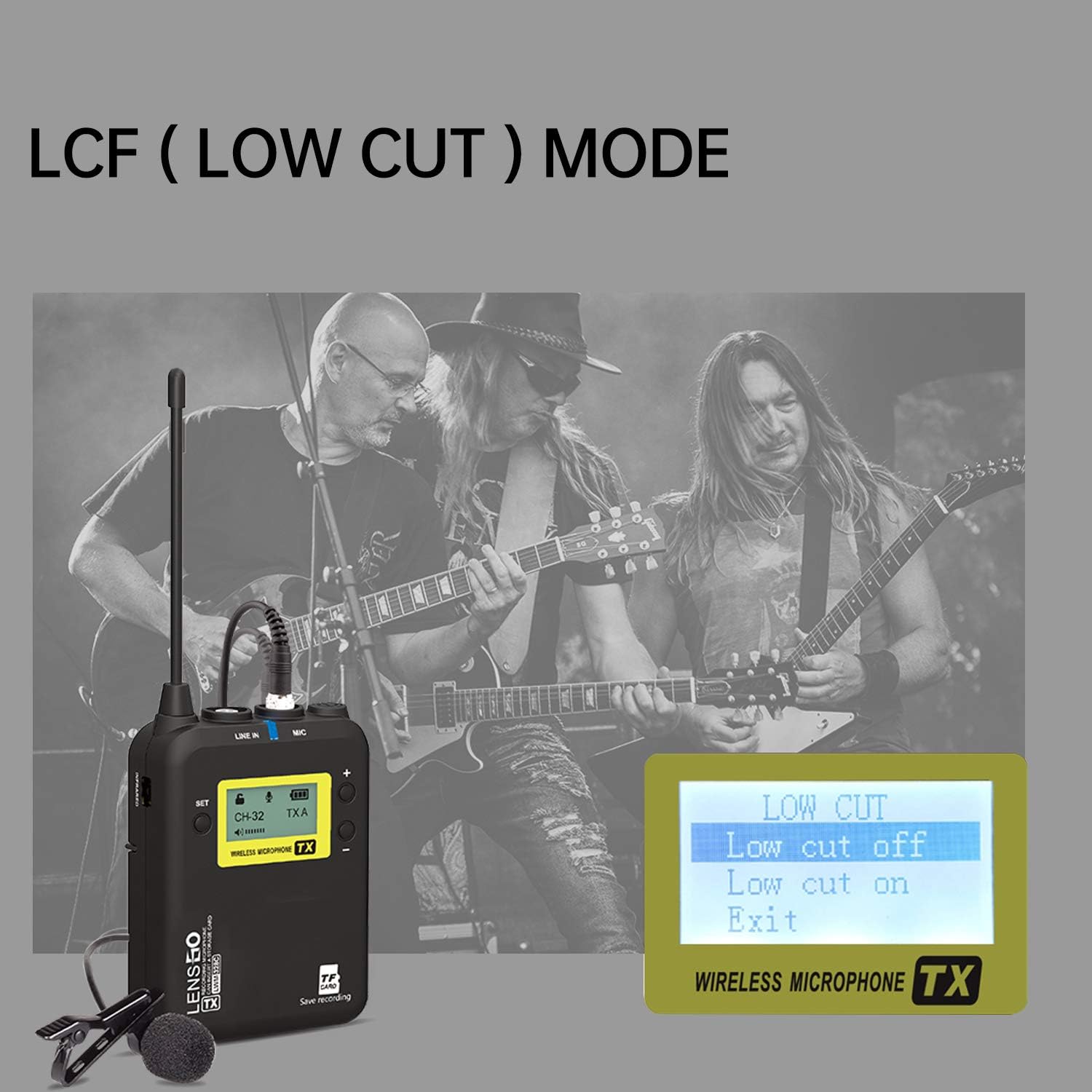
Figure 8: LCF mode settings on the transmitter unit.
5. Real-Time Monitoring
The RX (Receiver) unit features a real-time monitoring function. Connect headphones to the MONITOR jack on the RX unit to listen to the audio being recorded. This allows you to verify audio quality and ensure proper operation during shooting.

Figure 9: Connecting headphones for real-time audio monitoring.
6. Official Product Videos
Watch these official LENSGO videos for more insights into the LWM-328C system:
Video 1: Lensgo LWM-328 Wireless Lavalier Microphone - A detailed overview of the microphone system's features and usage.
Video 2: Wireless LAVALIER MICROPHONE - A concise demonstration of the wireless lavalier microphone in action.
Maintenance
Proper maintenance ensures the longevity and optimal performance of your LWM-328C system:
- Battery Replacement: Always replace both AA batteries in the TX and RX units when the battery indicator is low to avoid interruptions during recording.
- Cleaning: Use a soft, dry cloth to clean the units. Avoid using harsh chemicals or abrasive materials.
- Storage: When not in use, store the system in a cool, dry place, away from direct sunlight and extreme temperatures. Remove batteries if storing for extended periods.
Troubleshooting
If you encounter issues with your LWM-328C system, refer to the following common problems and solutions:
- No Audio Output:
- Ensure both TX and RX units are powered on and have fresh batteries.
- Verify that the microphone is securely connected to the TX unit.
- Check that the RX unit is correctly connected to your recording device (camera, smartphone) using the appropriate cable.
- Confirm that the volume levels on both the microphone system and your recording device are set appropriately.
- Interference/Poor Audio Quality:
- Perform an auto-scan and IR sync to find a clearer channel (refer to Operating Instructions).
- Adjust the RF signal strength to 'HIGH' mode if recording at longer distances.
- Ensure there are no major obstructions or strong electromagnetic interference sources between the TX and RX units.
- Activate the LCF (Low Cut Filter) mode to reduce low-frequency noise.
- TF Card Recording Issues:
- Ensure a compatible TF card (up to 32GB) is inserted correctly.
- Verify that 'Record Menu' is set to 'Enable' on the TX unit.
- Check the TF card for sufficient storage space.
Specifications
| Feature | Specification |
|---|---|
| Brand | LENSGO |
| Model Name | Wireless Lavalier Microphone |
| Item Model Number | LWM_328C |
| Microphone Form Factor | Lavalier |
| Polar Pattern | Omnidirectional |
| Connectivity Technology | UHF |
| Number of Channels | 99 |
| Frequency Response | 521 MHz |
| Signal-to-Noise Ratio | 60 dB |
| Power Source | Battery Powered (2 AA batteries required per unit) |
| Working Range | Up to 500 ft (150m) in open areas; best within 246 ft (75m) |
| Working Hours | Up to 5 hours |
| Max TF Card Support | 32GB |
| Compatible Devices | Camera, Camcorder, Smartphone, Tablet |
| Item Weight | 0.46 Kilograms (1.01 pounds) |
Warranty and Support
LENSGO offers comprehensive support for your LWM-328C system:
- 30-Day Returns: We accept returns within 30 days without any reason.
- 2-Year LENSGO Warranty: Enjoy a 2-year warranty on your product.
- Lifetime Customer Service: Benefit from lifetime customer service and technical support.
For any problems or inquiries, please feel free to contact LENSGO Official customer service. We are always dedicated to improving our products and services.
Documents and downloads
Ask a question about this manual
Ask about setup, troubleshooting, compatibility, parts, safety, or missing instructions. Manuals+ will review the question and use this page’s manual context to help answer it.