
Faber INSP28SS600
Contents
Faber INSP28SS600 Range Hood User Manual
Model: INSP28SS600
Introduction
This user manual provides essential information for the safe and efficient operation, installation, and maintenance of your Faber INSP28SS600 28" Inca Smart Stainless Steel Insert Hood. Please read this manual thoroughly before installation and use, and keep it for future reference.
The Faber INSP28SS600 is a powerful 600 CFM insert range hood designed for seamless integration into your kitchen cabinetry. It features electronic push-button controls, energy-efficient LED lighting, and dishwasher-safe mesh filters for easy cleaning.

Figure 1: The Faber INSP28SS600 range hood, showcasing its sleek stainless steel design and integrated lighting.
1. Setup and Installation
1.1 Safety Precautions
- Always disconnect power before servicing or cleaning the unit.
- Installation must be performed by a qualified technician in accordance with all local codes and regulations.
- Ensure adequate ventilation in the room when the range hood is used simultaneously with gas or other fuel-burning appliances.
- Do not flambé under the range hood.
1.2 Mounting
The INSP28SS600 is designed for built-in mounting within a cabinet. It features easy snap mounting clips for simplified installation. Ensure the cabinet opening dimensions match the hood's specifications for a secure fit.

Figure 2: The Faber INSP28SS600 range hood seamlessly integrated into kitchen cabinetry, demonstrating its built-in design and how it appears once installed above a cooking surface.
1.3 Electrical Connection
Connect the range hood to a dedicated electrical circuit as per local electrical codes. Ensure the voltage and frequency match the requirements specified on the product label. A qualified electrician should perform all electrical connections.
2. Operating Instructions
The Faber INSP28SS600 features electronic push-button controls for easy operation of the blower and lighting.
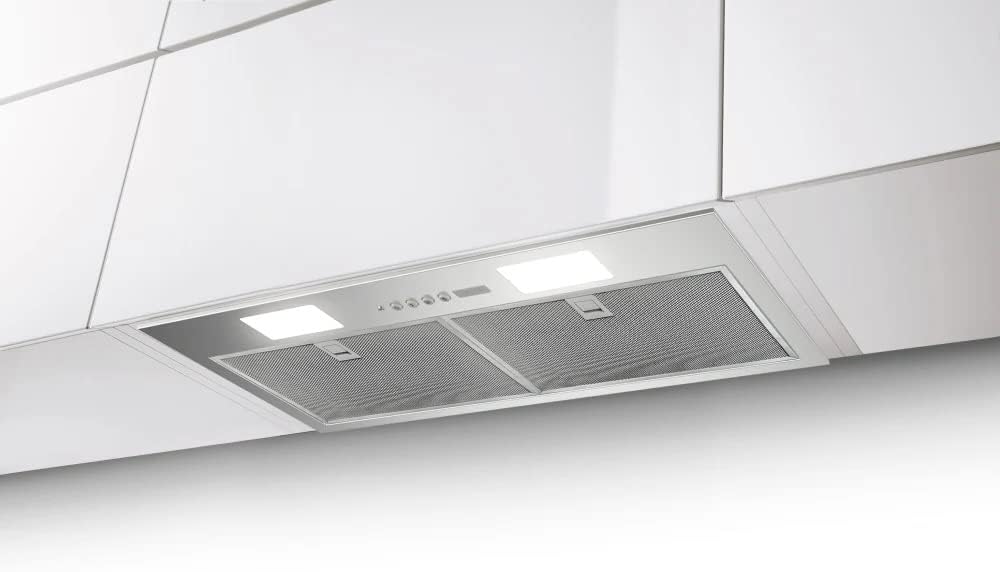
Figure 3: A detailed view of the control panel and LED lighting on the Faber INSP28SS600 range hood, showing the electronic push buttons for fan speed and light control.
2.1 Blower Control
Press the fan speed buttons to select the desired extraction level. The hood offers multiple speed settings to accommodate various cooking needs, from simmering to high-heat frying. The powerful 600 CFM blower efficiently removes smoke, steam, and cooking odors.
2.2 LED Lighting
Press the light button to turn the energy-efficient LED lights on or off. The integrated LED lighting provides bright illumination for your cooking surface.
3. Maintenance
Regular maintenance ensures optimal performance and longevity of your range hood.
3.1 Cleaning the Mesh Filters
The mesh filters are designed to trap grease and should be cleaned regularly (e.g., monthly, depending on cooking frequency). They are dishwasher safe for convenient cleaning.
- Ensure the range hood is turned off and disconnected from power.
- Locate the filter release clips and gently push or pull to disengage the filters.
- Remove the mesh filters.
- Wash the filters in a dishwasher or by hand using hot water and a mild detergent.
- Allow filters to dry completely before re-installing.
- Re-insert the filters, ensuring they click securely into place.
3.2 Cleaning the Exterior
Clean the stainless steel exterior with a soft cloth and a non-abrasive stainless steel cleaner. Avoid using harsh chemicals or abrasive pads, which can scratch the surface.
3.3 LED Light Replacement
LED lights have a long lifespan and typically do not require frequent replacement. If a light fails, consult a qualified technician or refer to the full service manual for replacement instructions.
4. Troubleshooting
Before contacting customer support, please refer to the following common issues and their solutions:
| Problem | Possible Cause | Solution |
|---|---|---|
| Hood does not turn on. | No power supply; circuit breaker tripped. | Check power connection; reset circuit breaker. |
| Poor suction. | Clogged filters; improper ducting; open windows/doors creating cross-drafts. | Clean or replace filters; check ductwork for obstructions or proper sizing; close windows/doors. |
| Lights not working. | Faulty LED module; loose connection. | Ensure connections are secure; contact service for LED replacement. |
| Excessive noise. | Loose components; motor issue; ducting issue. | Check for loose parts; inspect ductwork; contact service if noise persists. |
If the problem persists after attempting these solutions, please contact Faber customer support.
5. Product Specifications
Key technical specifications for the Faber INSP28SS600 range hood:
| Feature | Detail |
|---|---|
| Model Number | INSP28SS600 |
| Air Flow Capacity | 600 Cubic Feet Per Minute (CFM) |
| Material | Stainless Steel |
| Mounting Type | Built-In Mount (Insert) |
| Controls Type | Electronic Push Button |
| Light Source Type | LED |
| Filter Type | Mesh (Dishwasher Safe) |
| Product Dimensions (D x W x H) | 11.25" x 27.62" x 12.75" (approx.) |
| Ventilation Type | Exhaust |
| Special Features | Energy Efficient, LED Lighting, Easy Snap Mounting Clips |
6. Warranty Information
Faber products are manufactured to high-quality standards. For specific warranty terms and conditions applicable to your INSP28SS600 range hood, please refer to the warranty card included with your product or visit the official Faber website. Keep your proof of purchase for warranty claims.
7. Customer Support
If you require assistance with installation, operation, maintenance, or troubleshooting beyond the scope of this manual, please contact Faber customer support. Have your model number (INSP28SS600) and purchase date ready when you call.
For the most up-to-date contact information, please visit the official Faber website: www.faberonline.com
Ask a question about this manual
Ask about setup, troubleshooting, compatibility, parts, safety, or missing instructions. Manuals+ will review the question and use this page’s manual context to help answer it.