
1. Introduction
Thank you for choosing the ROCKPALS RP082 100W Foldable Solar Panel Charger. This manual provides essential information for the safe and efficient operation of your solar panel. Please read it thoroughly before use and retain it for future reference.
The ROCKPALS RP082 is a high-efficiency, portable solar panel designed to recharge compatible power stations and electronic devices using solar energy. Its foldable design, integrated kickstand, and multiple output ports make it ideal for outdoor activities and emergency power needs.
2. Safety Instructions
- Do not attempt to disassemble, repair, or modify the solar panel. This may cause damage, electric shock, or fire.
- Avoid exposing the solar panel to fire or extreme heat.
- Do not immerse the solar panel in water. While it is IP65 waterproof, prolonged submersion can cause damage.
- Keep the solar panel away from corrosive materials.
- Handle the panel with care. Avoid dropping or subjecting it to strong impacts.
- Ensure all connections are secure before use.
- Keep out of reach of children.
3. Package Contents
Verify that all items are present in your package:
- ROCKPALS RP082 100W Foldable Solar Panel
- DC to Anderson Cable
- DC to DC Cable (5.5*2.1mm)
- DC to DC Cable (8mm)
- Parallel Connection Cable (for connecting two RP082 panels)
- User Manual
4. Product Features
- High Conversion Efficiency: Monocrystalline silicon cells with up to 23.5% efficiency.
- Wide Compatibility: Includes Anderson, 5.5*2.1mm DC, and 8mm DC connectors for various power stations (e.g., Jackery, ROCKPALS).
- Fast Charging Outputs: Equipped with 1x USB QC 3.0 (5V/9V/12V, 3.4A max) and 1x USB-C (5V/9V/12V, 3.4A max) for direct device charging.
- Portable & Foldable Design: Compact with a handle for easy transport.
- Integrated Kickstand: Allows for optimal angle adjustment to maximize sunlight exposure.
- Durable Construction: Upgraded ETFE-laminated for enhanced lifespan, wear resistance, and fall resistance.
- IP65 Waterproof: Resistant to water splashes and dust, suitable for outdoor use.
5. Setup Instructions
- Unfold the Solar Panel: Carefully unfold the solar panel completely on a flat surface.
- Position the Panel: Place the solar panel in direct sunlight. For optimal performance, ensure no shadows are cast on the panel surface.
- Adjust Kickstand: Extend the integrated kickstands on the back of the panel. Adjust the angle to face the sun directly. This can significantly increase charging efficiency.

Image: A person demonstrating the easy setup of the solar panel by extending its integrated kickstands to achieve an optimal angle towards the sun.

Image: The ROCKPALS RP082 100W Foldable Solar Panel fully unfolded, showcasing its four solar segments and the included charging cables for various devices and power stations.
6. Operating Instructions
6.1 Charging a Power Station
- Identify the correct DC input port on your power station.
- Select the appropriate DC connector cable (Anderson, 5.5*2.1mm, or 8mm) that matches your power station's input.
- Connect the solar panel's output cable to the selected adapter cable, then connect the adapter cable to your power station's input port.
- Ensure the solar panel is exposed to direct sunlight. The power station should indicate that it is receiving a charge.

Image: An illustration detailing the wide compatibility of the solar panel, showing how its output can connect to power stations using 5.5*2.1mm, 8mm, or Anderson connectors.

Image: The ROCKPALS RP082 solar panel actively recharging a portable power station in an outdoor winter environment, demonstrating its utility in various conditions.
6.2 Parallel Connection (for increased power)
To achieve faster charging or higher power output, two ROCKPALS RP082 solar panels can be connected in parallel using the provided parallel cable.
- Ensure both solar panels are unfolded and positioned for optimal sunlight exposure.
- Connect the output cable of the first RP082 panel to one input of the parallel cable.
- Connect the output cable of the second RP082 panel to the other input of the parallel cable.
- Connect the single output of the parallel cable to your power station using the appropriate adapter.

Image: Two ROCKPALS RP082 solar panels deployed side-by-side and connected via a parallel cable, illustrating how to combine their power for faster recharging.
6.3 Direct Device Charging (USB-A QC 3.0 & USB-C)
The solar panel features dedicated USB ports for charging smartphones, tablets, and other USB-powered devices directly.
- Locate the USB QC 3.0 (USB-A) and USB-C output ports on the control box of the solar panel.
- Connect your device's charging cable to the appropriate USB port.
- Ensure the solar panel is in direct sunlight. Your device should begin charging.

Image: A user charging a smartphone directly from the solar panel's USB-C output, highlighting the convenience of its integrated fast-charging ports.
7. Maintenance
- Cleaning: Regularly wipe the solar panel surface with a soft, damp cloth to remove dust, dirt, or debris. A clean surface ensures maximum sunlight absorption. Do not use harsh chemicals or abrasive materials.
- Storage: When not in use, fold the solar panel and store it in a cool, dry place away from direct sunlight and moisture.
- Inspection: Periodically check cables and connectors for any signs of wear or damage. Replace damaged components immediately.
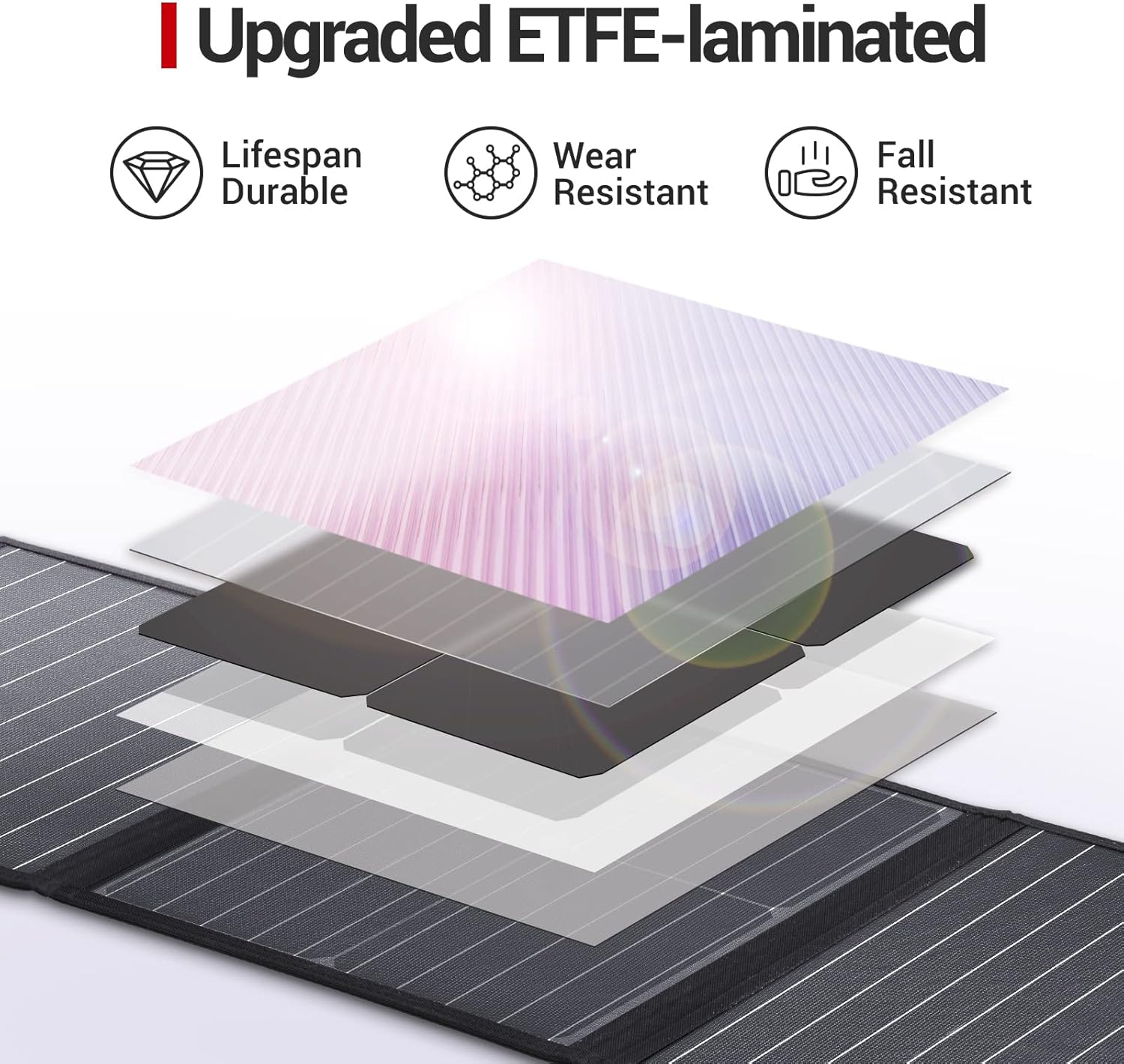
Image: A cutaway diagram showcasing the multi-layered, ETFE-laminated construction of the solar panel, emphasizing its enhanced durability, wear resistance, and fall resistance.

Image: The ROCKPALS RP082 solar panel positioned near splashing water, visually confirming its IP65 waterproof and dustproof rating, suitable for various outdoor conditions.
8. Troubleshooting
- No Power Output:
- Ensure the panel is in direct sunlight and not shaded.
- Check all cable connections to ensure they are secure and correctly inserted.
- Verify that the connected device or power station is compatible with the solar panel's output specifications.
- Clean the solar panel surface if it is dirty.
- Slow Charging:
- Adjust the panel's angle to face the sun directly.
- Ensure no partial shading on the panel.
- Charging efficiency decreases on cloudy days or during early morning/late afternoon.
- Check the ambient temperature; extreme heat can reduce efficiency.
- Device Not Recognized by USB Ports:
- Try a different USB cable.
- Ensure the device is compatible with the USB output voltage/current.
9. Specifications
| Specification | Value |
|---|---|
| Model | RP082 |
| Maximum Power | 100 Watts |
| Maximum Voltage | 18 Volts |
| Efficiency | Up to 23.5% |
| Material | Monocrystalline Silicon |
| USB QC 3.0 Output | 5V/9V/12V, 3.4A max |
| USB-C Output | 5V/9V/12V, 3.4A max |
| Waterproof Rating | IP65 |
| Item Weight | 4.31 kg |
| Included Components | Cables (Anderson, 5.5*2.1mm DC, 8mm DC, Parallel) |
| UPC | 619793171165 |
10. Warranty and Support
ROCKPALS products come with a standard warranty. For detailed warranty information, product support, or to register your product, please visit the official ROCKPALS website or contact their customer service directly. Please have your model number (RP082) and proof of purchase ready when contacting support.
Official Website: www.rockpals.com