
1. Introduction
This manual provides instructions for the assembly, operation, and maintenance of your FEZIBO Electric Height Adjustable Standing Desk. This desk is designed to offer a versatile workspace, allowing seamless transitions between sitting and standing positions to promote a healthier work environment.
The desk features a sturdy steel frame and an electric motor for smooth height adjustments. It includes customizable memory presets for convenience and is suitable for various home office and study applications.

Image: FEZIBO Electric Standing Desk in a modern home office setting.
2. Safety Information
- Ensure all components are securely fastened before use.
- Keep children and pets away from the desk during height adjustment.
- Do not place hands or objects near moving parts of the desk frame.
- Avoid overloading the desk. The maximum weight capacity is 176 lbs (80 kg).
- Use only the provided power adapter and ensure it is connected to a grounded outlet.
- If any unusual noise or movement occurs, discontinue use and consult the troubleshooting section or contact support.
3. Package Contents
Please verify that all parts are present before beginning assembly:
- Desktop Surface (40x24 Inch)
- Desk Legs (2 units)
- Foot Pads (2 units)
- Crossbeam and Side Wings
- Control Panel with Memory Presets
- Power Adapter and Cable
- Headphone Hook
- Assembly Hardware (screws, Allen wrench)
- User Manual
4. Assembly and Setup
Assembly is designed to be straightforward, with most components pre-assembled. Follow these steps for quick installation:
- Attach the Crossbeam: Securely attach the crossbeam to the sturdy desk legs using the provided hardware.
- Secure Foot Pads: Attach the adjustable foot pads to the bottom of the desk legs for stability.
- Assemble Frame Structure: Connect the crossbeam and side wings to form the complete frame structure.
- Place Tabletop: Carefully place and secure the desktop surface onto the assembled frame.
- Connect Power: Plug the power adapter into the control box and then into a wall outlet.
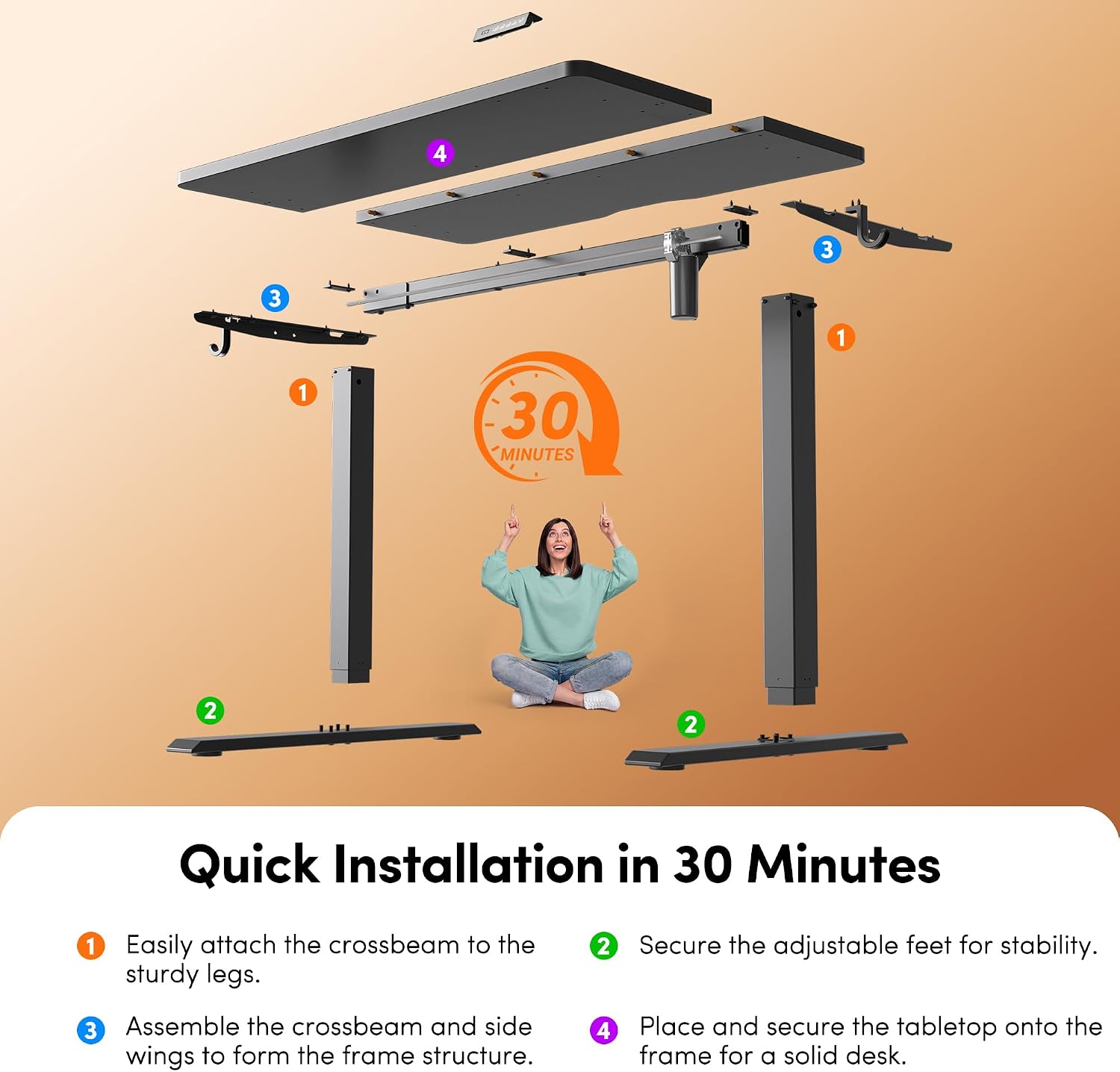
Image: Quick Installation Guide for the FEZIBO Standing Desk.
5. Operating Instructions
5.1 Height Adjustment
The desk features an electric lifting system for easy height adjustment from 28.3 inches to 46.5 inches. Use the up and down arrow buttons on the control panel to manually adjust the desk to your desired height.

Image: Sit-to-Stand Height Adjustment Range.
5.2 Memory Presets
The control panel includes three customizable memory presets (buttons 1, 2, 3) to save your preferred sitting and standing heights.
- Set a Memory Position: Adjust the desk to your desired height using the up/down arrows. Press the 'M' button, then press one of the number buttons (1, 2, or 3) within 3 seconds. The display will show 'S-' followed by the number, indicating the position is saved.
- Recall a Memory Position: Press the corresponding number button (1, 2, or 3) to automatically move the desk to the saved height.
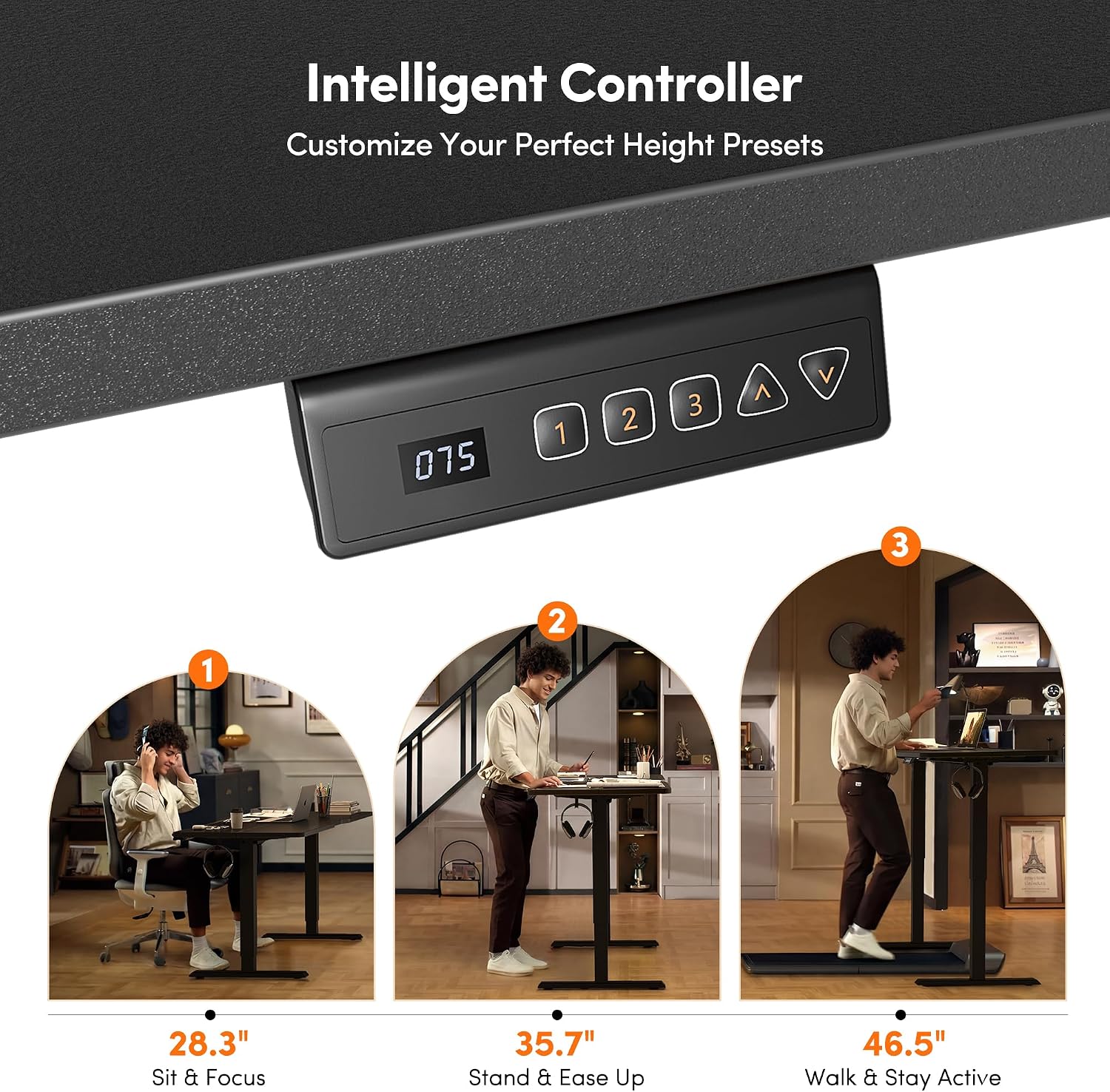
Image: Intelligent Controller with Memory Presets.
5.3 Quiet Operation
The desk's motor operates at a low noise level (under 45dB), ensuring a quiet environment during height adjustments.

Image: Ultra-Quiet Lifting Operation.
6. Maintenance
- Cleaning: Wipe the desktop surface with a soft, damp cloth. Avoid abrasive cleaners or harsh chemicals.
- Inspection: Periodically check all screws and connections to ensure they are tight.
- Cable Management: Ensure power cables are not pinched or tangled during height adjustments.
- Motor Care: The electric motor is designed for long-term operation and requires no special maintenance.
7. Troubleshooting
If you encounter issues with your FEZIBO standing desk, refer to the common problems and solutions below. For more detailed guidance, watch the official troubleshooting video.
7.1 Common Issues and Solutions
- Desk Not Moving: Check if the power cable is securely connected to both the desk and the wall outlet. Ensure the outlet is functional.
- Uneven Lifting: This can occur if the sync rod is not installed correctly. Lower the desk to its lowest position and reinstall the sync rod according to the assembly instructions.
- Error Codes: If the control panel displays an error code, refer to the full manual for specific code meanings and solutions. Often, unplugging the desk for 10 seconds and plugging it back in can reset the system.
- Wobbling: Ensure all screws are tightened, especially those connecting the legs to the desktop and the foot pads. The desk is built with a reinforced steel frame for stability, supporting up to 176 lbs.

Image: Desk stability with 176 lbs capacity.
7.2 Troubleshooting Video Guide
Video: Official Troubleshooting Guide and Quick Fixes for FEZIBO Standing Desks. This video provides visual instructions for resolving common operational issues.
8. Specifications
| Feature | Detail |
|---|---|
| Brand | FEZIBO |
| Model Number | DESK |
| Desktop Dimensions | 39.4"W x 23.6"D (40x24 Inch) |
| Height Adjustment Range | 28.3" to 46.5" |
| Weight Capacity | 176 lbs (80 kg) |
| Motor Noise Level | Under 45dB |
| Material | Engineered Wood (Desktop), Alloy Steel (Base) |
| Color | Black |
| Special Feature | Ergonomic, 3 Memory Presets |

Image: Product Dimensions Overview.
9. Warranty and Support
FEZIBO products are manufactured with quality and durability in mind. For specific warranty details, please refer to the warranty card included with your product or visit the official FEZIBO website. If you require assistance with assembly, operation, or troubleshooting that is not covered in this manual, please contact FEZIBO customer support.
Contact Information: Please refer to the contact details provided on your purchase receipt or the FEZIBO official website for the most up-to-date support information.


