
Introduction
Thank you for purchasing the Aspor Bluetooth Speaker A663. This manual provides detailed instructions on how to set up, operate, and maintain your speaker. Please read this manual carefully before use to ensure optimal performance and longevity of your device.

Image: Front view of the Aspor Bluetooth Speaker A663, showcasing its cylindrical design with mesh fabric and red accent buttons.
Package Contents
Please check the package for the following items:
- Aspor Bluetooth Speaker A663
- USB Charging Cable
- AUX Audio Cable
- User Manual
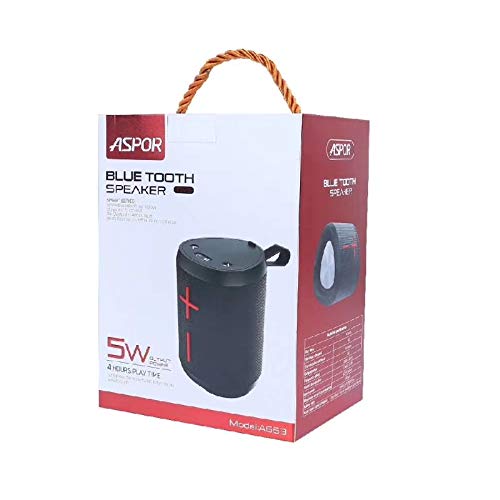
Image: The Aspor Bluetooth Speaker A663, its retail box, USB charging cable, AUX audio cable, and user manual laid out.
Product Features
- Wireless Standard: Bluetooth 4.2
- Transmission Distance: Up to 10 meters
- Output Power: 5W
- Play Time: Approximately 4 hours
- Frequency Effect: 100Hz~18KHz
- Input Power: DC5V 500mA
- Support for Micro SD Card Playback
- Support for AUX Playback
- Support for Hands-free Calls
- Built-in FM Radio
Controls and Indicators
Familiarize yourself with the buttons and ports on your Aspor A663 speaker:

Image: Top view of the Aspor Bluetooth Speaker A663 showing the control panel with buttons and ports. The buttons include power, mode, and volume controls. Ports include DC 5V, TF (Micro SD), USB, and AUX.
- Power Button (⏻): Press and hold to power on/off.
- Mode Button (M): Press to switch between Bluetooth, FM Radio, AUX, and Micro SD card modes.
- Volume Down / Previous Track (<): Short press for previous track, long press to decrease volume.
- Volume Up / Next Track (>): Short press for next track, long press to increase volume.
- DC 5V Port: For charging the speaker.
- TF Card Slot: For Micro SD card playback.
- USB Port: (Function not explicitly detailed, typically for USB drive playback or charging out)
- AUX Port: For wired audio connection.
Setup
1. Charging the Speaker
Before first use, fully charge the speaker. Connect the supplied USB charging cable to the DC 5V port on the speaker and the other end to a USB power adapter (not included) or a computer's USB port. The charging indicator light will show the charging status (specific light behavior not detailed in product info, refer to device for actual behavior).
2. Powering On/Off
- To Power On: Press and hold the Power button (⏻) for a few seconds until you hear an audible prompt or see an indicator light.
- To Power Off: Press and hold the Power button (⏻) again for a few seconds until the speaker powers down.
3. Bluetooth Pairing
- Power on the speaker. It will automatically enter Bluetooth pairing mode (indicated by a flashing light or audible prompt).
- On your mobile device (smartphone, tablet, computer), enable Bluetooth.
- Search for available Bluetooth devices. You should see "A663" or "Aspor A663" in the list.
- Select "A663" to connect. Once paired, you will hear a confirmation sound.
- The speaker will automatically connect to the last paired device when powered on, if that device's Bluetooth is active and within range.
4. AUX Connection
Use the provided AUX audio cable to connect the speaker's AUX port to the audio output jack of your device (e.g., MP3 player, computer). The speaker will automatically switch to AUX mode or you may need to press the Mode button (M) to select AUX.
5. Micro SD Card Playback
Insert a Micro SD card (TF card) with audio files into the TF card slot. The speaker will automatically switch to Micro SD card mode and begin playing music. If not, press the Mode button (M) to select this mode.
Operating
Music Playback
- Play/Pause: (No explicit button mentioned, typically the Power button or a dedicated Play/Pause button, assuming it's integrated with Power or Mode for simplicity, or controlled by source device).
- Next Track: Short press the '>' button.
- Previous Track: Short press the '<' button.
- Volume Up: Long press the '>' button.
- Volume Down: Long press the '<' button.
Hands-free Calls (Bluetooth Mode)
- Answer Call: When a call comes in, press the Power button (⏻) once to answer.
- End Call: During a call, press the Power button (⏻) once to end the call.
- Reject Call: Press and hold the Power button (⏻) to reject an incoming call.
FM Radio Operation
- Press the Mode button (M) to switch to FM Radio mode.
- (No explicit button for auto-scan, assuming Power button or Mode button might trigger it, or it scans automatically upon entering FM mode).
- Use the '<' and '>' buttons to switch between saved radio stations or manually tune.
Maintenance
- Keep the speaker away from extreme temperatures, direct sunlight, and dusty environments.
- Do not expose the speaker to water or excessive moisture, despite being listed as "Is Waterproof: TRUE" in specifications, general caution is advised for electronics.
- Clean the speaker with a soft, dry cloth. Do not use abrasive cleaners or solvents.
- Avoid dropping or subjecting the speaker to strong impacts.
- When not in use for extended periods, charge the speaker at least once every three months to preserve battery life.
Troubleshooting
| Problem | Possible Cause | Solution |
|---|---|---|
| Speaker does not power on. | Low battery. | Charge the speaker fully. |
| Cannot pair with Bluetooth device. | Speaker not in pairing mode; Device Bluetooth off; Speaker too far. | Ensure speaker is in pairing mode; Turn on device Bluetooth; Move speaker closer to device (within 10m). |
| No sound. | Volume too low; Incorrect mode selected; Device not playing. | Increase speaker and device volume; Press Mode button to select correct input; Ensure device is playing audio. |
| FM radio reception is poor. | Weak signal; Interference. | Relocate the speaker to an area with better reception. |
Specifications
| Feature | Detail |
|---|---|
| Model Name | A663 |
| Wireless Standard | Bluetooth 4.2 |
| Transmission Distance | 10 meters |
| Output Power | 5W |
| Frequency Effect | 100Hz~18KHz |
| Input Power | DC5V 500mA |
| Play Time | 4 hours |
| Battery Life | 4 Hours |
| Battery Type | 1500mAh/5.55Wh |
| Special Features | Radio, SD Card, AUX Playback, Hands-free Calls |
| Is Waterproof | TRUE |
| Item Weight | 450 g |
| Manufacturer | Aspor |
Warranty and Support
For warranty information and customer support, please refer to the product packaging or visit the official Aspor website. Keep your purchase receipt as proof of purchase for warranty claims.
Manufacturer: Aspor
Date First Available: 3 July 2020