
LEXiBOOK ROB15EN
Contents
LEXiBOOK Powerman First Smart Interactive Robot Toy
Model: ROB15EN
Introduction
The LEXiBOOK Powerman First is an interactive learning robot designed to engage children aged 3 years and up. This smart toy combines entertainment with educational features, allowing children to learn numbers, shapes, and colors through interactive play. It also features dancing, music, and a quiz mode to enhance the learning experience.
Safety Information
- Recommended for ages 3 years and up.
- Adult supervision is recommended during play.
- Do not immerse the robot in water or expose it to excessive moisture.
- Keep away from heat sources and direct sunlight.
- Ensure batteries are inserted with correct polarity. Do not mix old and new batteries, or different types of batteries.
- Remove batteries if the toy is not used for an extended period.
Package Contents
- 1 x LEXiBOOK Powerman First Robot
- 1 x Remote Control
- 1 x User Manual
Setup
Battery Installation
The Powerman First robot requires 4 AA batteries (not included). The remote control also requires batteries (type not specified in input, assuming common small batteries like AAA or button cells, but will omit specific type to avoid hallucination). Follow these steps for battery installation:
- Locate the battery compartment on the back of the robot.
- Using a screwdriver, open the battery compartment cover.
- Insert 4 AA batteries, ensuring correct polarity (+/-).
- Replace the battery compartment cover and secure it with the screw.
- For the remote control, open its battery compartment and insert the required batteries, observing polarity.
Once batteries are installed, locate the ON/OFF switch on the back of the robot and slide it to the 'ON' position to activate the robot.
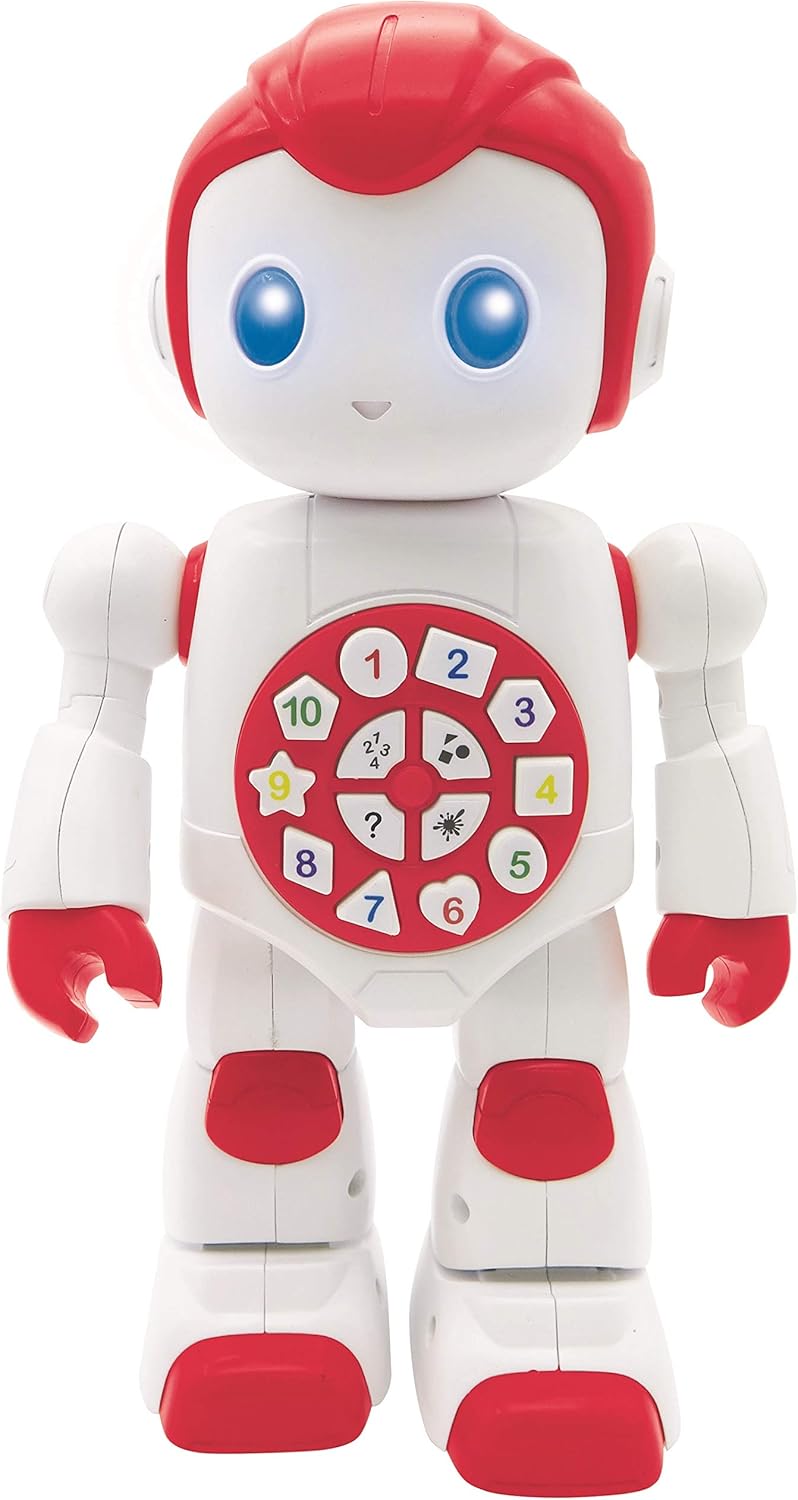
Figure 1: Front view of the Powerman First robot, highlighting its main features and design.
Operating Instructions
The Powerman First robot offers various interactive modes and functions, controlled via its chest panel or the included remote control.
Main Control Panel (Robot's Chest)
The circular panel on the robot's chest features numbered buttons (1-10) and various function icons. Pressing these buttons activates different learning and play modes.
- Numbers Mode: Press any numbered key (1-10) on the robot's chest, and the robot will repeat the corresponding number.
- Shapes Mode: Locate and press the 'Shapes' icon on the chest panel. The robot will then prompt you to identify shapes, or it will announce shapes as you press related buttons.
- Colors Mode: Locate and press the 'Colors' icon on the chest panel. The robot will then prompt you to identify colors, or it will announce colors as you press related buttons.
- Quiz Mode: Press the 'Quiz' icon (often represented by a question mark). In this mode, the robot will ask questions, and you must answer by pressing the correct key on its chest panel.
- Dance Mode: Press the robot's head to activate its dance and music functions. The robot will move and play various tunes.

Figure 2: Visual representation of the robot's interactive capabilities.
Remote Control Functions
The remote control provides additional commands and programming capabilities for the robot.
- Movement: Use the directional buttons to make the robot move forward, backward, turn left, or turn right.
- Programming: The remote allows for simple programming sequences. Press 'P+' to start a programming sequence, then input a series of commands (e.g., movements, actions). Press 'P' to end the sequence. Press the 'Play' button (often a triangle icon) to execute the programmed sequence.
- Voice Recording/Playback: The remote may include a button to record your voice, which the robot can then repeat.
- Volume Control: Adjust the robot's volume using dedicated buttons on the remote.

Figure 3: Example of interactive play, where the robot prompts the user.
Maintenance
- Clean the robot with a soft, dry cloth. Do not use abrasive cleaners or solvents.
- Avoid dropping the robot or subjecting it to strong impacts.
- Store the robot in a cool, dry place away from direct sunlight when not in use.
- Remove batteries if storing for extended periods to prevent leakage.
Troubleshooting
| Problem | Possible Cause | Solution |
|---|---|---|
| Robot does not turn on. | Batteries are low or incorrectly installed. | Check battery polarity. Replace with fresh 4 AA batteries. |
| Robot does not respond to remote control. | Remote control batteries are low or incorrectly installed; Obstruction between remote and robot. | Replace remote control batteries. Ensure clear line of sight between remote and robot. |
| Robot's movements are erratic or slow. | Low battery power. | Replace robot batteries. |
| Sound is distorted or too low. | Volume setting is too low; Low battery power. | Adjust volume using the remote control. Replace robot batteries. |
Specifications
- Model: ROB15EN
- Brand: LEXiBOOK
- Product Dimensions: 5.31 x 3.15 x 8.66 inches
- Item Weight: 10.3 ounces
- Power Supply (Robot): 4 AA batteries (not included)
- Recommended Age: 3 years and up
- Manufacturer: Lexibook
- Release Date: June 29, 2023
Warranty & Support
For warranty information and customer support, please refer to the contact details provided on the product packaging or visit the official LEXiBOOK website. Keep your purchase receipt as proof of purchase for any warranty claims.
Manufacturer: Lexibook
Website: Visit the LEXiBOOK Store on Amazon
Documents and downloads
Ask a question about this manual
Ask about setup, troubleshooting, compatibility, parts, safety, or missing instructions. Manuals+ will review the question and use this page’s manual context to help answer it.