
Garmin Striker 4
Garmin Striker 4 CHIRP Fishfinder/GPS Bundle Instruction Manual
Brand: Garmin | Model: Striker 4
Introduction
This manual provides detailed instructions for the setup, operation, and maintenance of your Garmin Striker 4 CHIRP Fishfinder/GPS Bundle. The Striker 4 is an easy-to-use 3.5-inch color fishfinder featuring built-in high-sensitivity GPS, CHIRP traditional sonar, and Quickdraw Contours mapping software. It is designed to enhance your fishing experience by providing clear views of underwater environments and precise navigation capabilities.
Product Overview
The Garmin Striker 4 CHIRP Fishfinder/GPS Bundle includes the main fishfinder unit, a dual-beam transducer, a tilt/swivel mount, a portable bag, a base/handle, a suction cup mount, a foam float, a kayak in-hull transducer mount, a power cable, a rechargeable battery, and an AC charger. This comprehensive bundle ensures versatility for various fishing environments, from boats to kayaks and ice fishing.

Image: Garmin Striker 4 Fishfinder unit housed within its portable carrying bag, accompanied by a protective cover.
Setup
1. Unboxing and Initial Inspection
Carefully remove all components from the packaging. Verify that all items listed in the "In the Box" section of the product overview are present and undamaged. Familiarize yourself with the main unit, transducer, and various mounting options.
2. Power Connection
Connect the power cable to the fishfinder unit. The bundle includes a rechargeable battery and AC charger. Ensure the battery is fully charged before initial use. Connect the red wire to the positive terminal and the black wire to the negative terminal of the battery.
3. Transducer Mounting
The transducer is crucial for sonar functionality. Several mounting options are provided:
- Tilt/Swivel Mount: For permanent installation on a boat's transom.
- Suction Cup Mount: For temporary attachment to a boat hull.
- Foam Float: For ice fishing or temporary deployment from a dock.
- Kayak In-hull Transducer Mount: For kayaks, allowing the transducer to shoot through the hull.
Ensure the transducer is securely mounted and submerged in water for optimal performance. The mount allows for adjustment to ensure the transducer sits flat in the water, which is critical for accurate readings.

Image: Protective cover for the Garmin Striker 4 unit, designed to shield the screen and buttons from elements.
Operating Instructions
1. Powering On/Off
Press and hold the power button (usually marked with a power symbol) to turn the unit on or off. The unit will display the Garmin logo upon startup.
2. Navigating the Menu
Use the directional keypad and the 'Select' button to navigate through the menu options. The 'Back' button returns to the previous screen.
3. Sonar Modes
The Striker 4 offers several sonar display modes:
- Traditional Sonar: Provides a classic view of fish arches and bottom structure.
- ClearVü Scanning Sonar: Offers a nearly photographic, wide image of what passes below your boat, clearly showing structure, submerged objects, and fish.
- Flasher: Ideal for ice fishing, displaying sonar returns in a circular flasher format.
- Split Frequency: Displays two different sonar frequencies simultaneously for varied detail.
- Traditional + ClearVü: Combines both traditional and ClearVü sonar views on a split screen.

Image: The Garmin Striker 4 display in traditional sonar mode, showing fish arches and bottom contours with depth and water temperature information.
4. GPS Features
The built-in high-sensitivity GPS allows you to:
- Mark Waypoints: Save locations of interest, such as fishing spots, docks, or hazards.
- Navigate: Return to marked waypoints with ease.
- Track Speed: Monitor your boat's speed accurately.
- View Heading: See your current direction of travel.
- Display Depth and Water Temperature: Essential environmental data is shown on screen.
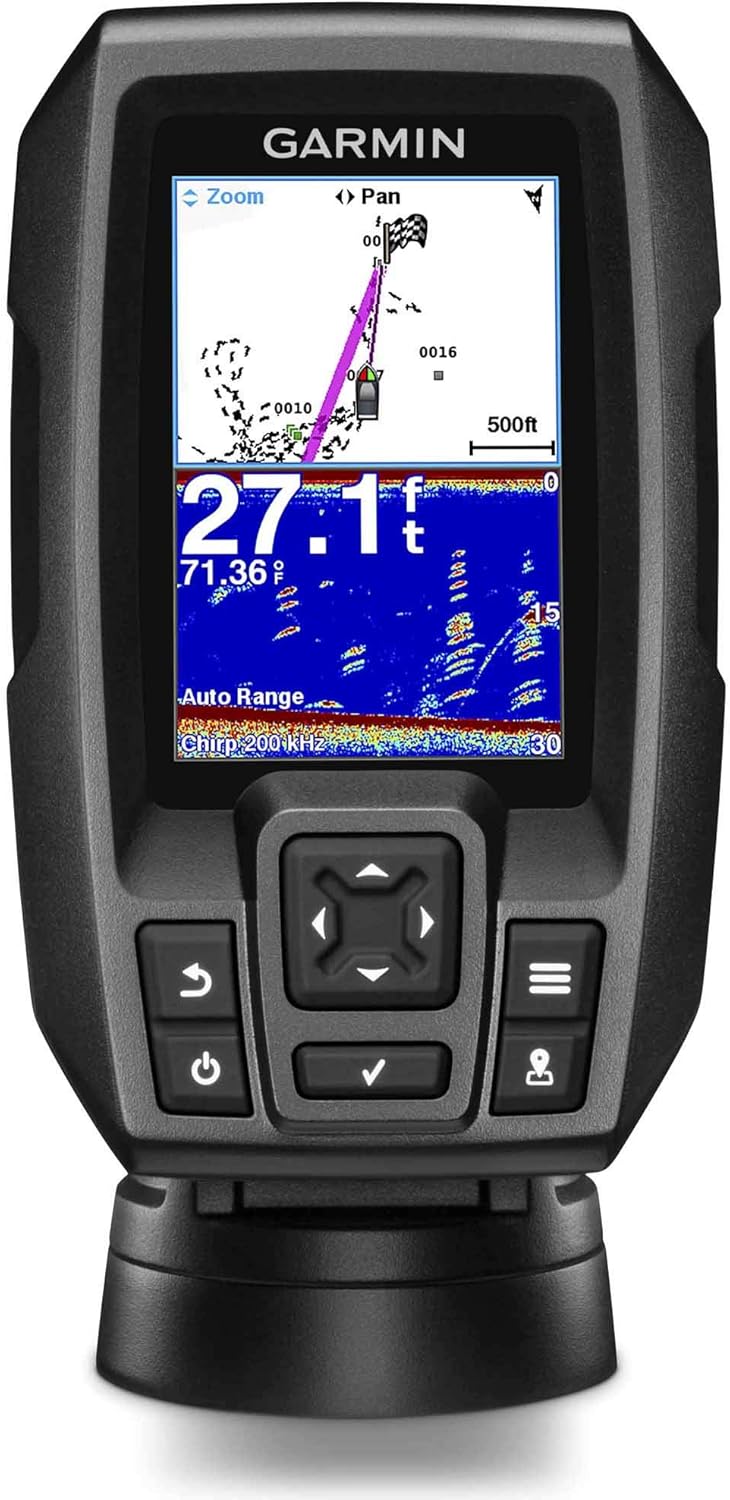
Image: The Garmin Striker 4 display showing a split screen with GPS mapping on top and sonar data below, indicating boat position and underwater features.
5. Quickdraw Contours Mapping
The Quickdraw Contours software enables you to create and store personalized HD fishing maps with 1-foot contours of the areas you fish. This feature requires no special knowledge and can store up to 2 million acres of content.
Maintenance
1. Cleaning the Unit
Wipe the display and unit casing with a soft, damp cloth. Avoid using harsh chemicals or abrasive cleaners, as these can damage the screen or housing.
2. Battery Care
Regularly charge the included rechargeable battery using the AC charger. Store the battery in a cool, dry place when not in use. Avoid fully discharging the battery for extended periods to prolong its lifespan.
3. Transducer Inspection
Periodically inspect the transducer for any marine growth or damage. Clean the transducer face with a soft cloth and mild soap if necessary to ensure clear sonar signals.
Troubleshooting
- No Power: Check battery connections and ensure the battery is charged. Verify the power cable is securely connected to the unit.
- No Sonar Readings: Ensure the transducer is properly submerged in water and free from obstructions. Check transducer cable connections to the unit.
- Inaccurate Readings: Confirm the transducer is mounted correctly and sitting flat in the water. Adjust settings if necessary.
- GPS Not Acquiring Signal: Ensure the unit has a clear view of the sky. Move away from tall structures or dense foliage that might obstruct the signal.
Specifications
| Brand | Garmin |
| Model Name | STRIKER 4 |
| Power Source | Battery Powered |
| Screen Size | 3.5 Inches |
| Display Type | HVGA Color |
| Item Weight | 16 ounces |
| Mounting Type | Transom Mount |
| UPC | 840133928556 |
| Part Number | E1GRSTRIKER4PB |
Warranty and Support
The Garmin Striker 4 CHIRP Fishfinder/GPS Bundle is covered by a Garmin Limited Warranty. For detailed warranty information, product support, or service inquiries, please refer to the official Garmin website or contact Garmin customer service directly.
Ask a question about this manual
Ask about setup, troubleshooting, compatibility, parts, safety, or missing instructions. Manuals+ will review the question and use this page’s manual context to help answer it.